1. Introduction
This manual provides instructions for the LOMCA Replacement Voice Remote Control, designed for use with various Skyworth 4K Smart Android TV models. Please read this guide carefully to ensure proper setup and operation of your new remote control.
2. Product Overview
The LOMCA Replacement Voice Remote Control is a universal remote designed to replace your original Skyworth TV remote. It includes voice control functionality for enhanced user experience.
Key Features:
- Universal replacement remote with voice function.
- No programming or pairing required for initial use.
Compatible Skyworth TV Models:
- 50UC6200, 55UD7200, 65UD7200, 75UD6200, 65UC6200, 70UC6200, 58UC6200, 50UD7200, 55UC6200
- 40E20300, 43U5A, 49G2, 49G6, 49U5A, 50G2, 50G2A, 55G2, 55G2A, 55G6, 55G6A, 55S9A, 55U5200, 55U5A, 55XA8000, 58G2A, 65Q20, 65S9A, 65U2A
- And other compatible Skyworth 4K UHD Smart Android TV models.

Image: The LOMCA Voice Remote Control, highlighting its compatibility with Skyworth 4K UHD Smart Android TVs and dedicated Netflix and Prime Video buttons.
3. Setup
This remote control requires two (2) 1.5V AAA alkaline batteries (not included).
- Open the Battery Compartment: Locate the battery cover release button on the back of the remote. Press the button and slide the cover open.
- Insert Batteries: Insert two (2) AAA alkaline batteries, ensuring the correct polarity (+ and -) as indicated inside the compartment.
- Close the Battery Compartment: Slide the battery cover back into place until it clicks securely.
- Initial Use: The remote control is ready for immediate use with your compatible Skyworth TV. No programming or pairing is required.
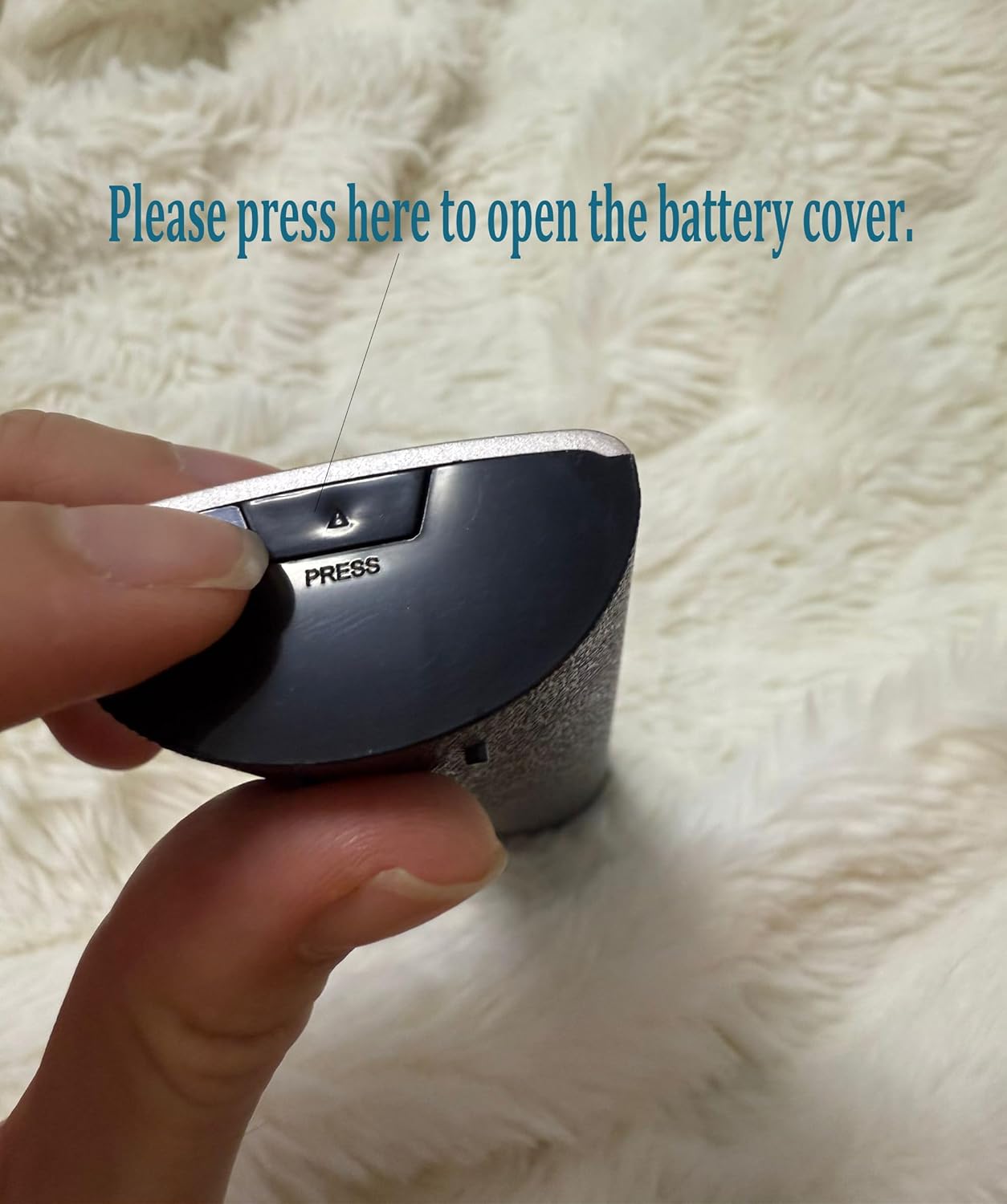
Image: A hand pressing the designated 'PRESS' area to open the battery cover on the remote control.

Image: The remote control with its battery compartment open, revealing two AAA batteries correctly inserted.
4. Operating Instructions
Point the remote control directly at your Skyworth TV's infrared receiver for optimal performance. The remote features standard TV control buttons, dedicated app buttons, and voice control.
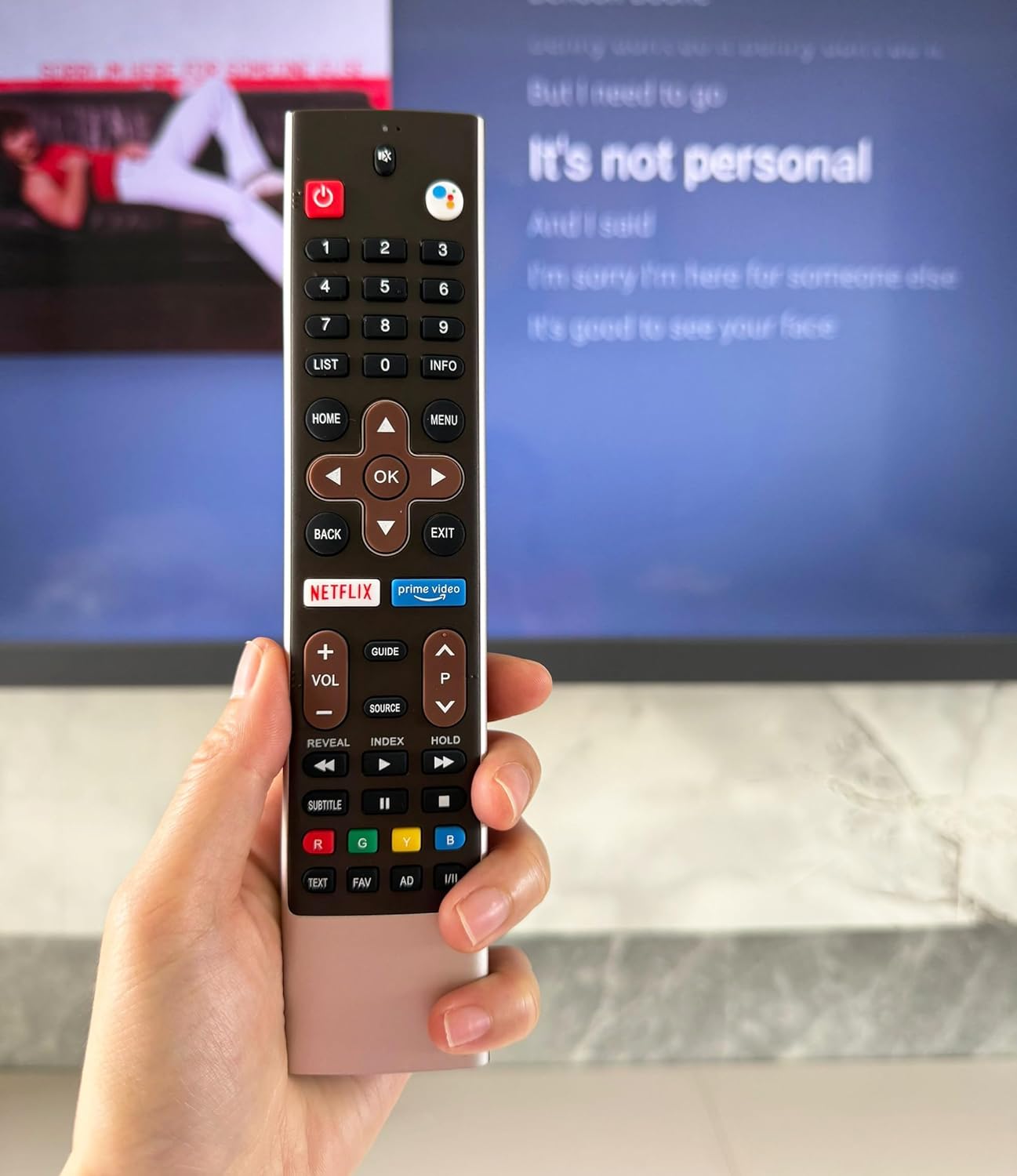
Image: A hand holding the LOMCA remote control, demonstrating its use in front of a Skyworth television.
Button Functions:
- Power Button: Turns the TV on or off.
- Number Buttons (0-9): For direct channel input.
- LIST / INFO: Access channel lists or display program information.
- HOME / MENU: Navigate to the TV's home screen or menu.
- Navigation Pad (Up, Down, Left, Right, OK): For menu navigation and selection.
- BACK / EXIT: Return to the previous screen or exit a menu.
- Netflix / Prime Video: Direct access buttons for these streaming services.
- Volume Up/Down (+VOL -): Adjust the TV volume.
- Channel Up/Down (P): Change TV channels. Note: Some models may display 'P' for program/channel.
- Mute Button: Mute or unmute the TV audio.
- Source Button: Select input sources (HDMI, AV, etc.).
- Media Control Buttons (Play, Pause, Fast Forward, Rewind): Control media playback.
- Voice Control Button: Press and hold to activate voice commands (if your TV supports this feature and is configured).
5. Maintenance
To ensure the longevity and proper functioning of your remote control, follow these maintenance guidelines:
- Battery Replacement: Replace batteries when the remote's response becomes sluggish or stops working. Always use new 1.5V AAA alkaline batteries and ensure correct polarity.
- Cleaning: Wipe the remote control with a soft, dry cloth. Do not use liquid cleaners, sprays, or abrasive materials, as these can damage the remote.
- Storage: Store the remote in a cool, dry place away from direct sunlight and extreme temperatures. If not used for an extended period, remove the batteries to prevent leakage.
6. Troubleshooting
If you encounter issues with your remote control, refer to the following common solutions:
- Remote Not Responding:
- Check if the batteries are inserted correctly with the right polarity.
- Replace old batteries with new 1.5V AAA alkaline batteries.
- Ensure there is a clear line of sight between the remote control and the TV's infrared receiver. Obstructions can block the signal.
- Confirm you are within the effective operating range (typically within 15 feet / 4.5 meters) of the TV.
- Voice Control Not Working:
- Ensure your Skyworth TV model supports voice control and that the feature is enabled in the TV's settings.
- Press and hold the voice control button while speaking your command.
- Buttons Not Functioning Correctly:
- Clean the remote control surface and buttons to remove any dirt or debris that might be interfering with button presses.
- If specific buttons are unresponsive, and battery replacement does not help, the remote may require replacement.
- Channel Up/Down Button Displays 'P': This is a design characteristic for some compatible TV models, indicating 'Program' or 'Channel'. It functions as intended for channel navigation.
7. Specifications
| Feature | Detail |
|---|---|
| Brand | LOMCA |
| Model Number | 9f7ba10d-3766-4ca0-9c72-437bacd2b95a |
| Compatible Devices | Skyworth 4K Smart Android Televisions |
| Power Supply | 2 x 1.5V AAA Alkaline Batteries (not included) |
| Special Feature | No Programming Required, Universal, Voice Function |
| Color | Black/White/Silver |
| Item Weight | 3.84 ounces |
| Package Dimensions | 9.88 x 4.37 x 1.14 inches |
8. Warranty and Support
For any questions, concerns, or support regarding your LOMCA Replacement Voice Remote Control, please contact the seller or manufacturer directly through your purchase platform. Please refer to your purchase documentation for specific warranty information.