
AIPER Scuba SE
AIPER Cordless Automatic Cleaner with HydroComm Smart Pool Monitor User Manual
Model: Scuba SE
1. Introduction
Thank you for choosing the AIPER Cordless Automatic Cleaner with HydroComm Smart Pool Monitor. This manual provides essential information for the safe operation, maintenance, and troubleshooting of your new pool cleaning and monitoring system. Please read this manual thoroughly before use and retain it for future reference.
2. Important Safety Instructions
Always follow basic safety precautions when using electrical appliances, especially when children are present. Failure to follow these instructions may result in electric shock, fire, or serious injury.
- Read all instructions before using the appliance.
- Do not operate the cleaner or monitor if the power cord or plug is damaged.
- Do not allow children to play with the appliance.
- Ensure the pool cleaner is fully submerged before operation.
- Do not operate the cleaner out of water.
- Only use accessories specified by the manufacturer.
- Store the cleaner and monitor in a cool, dry place when not in use.
- Keep hands, hair, and loose clothing away from moving parts.
- Disconnect the cleaner from the charger before performing any maintenance.
3. Product Overview
The AIPER Cordless Automatic Cleaner (Scuba SE) and HydroComm Smart Pool Monitor work together to provide a comprehensive solution for pool cleaning and water quality management.
3.1. Components
- AIPER Scuba SE Robotic Pool Cleaner
- AIPER HydroComm Smart Pool Monitor
- Charging Adapter for Scuba SE
- Charging Cable for HydroComm
- User Manual (this document)
3.2. Key Features
- Cordless Design: Freedom of movement without tangled cords.
- Optimized Hydrodynamic Design: Efficient cleaning with reduced power consumption.
- Self-Parking Function: Cleaner automatically returns to its starting point for easy retrieval.
- Long Battery Life: Up to 90 minutes of cleaning for pools up to 860 sq.ft.
- 5-in-1 Water Testing (HydroComm): Measures pH, ORP, EC, TDS, and Temperature.
- Instant App Access: Real-time water quality data and historical trends via the Aiper app (WiFi & Bluetooth).

Figure 3.2.1: AIPER Scuba SE Robotic Pool Cleaner and HydroComm Smart Pool Monitor. The image shows the compact robotic cleaner, the circular HydroComm monitor, and a smartphone screen displaying the Aiper app interface.

Figure 3.2.2: The Scuba SE cleaner submerged in a pool, illustrating its new hydrodynamic design which dedicates more power to cleaning efficiency.
4. Setup
4.1. Charging the Scuba SE Pool Cleaner
- Connect the charging adapter to a power outlet.
- Connect the charging cable to the charging port on the Scuba SE cleaner.
- Ensure the charging indicator light illuminates, indicating charging is in progress.
- Allow approximately 90 minutes for a full charge. The indicator light will change when charging is complete.
4.2. Setting up the HydroComm Smart Pool Monitor
- Download the "Aiper" app from your smartphone's app store (iOS or Android).
- Open the app and create an account or log in.
- Power on the HydroComm monitor by pressing its power button.
- Follow the in-app instructions to connect the HydroComm monitor to your home Wi-Fi network and pair it via Bluetooth.
- Ensure the HydroComm is placed in the pool water for accurate readings.

Figure 4.2.1: The HydroComm monitor in the pool, showing its integration with the Aiper app for comprehensive pool condition ratings.
5. Operating Instructions
5.1. Operating the Scuba SE Pool Cleaner
- Ensure the cleaner is fully charged.
- Place the cleaner into the pool, ensuring it is fully submerged.
- Activate the cleaner according to the instructions in the Aiper app or by pressing the power button on the unit (if available).
- The cleaner will begin its cleaning cycle, navigating the pool floor.
- Upon completion of the cleaning cycle or when the battery is low, the cleaner will automatically return to its starting point (Self-Parking Function) for easy retrieval.
- Use the retrieval hook (if included) to safely remove the cleaner from the pool.

Figure 5.1.1: The Scuba SE cleaner utilizing its self-parking technology, automatically returning to its starting point for effortless retrieval after completing its cleaning cycle.

Figure 5.1.2: The Scuba SE cleaner operating in an above-ground pool, highlighting its 90-minute battery life capable of cleaning pools up to 860 square feet.
5.2. Using the HydroComm Smart Pool Monitor
- Ensure the HydroComm monitor is properly placed in the pool water.
- Open the Aiper app on your smartphone.
- The app will display real-time water quality data, including pH, ORP, EC, TDS, and Temperature.
- Review the "Pool Comprehensive Rating" for an overall assessment of your pool's condition.
- Access the "Data Tracking & Analysis" section to view historical trends and insights into your pool's water quality over time.
- The app may provide smart suggestions for maintaining optimal water balance based on the readings.
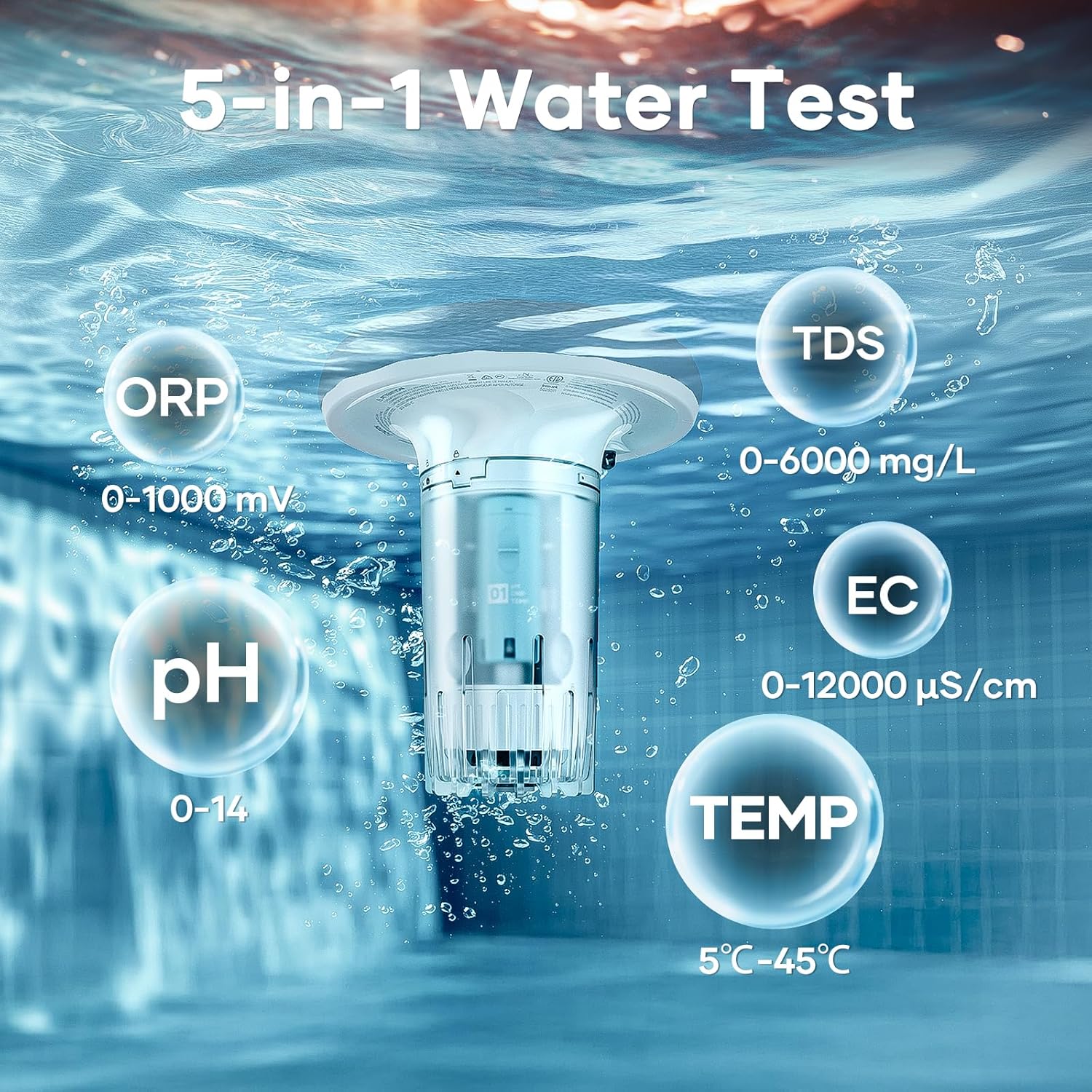
Figure 5.2.1: The HydroComm monitor demonstrating its 5-in-1 water testing capabilities, measuring ORP (0-1000 mV), pH (0-14), TDS (0-6000 mg/L), EC (0-12000 µS/cm), and Temperature (5°C-45°C).
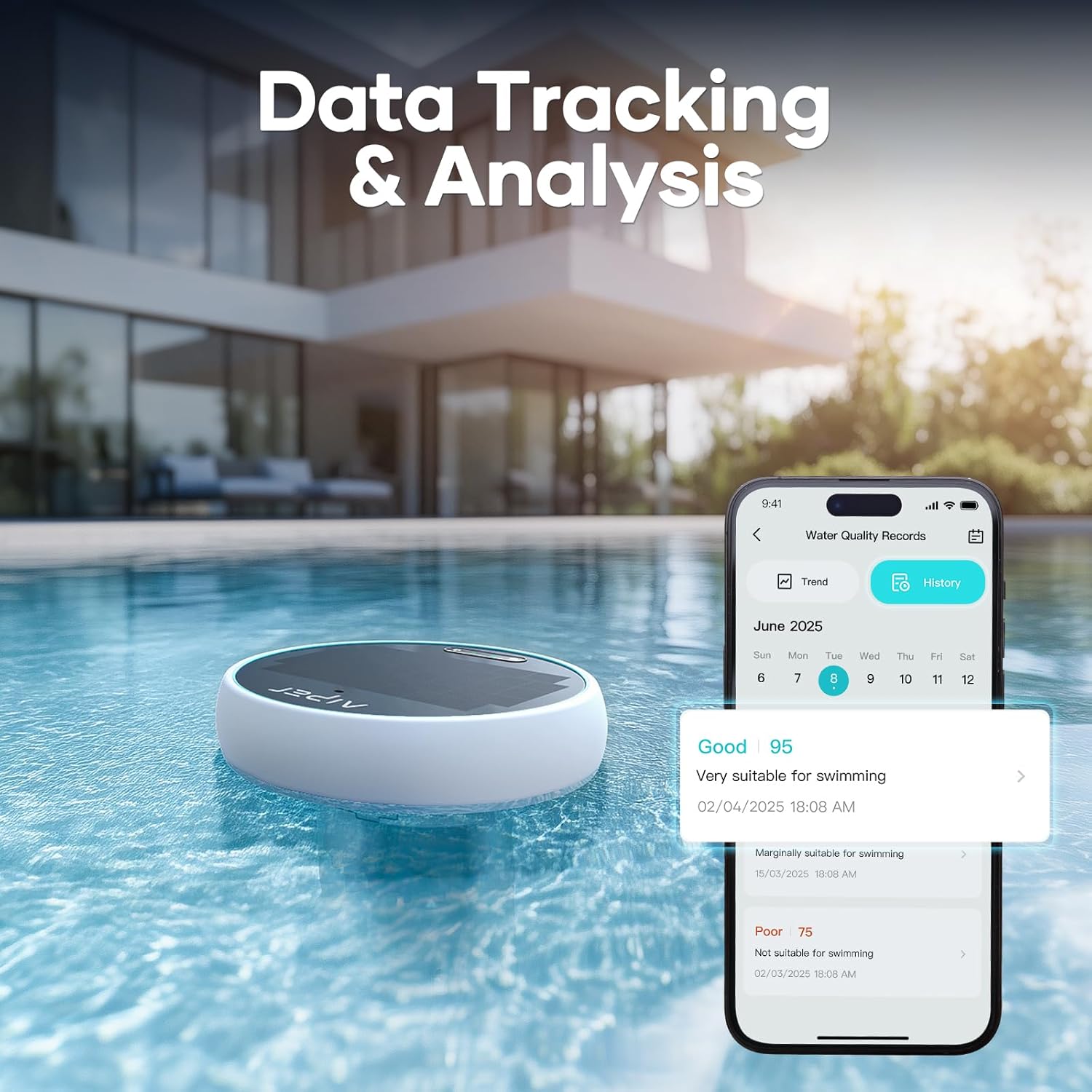
Figure 5.2.2: The Aiper app's data tracking and analysis feature, showing historical water quality records and trends from the HydroComm monitor.

Figure 5.2.3: A comparison highlighting the "Smarter Test Mode" of the HydroComm, detailing its superior accuracy (near-industrial-grade), smart suggestions, data storage, and 24/7 monitoring capabilities compared to other standard testers.
6. Maintenance
6.1. Cleaning the Scuba SE Pool Cleaner
- After each use, remove the cleaner from the pool.
- Open the filter compartment and remove the filter basket/filter.
- Rinse the filter basket/filter thoroughly with a garden hose to remove debris.
- Clean the cleaner's exterior with a soft cloth and fresh water. Do not use harsh chemicals.
- Ensure all components are dry before storing.
6.2. Maintaining the HydroComm Smart Pool Monitor
- Periodically clean the detection head of the HydroComm monitor with a soft brush and clean water to remove any buildup or algae.
- Ensure the sensors are free from obstructions.
- Store the monitor in a clean, dry place when not in use for extended periods.
- Refer to the Aiper app for any calibration or sensor maintenance recommendations.
7. Troubleshooting
| Problem | Possible Cause | Solution |
|---|---|---|
| Cleaner not moving or operating. | Low battery; Obstruction in brushes/wheels; Power button not pressed. | Charge the cleaner fully; Check for and remove debris; Ensure power button is pressed or activated via app. |
| Cleaner not cleaning effectively. | Filter basket full; Impeller clogged; Worn brushes. | Empty and clean filter basket; Check and clear impeller; Contact support for replacement brushes. |
| HydroComm not connecting to app. | Bluetooth/Wi-Fi off; Monitor out of range; App issue. | Ensure Bluetooth/Wi-Fi is on; Move monitor closer to router/phone; Restart app/monitor. |
| Inaccurate HydroComm readings. | Dirty sensors; Calibration needed. | Clean detection head; Refer to app for calibration instructions. |
8. Specifications
| Feature | Detail |
|---|---|
| Model Name | Scuba SE |
| Brand | AIPER |
| Power Source | Battery Powered (Lithium-Ion) |
| Charging Time | Approx. 90 minutes |
| Battery Life (Scuba SE) | Up to 90 minutes |
| Max Pool Size (Scuba SE) | Up to 860 sq.ft. (40 feet) |
| Control Method | App (Wi-Fi & Bluetooth) |
| HydroComm Water Tests | pH, ORP, EC, TDS, Temperature |
| Installation Type | Robotic |
| Assembly Required | No |
| Warranty Type | Limited |
9. Warranty and Support
9.1. Limited Warranty
AIPER provides a limited warranty for this product. The warranty period and terms may vary by region. Please refer to the warranty card included with your product or visit the official AIPER website for detailed warranty information. This warranty typically covers defects in materials and workmanship under normal use.
The warranty does not cover damage caused by misuse, abuse, neglect, unauthorized repair, or acts of nature.
9.2. Customer Support
For technical assistance, troubleshooting, or warranty claims, please contact AIPER Customer Support. Have your product model number (Scuba SE) and purchase information ready when contacting support.
- AIPER Official Website: www.aiper.com (Check for support contact details, FAQs, and product registration)
- Email Support: Refer to the website or product packaging for the most current email address.
- Phone Support: Refer to the website or product packaging for the most current phone number.
Regularly check the AIPER website for updated manuals, firmware, and app versions to ensure optimal performance of your product.
Related documentsScuba SE


Ask a question about this manual
Ask about setup, troubleshooting, compatibility, parts, safety, or missing instructions. Manuals+ will review the question and use this page’s manual context to help answer it.