
Introduction
This manual provides instructions for the Kassionel Universal Remote Control, model KS-MI01. This remote is designed as a replacement for various Mitsubishi Electric Mr Slim air conditioner models, including E12N91426 and KM15A. Please read this manual carefully before use to ensure proper operation and to maximize the lifespan of your remote control.

Image: The Kassionel Universal Remote Control in use, demonstrating its compatibility with Mitsubishi Electric air conditioning units.
Setup
1. Battery Installation
The remote control requires two (2) AAA 1.5V alkaline batteries (not included). Ensure correct polarity when inserting batteries.
- Open the battery compartment cover located on the back of the remote control.
- Insert two AAA batteries, matching the (+) and (-) terminals as indicated inside the compartment.
- Close the battery compartment cover securely.

Image: View of the remote control with the battery cover removed, illustrating the battery insertion process. Two AAA batteries are required.
2. Initial Setup (Auto Search)
This remote control typically requires a simple initial setup to pair with your air conditioner.
- Press and hold the "ON/OFF" button on the remote control.
- Continue holding until your air conditioner turns on or off. This indicates that the remote has found the correct code.
- Release the "ON/OFF" button.
If only a few buttons function after setup, please try to reset the remote and repeat the auto search process.

Image: The remote control packaging, displaying the initial setup instructions for auto search and temperature unit switching.
Operating Instructions
Basic Functions
- ON/OFF: Press to turn the air conditioner on or off.
- MODE: Cycles through operating modes (e.g., Cool, Heat, Fan, Dry, Auto).
- Temperature Adjustment: Use the "TOO WARM" (down arrow) and "TOO COOL" (up arrow) buttons to adjust the desired temperature.
- FAN: Adjusts fan speed.
- VANE: Controls the direction of the air vanes.

Image: The remote control's LCD screen displaying current settings, including temperature in Fahrenheit and active mode icons.
Switching Between Fahrenheit and Celsius
The remote control defaults to Fahrenheit when powered on. To switch between Fahrenheit (°F) and Celsius (°C):
- Press and hold the "TOO WARM" (down arrow) and "TOO COOL" (up arrow) buttons simultaneously.
- Hold both buttons for approximately 5 seconds.
- The display will switch between Fahrenheit and Celsius.

Image: Instructions on the remote control display, demonstrating the method to toggle between Fahrenheit and Celsius temperature units.

Image: The remote control's LCD screen displaying the temperature set to 24 degrees Celsius.
Setting the Clock
To set the current time on the remote control:
- Locate the "CLOCK" button. This button is small and may be recessed beneath the panel. Use a small, pointed object (like a pen tip) to press it.
- After pressing "CLOCK", use the "h" (hour) and "min" (minute) buttons to adjust the time.
- Press the "CLOCK" button again to confirm and save the set time.
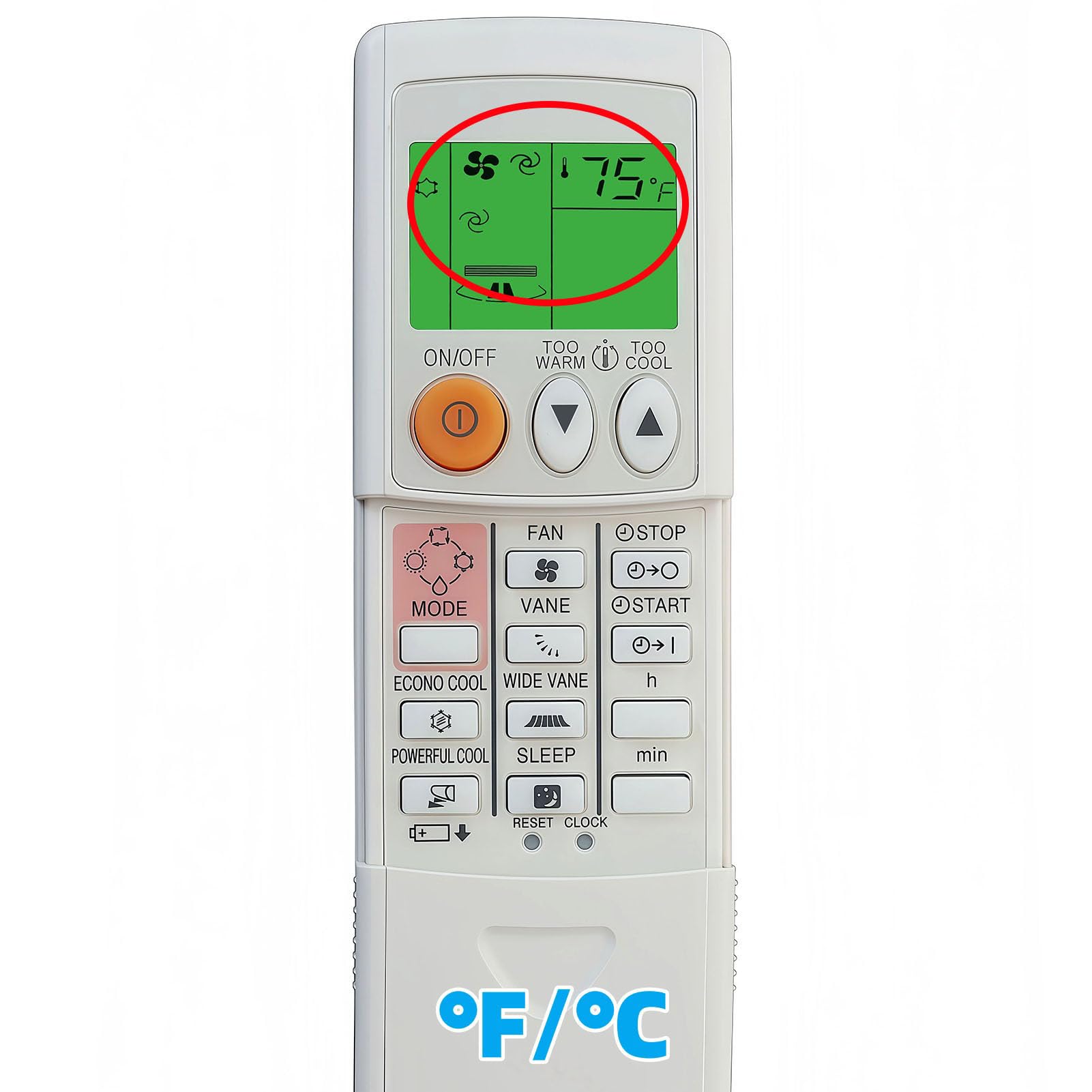
Image: Detailed visual guide for setting the clock on the remote control, highlighting the 'CLOCK', 'h', and 'min' buttons.
Special Modes
- Memory Function: The remote retains its last settings even after battery replacement, reducing the need for frequent re-configuration.
- EP Mode (Environment Protection Mode): This mode is designed for public areas. To activate, press and hold "MODE" for 10 seconds. In EP mode, the air conditioner typically operates within a limited temperature range (e.g., Cool: 26-30°C, Heat: 18-25°C).
Maintenance
Cleaning
To maintain the remote control's appearance and functionality:
- Wipe the surface with a soft, dry cloth.
- Do not use liquid cleaners, abrasive pads, or chemical solvents, as these can damage the remote.
Battery Replacement
Replace batteries when the remote control's performance degrades or the display becomes dim. Always replace both batteries at the same time with new AAA 1.5V alkaline batteries.
- Follow the battery installation steps outlined in the "Setup" section.
- Dispose of used batteries according to local regulations.
Troubleshooting
| Problem | Possible Cause | Solution |
|---|---|---|
| Remote not responding. | Dead or incorrectly inserted batteries. | Replace batteries with new ones, ensuring correct polarity. |
| Remote only controls some functions. | Incorrect code selected during setup. | Perform the "Initial Setup (Auto Search)" again. |
| Air conditioner does not respond. | Obstruction between remote and AC unit; remote too far. | Ensure clear line of sight to the AC unit's receiver. Move closer to the AC unit (maximum range is 10 meters). |
| Display is dim or blank. | Low battery power. | Replace batteries. |
Specifications
- Model Name: KS-MI01
- Brand: Kassionel
- Compatible Devices: Mitsubishi Electric Mr Slim Air Conditioners
- Connectivity Technology: Infrared
- Controller Type: Button Control
- Maximum Range: 10 Meters
- Power Source: 2 x AAA 1.5V Alkaline Batteries (not included)
- Item Weight: 90 Grams
- Dimensions (L x W x H): 6.39" x 2.29" x 0.73"
- Special Features: Universal compatibility, Fahrenheit/Celsius display, Backlight, Memory function, EP Mode.
Warranty and Support
This product comes with a 1-year warranty from the date of purchase. For warranty claims, technical support, or further assistance, please contact Kassionel customer service through the retailer where the product was purchased or visit the official Kassionel website.
Please retain your purchase receipt as proof of purchase for warranty purposes.