
HIBOITEC CDD-1004
HIBOITEC Low Voltage Landscape Lighting Kit
Model: CDD-1004
User Instruction Manual
1. Introduction
Thank you for choosing the HIBOITEC Low Voltage Landscape Lighting Kit. This manual provides detailed instructions for the safe and efficient installation, operation, and maintenance of your new landscape lighting system. Please read this manual thoroughly before installation and retain it for future reference.
2. Package Contents
Verify that all components listed below are included in your package:
- 8 x 12W Low Voltage Landscape Lights
- 1 x 100W Low Voltage Landscape Transformer with Photocell Sensor and Timer
- 8 x Wire Connectors
- 1 x Instruction Manual

Figure 2.1: Package contents of the HIBOITEC Low Voltage Landscape Lighting Kit. Includes spotlights, ground stakes, a 100W transformer, wire connectors, screws, and a user manual.
3. Safety Information
Please observe the following safety precautions during installation and operation:
- WARNING: The temperature of the equipment is high. Be careful of scalding.
- CAUTION: PLEASE turn off the power of the fuse box or circuit breaker before installation.
- Applicable for outdoor use only. Can't be used with dimmers.
- Please do not exceed the maximum power of this device. The actual power used can not exceed 100W.
- Mount the transformer at least 39 inches (1M-1.5M) above ground.
- This is a low voltage system (12-24V AC/DC) designed for safety around children and pets.
4. Setup and Installation
This kit is designed for easy DIY installation. Follow these steps for proper setup:
4.1. Prepare the Transformer
- Ensure the power is off at the circuit breaker.
- Mount the 100W low voltage transformer in a suitable outdoor location, at least 39 inches (1M-1.5M) above ground.
- Prepare your low voltage landscape wire (sold separately). Split approximately 2-3 inches of the wire at one end.
- Strip a small portion of the insulation from each conductor to expose the copper wires.
- Connect the exposed copper wires to the 'OUT1' or 'OUT2' terminals on the transformer. Loosen the screws, insert one wire into each terminal, and tighten the screws securely. Ensure a firm connection.
Video 4.1: Demonstrates how to connect the low voltage landscape wire to the HIBOITEC transformer terminals. The video shows stripping the wire and securing it under the terminal screws.
4.2. Install the Spotlights
- Determine the desired placement for each spotlight. Push the ground stakes into the ground first, then attach the lights with the included screws.
- Run the low voltage landscape wire (sold separately) along your desired path.
- At each spotlight location, split the main landscape wire (approximately 2-3 inches) to separate the two conductors. Do not cut the wire completely.
- Take one of the included wire connectors. Unscrew both caps from the connector.
- Insert one conductor of the main landscape wire into one side of the connector, ensuring the metal pin inside the connector punctures the wire's insulation to make contact with the copper. Screw the cap on tightly.
- Repeat the process for the second conductor of the main landscape wire with the other side of the connector.
- Connect the wires from the spotlight to the remaining two openings on the wire connector. Ensure the exposed copper wires from the spotlight are inserted into the connector and the caps are screwed on tightly, allowing the metal pins to make contact.
- Repeat for all spotlights.
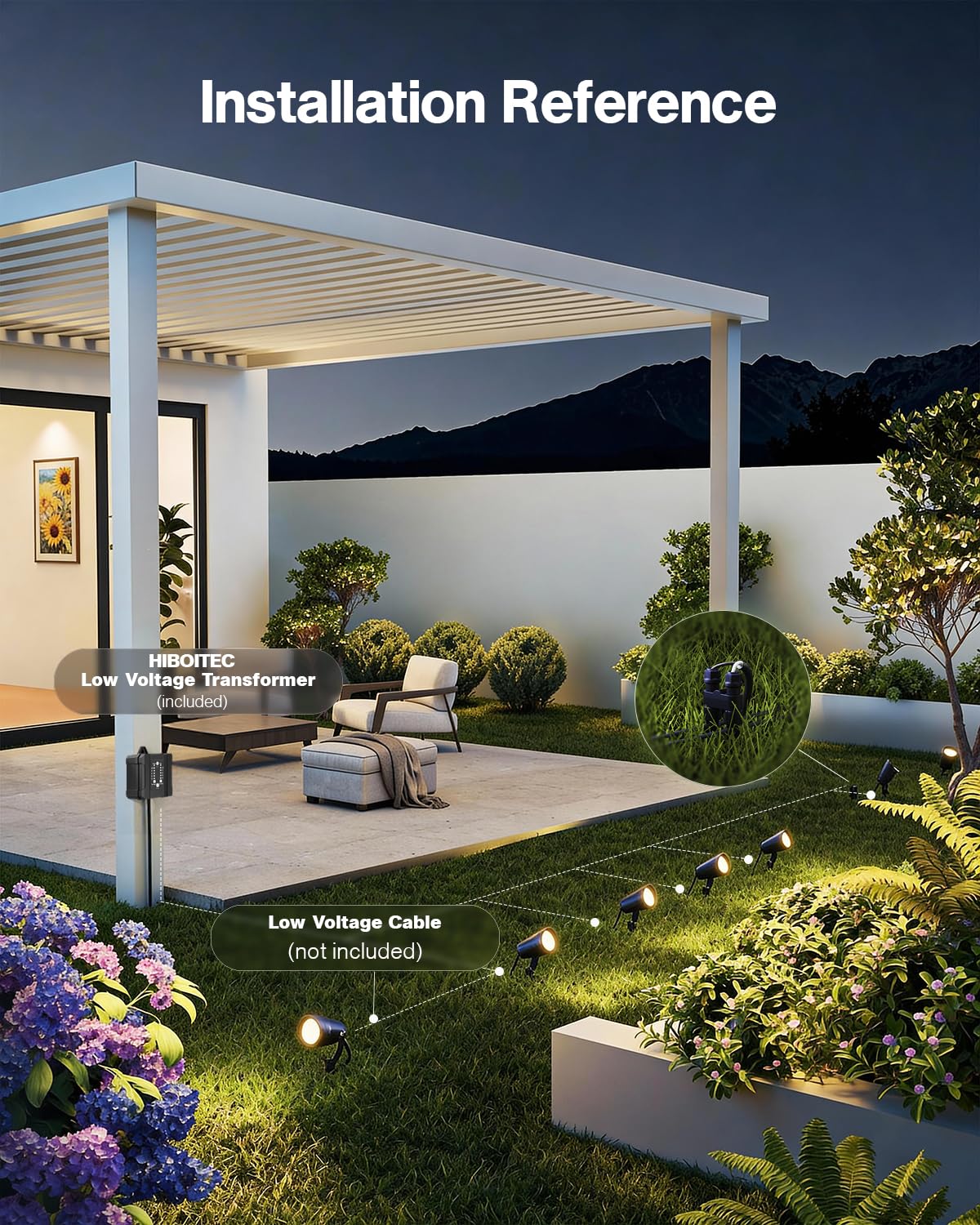
Figure 4.1: Installation reference diagram showing the transformer connected to a low voltage cable (not included) which then connects to multiple spotlights in a garden setting.
Video 4.2: Detailed demonstration of connecting the low voltage wire to the individual spotlights using the provided wire connectors. Shows how to split the main wire and secure the connections.
5. Operating Instructions
The HIBOITEC transformer offers multiple operating modes for convenience:
5.1. Transformer Control Panel
The transformer features an intuitive control panel with indicator lights and buttons for setting modes and timers.

Figure 5.1: The HIBOITEC transformer control panel, illustrating the 'Dusk to Dawn' functionality with automatic on/off based on light conditions.
5.2. Mode Settings
- ON/OFF: Manually turn the lights on or off.
- Sensor (Photocell): The lights will automatically turn on at dusk and turn off at dawn.
- Timer Settings (1H, 3H, 5H, 9H, 12H): Set the lights to turn on at dusk and remain on for the selected duration (e.g., 1 hour, 3 hours, etc.).
- Auto: Combines photocell and timer functions. Lights turn on at dusk and stay on for a set duration (e.g., 1H, 3H, 5H, 9H).
- Memory Function: The transformer automatically restores your last lighting mode even after power loss.
Video 5.1: Overview of the HIBOITEC 12W Low Voltage Landscape Lighting kit, demonstrating its features and various timer and sensor modes.
6. Maintenance
To ensure the longevity and optimal performance of your landscape lighting kit:
- Regularly clean the light fixtures and transformer housing to remove dirt, debris, and leaves.
- Inspect wiring periodically for any damage, fraying, or loose connections. Repair or replace as needed.
- Ensure the photocell sensor on the transformer is not obstructed by foliage or debris to maintain accurate dusk-to-dawn operation.
- The lights and transformer are IP65 waterproof, but avoid submerging them in water.
7. Troubleshooting
If you encounter issues, refer to the following common problems and solutions:
| Problem | Possible Cause | Solution |
|---|---|---|
| Lights not turning on | No power to transformer; loose wiring; photocell obstructed; incorrect timer setting. | Check circuit breaker/outlet; inspect all wire connections; clear photocell sensor; adjust timer/mode settings. |
| Lights are dim or flickering | Loose connections; insufficient power (too many lights for transformer); damaged wire. | Tighten all connections; ensure total wattage does not exceed 100W; inspect wire for damage. |
| Lights stay on during the day | Photocell sensor obstructed or faulty; incorrect mode setting. | Clear any obstructions from the photocell; ensure 'Sensor' or 'Auto' mode is selected. |
8. Specifications
| Feature | Specification |
|---|---|
| Brand | HIBOITEC |
| Model Number | CDD-1004 |
| Light Source | LED |
| Number of Lights | 8 |
| Wattage (per light) | 12 Watts |
| Brightness (per light) | 1200 Lumens |
| Color Temperature | 2900K (Warm White) |
| Beam Angle | 45° |
| Adjustable Head | 270° |
| Transformer Power | 100W |
| Input Voltage | 100-240VAC 50-60Hz |
| Output Voltage | 12VDC 8.3A |
| Water Resistance Rating | IP65 |
| Material | Metal (Aluminum Housing) |
| Lifespan | 50,000 hours |
| Certifications | FCC, ETL, UL Listed |
| Item Dimensions (L x W x H) | 6.89"L x 5.12"W x 6.77"H |
9. Warranty and Support
HIBOITEC is committed to providing excellent after-sales support.
- Lifetime Warranty: We offer a lifetime warranty for this product. If a component fails, we will replace it.
- Customer Service: Our customer service team responds to emails within 24 hours. Please contact us for any assistance.
Ask a question about this manual
Ask about setup, troubleshooting, compatibility, parts, safety, or missing instructions. Manuals+ will review the question and use this page’s manual context to help answer it.