1. Product Overview
The Kohree 48 Volt 15 Amp Golf Cart Battery Charger is designed for efficient and safe charging of EZGO RXV & TXT lead-acid batteries. It features an advanced LED display for real-time monitoring of charging progress and battery voltage, intelligent trickle charging technology to extend battery lifespan, and multiple protection mechanisms for enhanced safety.

Figure 1.1: Kohree 48V 15A Golf Cart Battery Charger. This image shows the charger unit with its integrated handle, LED display, and the 3-pin triangular plug designed for EZGO golf carts.
- Real-time Progress Display: An integrated LED screen provides instant readings of battery voltage and charging percentage, offering clear visibility of the charging status.
- Intelligent Trickle Charging: Automatically switches to trickle charge at 95% capacity and stops charging when full, preserving battery health.
- Advanced Protection: Equipped with safeguards against overload, overvoltage, overcharge, short-circuit, and reverse connections.
- Portable Design: Lightweight (approx. 7 lbs) with an ergonomic carrying handle and an extended 16ft power cord for convenient use.
2. Safety Information
Please read and understand all safety instructions before operating the charger. Failure to follow these instructions may result in electric shock, fire, or serious injury.
- Indoor Use Only: This charger is designed for indoor use in a dry, well-ventilated area. Do not expose to rain, moisture, or extreme temperatures.
- Proper Ventilation: Ensure adequate airflow around the charger during operation. Do not cover the charger or block its ventilation openings.
- Battery Compatibility: Only use this charger with 48V lead-acid batteries as specified. Using it with incompatible battery types may cause damage or injury.
- Connection Sequence: Always connect the charger to the battery first, then plug the charger into the AC power outlet. Disconnect in reverse order.
- Damaged Cables: Do not operate the charger if the power cord or charging cables are damaged. Contact customer service for replacement.
- Supervision: Do not leave the charger unattended for extended periods during charging.
- FCC Certified: This charger complies with FCC standards, ensuring protection against various electrical faults.

Figure 2.1: Multiple Power Protection Mechanisms. This image illustrates the various safety features built into the charger, including protection against overload, overvoltage, overcharge, short-circuit, reverse connection, and intelligent cooling.
3. Package Contents
Verify that all items are present and in good condition upon opening the package. If any items are missing or damaged, please contact customer service.
- 1 x Kohree 48 Volt 15 Amp Golf Cart Battery Charger
- 1 x AC Power Cord (attached)
- 1 x DC Charging Cable with 3-Pin Triangular Plug (attached)
- 1 x User Manual
4. Setup
4.1 Compatibility Check
This charger is specifically designed for EZGO RXV (2008-) and TXT (2010-) golf carts equipped with lead-acid batteries and a 3-pin triangular plug. Please ensure your golf cart's plug type matches before use.
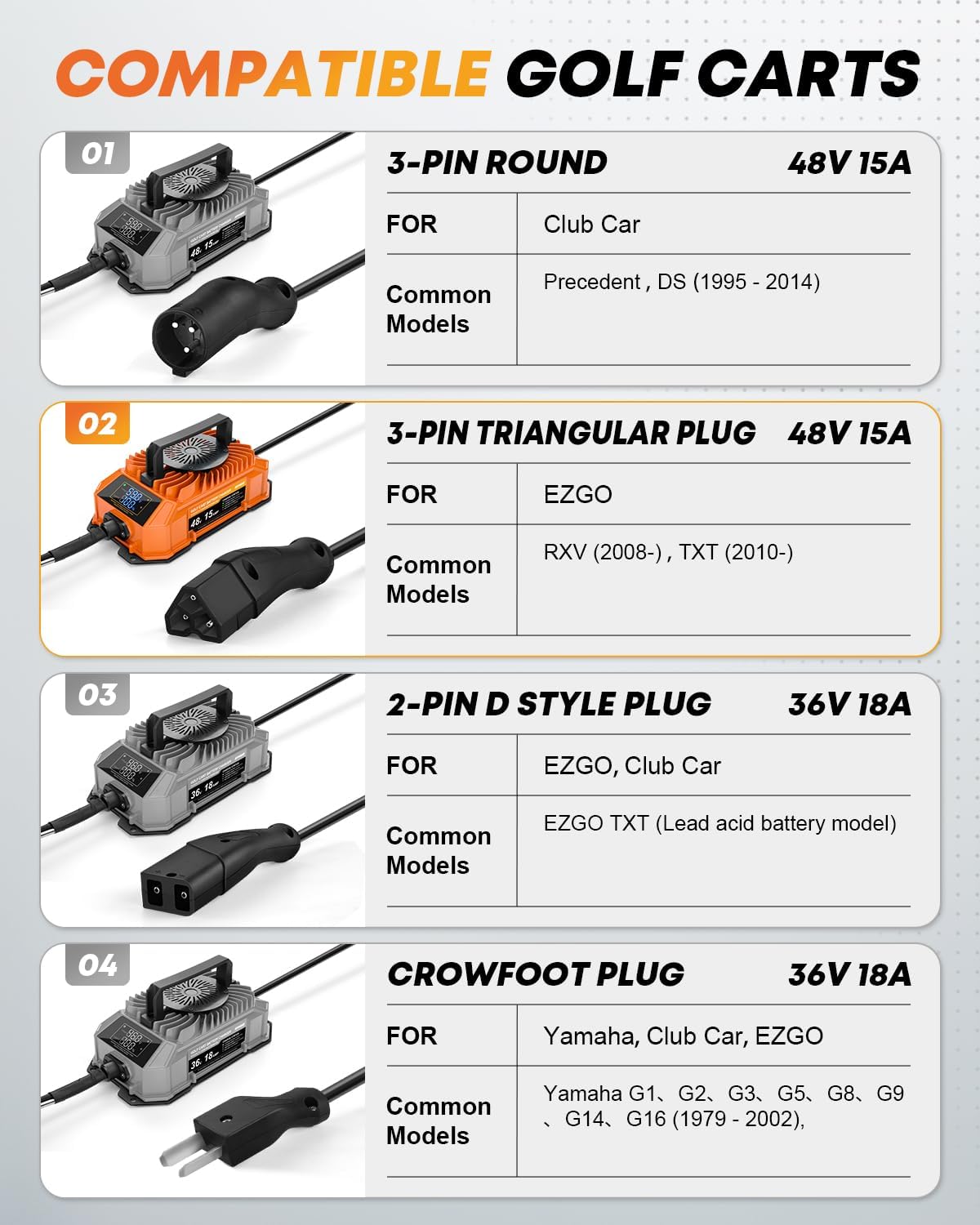
Figure 4.1: Compatible Golf Carts. This image displays various golf cart charger plug types, highlighting the 3-pin triangular plug (Type 02) compatible with EZGO RXV and TXT models, which is the focus of this manual.
4.2 Initial Connection
- Place the charger on a stable, flat surface in a dry, well-ventilated area, away from direct sunlight or heat sources.
- Ensure the golf cart is turned off and the ignition key is removed.
- Connect the 3-pin triangular DC charging plug firmly into the golf cart's charging receptacle.
- Plug the AC power cord into a standard 120V AC wall outlet.
5. Operating Instructions
5.1 Charging Process
Once connected, the charger will automatically begin the charging process. The LED screen will activate, displaying real-time information.
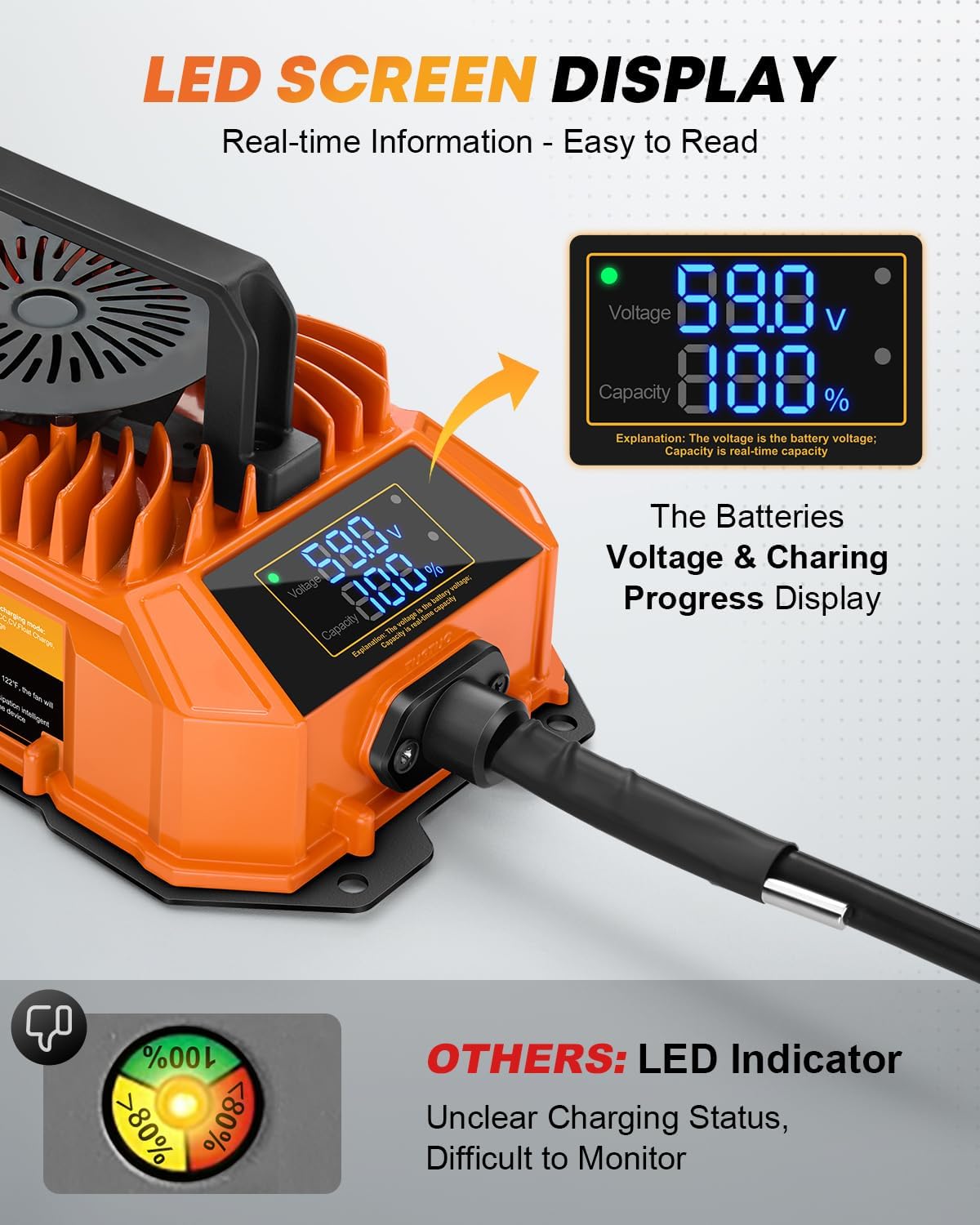
Figure 5.1: LED Screen Display. This image shows the charger's LED screen, which provides real-time readings for battery voltage (V) and charging capacity percentage (%).
- The LED screen will show the current battery voltage and the charging progress as a percentage.
- The charger employs an intelligent multi-stage charging process. Initially, it delivers a high current for rapid charging.
- As the battery approaches full capacity (approximately 95%), the charger automatically transitions to a trickle charging mode to prevent overcharging and optimize battery health.
- Charging will automatically cease once the battery reaches 100% capacity.

Figure 5.2: Intelligent Trickle Charging Technology. This diagram illustrates the charging stages, showing how the charger automatically reduces current and powers off when charging is complete, extending battery life.
5.2 Disconnecting the Charger
- Once charging is complete, first unplug the AC power cord from the wall outlet.
- Then, disconnect the 3-pin triangular DC charging plug from the golf cart's charging receptacle.
6. Maintenance
Regular maintenance ensures optimal performance and longevity of your charger.
- Cleaning: Periodically wipe the charger's exterior with a soft, dry cloth. Do not use harsh chemicals or abrasive cleaners. Ensure the charger is unplugged before cleaning.
- Storage: When not in use, store the charger in a cool, dry place, away from direct sunlight and moisture. Coil the cables neatly to prevent damage.
- Ventilation: Keep the charger's ventilation openings clear of dust and debris to ensure proper cooling. The intelligent cooling fan activates only when needed, based on internal temperature.
- Environmental Adaptability: The charger is designed to operate effectively in various temperature environments, with features for fast heat dissipation.

Figure 6.1: Environmental Adaptability. This image highlights the charger's rain-proof design and its ability to adapt to both low and high-temperature environments, featuring smart energy-saving fan activation based on internal temperature.
7. Troubleshooting
If you encounter issues with your charger, refer to the table below for common problems and solutions.
| Problem | Possible Cause | Solution |
|---|---|---|
| Charger not turning on / No LED display | No power from outlet; Loose connections; Faulty charger. | Check wall outlet with another device. Ensure all connections are secure. If problem persists, contact customer service. |
| Charging very slow or not reaching 100% | Battery deeply discharged; Battery nearing end of life; Incorrect battery type. | Allow more time for charging. Have battery tested by a professional. Confirm battery is 48V lead-acid. |
| Charger gets hot during operation | Normal operation; Insufficient ventilation; Overload. | Some heat is normal. Ensure charger is in a well-ventilated area and not covered. If excessively hot, disconnect and contact customer service. |
| Error message on LED display (if applicable) | Short circuit; Reverse polarity; Overvoltage/Overcurrent. | Disconnect charger immediately. Check for short circuits or incorrect connections. Reconnect carefully. If error persists, contact customer service. |
8. Specifications
| Feature | Specification |
|---|---|
| Input Voltage | 100-240V AC, 50/60Hz |
| Output Voltage | 48V DC |
| Output Current | 15 Amp |
| Compatible Battery Type | Lead-Acid Batteries |
| Plug Type | 3-Pin Triangular Plug (for EZGO RXV & TXT) |
| Item Weight | 8.03 pounds (approx. 3.64 kg) |
| Package Dimensions | 12.2 x 7.72 x 7.6 inches (approx. 31 x 19.6 x 19.3 cm) |
| Manufacturer | Kohree |

Figure 8.1: Portable and Lightweight Design. This image shows a person holding the charger, illustrating its compact dimensions (9.5in x 5.3in x 2.9in) and light weight (7 lbs), emphasizing its portability.
9. Warranty & Support
Kohree is committed to providing reliable products and excellent customer service. If you have any questions or require assistance with your golf cart battery charger, please do not hesitate to contact our customer service team. We aim to respond to all inquiries within 24 hours.
Before contacting support, please ensure you have checked the compatibility of the charger with your golf cart's plug type, as outlined in Section 4.1.
For warranty information or to report an issue, please refer to the contact details provided on the product packaging or the official Kohree website.


