
Introduction
The Bitvae X122 Infrared Sensing Toothbrush Cleaner is designed to provide a hygienic and convenient solution for storing and maintaining toothbrushes. This wall-mounted device features advanced UVA+UVC dual-band cleaning technology, an infrared motion sensor for automatic operation, and an LED smart screen for status indication. It also includes an air-drying function to keep brushes dry and fresh.
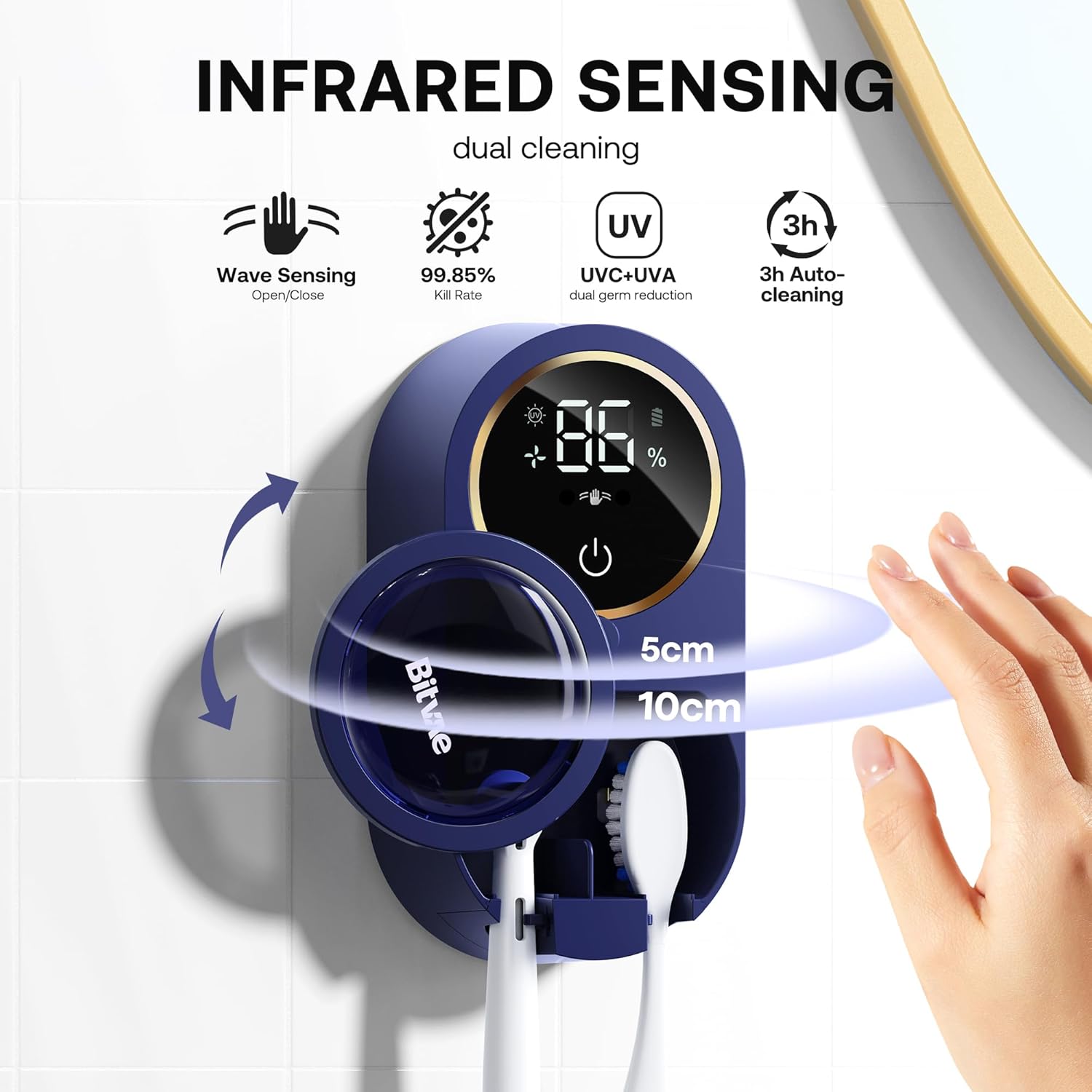
Image: The Bitvae X122 Toothbrush Cleaner highlighting its infrared sensing, dual cleaning, and LED display features.
Key features include:
- Dual-Band UVA+UVC Cleaning: Utilizes both UVA and UVC light for comprehensive cleaning and to prevent regrowth of microorganisms.
- Infrared Sensing: Automatically opens and closes the cover when a hand is detected within 5-10cm.
- LED Smart Screen: Displays cleaning progress, operation mode, and battery level.
- Automatic Cleaning & Air Drying: Runs a 3-hour cleaning and ventilation cycle to ensure brushes remain dry and hygienic.
- Universal Compatibility: Accommodates most sonic, electric, and manual toothbrushes for both adults and children.
- Removable Brush Slot: The inner tray can be easily removed for cleaning.
- Long Battery Life: Up to 30 days on a single charge via Type-C port.
Package Contents
Verify that all items are present in the package:
- 1 x Bitvae Toothbrush Cleaner (Model X122)
- 1 x Wall Bracket
- 2 x Screws (for optional mounting)
- 1 x UV Test Card
- 1 x USB Cable (Type-C)
- 1 x Instruction Manual
- 1 x Quick Guide
Note: A 5V-1A USB power adapter is required for charging and is not included.
Setup and Installation
The Bitvae X122 can be installed using either the adhesive pad for smooth surfaces or screws for uneven surfaces.
- Choose Installation Method:
- Adhesive Mounting (for smooth surfaces like tiles, mirrors): Ensure the surface is clean, dry, and smooth. Peel the protective film from the adhesive on the wall bracket and firmly press it onto the desired location. Hold for 30 seconds to ensure strong adhesion.
- Screw Mounting (for uneven surfaces like painted walls, wallpaper): Mark the desired drilling points using the wall bracket. Drill two holes, insert wall anchors (if necessary, not included), and secure the bracket with the provided screws.
- Attach the Device: Once the wall bracket is securely installed, align the Bitvae X122 toothbrush cleaner with the bracket and slide it down until it clicks into place.
- Initial Charge: Before first use, fully charge the device using the provided USB-C cable and a 5V-1A USB adapter. The LED screen will indicate the battery level.

Image: Quick Start Guide illustrating the four steps for installation and initial use.

Image: Visual guide showing compatibility with sonic, rotary, and manual toothbrushes, and suitable wall surfaces for mounting.
Operating Instructions
- Power On/Off: Long-press the power button (located on the LED screen) for 2 seconds to turn the device on or off.
- Inserting Toothbrushes:
- The device has two brush slots. Place toothbrushes with thicker stems in the left slot and thinner stems in the right slot.
- Ensure the brush heads are facing the UV lights for effective cleaning.
- Automatic Open/Close (Infrared Sensing):
- Wave your hand within 5-10cm of the infrared sensor area (indicated on the LED screen) to activate the auto-open function.
- The cover will automatically close after a short delay once no hand is detected.
- Cleaning Cycle:
- Upon closing the cover, the device will initiate a 100-second cleaning cycle. The LED screen will display a countdown.
- Additionally, the device automatically runs a 20-second refresh cycle every 3 hours to maintain hygiene and dryness.
- LED Display Information: The smart screen provides real-time information:
- Cleaning Countdown: Shows remaining time for the current cleaning cycle.
- Cleaning Indicator: Illuminates when a cleaning cycle is active.
- Air Drying Indicator: Illuminates when the air drying function is active.
- Battery Indicator: Displays the current battery percentage.

Image: Detailed view of the LED display showing cleaning countdown, indicators for cleaning and air drying, hand-wave sensor area, power button, and battery indicator.
Maintenance
Regular cleaning ensures optimal performance and hygiene of your Bitvae X122 toothbrush cleaner.
- Cleaning the Inner Tray: The inner tray with brush slots is removable. Gently pull it out from the main unit. Rinse it under running water to remove any residue buildup. Ensure it is completely dry before reinserting.
- Cleaning the Exterior: Wipe the exterior of the device with a soft, damp cloth. Do not use abrasive cleaners or immerse the unit in water.
- Charging: When the battery indicator shows low charge, detach the unit from the wall bracket and connect it to the USB-C charging cable. Charge using a 5V-1A adapter. Avoid using fast chargers as they may cause damage.
Troubleshooting
| Problem | Possible Cause | Solution |
|---|---|---|
| Device does not power on. | Low battery or device is off. | Charge the device fully. Long-press the power button for 2 seconds to turn it on. |
| Infrared sensor not responding. | Hand too far or too close; sensor obstructed. | Ensure hand is within 5-10cm range. Clean the sensor area if obstructed. |
| Cleaning cycle not starting. | Cover not fully closed; low battery. | Ensure the cover is completely closed. Check battery level and recharge if necessary. |
| Toothbrushes not drying properly. | Excess water on brushes; ventilation obstructed. | Shake off excess water from brushes before placing them in the holder. Ensure ventilation ports are clear. |
Specifications
- Model: X122
- Brand: Bitvae
- Material: Plastic
- Color: Navy Blue (for this variant)
- Product Dimensions (L x W x H): 4.65" x 2.36" x 1.42"
- Mounting Type: Wall Mount (Adhesive or Screws)
- Cleaning Technology: UVA+UVC Dual-Band
- Battery: 1800mAh
- Charging Port: Type-C
- Battery Life: Up to 30 days on a single charge
- Number of Compartments: 2
- Additional Features: Dust Proof, Lightweight, Mildew Resistant, Portable

Image: Visual representation of the 30-day battery life and Type-C charging capability.
Warranty and Support
The Bitvae X122 Toothbrush Cleaner comes with a 2-year warranty from the date of purchase. This warranty covers manufacturing defects and malfunctions under normal use.
For warranty claims, technical support, or any inquiries regarding your product, please contact Bitvae customer service through their official website or the contact information provided in your product packaging.
Please retain your proof of purchase for warranty validation.
