
1. Setup Guide
1.1 What's in the Box
- 10.1" Radio x1
- Double Din Cage x1
- Left & Right Bracket x1
- Reinforced Shims x1
- Plastic Trim Out x1
- Installation Manual x1
- WiFi Antenna x1
- GPS Antenna x1
- 4G Antenna x2
- External Mic x1
- USB Cable x2
- AR Cable x1
- Screen Ribbon Cable x1
- ISO Cable x1
- User Manual x1

Image: All components included in the Joying Android 13 Double Din Car Radio package.
1.2 Installation Overview
For installation, an installation frame kit with an inner size of 178 x 102mm, a special ISO harness, an amplifier adapter, or a CANbus decoder may be required depending on your car's specific situation. This unit does not support factory car GPS antenna, backup rear camera, Bluetooth, USB, or microphone. Only JOYING accessories are supported.
The fixing position of the left and right brackets can be extended or telescoped to achieve the best fixing position according to your car's center console, adapting to a wider range of vehicles. If your car is a Hyundai or Kia brand, please contact us for a different bracket.
Video: Demonstrates the installation process for a 13-inch Android car stereo frame, showing how to mount the unit into a vehicle's dashboard.
1.3 Adjustable Screen Mounting
The screen can be adjusted up and down to optimize viewing angles and ensure it does not obstruct other vehicle controls, such as air conditioning vents or buttons. This flexibility allows for a customized fit in various car models.
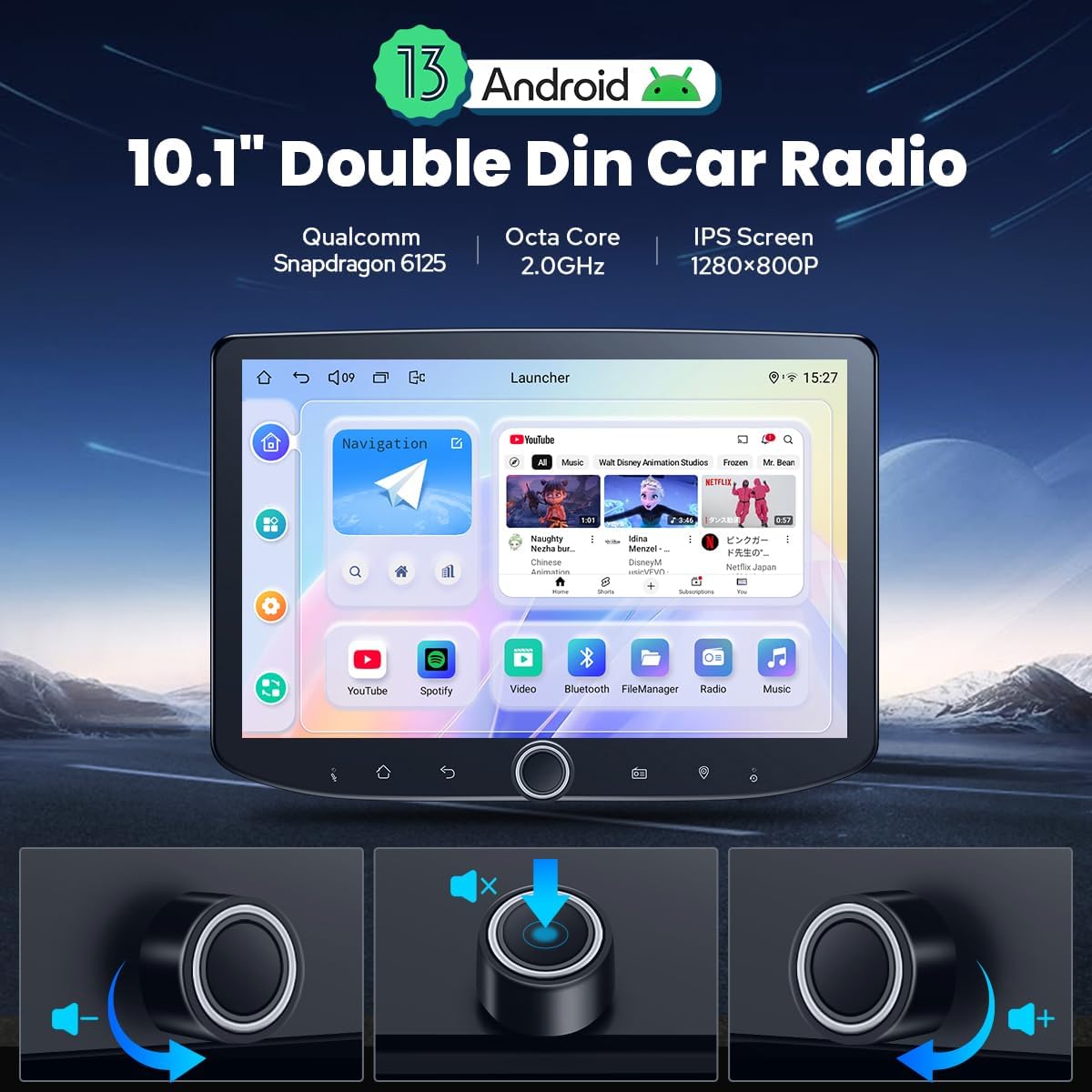
Image: The Joying car radio unit, highlighting its adjustable screen and the physical volume knob for easy control.
Video: Shows the screen adjustment feature of the car stereo, demonstrating how the display can be moved up and down to avoid interfering with vehicle controls.
2. Operating Instructions
2.1 Basic Functions
The unit features a fast boot function, starting up immediately and entering the user interface within 2 seconds after the car key is inserted (initial boot-up takes approximately 30-40 seconds). A physical volume knob provides tactile control for audio adjustments.

Image: The main user interface of the Joying Android 13 car radio, showcasing the 10.1-inch display and the integrated volume knob.
Video: Demonstrates the user interface, settings, and various functions of the Android 12 car radio, including navigation, music playback, and camera views.
2.2 Connectivity (CarPlay & Android Auto)
Connect your mobile phone via USB cable or Bluetooth to utilize Carplay and Android Auto, sharing phone apps for navigation, calls, and music on the larger screen. The unit includes a built-in 4G module for internet access (SIM card required, does not support phone calls or SMS). Precise GPS navigation is provided with accurate positioning and offline map support. Synchronize mobile phone map data to the head unit via Carplay/Android Auto.

Image: Illustrates the seamless integration of built-in Carplay and Android Auto, allowing users to access phone features on the car radio display.
2.3 Audio Features
For enhanced sound quality, the unit offers Optical Fiber and Coaxial Digital Output. If your external amplifier has compatible inputs, you can achieve ultimate sound quality directly. It also features a 48-band graphic equalizer and 4x50W Max Output Power.

Image: Highlights the high-quality sound features, including the TDA7851 DSP chip, 48-band graphic equalizer, and support for aftermarket amplifiers with optical fiber and SPDIF coaxial output.
2.4 Display and Personalization
The 10.1-inch 1280x800P display offers clear visuals. Personalize your experience with changeable button colors, customizable wallpapers, and adjustable screen brightness. The unit also supports various other features like Picture-in-Picture, 3 USB ports, Micro SD Card Slot, and AM/FM Radio.
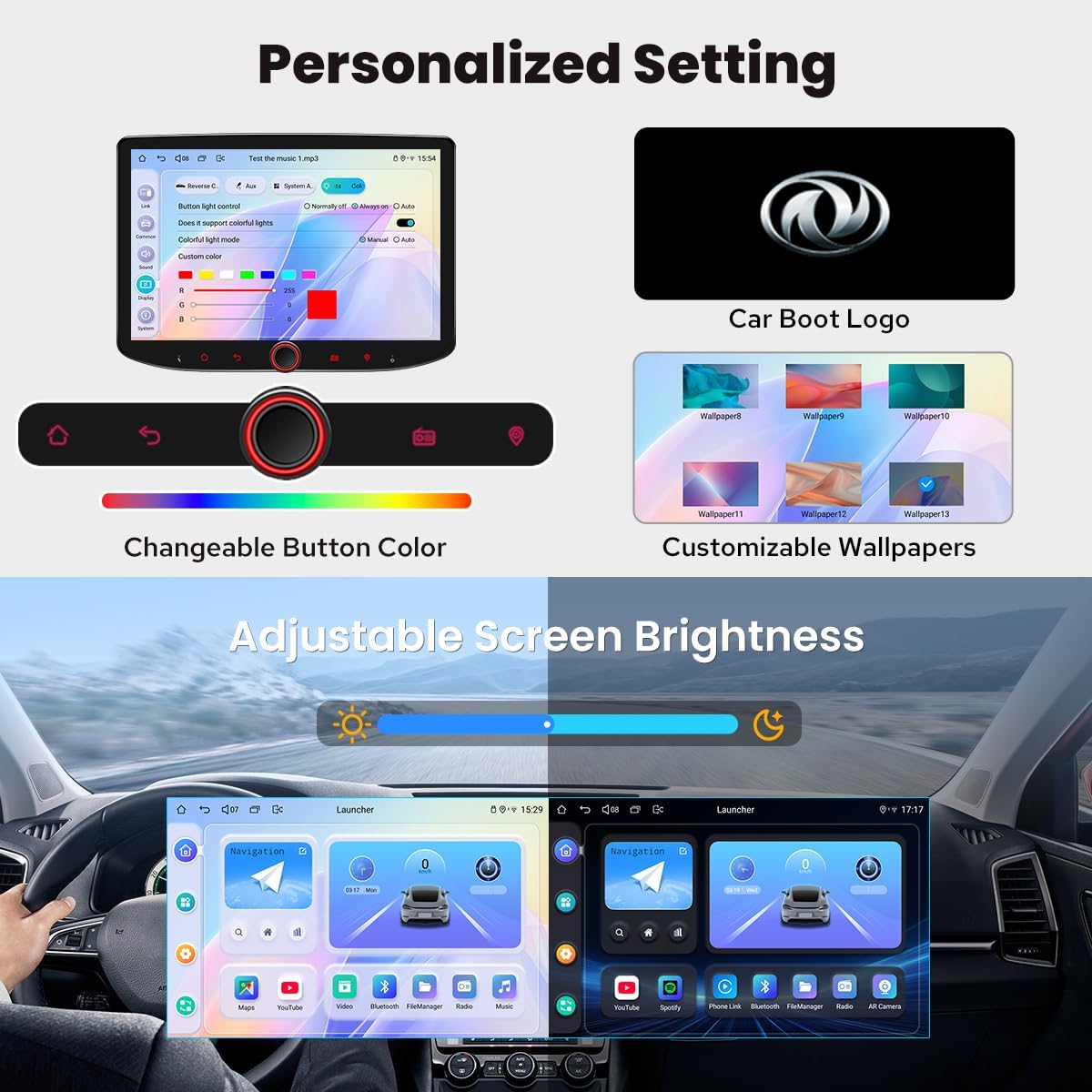
Image: Shows the personalized settings available, including changeable button colors, customizable wallpapers, and adjustable screen brightness.
2.5 Multitasking
The split-screen multitasking feature allows you to run two applications simultaneously on the display, such as navigation and music playback, enhancing convenience during your drive.

Image: Demonstrates the split-screen multitasking capability, showing navigation and a video playing side-by-side on the 10.1-inch display.
2.6 Steering Wheel Control
The unit supports steering wheel controls, allowing you to easily switch songs, radio channels, and adjust volume for a safer and more enjoyable journey. Note: Cars with a CANbus system may require an extra CANbus cable to enable this feature.

Image: Illustrates the steering wheel control feature, showing how drivers can manage media and settings without taking their hands off the wheel.
2.7 HDMI Output
The HDMI output provides a full digital image and sound-sending interface, allowing uncompressed audio and video signals to be output synchronously without manual adjustment. This supports projection screen displays for passengers in the headrest and on-screen displays with 1080P clear picture and zero delays.

Image: Details the HDMI output feature, showing how the car radio can connect to external screens for passenger entertainment and synchronized display.
3. Maintenance
3.1 Cooling System
The unit features a dual heat sink design for superior heat dissipation, improved temperature control, and enhanced performance stability. You can set a warning value for CPU temperature or radio volume; if exceeded, the fan will automatically turn on to prevent overheating.

Image: Illustrates the upgraded cooling system with dual heat sinks and fan control, designed to maintain optimal operating temperature.
3.2 Wi-Fi Signal
An independent Wi-Fi antenna ensures stable signal quality and provides fast and smooth internet access. The unit supports 802.11a/b/g/n/AC standards across 2.4GHz/5GHz spectral bands.

Image: Shows the independent WiFi antenna, indicating improved signal strength and reliable internet connectivity for the car radio.
4. Troubleshooting
If you experience issues, first ensure all connections are secure and correctly installed according to the installation manual. Verify that only JOYING-compatible accessories are used, as third-party accessories may cause malfunctions. Common issues like occasional lag when switching apps or unclear built-in microphone audio are noted in user feedback. For persistent problems, consult the detailed troubleshooting section in the full user manual or contact customer support.
Important Note: This unit does not support factory car GPS antenna, back up rear camera, Bluetooth, USB, and microphone. It only supports JOYING accessories.
5. Product Specifications
| Feature | Specification |
|---|---|
| Item Weight | 2.65 pounds |
| Package Dimensions | 14.88 x 8.03 x 5.98 inches |
| Item Model Number | JY-UTD10N4-B |
| Display Size | 10.1 Inches |
| Operating System | Android 13 |
| CPU Info | Snapdragon 8-core 2.0GHz, Adreno TM 610GPU |
| Running Memory | 4GB |
| Storage | 64GB (47.46 GB available) |
| Screen Resolution | 1280x800P |
| Special Features | Android Auto, Apple CarPlay, Built-In Bluetooth, Built-In Wi-Fi, Equalizer, Built-in 4G Module, Optical Fiber and Coaxial Digital Output |
| Connectivity Technology | Bluetooth, Ethernet, HDMI, USB, Wi-Fi |
| Map Type | North America (Offline maps supported) |
| Audio Output Mode | Stereo |
| Mounting Type | Dashboard Mount |

Image: Provides a detailed view of the unit's dimensions and the various ports located on the rear for connections.
6. Warranty and Support
6.1 Warranty Information
The Joying Android 13 Double Din Car Radio comes with a 2-year warranty. Please retain your proof of purchase for warranty claims.
6.2 Optional Accessories
Additional accessories such as DVR, OBDII scanner, reverse camera, TPMS, and steering wheel controller are not included in the delivery contents but can be ordered separately from JOYING. Ensure to use only JOYING-compatible accessories for optimal performance and to maintain warranty validity.

Image: Displays various optional accessories like OBD2, AR Front Camera, and AR Rear Camera that can be purchased separately to enhance the car radio's functionality.
6.3 Customer Support
For further assistance, technical support, or warranty inquiries, please refer to the contact information provided in your product packaging or visit the official JOYING website.
