
1. Introduction
This manual provides essential information for the safe and efficient operation of your DOOGEE Blade10 Energy rugged smartphone. Please read this manual thoroughly before using your device to ensure proper functionality and to prevent damage.
The DOOGEE Blade10 Energy is designed for durability and performance, featuring an Android 15 operating system, an octa-core processor, a 6.56-inch HD+ 90Hz display, a 16MP camera, and IP68/IP69K water and dust resistance.
2. Package Contents
Verify that all items are present in the package:
- DOOGEE Blade 10 Energy rugged phone
- Type-C USB Cable
- Charger
- Tempered Glass Protective Film (Pre-applied)
- Sling
- User Manual
- Warranty Card
- Protective Case

Image: Contents of the DOOGEE Blade10 Energy retail package, including the phone, charger, cable, and accessories.
3. Device Layout
Familiarize yourself with the physical components of your smartphone.
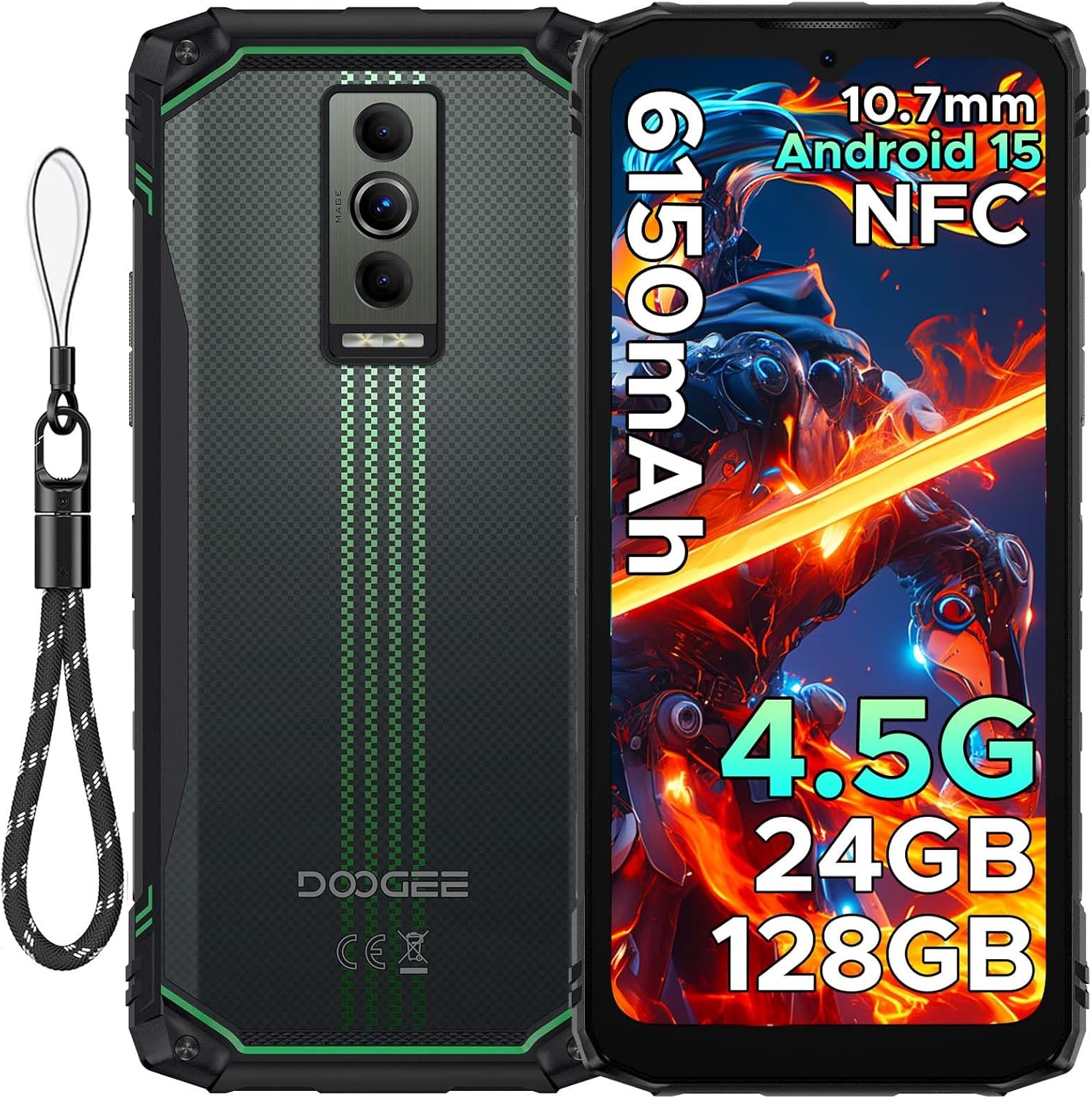
Image: Front and rear view of the DOOGEE Blade10 Energy smartphone, highlighting the display, cameras, and side buttons.
- Front: 6.56" HD+ Display, 8MP Front Camera
- Rear: 16MP Main Camera, Flashlight
- Sides: Power Button, Volume Buttons, SIM/MicroSD Card Slot, USB Type-C Port
4. Setup
4.1. SIM Card and MicroSD Card Installation
- Locate the SIM/MicroSD card slot on the side of the device.
- Use the provided SIM ejector tool to open the tray.
- Carefully place your Nano-SIM cards and/or MicroSD card into the designated slots. Ensure correct orientation.
- Gently push the tray back into the slot until it is flush with the phone's body.

Image: Close-up of the SIM/MicroSD card tray, illustrating the correct placement of cards.
4.2. Initial Charging
Before first use, fully charge your device using the provided Type-C USB cable and charger.
- Connect the Type-C cable to the phone's charging port.
- Connect the other end of the cable to the charger, then plug the charger into a power outlet.
- The charging indicator will appear on the screen.

Image: The DOOGEE Blade10 Energy connected to its charger via a Type-C cable.
5. Operating Instructions
5.1. Power On/Off and Restart
- Power On: Press and hold the Power button until the screen lights up.
- Power Off/Restart: Press and hold the Power button until the power options menu appears. Select "Power off" or "Restart".
5.2. Android 15 Operating System
Your DOOGEE Blade10 Energy runs on Android 15, offering enhanced performance, smarter interactions, and improved privacy features. Navigate through the interface using touch gestures.

Image: Screenshot of the Android 15 home screen and app icons on the DOOGEE Blade10 Energy.
5.3. Display Features
The 6.56-inch HD+ display with a 90Hz refresh rate provides a smooth visual experience. Widevine L1 support ensures high-definition streaming content playback.

Image: The DOOGEE Blade10 Energy display showcasing vibrant colors and smooth motion.
5.4. Camera Operation
Capture photos and videos using the 16MP rear camera and 8MP front camera. The device also features an underwater shooting mode for aquatic environments.

Image: The DOOGEE Blade10 Energy camera interface, highlighting the underwater shooting mode.
5.5. Security Features
Unlock your phone using Face ID for quick and secure access.

Image: An illustration of the Face ID recognition feature in use on the DOOGEE Blade10 Energy.
5.6. NFC Functionality
The NFC (Near Field Communication) feature allows for contactless payments, data sharing, and card emulation. Enable NFC in your phone's settings to use these functions.

Image: The DOOGEE Blade10 Energy being used for a contactless payment via NFC.
6. Durability Features
The DOOGEE Blade10 Energy is built to withstand harsh environments with its IP68/IP69K and MIL-STD-810H certifications.
- IP68/IP69K: Provides dustproof and waterproof protection. The phone can withstand immersion in water up to 1.5 meters deep for 30 minutes.
- MIL-STD-810H: Certified for drop resistance up to 1.5 meters.

Image: The DOOGEE Blade10 Energy shown in various rugged scenarios, highlighting its dustproof, drop-proof, and waterproof design.
Video: This video demonstrates the IP68/IP69K waterproof capabilities of the DOOGEE Blade10 Energy.
7. Battery Management
The device is equipped with a 6150mAh silicon anode battery for extended usage. It also supports reverse charging.
Image: The DOOGEE Blade10 Energy showcasing its 6150mAh battery and the reverse charging capability with another device.
7.1. Reverse Charging
To use your phone as a power bank, connect a compatible device to your Blade10 Energy using a USB-C to USB-C cable or a USB-C to the appropriate cable for the other device. Ensure reverse charging is enabled in the settings if it doesn't start automatically.
Video: This video highlights the ultra-thin design and long battery life of the DOOGEE Blade 10 series, including the Blade10 Energy.
8. Connectivity
- 4.5G Dual SIM: Supports dual SIM cards for flexible network usage.
- GPS: Integrated with Beidou, Galileo, GLONASS, and GPS for accurate positioning.
- Wi-Fi: Supports standard Wi-Fi connectivity.
9. Maintenance
To ensure the longevity and optimal performance of your DOOGEE Blade10 Energy, follow these maintenance guidelines:
- Keep the device clean by wiping it with a soft, damp cloth. Avoid harsh chemicals.
- Ensure all port covers are securely closed when the device is exposed to water or dust.
- Avoid exposing the device to extreme temperatures or direct sunlight for prolonged periods.
- Regularly back up your data to prevent loss.
10. Troubleshooting
If you encounter issues with your device, refer to the following common solutions:
| Problem | Solution |
|---|---|
| Device does not power on | Ensure the battery is charged. Connect to the charger and wait a few minutes before attempting to power on again. |
| Poor network signal | Check SIM card installation. Move to an area with better network coverage. Restart the device. |
| Touchscreen unresponsive | Restart the device. If the issue persists, perform a factory reset (note: this will erase all data). |
| Battery drains quickly | Close unused applications. Reduce screen brightness. Disable unnecessary features like Wi-Fi, Bluetooth, or GPS when not in use. |
11. Specifications
| Feature | Detail |
|---|---|
| Model Name | Blade10 Energy |
| Operating System | Android 15 |
| CPU Model | Mediatek Dimensity 9000 (Octa-Core, 1.8 GHz) |
| RAM | 24 GB (4GB Basic + 20GB Extended) |
| Internal Storage | 128 GB |
| Expandable Storage | Up to 2 TB (MicroSD/TF card) |
| Screen Size | 6.56 Inches |
| Resolution | 720 x 1600 (HD+) |
| Refresh Rate | 90 Hz |
| Main Camera | 16 MP |
| Front Camera | 8 MP |
| Battery Capacity | 6150 mAh |
| Connectivity | 4.5G Dual SIM, Wi-Fi, NFC |
| Navigation | Beidou, Galileo, GLONASS, GPS |
| Durability | IP68/IP69K, MIL-STD-810H |
| Dimensions | 6.45 x 2.98 x 0.33 inches |
| Weight | 6.9 ounces (195 Grams) |
12. Warranty and Support
Your DOOGEE Blade10 Energy comes with a two-year warranty. For technical support or warranty claims, please refer to the contact information provided on the warranty card included in your package or visit the official DOOGEE support website.
The package includes a Warranty Card and a Service Card for your reference.


