
1. Introduction
The RadioMaster TX16S Mark II is a versatile multi-protocol radio controller designed for remote-controlled vehicles. It supports both EdgeTX and OpenTX firmware, offering extensive customization and compatibility with various receiver protocols. This manual provides essential information for setting up, operating, and maintaining your TX16S Mark II radio controller.

Figure 1: Rear view of the RadioMaster TX16S Mark II Radio Controller, showing the external module bay and ergonomic grips.
2. Key Features
- Improved Internal Circuitry: Optimized power supply for enhanced performance.
- V4.0 Hall Gimbals: Features the same chipset as AG01 gimbals, with optimized hall sensor circuitry for improved center point positioning and temperature stability. Stick travel, self-centering, and stick tension are externally adjustable.
- Firmware Support: Pre-installed with EdgeTX (touch screen enabled) and compatible with OpenTX (requires version 2.3.15 or later).
- Multi-Protocol Module: Internal 4-in-1 multi-protocol module (CC2500 CYRF6936 A7105 NRF2401) or Internal ELRS (SX1280) for broad receiver compatibility.
- Ergonomic Design: Includes both raised and flat rear grips for customizable comfort.
- Audio Features: Built-in dual speakers and a new 3.5mm audio jack for headphone use.
- Display: Bright and clear 4.3-inch TFT full-color touch display with 480x272 resolution.
- External Module Bay: JR compatible module bay, natively supporting Team Black Sheep MicroTX modules in CRSF mode with LUA scripts.
- Easy Firmware Updates: Supports USB-C online and SD card offline upgrades.
- Enhanced Controls: Improved S1/S2 knobs with center detents and smoother LS/RS sliders.
- Redesigned Battery Cover: Easier to remove for battery access.
- Rear DIY Socket: Added for personalized modifications.

Figure 2: The TX16S Mark II radio controller securely placed in its carry case.
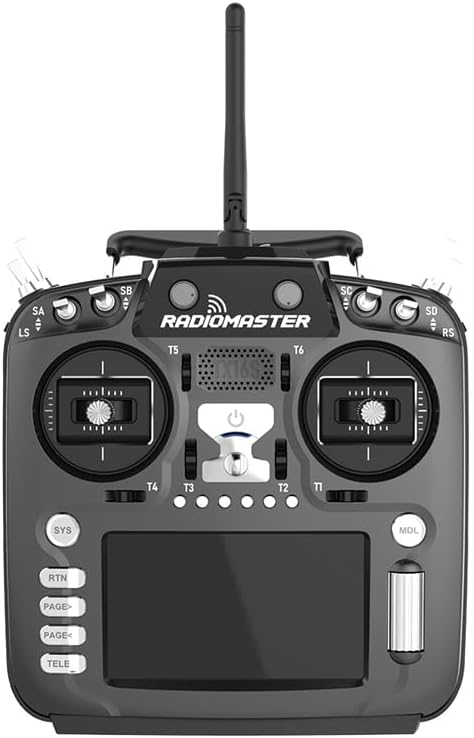
Figure 3: Front view of the RadioMaster TX16S Mark II, highlighting the gimbals and display.
3. Setup
3.1 Battery Installation
The TX16S Mark II uses 18650 batteries (not included). Open the redesigned battery cover on the back of the unit and insert the batteries into the provided tray, ensuring correct polarity. Close the cover securely.

Figure 4: The battery compartment of the TX16S Mark II, showing the 18650 battery tray.
3.2 Gimbal Adjustment
The V4.0 Hall Gimbals allow for external adjustment of stick travel, self-centering, and stick tension. Refer to the detailed instructions in the full manual for precise adjustment procedures to suit your flying style.
3.3 Grip Customization
The radio controller comes with both flat and raised rear grips. To change the grips, carefully remove the installed grips and attach your preferred set for improved ergonomics and comfort.
4. Operating Instructions
4.1 Power On/Off
To power on the TX16S Mark II, press and hold the power button located on the front panel until the screen illuminates. To power off, press and hold the power button again until the unit shuts down.
4.2 Navigation and Model Selection
The 4.3-inch TFT full-color touch display allows for intuitive navigation through menus and model selection. Use the touch screen or the scroll wheel and buttons to access various settings and choose your desired model profile.

Figure 5: The vibrant 4.3-inch IPS color display of the TX16S Mark II, showing model setup interface.
4.3 Binding with Receivers
The TX16S Mark II supports multiple protocols. To bind with a receiver, select the appropriate protocol in the radio's settings menu (e.g., 4-in-1 multi-protocol or ELRS) and follow the binding procedure specific to your receiver. Ensure the receiver is in binding mode.
4.4 Using Switches and Knobs
The radio features various switches (SA, SB, SC, SD, SE, SF) and knobs (S1, S2, LS, RS sliders) that can be assigned to different functions for controlling your model. Customize these assignments within the EdgeTX/OpenTX firmware to match your preferences.
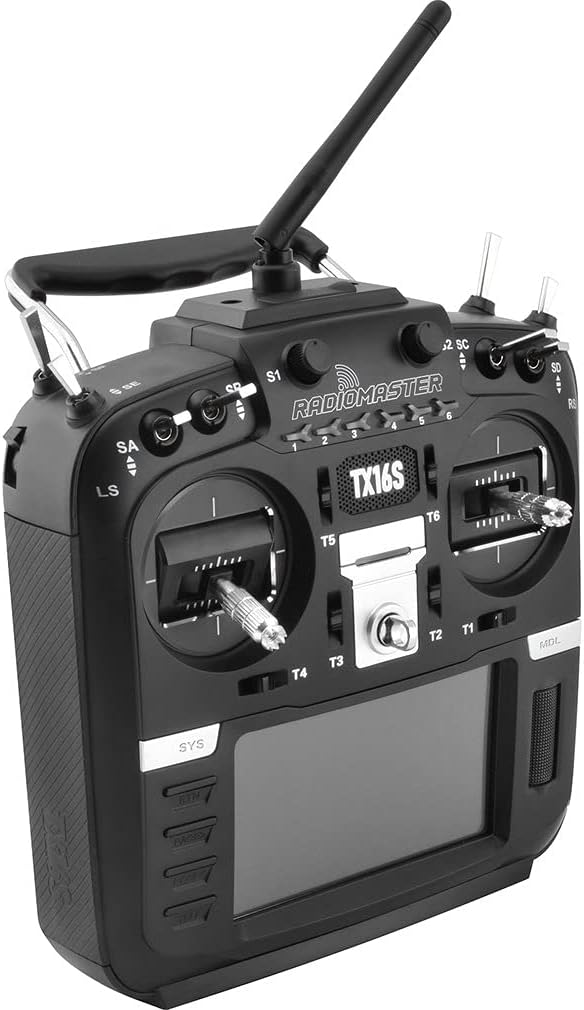
Figure 6: Side view of the RadioMaster TX16S Mark II, showing the various switches and sliders.
4.5 Audio Features
The built-in dual speakers provide audible alerts and voice prompts. For private listening, connect headphones to the 3.5mm audio jack located on the rear of the unit.
Video 1: Overview of the RadioMaster TX16S Mark II V4.0 Hall Gimbal 4-in-1 ELRS Radio Controller features.
5. Maintenance
5.1 Firmware Updates
Regularly check for and install firmware updates for both EdgeTX/OpenTX and the internal module. Updates can be performed via USB-C connection to a computer or by loading firmware files onto an SD card and updating offline.
5.2 Battery Care
Use only recommended 18650 batteries. Charge batteries using the USB-C port or an external charger. Avoid overcharging or fully discharging batteries to prolong their lifespan. Store the radio in a cool, dry place when not in use.
5.3 Cleaning
Clean the radio controller with a soft, dry cloth. Avoid using harsh chemicals or abrasive materials that could damage the display or casing.
6. Troubleshooting
6.1 Binding Issues
If you experience difficulty binding, ensure the receiver is compatible with the selected protocol and that both the radio and receiver are in binding mode. Check for any obstructions or interference. Consult the specific receiver's manual for its binding procedure.
6.2 Display Problems
If the display is dim or unresponsive, check the brightness settings in the system menu. Ensure the battery is adequately charged. If issues persist, try restarting the radio.
6.3 Control Unresponsiveness
Verify that the model is correctly bound and that all servo connections are secure. Check the channel monitor in the radio's settings to ensure stick inputs are registered correctly. Perform a range test before flying.
7. Specifications
- Item Name: TX16S Mark II Radio Controller
- Color: Black
- Version: 4-IN-1/ELRS
- Gimbal: V4.0 Hall sensor with Aluminium fascia
- Size: 287x129x184mm
- Weight: 750g (without battery)
- Transmission Frequency: 2.400GHz-2.480GHz
- Transmitter Module: Internal 4-in-1 multi-protocol module (CC2500 CYRF6936 A7105 NRF2401) OR Internal ELRS (SX1280)
- Transmitting Power: Internal 4-in-1: Max 100mw (protocol dependent); Internal ELRS: Max 250mw (adjustable)
- Antenna Gain: 2db (transmit power adjustable)
- Working Current: 400mA
- Working Voltage: 6.6-8.4v DC
- Remote Control Distance: > 2km @ 22dbm
- Radio Firmware: EdgeTX (default)
- Module Firmware: Multiprotocol-Module (4IN1) OR ExpressLRS (ELRS)
- Channels: Up to 16 channels (depending on the receiver)
- Display: 4.3-inch TFT full-colour touch display with 480 * 272 resolution
- Module Bay: JR compatible
- Upgrade Method: Supports USB-C online / SD card offline upgrade
- ASIN: B0F3J4JTW5
- UPC: 765477855255
8. Warranty and Support
For warranty claims or technical support, please contact the manufacturer, RadioMaster (or Xiangtat, as listed on Amazon), and provide your product model number (TX16S Mark II) and proof of purchase. Specific warranty terms and conditions may vary by region and retailer.
Video 2: Demonstration of the Radiomaster Lanyard Neck Strap Shoulder Belt Sling.


