
SOAR NFL-SUN-STLR
Contents
SOAR NFL Sunrise Alarm Clock Pittsburgh Steelers User Manual
Model: NFL-SUN-STLR
1. Introduction
Thank you for purchasing the SOAR NFL Sunrise Alarm Clock. This device combines a digital alarm clock with a natural sunrise simulation feature, designed to help you wake up more gently and refreshed. This manual provides detailed instructions for setup, operation, maintenance, and troubleshooting to ensure optimal performance of your alarm clock.
2. Safety Information
- Read all instructions before using the device.
- Keep this manual for future reference.
- Do not expose the device to water or excessive moisture.
- Do not place the device near heat sources such as radiators, heat registers, stoves, or other apparatus (including amplifiers) that produce heat.
- Use only the power adapter supplied or recommended by the manufacturer.
- Clean only with a dry cloth.
- Do not attempt to disassemble or modify the device. Refer all servicing to qualified service personnel.
3. Package Contents
- SOAR NFL Sunrise Alarm Clock
- USB-C Power Cable
- User Manual (this document)
4. Product Overview
Familiarize yourself with the components and controls of your SOAR NFL Sunrise Alarm Clock.
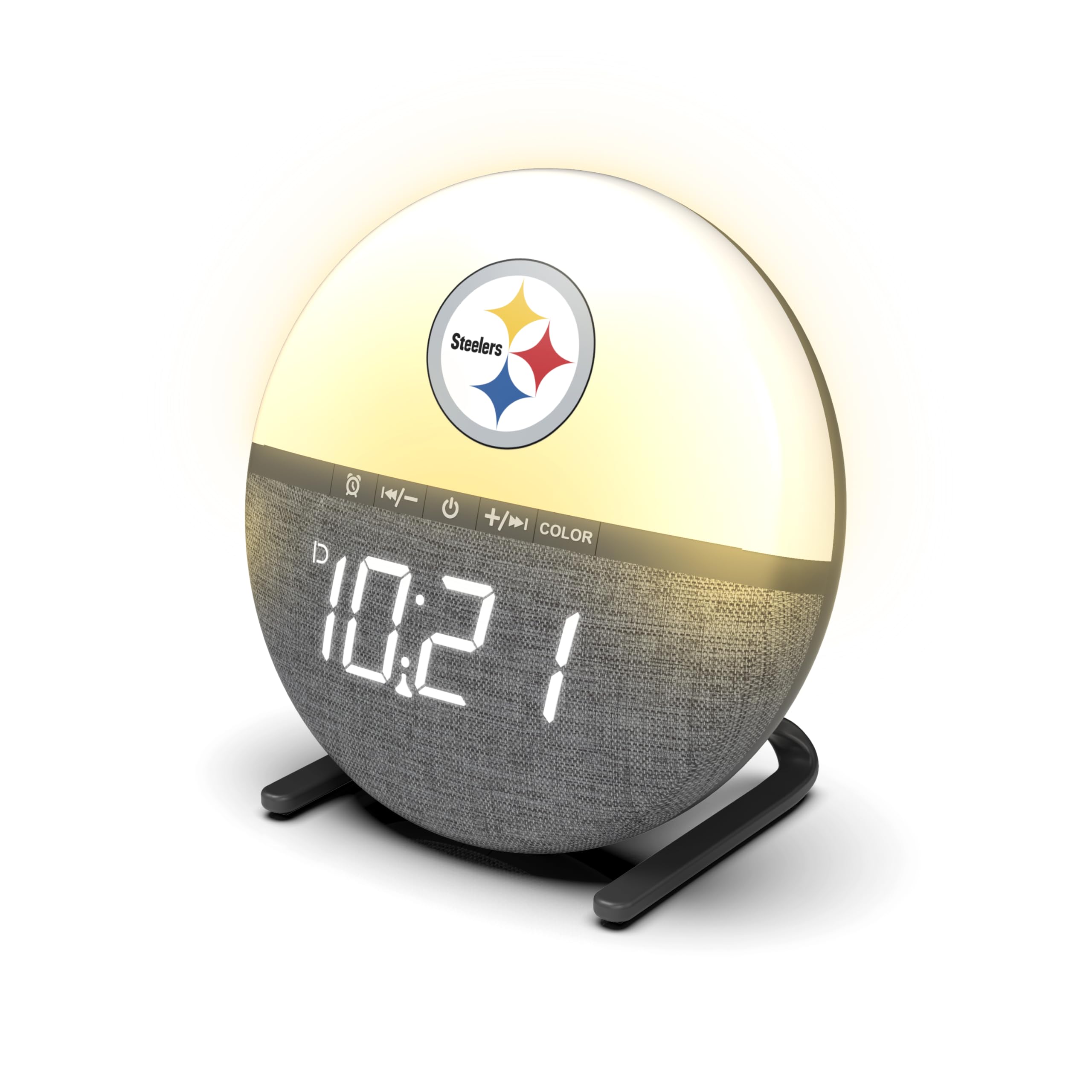
Figure 4.1: Front view of the SOAR NFL Sunrise Alarm Clock with Pittsburgh Steelers logo.

Figure 4.2: Dimensions of the SOAR NFL Sunrise Alarm Clock. The clock measures approximately 5 inches in height and 5.125 inches in width.

Figure 4.3: Top panel controls and rear USB-C port. The controls include buttons for alarm settings, time adjustment, power, and color mode selection. The USB-C port is located at the back for power input.
Control Buttons:
- Alarm Button: Used to set and activate/deactivate the alarm.
- Time/Minus Button: Used to adjust time settings downwards or navigate menus.
- Power Button: Turns the device on/off or confirms selections.
- Plus/Color Button: Used to adjust time settings upwards, navigate menus, or change light color modes.
5. Setup
- Connect Power: Insert the USB-C end of the provided power cable into the USB-C port on the back of the alarm clock. Plug the other end of the USB cable into a compatible USB power adapter (not included) and then into a wall outlet.
- Initial Power On: The clock display will illuminate, and the device will be ready for initial setup.
6. Operating Instructions
6.1 Setting the Time
- Press and hold the Power Button for a few seconds until the time display starts flashing.
- Use the Time/Minus Button or Plus/Color Button to adjust the hours. Press the Power Button to confirm.
- Use the Time/Minus Button or Plus/Color Button to adjust the minutes. Press the Power Button to confirm.
- The time is now set.
6.2 Setting the Alarm
- Press and hold the Alarm Button for a few seconds until the alarm time display starts flashing.
- Use the Time/Minus Button or Plus/Color Button to adjust the alarm hours. Press the Alarm Button to confirm.
- Use the Time/Minus Button or Plus/Color Button to adjust the alarm minutes. Press the Alarm Button to confirm.
- The alarm is now set and activated. An alarm icon will appear on the display.
- To deactivate the alarm, press the Alarm Button once. The alarm icon will disappear.
6.3 Sunrise Simulation

Figure 6.1: The sunrise simulation feature gradually brightens the light before your set alarm time, offering a gentle wake-up experience. The clock also supports dual light modes: soft warm yellow and crisp blue tones.
The sunrise simulation feature gradually increases the light intensity before your set alarm time, mimicking a natural sunrise. This feature is automatically enabled when an alarm is set.
6.4 Light Settings (Color Modes & Brightness)

Figure 6.2: The alarm clock features adjustable light brightness and color tones, including a bright white and a warm yellow. The snooze function allows for additional rest.
Your alarm clock offers customizable light settings:
- Changing Color Mode: Press the Plus/Color Button briefly to cycle between available light color modes (e.g., warm yellow, bright white).
- Adjusting Brightness: While the light is on, press the Time/Minus Button or Plus/Color Button to adjust the light brightness through 3 available levels.
6.5 Alarm Sounds

Figure 6.3: The SOAR NFL Sunrise Alarm Clock offers 18 built-in alarm tones, ranging from peaceful melodies to energizing alerts, allowing users to choose their preferred wake-up sound.
The alarm clock features 18 built-in alarm sounds. To select an alarm sound:
- When setting the alarm (Section 6.2), after setting the minutes, you will be prompted to select an alarm sound.
- Use the Time/Minus Button or Plus/Color Button to cycle through the available sounds. A short preview of each sound will play.
- Press the Alarm Button to confirm your selection.
6.6 Snooze Function
When the alarm sounds, press any button (except the Power Button) to activate the snooze function. The alarm will pause for 10 minutes and then sound again. You can repeat the snooze cycle multiple times. To turn off the alarm completely, press the Power Button when the alarm is sounding.
7. Maintenance
- Cleaning: Unplug the device before cleaning. Use a soft, dry cloth to wipe the surface of the alarm clock. Do not use liquid cleaners or abrasive materials.
- Storage: If not in use for an extended period, unplug the device and store it in a cool, dry place.
8. Troubleshooting
| Problem | Possible Cause | Solution |
|---|---|---|
| Clock display is off. | No power supply. | Ensure the USB-C cable is securely connected and the power adapter is plugged into a working outlet. |
| Alarm does not sound. | Alarm is not activated or set incorrectly. | Check if the alarm icon is displayed. Re-set the alarm time following Section 6.2. |
| Light does not turn on. | Light function is off or brightness is set to minimum. | Press the Power Button to turn on the light. Adjust brightness using the Time/Minus Button or Plus/Color Button. |
| Buttons are unresponsive. | Temporary software glitch. | Unplug the device from power for 30 seconds, then plug it back in to reset. |
9. Specifications

Figure 9.1: Overview of key features including 24-hour display, 40mm speaker, USB-C power input, 3 levels of light brightness, 10-minute snooze, 2 color modes, and 18 alarm tones.
| Feature | Detail |
|---|---|
| Model Number | NFL-SUN-STLR |
| Display Type | Digital LED |
| Power Source | Corded Electric (USB-C) |
| Connectivity | USB |
| Light Modes | 2 Color Modes (Warm Yellow, Bright White) |
| Brightness Levels | 3 Levels |
| Alarm Tones | 18 Built-in Sounds |
| Snooze Duration | 10 Minutes |
| Speaker Size | 40mm |
| Dimensions (W x H) | 3.01"W x 4.97"H |
| Weight | 0.28 kg |
| Material | Plastic |
| UPC | 192129197768 |
10. Warranty
This SOAR NFL Sunrise Alarm Clock comes with a 1-year manufacturer's limited warranty from the date of purchase. This warranty covers defects in materials and workmanship under normal use. It does not cover damage caused by misuse, accidents, unauthorized modifications, or external causes.
11. Support
For further assistance, troubleshooting, or warranty claims, please contact SOAR customer support through the retailer where the product was purchased or visit the official SOAR brand store online.
Ask a question about this manual
Ask about setup, troubleshooting, compatibility, parts, safety, or missing instructions. Manuals+ will review the question and use this page’s manual context to help answer it.