1. Introduction
This manual provides detailed instructions for the proper installation, operation, and maintenance of your AWAVINGCEM JDY-62A Mini Bluetooth Stereo Audio Module. The JDY-62A is a compact Bluetooth audio module designed for integrating wireless stereo audio capabilities into various electronic projects and devices. It supports dual-channel high and low-level audio output and features an automatic sleep function for power efficiency. Please read this manual thoroughly before using the module to ensure optimal performance and longevity.
2. Safety Information
- Power Supply: Ensure the power supply voltage and current are within the specified limits for the module. Incorrect power can damage the device.
- Static Electricity: Handle the module with care, preferably in an anti-static environment, to prevent damage from electrostatic discharge.
- Environment: Avoid exposing the module to extreme temperatures, humidity, dust, or corrosive substances.
- Wiring: Double-check all wiring connections before applying power to prevent short circuits or component damage.
- Modifications: Do not attempt to modify the module unless explicitly instructed. Unauthorized modifications can void the warranty and pose safety risks.
3. Setup and Installation
The JDY-62A module is designed for straightforward integration. Below are general steps for connecting the module.
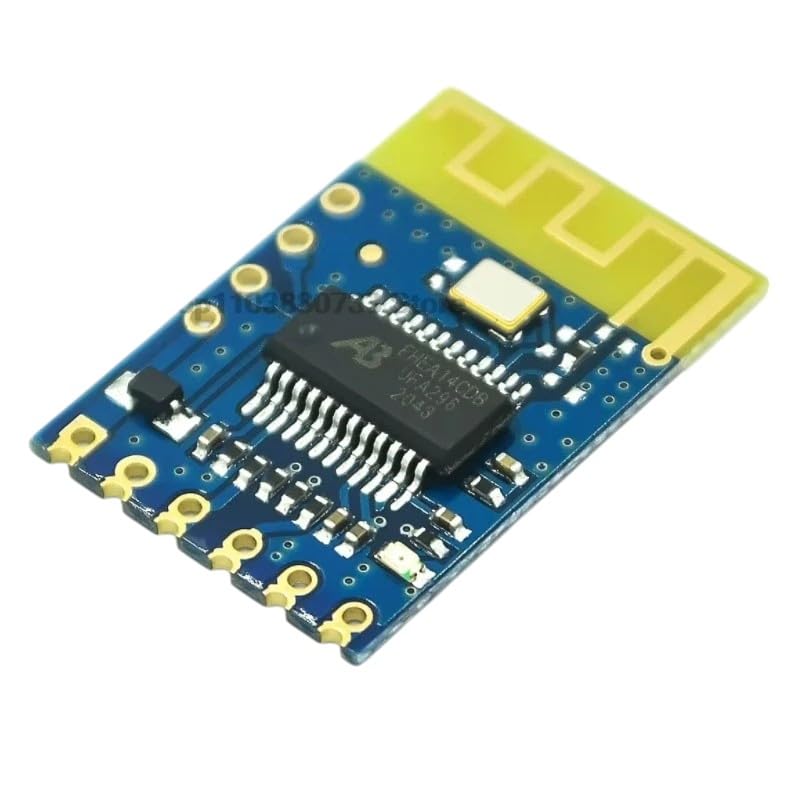
Figure 3.1: The AWAVINGCEM JDY-62A Mini Bluetooth Stereo Audio Module. This image displays the compact blue PCB with integrated components and gold-plated connection pads, highlighting its small form factor for easy integration into electronic projects.
3.1 Pinout Description (Typical)
While specific pin labels may vary slightly, common pins for a Bluetooth audio module like the JDY-62A typically include:
- VCC: Power input (e.g., 3.3V - 5V DC)
- GND: Ground connection
- L_OUT: Left audio channel output
- R_OUT: Right audio channel output
- KEY: Control input (e.g., for pairing, play/pause, next/previous track)
- LED: Status indicator output (optional)
3.2 Connection Steps
- Power Connection: Connect the VCC pin to your regulated power supply (e.g., 5V DC) and the GND pin to the system ground.
- Audio Output: Connect the L_OUT and R_OUT pins to the input of an audio amplifier or directly to headphones/speakers if the module provides sufficient output power (check specifications).
- Control (Optional): If using control functions, connect the KEY pin(s) to appropriate buttons or microcontroller outputs.
4. Operating Instructions
4.1 Powering On
Once correctly wired, apply power to the VCC and GND pins. The module will typically enter a pairing mode, indicated by a flashing LED (if available).
4.2 Bluetooth Pairing
- Enable Bluetooth on your source device (e.g., smartphone, tablet, computer).
- Scan for new Bluetooth devices. The module should appear as a device named similar to "JDY-62A" or "Bluetooth Audio".
- Select the module to pair. A successful connection is usually indicated by a solid LED light or a specific audio prompt.
4.3 Audio Playback
After successful pairing, you can play audio from your source device. The audio will be transmitted wirelessly to the JDY-62A module and output through its L_OUT and R_OUT pins.
4.4 Automatic Sleep Function
The JDY-62A module features an automatic sleep function to conserve power. If no Bluetooth connection is established or no audio is played for a certain period (typically several minutes), the module may enter a low-power sleep mode. To reactivate, simply attempt to connect or play audio from your paired device.
5. Maintenance
- Cleaning: Keep the module clean and free from dust. Use a soft, dry cloth for cleaning. Avoid liquid cleaners.
- Storage: Store the module in a dry, cool environment when not in use.
- Inspection: Periodically inspect connections for any signs of wear or damage.
6. Troubleshooting
| Problem | Possible Cause | Solution |
|---|---|---|
| Module does not power on. | Incorrect power supply voltage or polarity; faulty wiring. | Verify VCC and GND connections and ensure power supply is within specified range. |
| Cannot find module in Bluetooth scan. | Module not in pairing mode; too far from source device; interference. | Ensure module is powered on and in pairing mode. Move source device closer. Reduce potential interference sources. |
| No audio output after pairing. | Incorrect audio output connections; volume too low on source device or amplifier; module in sleep mode. | Check L_OUT/R_OUT connections. Increase volume on source device and amplifier. Try re-pairing or playing audio to wake the module. |
| Audio quality is poor or intermittent. | Weak Bluetooth signal; interference; faulty audio connections. | Move source device closer to the module. Ensure no strong Wi-Fi or other wireless signals are nearby. Check audio wiring for loose connections. |
7. Specifications
- Model: JDY-62A
- Bluetooth Version: (Typically Bluetooth 4.0 or higher for modern modules)
- Audio Output: Stereo, Dual Channel (High/Low Level)
- Power Supply: (Typically 3.3V - 5V DC, specific voltage range should be confirmed from product datasheet)
- Features: Automatic Sleep Function, iOS compatibility (for general Bluetooth audio profiles)
- Dimensions: Mini form factor (specific dimensions should be confirmed from product datasheet)

Figure 7.1: An illustration of various isometric semiconductor electronic components. This image provides a visual representation of the types of components that might be found within or used alongside the JDY-62A module in electronic projects.
8. Warranty Information
AWAVINGCEM products are manufactured to high-quality standards. This product is covered by a standard manufacturer's warranty against defects in materials and workmanship for a period of one year from the date of purchase. This warranty does not cover damage caused by improper installation, misuse, unauthorized modification, accident, or natural disaster. Please retain your proof of purchase for warranty claims.
9. Customer Support
If you encounter any issues or have questions regarding the AWAVINGCEM JDY-62A Mini Bluetooth Stereo Audio Module that are not addressed in this manual, please contact our customer support team. For the most efficient assistance, please have your product model and purchase details ready.
Contact Information:
- Website: Visit the AWAVINGCEM official website (if available) for support resources.
- Email: Refer to your purchase documentation for customer service email.