
1. Introduction
This manual provides detailed instructions for the safe and effective use of your KYTO OTC Hearing Aids, Model B0DP6K5795. Please read this manual thoroughly before using the device and retain it for future reference.
The KYTO OTC Hearing Aids are designed to assist individuals with mild to moderate hearing loss by amplifying sounds and enhancing speech clarity. They feature Bluetooth connectivity, a rechargeable design, and intelligent sound processing for an improved listening experience.
2. Safety Information
- Consult a medical professional if you experience sudden hearing loss, ear pain, or discharge before using this device.
- Do not use this device if you have a perforated eardrum, active ear infection, or other ear conditions.
- Keep the device out of reach of children and pets to prevent accidental ingestion of small parts.
- Avoid exposing the device to extreme temperatures, humidity, or direct sunlight.
- Do not attempt to modify or repair the device yourself. Contact customer support for assistance.
- Remove the hearing aids before showering, swimming, or engaging in water sports.
3. Package Contents
Verify that all items listed below are present in your package:
- KYTO Hearing Aids (2 units)
- Charging Case (1 unit)
- USB Power Cord (1 unit)
- Earcaps (3 pairs: Small, Medium, Large)
- Instruction Manual (1 unit)

Image: Contents of the KYTO Hearing Aids package. This includes two hearing aids, a charging case, a USB power cord, three pairs of earcaps (S, M, L), and the instruction manual.
4. Product Overview
4.1 Components and Features

Image: Detailed diagram illustrating the components of a KYTO Hearing Aid. Key features include touch-sensitive buttons for control, a microphone for sound input, replaceable earcups, and a status light. Available earcup sizes are Small (0.48 inches), Medium (0.52 inches), and Large (0.56 inches).
- Touch-Sensitive Buttons: For controlling functions such as volume adjustment and mode switching.
- Microphone: Captures ambient sounds for amplification.
- Earcup: Ensures a comfortable and secure fit in the ear canal. Three sizes (S, M, L) are provided for optimal fit and to prevent whistling.
- Status Light: Indicates device status, such as charging or pairing.
4.2 Key Technologies

Image: An exploded view of the KYTO Hearing Aid, highlighting its internal technology. Features include a DSP chip for intelligent sound processing, automatic noise reduction, whistling suppression, and 4-level volume control. The device provides a sound gain of 38 dB.
- Intelligent DSP Chip: Processes sound to enhance human voice and reduce environmental noise, providing clear and natural sound.
- 16-Channel Sound Processing: Allows for precise sound adjustment and noise management across various frequencies.
- Automatic Noise Cancellation: Suppresses background noise and whistling for a more comfortable listening experience.
- Bluetooth Connectivity: Enables connection to smartphones for app control and audio streaming.
- 2-in-1 Functionality: Functions as both a hearing aid and a Bluetooth headset for calls and music.
5. Setup
5.1 Charging the Device
Before first use, fully charge the hearing aids and the charging case.
- Place both hearing aids into the charging case. Ensure they are correctly seated.
- Connect the USB power cord to the charging case and a suitable power adapter (not included).
- The status light on the hearing aids and/or charging case will indicate charging status. A full charge takes approximately 2 hours.
- Once fully charged, the hearing aids provide approximately 12 hours of use. The charging case can recharge the hearing aids four times before needing to be recharged itself.
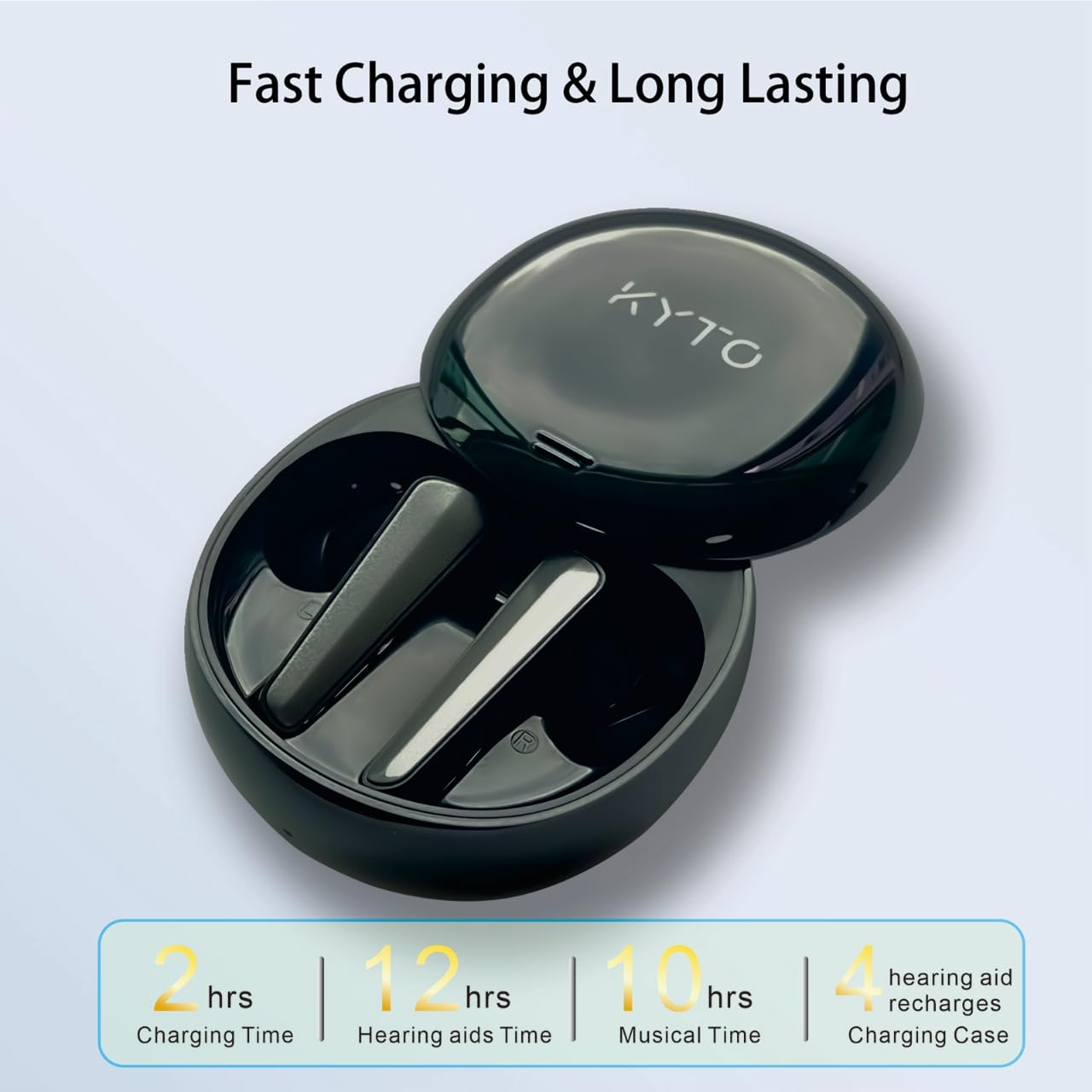
Image: The KYTO Hearing Aids in their charging case. This graphic indicates a charging time of 2 hours for both the case and the hearing aids. Once charged, the hearing aids offer 12 hours of use, and the charging case provides 4 full recharges for the aids.
5.2 Selecting Earcaps
Choose the earcaps that provide the most comfortable and secure fit. An improper fit can lead to whistling or reduced sound quality.
- Experiment with the Small, Medium, and Large earcaps provided.
- The correct size should seal your ear canal without causing discomfort.

Image: Illustration of the three different earcaps (Small, Medium, Large) included with the KYTO Hearing Aids, designed for a soft and comfortable fit.
5.3 Initial Pairing (Bluetooth)
The hearing aids can be paired with your smartphone for app control and audio streaming.
- Ensure the hearing aids are charged and removed from the charging case. They will automatically enter pairing mode.
- On your smartphone, go to Bluetooth settings and search for available devices.
- Select "KYTO Hearing Aids" (or similar name) from the list to connect.
- Once paired, you can use the dedicated app for advanced settings.
6. Operating Instructions
6.1 Power On/Off
- Power On: Remove the hearing aids from the charging case. They will power on automatically.
- Power Off: Place the hearing aids back into the charging case. They will power off automatically. Alternatively, press and hold the touch-sensitive button on each aid for approximately 3 seconds until you hear a power-off prompt.
6.2 Volume Adjustment
The hearing aids offer 4 levels of volume adjustment.
- Manual Adjustment: Gently tap the touch-sensitive button on either hearing aid to cycle through volume levels. Each tap will increase or decrease the volume.
- App Adjustment: Use the KYTO app on your smartphone for more precise and independent volume control for each ear.

Image: A user adjusting the KYTO Hearing Aid. The image highlights the ability to tailor equalizer settings via the companion app and to adjust volume by simply pressing the touch-sensitive area on the hearing aid.
6.3 Mode Selection
The hearing aids feature four distinct modes to optimize your listening experience in various environments.
- Indoor Mode: Optimized for quiet indoor environments, enhancing speech clarity.
- Public Transportation Mode: Reduces background noise common in buses, trains, or subways.
- Outdoor Mode: Designed to manage wind noise and other outdoor ambient sounds.
- Restaurant Mode: Focuses on speech while minimizing chatter and clatter in busy dining settings.
To switch modes, use the KYTO app or refer to the specific tap gestures detailed in the app or quick start guide (if provided separately).

Image: This graphic illustrates the four distinct environmental modes available for the KYTO Hearing Aids: Indoor Mode, Outdoor Mode, Public Transportation Mode, and Restaurant Mode. These modes allow users to hear more naturally in various scenarios.
6.4 Using the KYTO App
The dedicated KYTO app provides advanced control and customization options:
- Equalizer Settings: Tailor sound frequencies to your preference.
- Independent Ear Control: Adjust settings for the left and right hearing aids separately.
- Hearing Tests: Conduct in-app hearing tests to personalize amplification.
- Mode Switching: Easily switch between the four listening modes.
Download the "KYTO Hearing Helper" app from your smartphone's app store. Follow the in-app instructions for setup and usage.

Image: The KYTO Hearing Aids in their charging case, positioned next to a smartphone displaying the KYTO companion app. The app interface shows options for tuning, adjusting settings, and monitoring battery levels for both the left and right hearing aids.
7. Maintenance
7.1 Cleaning
- Regularly clean your hearing aids and earcups to prevent wax buildup and maintain optimal performance.
- Use a soft, dry cloth to wipe the surface of the hearing aids.
- Remove the earcups and clean them with a mild soap solution and water. Ensure they are completely dry before reattaching.
- Do not use alcohol, solvents, or abrasive cleaners.
7.2 Storage
- When not in use, store the hearing aids in their charging case to protect them and keep them charged.
- Store the device in a cool, dry place away from direct sunlight and extreme temperatures.
8. Troubleshooting
| Problem | Possible Cause | Solution |
|---|---|---|
| No sound or low volume | Low battery; Earcup blocked by wax; Incorrect volume setting; Device not powered on. | Charge the hearing aids; Clean the earcup; Adjust volume using touch control or app; Power on the device. |
| Whistling or feedback sound | Improper earcup fit; Earcup too small or loose; Device not inserted correctly. | Try a different size earcup for a better seal; Reinsert the hearing aid firmly into the ear canal. |
| Cannot pair with smartphone | Bluetooth is off on phone; Hearing aids not in pairing mode; Interference. | Ensure Bluetooth is enabled on your phone; Remove aids from case to enter pairing mode; Restart phone and aids. |
| App not connecting or functioning | Bluetooth not connected; App outdated; Software glitch. | Verify Bluetooth connection; Update the app; Restart the app and hearing aids. |
| Charging issues | Charging cable faulty; Charging port dirty; Aids not seated correctly in case. | Try a different USB cable; Clean charging contacts; Ensure aids are properly placed in the case. |

Image: A visual comparison demonstrating the KYTO Hearing Aid's ability to effectively suppress whistling, contrasting it with a traditional hearing aid that often produces whistling sounds.
9. Specifications
| Feature | Detail |
|---|---|
| Model Number | B0DP6K5795 |
| Brand | KYTO |
| Sound Processing Channels | 16-Channel |
| Volume Levels | 4 |
| Maximum Sound Gain | Over 35 dB (customizable up to 41 dB) |
| Charging Time (Aids & Case) | Approximately 2 hours |
| Hearing Aid Usage Time (per charge) | Approximately 12 hours |
| Case Recharges for Aids | 4 times |
| Battery Type | Lithium Ion (1 per aid, included) |
| Battery Weight | 1.8 Grams |
| Compatible Devices | Smartphone (via Bluetooth) |
| Package Dimensions | 7.95 x 4.17 x 2.13 inches |
| Package Weight | 6 ounces |
10. Warranty and Support
For warranty information and customer support, please refer to the warranty card included in your package or visit the official KYTO website. If you encounter any issues not covered in this manual, please contact KYTO customer service for assistance.
Manufacturer: KYTO
Date First Available: November 28, 2024