
PopBloom HertzRL180WiFi Black
Contents
PopBloom RL180 WiFi LED Aquarium Light User Manual
Model: HertzRL180WiFi Black
1. Introduction
The PopBloom RL180 WiFi LED Aquarium Light is a professional reef aquarium lighting system designed for SPS, LPS corals, and saltwater fish tanks. It features enhanced UV & Blue spectrums, nature simulation capabilities, and smart APP programmability for comprehensive control over your aquarium's lighting environment.
This manual provides detailed instructions for the setup, operation, and maintenance of your RL180 light, ensuring optimal performance and longevity.
2. Package Contents
Verify that all items listed below are included in your package:

Image: Package contents of the PopBloom RL180 light.
- 1 x RL180 Light
- 1 x Power supply
- 1 x Power Plug
- 1 x Arm Kit
- 1 x User Manual (this document)
3. Specifications
The PopBloom RL180 light is engineered with advanced features for optimal aquarium lighting:

Image: Technical specifications and spectrum details for the RL180 light.
| Feature | Detail |
|---|---|
| Model | HertzRL180WiFi Black |
| Dimensions (Light) | 10.4"L x 4.8"W x 2.2"H (26 x 12 x 5.5 cm) |
| Wattage | 180 Watts (Max Compatible) |
| PAR at Water Surface | 550 PAR |
| PAR at 80cm Depth | 130 PAR |
| Light Source Type | LED (Full Spectrum with Enhanced UV & Blue) |
| Control Method | Wi-Fi/Smart APP (Android/iOS, 2.4GHz Wi-Fi) |
| Channels | 4 Programmable Channels |
| Heat Dissipation | Dual-fan on Top, Fin-wavy Aluminum Alloy |
| Weight | 2.5 Pounds |
| Voltage | 220 Volts |
Spectrum Channels:
| Channel | Symbol | Wattage |
|---|---|---|
| Channel 1 | White | 20 W |
| Channel 2 | Blue/UV | 10 W |
| Channel 3 | Royal Blue | 130 W |
| Channel 4 | Red/Green | 20 W |
4. Setup and Installation
4.1 Arm Mounting Way
The RL180 light comes with an adjustable arm kit for flexible mounting options. Ensure the arm is securely attached to your aquarium.
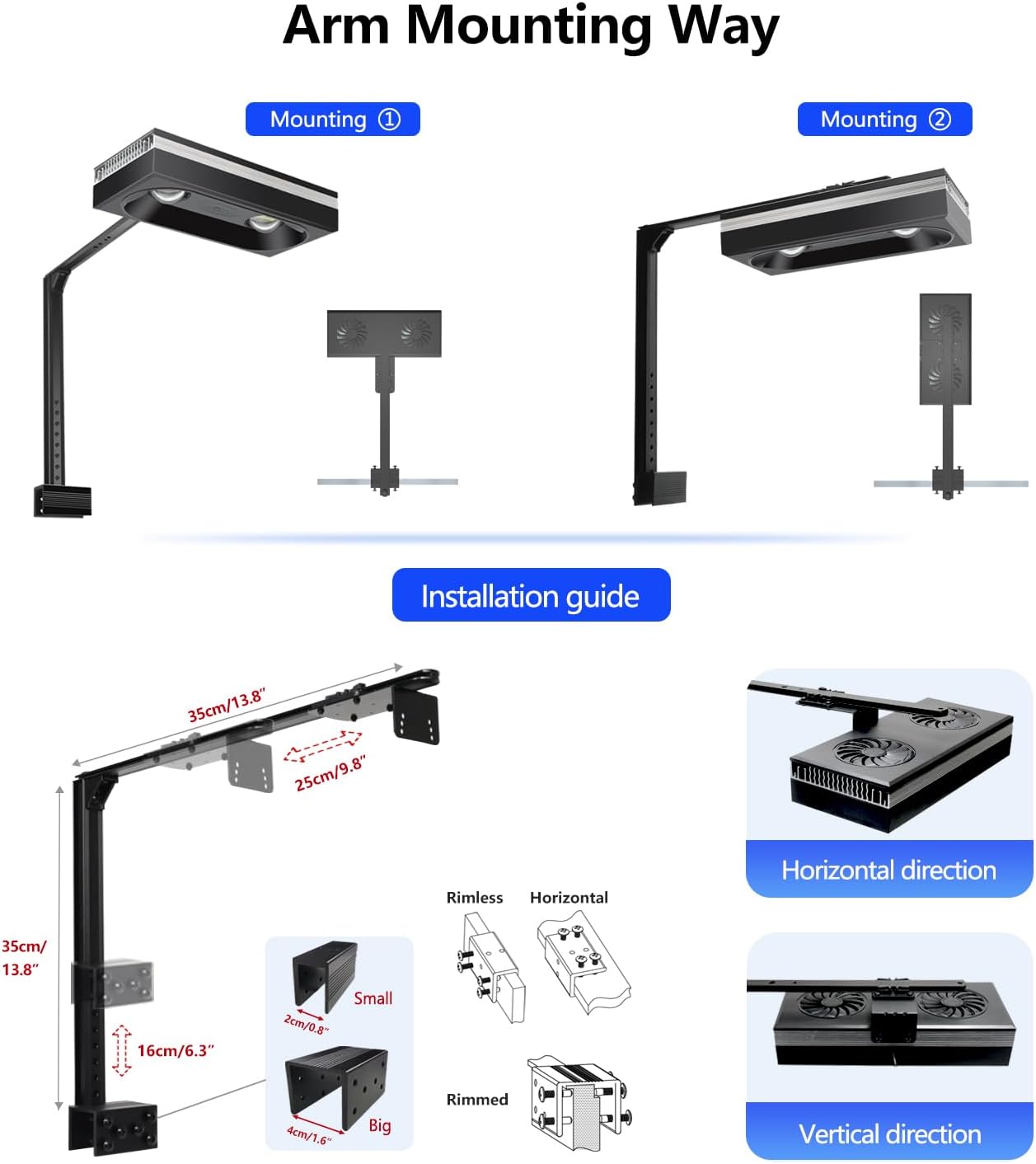
Image: Various arm mounting configurations and detailed installation dimensions.
The arm kit supports both rimless and rimmed tanks. The light can be oriented in either horizontal or vertical direction depending on your tank setup and desired light spread.
- Mounting 1: Standard arm setup for horizontal light orientation.
- Mounting 2: Arm setup for vertical light orientation.
Refer to the image for detailed dimensions and bracket types (small/big) for different tank rims.
4.2 Power Connection
Connect the power supply to the light unit, then plug the power plug into a suitable electrical outlet. Ensure all connections are secure before powering on.
5. Operating Instructions
5.1 Wi-Fi/APP Control System
The PopBloom RL180 light is controlled via a smart application, allowing for comprehensive management of your aquarium lighting from your mobile device (Android/iOS). All lights can form a group and be controlled simultaneously.

Image: Overview of the Wi-Fi group control system and app interface.
5.2 Easy Setup: 4 Steps to Connect
Follow these steps to connect your RL180 light to the Smart Life APP:

Image: Step-by-step guide for connecting the light to the mobile application.
- Open Wi-Fi & Bluetooth: Ensure Wi-Fi and Bluetooth are enabled on your mobile device.
- Open APP, Add Device: Download and open the "Smart Life" app. Click "Add Device" or the "+" icon. You can download the app from https://smartapp.tuya.com/smartlife.
- Connect to Home Wi-Fi: Enter your 2.4GHz home Wi-Fi network password. (Note: 5GHz networks are not supported).
- Connect to Light: The app will search for and connect to your RL180 light. Once connected, you can begin programming.
For a more detailed visual guide on app connection, refer to the "Simple Connection" image in the A+ content:

Image: Simple connection process for the PopBloom light via the app.
5.3 Programmable Usage & Natural Simulation
The RL180 offers extensive programming capabilities to simulate natural lighting conditions and customize settings for your specific coral and fish needs.
Beginner Friendly Modes:
The app includes 16 preset modes for quick and easy setup, along with a 24-hour auto cycle function.

Image: App interface demonstrating beginner-friendly preset modes.
DIY (Custom) Program:
For advanced users, the DIY mode allows for precise control:
- Set up to 16 time-points for programming.
- Customize ramp up and ramp down times and brightness for each channel.
- Control 4 independent channels.

Image: App interface for creating custom DIY lighting programs.
Natural Simulation Features:
The light can simulate various natural phenomena to create a dynamic environment for your aquatic life:
- Sunrise/Sunset: Gradually increases and decreases light intensity.
- Lunar Cycle: Simulates the 29-day lunar cycle, adjusting moonlight intensity.
- Coral Acclimation: A function to gradually acclimate new corals to the light.
- Lightning: Simulates storm conditions with sudden flashes.

Image: App features for natural light simulation.
Sharing Settings:
You can share your customized lighting settings with friends or other devices, promoting optimal coral growth.

Image: App interface for sharing light settings.
6. Optimal Performance and Coverage
6.1 Optimal PAR Distribution
The RL180 is designed to provide ideal PAR (Photosynthetically Active Radiation) values throughout your aquarium, minimizing hotspots and ensuring sufficient light for coral growth across the tank.

Image: Visual representation of PAR distribution within an aquarium using the RL180 light.
For larger tanks or specific PAR requirements, multiple RL180 units can be used. Refer to the "PAR Distribution" image for guidance on coverage with different models.

Image: PAR distribution comparison across different PopBloom light models.
6.2 Dual LED Chips & High Output
The RL180 is equipped with two high-quality LED chips and anti-glare lenses, providing a super-wide 120° spread, large illumination area, low light decay, and uniform optical output for better light efficiency.
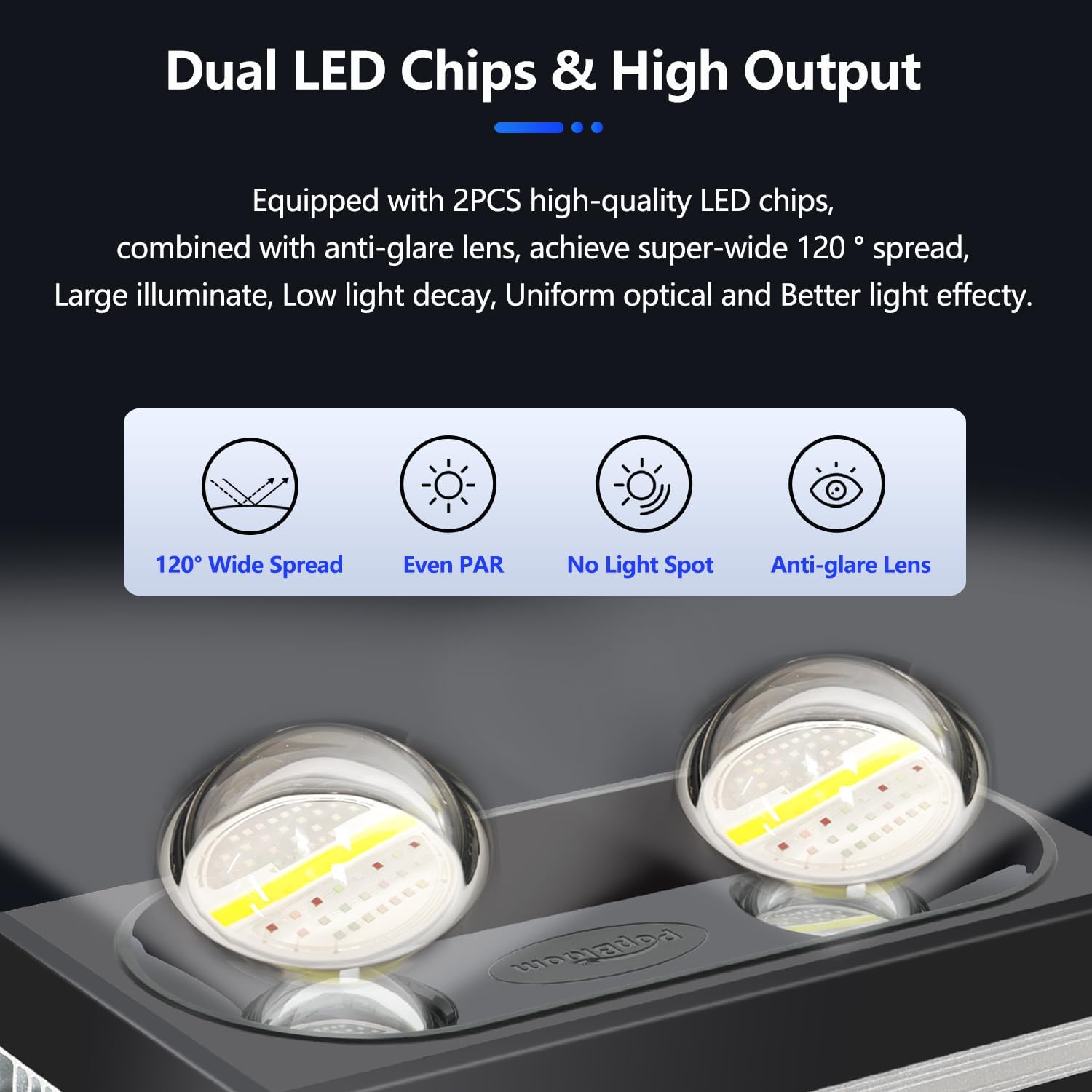
Image: Detail of the dual LED chips and their optical properties.
This design ensures powerful and effective lighting for the growth of sclerotia and cartilage in corals.
6.3 Multi-efficient Heat Dissipation
Efficient heat management is crucial for LED longevity. The RL180 features a multi-cooling system:
- Dual-fan on Top: Actively expels heat.
- Fin-wavy Aluminum Alloy: Accelerates air convection for passive heat dissipation.

Image: Heat dissipation system of the RL180 light.
This comprehensive cooling system enhances heat dissipation, extending the lifespan of the light.
7. Maintenance
Regular maintenance ensures the optimal performance and longevity of your PopBloom RL180 light.
- Cleaning: Periodically wipe the light fixture and lenses with a soft, damp cloth to remove salt creep, dust, and water spots. Ensure the light is unplugged before cleaning.
- Fan Inspection: Check the cooling fans for any obstructions or excessive dust buildup. Clean gently with compressed air if necessary.
- Cable Check: Inspect power cables and connections for any signs of wear or damage. Replace if necessary.
- Software Updates: Keep the Smart Life app updated to the latest version to access new features and performance improvements.
Do not use abrasive cleaners or solvents on the light fixture or lenses.
8. Troubleshooting
If you encounter issues with your PopBloom RL180 light, refer to the following common troubleshooting steps:
- Light Not Turning On:
- Ensure the power plug is securely connected to both the light and the power outlet.
- Verify that the power outlet is functional.
- Check if the power supply unit is working correctly.
- Cannot Connect to Wi-Fi/App:
- Ensure your mobile device is connected to a 2.4GHz Wi-Fi network. The light does not support 5GHz networks.
- Verify that your Wi-Fi password is entered correctly in the app.
- Restart the light by unplugging and re-plugging it.
- Restart your Wi-Fi router.
- Ensure Bluetooth is enabled on your mobile device during the initial setup process.
- Make sure the light is within range of your Wi-Fi router.
- Light Flickering or Dimming Unexpectedly:
- Check power connections for looseness.
- Ensure the light is not overheating. Verify fans are clear and operating.
- Review your programmed settings in the app for any scheduled dimming or changes.
- App Not Responding:
- Close and reopen the Smart Life app.
- Restart your mobile device.
- Ensure your app is updated to the latest version.
If the issue persists after attempting these steps, please contact PopBloom customer support for further assistance.
9. Warranty and Support
For warranty information and customer support, please refer to the documentation provided with your purchase or visit the official PopBloom website. Keep your purchase receipt as proof of purchase for warranty claims.
Manufacturer: Shenzhen PopBloom Electronic Technology Co., Ltd
Documents and downloads
Ask a question about this manual
Ask about setup, troubleshooting, compatibility, parts, safety, or missing instructions. Manuals+ will review the question and use this page’s manual context to help answer it.