
Bextgoo R90-Pro
Bextgoo R90-Pro 4G LTE Cellular Security Camera User Manual
Model: R90-Pro | Brand: Bextgoo
1. Introduction
Thank you for choosing the Bextgoo R90-Pro 4G LTE Cellular Security Camera. This compact and versatile camera is designed to provide reliable surveillance in locations without Wi-Fi access, utilizing 4G LTE connectivity. With its high-capacity 5200mAh battery, 2K HD resolution, 160° wide-angle view, and smart motion detection, the R90-Pro offers comprehensive monitoring for various indoor and outdoor environments. This manual provides detailed instructions for setup, operation, and maintenance to ensure optimal performance of your device.
2. Package Contents
Please verify that all items are present and in good condition upon opening the package:
- Bextgoo R90-Pro Security Camera
- Mounting Bracket
- 4G SIM Card (with 300MB free data trial)
- Screw Pack for installation
- User Manual
3. Product Features
3.1. 4G LTE Cellular Connectivity (No Wi-Fi Needed)
The Bextgoo R90-Pro operates on 4G LTE networks, making it ideal for locations without Wi-Fi, such as remote cabins, campsites, or vehicles. A prepaid 4G SIM card with 300MB of free data is included to get you started immediately. The camera supports major U.S. networks like Verizon, AT&T, and T-Mobile, and is compatible with local SIM cards (refer to the manual for specific support details).

Image: The Bextgoo R90-Pro camera highlighting its 4G SIM card slot and compatibility with major cellular networks.

Image: Visual representation of the included 4G SIM card and available data plan options for the Bextgoo R90-Pro.
3.2. Long-lasting 5200mAh Battery
Equipped with a powerful 5200mAh battery and advanced energy-saving technology, the R90-Pro offers extended usage times, significantly reducing the frequency of recharging. This large battery capacity ensures reliable, uninterrupted performance for daily security, travel, or outdoor activities.

Image: Comparison illustrating the Bextgoo R90-Pro's superior 5200mAh battery capacity versus smaller batteries in other mini cameras.
3.3. 2K HD Image Quality & Night Vision
Experience superior clarity with 2K HD resolution, providing sharper and more detailed visuals than standard 1080P cameras. The 160° wide-angle lens and 10X digital zoom allow for extensive area coverage and clear viewing of important details. The camera automatically switches to IR night vision in low-light conditions, offering clear footage up to 33 feet (10 meters) day or night.

Image: Demonstrating the enhanced clarity of 2K resolution from the Bextgoo R90-Pro compared to 1080P.

Image: Illustrates the crisp 2K HD image quality during both day and night, with night vision effective up to 33 feet.
3.4. Smart Motion Detection & Instant Alerts
The R90-Pro features advanced motion detection capabilities that accurately identify movement, minimizing false alarms. When motion is detected, you will receive instant push notifications on your smartphone, allowing you to take immediate action regardless of your location. You can customize alert sensitivity and schedule monitoring times through the app.
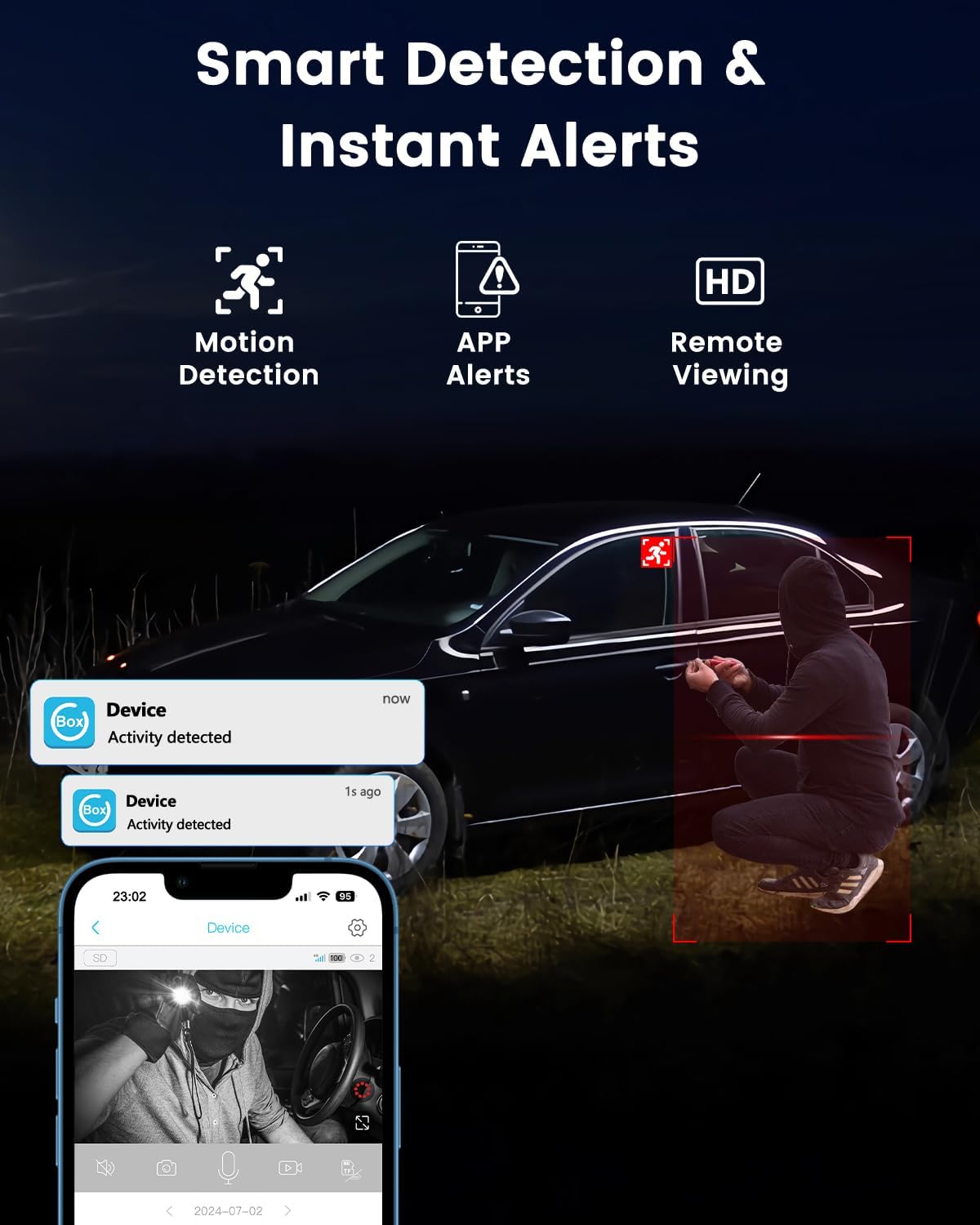
Image: Depicts the smart motion detection feature, showing an alert on a smartphone when activity is detected by the camera.

Image: Screenshot of the mobile application interface, demonstrating options to tailor alerts and adjust sensitivity for motion detection.
3.5. Remote View and Real-time Response
Access live video feeds and communicate in real-time through the camera's two-way audio feature using your smartphone. This allows you to monitor your property and interact with visitors or deter intruders from anywhere.

Image: A user viewing the live camera feed on their smartphone, demonstrating the remote viewing capability.
3.6. Secure & Flexible Storage Options
The camera supports local storage via a Micro SD card (up to 128GB, not included) and offers cloud storage with a 30-day free trial. Videos are automatically overwritten when storage is full, eliminating the need for manual deletion. All data stored in the cloud is encrypted for security.

Image: Illustrates the camera's support for both local Micro SD card storage and cloud storage options.
3.7. Small, Portable, and Versatile Placement
Its compact design allows for easy portability and installation in various settings, including homes, vehicles, motorhomes, campsites, and remote cabins. The included mounting bracket facilitates flexible placement on ceilings, tabletops, or walls.

Image: Demonstrates the compact size of the Bextgoo R90-Pro and its versatile placement options in different environments.

Image: Examples of common use cases for the Bextgoo R90-Pro in areas without Wi-Fi, such as vehicles, motorhomes, camping sites, and remote cabins.
4. Setup Guide
4.1. Initial Charging
Before first use, fully charge the camera using a standard 5V USB power adapter (not included) and the provided charging cable. The charging indicator light will typically change color or turn off when fully charged.
4.2. Inserting the SIM Card and Micro SD Card
Locate the SIM card slot and Micro SD card slot on the camera. Insert the included 4G SIM card into its designated slot with the gold contacts facing down. If using local storage, insert a Micro SD card (up to 128GB, not included) into its slot. Ensure both cards are inserted correctly until they click into place.
4.3. App Download and Account Creation
Download the official Bextgoo app from your smartphone's app store (iOS App Store or Google Play Store). Follow the on-screen instructions to create a new user account or log in if you already have one.
4.4. Device Pairing
- Power on the camera.
- Open the Bextgoo app and tap "Add Device" or the "+" icon.
- Select the appropriate camera model (R90-Pro) and follow the in-app instructions to scan the QR code on the camera or manually enter its ID.
- Once successfully paired, the camera will appear in your device list within the app.
4.5. Mounting the Camera
The R90-Pro comes with a versatile mounting bracket. Choose a suitable location for installation, considering the desired viewing angle and cellular signal strength. Use the included screw pack to securely attach the bracket to a wall, ceiling, or other stable surface. The camera can then be attached to the bracket, allowing for angle adjustment.
5. Operation Guide
5.1. Live View
From the app's device list, tap on your R90-Pro camera to access the live video feed. You can view real-time footage, take snapshots, or manually record video.
5.2. Motion Detection Settings
Navigate to the camera settings within the app. Here you can:
- Enable/Disable motion detection.
- Adjust sensitivity levels (High, Medium, Low) to reduce false alarms.
- Set up detection zones (if available in app).
- Schedule specific times for motion detection to be active.
5.3. Video Recording and Playback
Motion-triggered events are automatically recorded. To view recorded footage:
- Access the "Playback" or "History" section in the app.
- Select the date and time to review recorded events.
- You can download important clips to your phone's gallery.

Image: The app's smart playback feature, allowing users to quickly review video clips from a timeline.
5.4. Two-Way Audio
While in live view, tap the microphone icon to speak through the camera's speaker. Tap the speaker icon to listen to audio from the camera's surroundings.
5.5. Data Usage and SIM Card Management
The app allows you to monitor your 4G SIM card data usage and purchase additional data plans as needed. Refer to the app's "SIM Card" or "Data Plan" section for details.
6. Maintenance
6.1. Battery Charging
Regularly check the battery level in the app. Recharge the camera promptly when the battery is low to ensure continuous operation. Use the provided USB cable and a compatible 5V power adapter.
6.2. Cleaning
Gently wipe the camera lens and body with a soft, dry cloth to remove dust or smudges. Avoid using harsh chemicals or abrasive materials that could damage the camera.
6.3. Firmware Updates
Periodically check the app for available firmware updates. Keeping your camera's firmware up-to-date ensures optimal performance, new features, and security enhancements. Follow the in-app instructions for any updates.
7. Troubleshooting
| Problem | Possible Cause | Solution |
|---|---|---|
| Camera not connecting to 4G network. | Weak cellular signal; SIM card not inserted correctly; SIM card not activated; data plan expired. | Move camera to an area with better signal; reinsert SIM card; check SIM card activation status with provider; check data plan status in app. |
| Poor image quality. | Dirty lens; insufficient lighting; camera too far from subject. | Clean the lens; ensure adequate lighting or rely on night vision; reposition camera closer to the area of interest. |
| Motion detection not working or too many false alarms. | Motion detection disabled; sensitivity too low/high; incorrect detection zone. | Enable motion detection in app; adjust sensitivity; reconfigure detection zones. |
| Battery drains quickly. | Frequent motion events; continuous live view; extreme temperatures. | Reduce motion detection frequency/sensitivity; limit live view duration; operate within recommended temperature range. |
| Cannot access recorded videos. | Micro SD card full or corrupted; cloud storage trial expired; no recording triggered. | Check Micro SD card status (format if necessary); subscribe to cloud plan; verify motion detection settings. |
7.1. Resetting the Camera
If the camera is unresponsive or experiencing persistent issues, you may need to perform a factory reset. Locate the reset button (usually a small pinhole) on the camera. Use a pin or paperclip to press and hold the reset button for approximately 5-10 seconds until you hear a prompt or see an indicator light change. The camera will then restart with factory default settings, requiring re-pairing with the app.
8. Specifications
| Feature | Detail |
|---|---|
| Model Name | R90-Pro |
| Video Capture Resolution | 2K (4MP Effective Still Resolution) |
| Connectivity Technology | 4G LTE Cellular (Wireless) |
| Power Source | Battery Powered |
| Battery Capacity | 5200mAh Lithium Ion (included) |
| Viewing Angle | 160 Degrees |
| Night Vision Range | 33 Feet (Infrared) |
| Storage Options | Micro SD (up to 128GB, not included), Cloud Storage (30-day trial) |
| Motion Detection | Smart Motion Detection (Motion Only Alert Type) |
| Control Method | App (Compatible with Smartphone - Android) |
| Indoor/Outdoor Usage | Indoor, Outdoor |
| Dimensions (L x W x H) | 2.16 x 1.65 x 1.49 inches |
| Item Weight | 7.5 ounces |
| Material | Plastic |
9. Warranty and Support
For detailed warranty information and customer support, please refer to the warranty card included in your product packaging or visit the official Bextgoo website. You can also contact Bextgoo customer service through the contact information provided on their website or within the mobile application for technical assistance and inquiries.
No official product videos were found for this model from the seller.
Related documentsR90-Pro

Ask a question about this manual
Ask about setup, troubleshooting, compatibility, parts, safety, or missing instructions. Manuals+ will review the question and use this page’s manual context to help answer it.