
OSCAL Marine 1 Black (12+128GB) Rugged Smartphone 2025
OSCAL Marine 1 Rugged Smartphone User Manual
Model: Marine 1 Black (12+128GB) Rugged Smartphone 2025
Brand: OSCAL
Introduction
Welcome to the user manual for your new OSCAL Marine 1 Rugged Smartphone. This manual provides essential information on setting up, operating, maintaining, and troubleshooting your device. The OSCAL Marine 1 is designed for durability and performance, featuring robust protection, advanced AI capabilities, and a powerful operating system to support your daily activities and outdoor adventures.
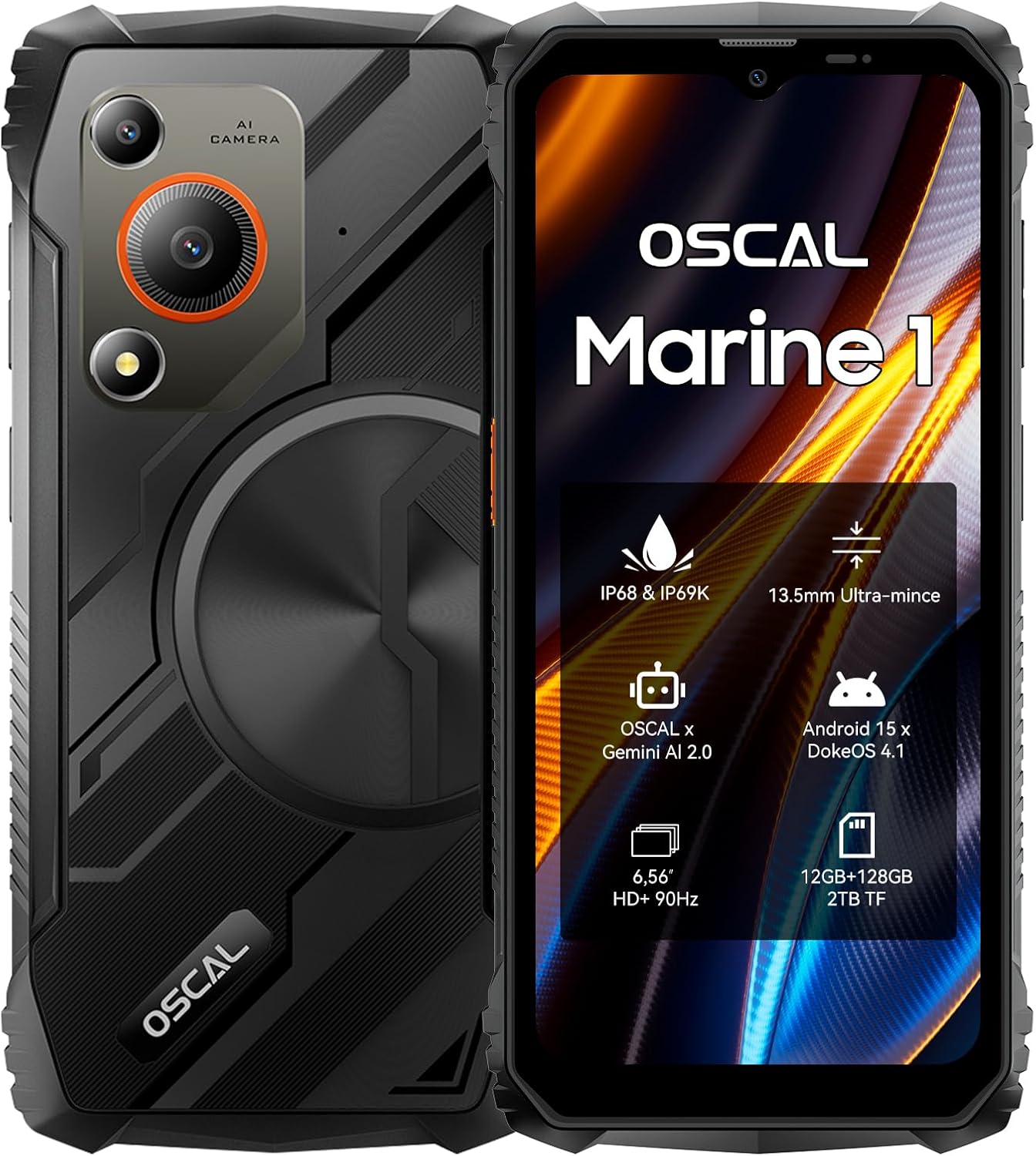
Figure 1: Front and back view of the OSCAL Marine 1 Rugged Smartphone.
What's in the Box
Upon opening the package, please verify that all the following items are included:
- OSCAL Marine 1 Black Rugged Smartphone
- Phone Charger
- Type C Charging Cable
- Card Pin
- User Manual (this document)
Product Overview
Physical Features
The OSCAL Marine 1 is designed to be both durable and portable. It features a slim profile and a robust build.
- Dimensions: 17.8 x 8.15 x 1.35 cm
- Weight: 304 grams
- Display: 6.56-inch IPS HD+ display with 90Hz refresh rate and 450 nits brightness. Features a Panda screen for enhanced durability.
- Cameras: 16MP AI main camera (ISOCELL JN1 sensor) and 8MP front camera.
- Ports: USB Type-C charging port.
- Card Slots: Triple card slots (Dual Nano SIM + 1 MicroSD).
- Buttons: Power button, volume buttons, and a customizable shortcut button.

Figure 2: The OSCAL Marine 1 is significantly lighter and thinner than typical rugged phones.
Rugged Design and Protection
The Marine 1 is built to withstand harsh environments, meeting military-grade standards.
- MIL-STD 810H Certified: Tested for durability against various environmental stresses.
- IP68 & IP69K Rated: Provides water and dust resistance. Can withstand immersion in water up to 1.5 meters deep for 30 minutes.
- Drop-Proof: Designed to withstand drops from a height of up to 1.2 meters.
- Temperature Resistance: Operates reliably in extreme temperatures ranging from -20°C to 60°C.

Figure 3: The Marine 1's robust protection features, including water, dust, and drop resistance.
Setup
1. Inserting SIM and MicroSD Cards
- Locate the SIM card tray on the side of the phone.
- Insert the provided card pin into the small hole next to the tray to eject it.
- Carefully pull out the tray.
- Place your Nano SIM cards (up to two) and/or a MicroSD card into the designated slots on the tray. Ensure the gold contacts face downwards.
- Gently push the tray back into the phone until it clicks into place.
2. Initial Power On and Basic Setup
- Press and hold the Power button (usually on the right side) until the OSCAL logo appears.
- Follow the on-screen prompts to select your language, connect to a Wi-Fi network, and set up your Google account.
- You will be guided through setting up security features such as fingerprint recognition and facial recognition.
- Review and accept the terms and conditions to complete the initial setup.
3. Charging the Device
Before first use, it is recommended to fully charge your OSCAL Marine 1.
- Connect the Type C charging cable to the phone's charging port.
- Connect the other end of the cable to the provided phone charger.
- Plug the charger into a power outlet.
- The charging indicator will appear on the screen.
Operating Instructions
Operating System: DokeOS 4.1 based on Android 15
The Marine 1 runs on DokeOS 4.1, which is based on Android 15, offering an enhanced user experience with improved efficiency, privacy, personalization, convenience, and smoothness.
- Efficiency Upgrades: Includes features like Drag-and-Drop, App Cloning, and Split View with Smart App Pairing for multitasking.
- Privacy Upgrades: Offers Private Space, Per-app Screen Recording & Sharing, Enhanced Authentication Protection, and Authentication Requirement Before Changing USB Mode.
- Personalization Upgrades: Customize themes, quickly add widgets, and enhanced multi-layered color contrast.
- Convenience Upgrades: Wireless Bluetooth Popup Dialogue, Predicative Back Gestures, Independent Sound Control, and Lock Screen Shortcuts.
- Smoothness Upgrades: App Archiving, Detailed Storage Usage, and App Force Stop for optimized performance.
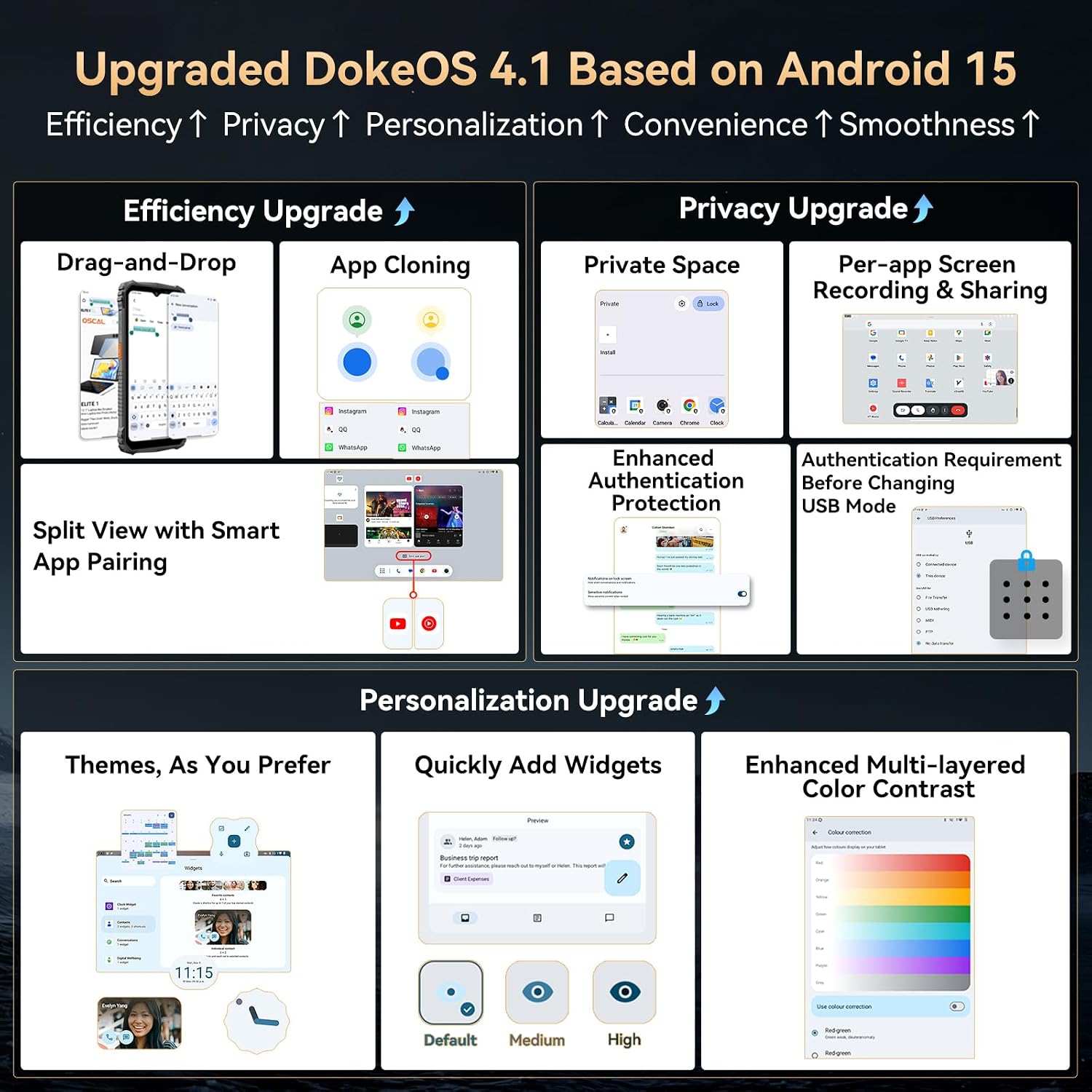
Figure 4: Overview of DokeOS 4.1 efficiency and privacy features.

Figure 5: Overview of DokeOS 4.1 convenience and smoothness features.
Performance and Memory
The Marine 1 is equipped with a Unisoc T615 processor and ample memory for smooth operation.
- Processor: Unisoc T615 Octa-core chip (2x A75 1.8GHz + 6x A55 1.6GHz) for efficient performance.
- RAM: 12GB RAM (4GB physical + 8GB expansion) for seamless multitasking and app handling.
- Storage: 128GB ROM, expandable up to 2TB via MicroSD card, providing extensive space for photos, videos, and applications.

Figure 6: Internal components highlighting the Unisoc T615 processor and memory configuration.
Gemini AI 2.0 Integration
The Marine 1 integrates Gemini AI 2.0, providing intelligent assistance for various tasks.
- Voice Commands: Interact hands-free for navigation, calls, messages, and app access.
- Smart Q&A: Understands, analyzes, and provides precise answers to your queries.
- AI Smart Google Lens: Features for visual searches, image text translation, object recognition, and content summarization.
- AI Voice Wake-Up: Gemini can be activated by voice even when the screen is off.

Figure 7: Gemini AI 2.0 in action, assisting with commands and information retrieval.
Display Features
Experience vibrant visuals on the 6.56-inch IPS HD+ display.
- Size: 6.56 Inches
- Resolution: HD+ (1080P)
- Refresh Rate: 90Hz for smoother scrolling and animations.
- Brightness: Up to 450 nits for clear visibility in various lighting conditions.
- Glove Mode: Allows for screen operation even when wearing gloves.

Figure 8: Visual representation of the display's key specifications.
Connectivity and Navigation
- NFC: For convenient payments, public transport, and data transfer.
- Navigation: Supports GPS, GLONASS, Galileo, and Beidou for accurate positioning.
- Dual SIM: Supports two Nano SIM cards for flexible network usage.
Battery Life
The Marine 1 is equipped with a 5100mAh battery and AI power-saving mode for extended usage.
- Battery Capacity: 5100mAh
- AI Power-Saving Mode: Optimizes battery consumption for longer performance.
Maintenance and Care
To ensure the longevity and optimal performance of your OSCAL Marine 1, follow these care guidelines:
- Cleaning: Use a soft, lint-free cloth to clean the screen and body. For stubborn dirt, a slightly damp cloth can be used. Avoid harsh chemicals or abrasive materials.
- Water and Dust Protection: While the phone is IP68/IP69K rated, ensure all port covers are securely closed before exposing the device to water or dusty environments. Do not intentionally submerge the phone in water beyond the specified depth and duration.
- Temperature: Avoid exposing the phone to temperatures outside its operating range (-20°C to 60°C) for prolonged periods.
- Impact: Despite its rugged design, avoid unnecessary drops or impacts.
- Charging: Use only the provided charger and cable to prevent damage to the battery and device.
Troubleshooting
This section addresses common issues you might encounter with your OSCAL Marine 1.
| Problem | Possible Cause | Solution |
|---|---|---|
| Phone does not turn on. | Battery is depleted or software crash. | Charge the phone for at least 30 minutes. If still unresponsive, press and hold the Power button for 10-15 seconds to force a restart. |
| Cannot connect to Wi-Fi. | Incorrect password, out of range, or router issue. | Ensure correct password. Move closer to the router. Restart your Wi-Fi router. Try forgetting the network and reconnecting. |
| Poor call quality or no network signal. | Weak signal area, SIM card not properly inserted, or network settings issue. | Move to an area with better signal. Re-insert the SIM card. Check network settings (Settings > Network & internet > Mobile network). |
| Apps are slow or crashing. | Too many apps running in the background, low storage, or app specific issue. | Close unnecessary background apps. Clear app cache (Settings > Apps > [App Name] > Storage & cache > Clear cache). Free up storage space. Update the app or the phone's software. |
| Fingerprint sensor not working. | Finger is wet/dirty, sensor is dirty, or software glitch. | Ensure your finger and the sensor are clean and dry. Re-register your fingerprint if the issue persists. |
If the problem persists after trying these solutions, please contact OSCAL customer support for further assistance.
Specifications
| Feature | Detail |
|---|---|
| Brand | OSCAL |
| Model Name | Marine 1 Black (12+128GB) Rugged Smartphone 2025 |
| Operating System | Android 15 (with DokeOS 4.1) |
| RAM Memory Installed Size | 12 GB (4GB + 8GB Expansion) |
| Memory Storage Capacity | 128 GB (Expandable to 2TB) |
| CPU Model | Unisoc T615 |
| CPU Speed | 1.8 GHz |
| Screen Size | 6.56 Inches |
| Resolution | 1080P (HD+) |
| Refresh Rate | 90 Hz |
| Product Dimensions | 17.8 x 8.15 x 1.35 cm |
| Weight | 304 g |
| Batteries | 1 A batteries required. (included) - Note: This likely refers to internal battery, not external A batteries. |
| Protection Rating | IP68 & IP69K, MIL-STD 810H |
| Camera (Rear) | 16 MP AI Main Camera |
| Camera (Front) | 8 MP |
| Connectivity | NFC, Dual SIM, GPS + GLONASS + Galileo + Beidou |
Warranty and Support
OSCAL is committed to providing high-quality products and excellent customer service.
- Warranty: Your OSCAL Marine 1 comes with a 2-year warranty, including free software updates.
- Customer Support: A professional customer service team is available 24/7 to provide personalized, high-quality support.
- Contact: If you encounter any issues with your Marine 1, please contact OSCAL customer service. Refer to the product packaging or OSCAL's official website for contact details.

Figure 9: OSCAL's commitment to customer support and warranty.
Related documentsMarine 1 Black (12+128GB) Rugged Smartphone 2025


Ask a question about this manual
Ask about setup, troubleshooting, compatibility, parts, safety, or missing instructions. Manuals+ will review the question and use this page’s manual context to help answer it.