1. Introduction
This manual provides instructions for the proper installation, use, and maintenance of your UYRUREL Soft Silicone Adjustable Stand Cover designed specifically for the Headwolf W6 Android 10 inch Tablet. Please read this manual thoroughly before using the product to ensure optimal performance and longevity.
2. Product Overview
The UYRUREL tablet case is engineered to provide protection and enhanced functionality for your Headwolf W6 tablet. Key features include:
- Compatibility: Exclusively designed for the Headwolf W6 Android 10 inch Tablet.
- Material: High-quality, skin-friendly soft silicone.
- Heat Dissipation: Interior three-dimensional honeycomb design for effective heat management.
- Adjustable Stand: Integrated PC material bracket for multiple viewing angles.
- Protection: Full wrap-around design to protect against drops and impacts.
- Accessibility: Precise cutouts for all ports, buttons, and camera.
- Maintenance: Easy to clean, resistant to oil and stains.

Figure 2.1: Full wrap-around design provides comprehensive protection against drops and impacts for the main unit.

Figure 2.2: The interior features a three-dimensional honeycomb design, engineered to effectively dissipate heat and prevent performance degradation.
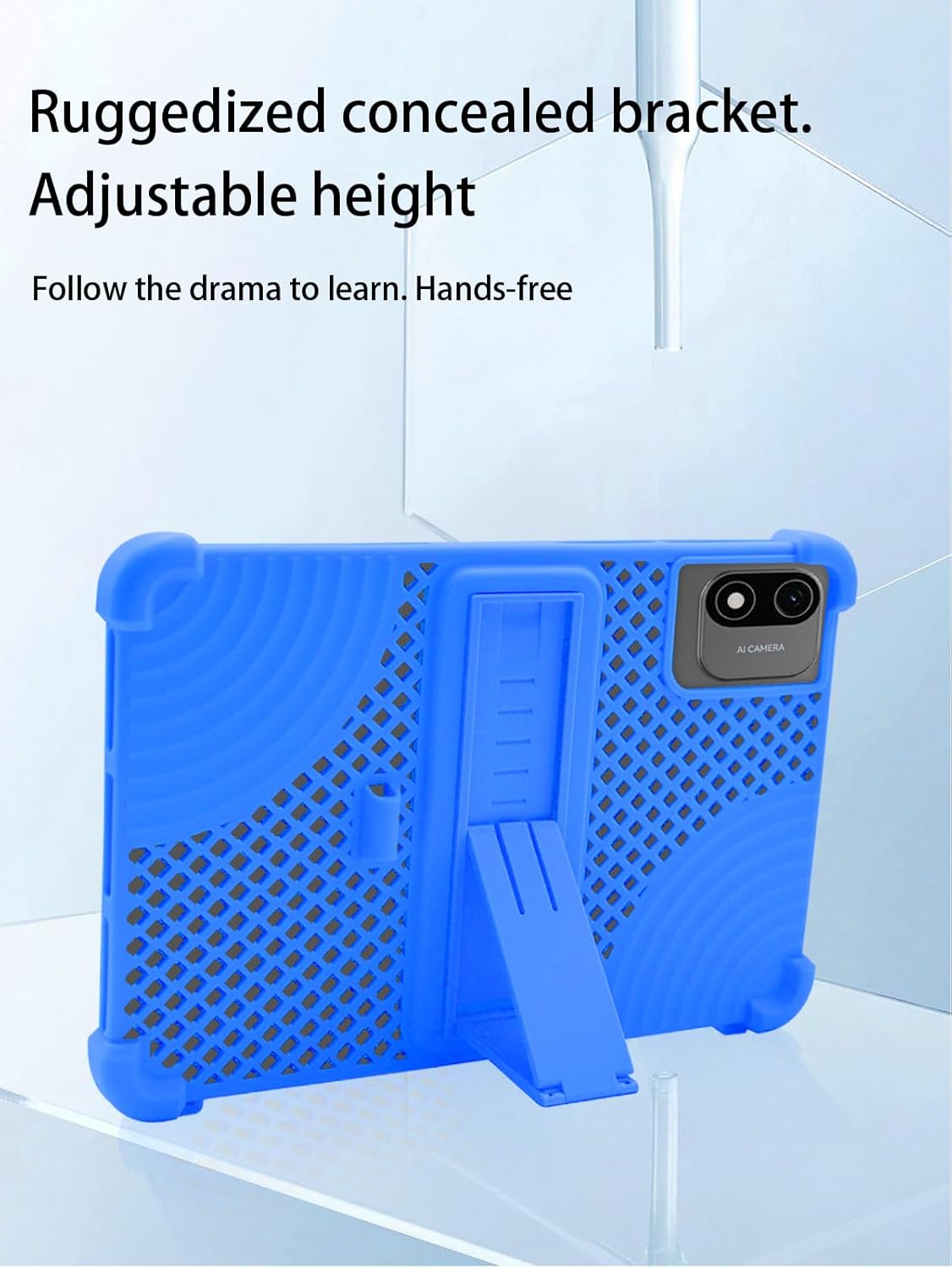
Figure 2.3: The ruggedized concealed bracket offers adjustable height, allowing for hands-free viewing and typing.

Figure 2.4: Constructed from high-quality silicone, the case is skin-friendly, easy to clean, resistant to oil and stains, and designed for durability against deformation, wear, and falls.

Figure 2.5: Precise openings ensure easy access to all camera, ports, and buttons without removing the case, protecting your device.

Figure 2.6: The case securely holds the Headwolf W6 tablet, maintaining full screen visibility and access.
3. Setup
- Prepare Your Tablet: Ensure your Headwolf W6 tablet is clean and free of dust or debris.
- Insert Tablet: Gently align your tablet with the case. Start by inserting one corner of the tablet into the corresponding corner of the silicone case.
- Secure the Tablet: Carefully work your way around the edges, stretching the soft silicone material over the remaining corners and sides of the tablet until it is fully seated and snug within the case. Ensure all edges are covered and the tablet is securely held.
- Check Fit: Verify that all ports, buttons, and the camera lens are properly aligned with the case's cutouts and are fully accessible.
4. Operating Instructions
4.1 Using the Adjustable Stand
- Extend the Stand: Locate the integrated stand on the back of the case. Gently pull the stand outwards from its recessed position until it clicks into place.
- Adjust Viewing Angle: The stand is designed to offer multiple viewing angles. Adjust the angle by positioning the tablet as desired. The PC material bracket can be disassembled and reassembled to achieve different stable positions.
- Retract the Stand: When not in use, push the stand back into its recessed slot until it lies flush with the case's surface.
4.2 Using the Capacitive Pen (if included)
If your product includes a capacitive pen, it can be used for precise navigation, drawing, and writing on your tablet screen. Store the pen in the designated holder on the case, if available, to prevent loss.
5. Maintenance
5.1 Cleaning the Case
The soft silicone material of the case is designed for easy cleaning:
- General Cleaning: Use a damp cloth with mild soap and water to wipe down the surface of the case.
- Stubborn Stains: For oil or other stubborn stains, the case can be cleaned directly with water. Avoid harsh chemicals or abrasive cleaners, as these may damage the silicone.
- Drying: Allow the case to air dry completely before reattaching it to your tablet.
5.2 Storage
When not in use, store the case in a cool, dry place away from direct sunlight and extreme temperatures to preserve its material integrity.
6. Troubleshooting
- Case does not fit:
Ensure you have the correct model case for your tablet. This case is specifically designed for the Headwolf W6 Android 10 inch Tablet. It is not compatible with other tablet models. Double-check your tablet's model number.
- Stand is difficult to open/close:
The stand is designed to be snug to provide stable support. Apply gentle, firm pressure to extend or retract it. Avoid excessive force. If the stand feels stiff, ensure no debris is obstructing its mechanism.
- Tablet feels hot inside the case:
The case features a honeycomb design for heat dissipation. If your tablet still feels excessively hot, ensure the tablet is not running resource-intensive applications for extended periods. Remove the case periodically to allow for maximum air circulation if needed.
7. Specifications
| Feature | Detail |
|---|---|
| Brand | UYRUREL |
| Model Number | W6 |
| Compatible Devices | Headwolf W6 Android 10 inch Tablet |
| Material | Soft Silicone, PC (for stand) |
| Color | Sky Blue |
| Form Factor | Case |
| Special Features | Adjustable Stand, Heat Dissipation Design, Lightweight, Kids Friendly, Slim Fit, Shockproof |
| Item Weight | 7.2 ounces (204 grams) |
| Package Dimensions | 9.93 x 7.88 x 0.99 inches |
8. Warranty and Support
UYRUREL is committed to providing high-quality after-sales service. If you encounter any issues with your product or its packaging, please contact us directly. We aim to provide a satisfactory solution within 24 hours of your inquiry.
For support, please refer to the contact information provided with your purchase or visit the official UYRUREL website.


