
1. Introduction
Thank you for choosing the MERACH Walking Pad MR-T21B1. This manual provides essential information for the safe and efficient operation and maintenance of your walking pad. Please read it thoroughly before use and retain it for future reference.

Image: The MERACH Walking Pad MR-T21B1 in a home setting, demonstrating its use for walking and as an under-desk treadmill.
2. Safety Information
Always follow basic safety precautions when using electrical appliances to reduce the risk of fire, electric shock, and personal injury. This includes:
- Ensure the walking pad is placed on a flat, stable surface.
- Keep children and pets away from the equipment during operation.
- Do not use the walking pad if it is damaged or malfunctioning.
- Wear appropriate athletic footwear.
- Consult a physician before starting any new exercise program.
- Maximum user weight capacity: 120 kg.
3. Package Contents
Verify that all items are present in the package:
- MERACH Walking Pad MR-T21B1
- User Manual
- Remote Control
- Hexagonal Wrench
- Foot Pads (4 pieces)

Image: Illustration of the MERACH Walking Pad MR-T21B1 package contents, including the walking pad, remote control, wrench, and user manual.
4. Setup
- Unpack: Carefully remove the walking pad and all accessories from the packaging.
- Placement: Place the walking pad on a firm, level surface. Ensure there is adequate clear space around the unit for safe operation.
- Power Connection: Connect the power cable to the walking pad and then to a suitable electrical outlet.
- Remote Control: Insert the included batteries into the remote control.
- Initial Check: Before first use, ensure the running belt is centered and free from obstructions.
5. Operating Instructions
5.1 Basic Operation with Remote Control
- Power On: Locate the red power switch on the front of the walking pad, near the power port, and switch it to the 'ON' position.
- Start: Press the 'Play/Pause' button on the remote control to start the walking pad. A countdown will appear on the LED display before the belt begins to move.
- Adjust Speed: Use the '+' and '-' buttons on the remote control to increase or decrease the speed. The speed range is 1 to 6 km/h.
- Stop: Press the 'Play/Pause' button again to pause or stop the walking pad.
- Mode Selection: Use the 'MODE' button to cycle through display modes (Speed, Time, Distance, Calories).
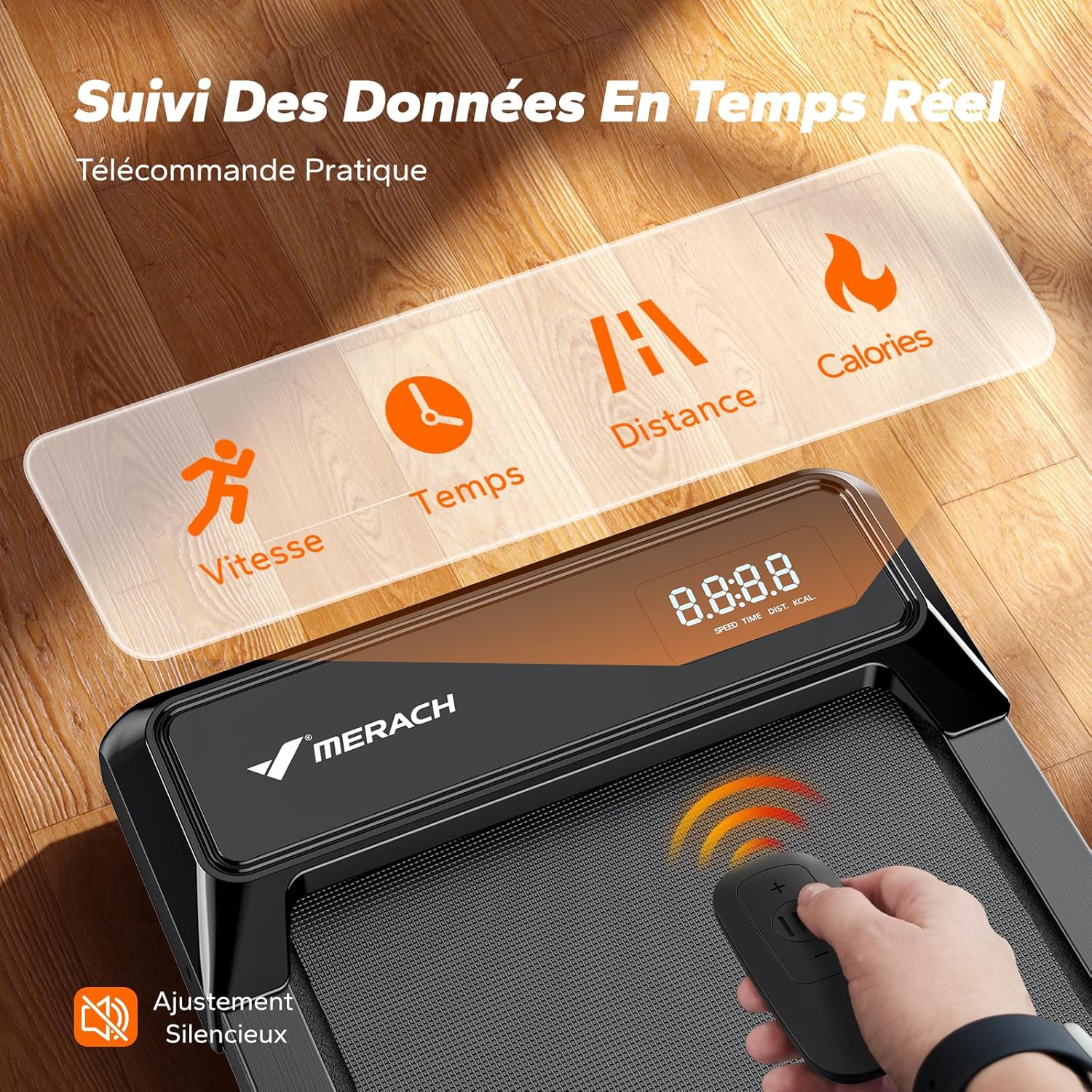
Image: Close-up of the MERACH Walking Pad's LED display showing real-time data and the compact remote control for speed adjustment.
5.2 Using the MERACH Fitness App
Enhance your workout experience by connecting your walking pad to the MERACH Fitness application:
- Download: Download the MERACH Fitness app from your device's app store.
- Connect: Follow the in-app instructions to connect your walking pad via Bluetooth.
- Features: Access coach-designed workouts, track real-time performance data (distance, speed, calories), and enjoy interactive games.

Image: The MERACH Fitness app displaying various workout programs and challenges, enhancing the user experience.

Image: The MERACH Fitness app interface showing daily workout statistics, including calories, duration, and distance.
5.3 Usage Modes
The MERACH Walking Pad MR-T21B1 supports various usage scenarios:
- Working Mode: Ideal for use under a standing desk at speeds of 2-3 km/h.
- Walking Mode: For general walking at speeds of 3-4 km/h.
- Light Jogging Mode: For light jogging at speeds of 4-6 km/h.

Image: A woman using the MERACH Walking Pad MR-T21B1 under a standing desk, illustrating its suitability for office environments.
6. Maintenance
Regular maintenance ensures the longevity and optimal performance of your walking pad:
- Cleaning: Wipe down the walking pad with a damp cloth after each use. Avoid abrasive cleaners.
- Lubrication: The running belt requires periodic lubrication with silicone oil. Refer to the full user manual for the recommended maintenance schedule based on usage and user weight.
- Belt Adjustment: If the running belt shifts to one side or slips, consult the full user manual for instructions on how to adjust it using the hexagonal wrench.
- Storage: When not in use, the compact design allows for easy storage under furniture.

Image: The MERACH Walking Pad MR-T21B1 being stored under a bed, highlighting its ultra-thin and compact design for easy storage.
7. Troubleshooting
If you encounter any issues, please refer to the following common troubleshooting tips:
- No Power: Ensure the power cable is securely connected and the main power switch is ON. Check the power outlet.
- Belt Not Moving: Confirm the walking pad is powered on and the remote control's 'Play' button has been pressed.
- Unusual Noise: Stop the machine immediately. Check for any foreign objects under the belt. If the noise persists, contact customer support.
- Remote Control Not Responding: Check the remote control batteries. Ensure there are no obstructions between the remote and the walking pad's sensor.
For more detailed troubleshooting, consult the comprehensive user manual or contact MERACH customer support.
8. Specifications
| Feature | Specification |
|---|---|
| Model Number | MR-T21B1 |
| Color | Black |
| Dimensions (L x W x H) | 109 x 47 x 11 cm |
| Item Weight | 13 Kilograms |
| Maximum User Weight | 120 kg |
| Motor Power | 2.5 Horsepower |
| Speed Range | 2-6 km/h |
| Noise Level | Below 50dB |
| Frame Material | Aluminum |
| Running Belt Layers | 5-layer anti-slip |
| Shock Absorption | 6 silicone cushions |
| Power Source | Corded Electric |
| Included Components | User Manual, Remote Control, Hexagonal Wrench, Foot Pads |

Image: Cross-section view of the MERACH Walking Pad's 5-layer anti-slip running belt and 6 silicone cushions, illustrating its shock absorption technology.
9. Warranty and Support
The MERACH Walking Pad MR-T21B1 comes with a one-year warranty. MERACH offers responsive 24/7 customer support to assist with any questions or concerns.
For support, please visit the official MERACH website or contact their customer service directly.