
DT-926
Contents
DT-926 Auto-ranging Digital Multimeter
User Manual
1. Introduction
Thank you for choosing the Generic DT-926 Auto-ranging Digital Multimeter. This device is a versatile and reliable tool designed for electrical measurements in various applications, from home use to professional industrial settings. It features auto-ranging capabilities, ensuring ease of use and accurate readings for voltage, current, resistance, and more. Please read this manual thoroughly before operation to ensure safe and proper use of the instrument.
2. Safety Information
Always adhere to the following safety precautions to prevent personal injury or damage to the multimeter or equipment under test:
- Do not exceed the maximum input limits for any function.
- Use extreme caution when working with voltages above 30V AC RMS, 42V peak, or 60V DC. These voltages pose a shock hazard.
- Always disconnect power to the circuit and discharge all high-voltage capacitors before performing resistance, continuity, diode, or capacitance measurements.
- Ensure the correct function and range are selected before making measurements.
- Inspect test leads for damaged insulation or exposed metal before use. Replace if damaged.
- Do not operate the multimeter if it appears damaged or if the case is open.
- Do not operate the multimeter in explosive gas, vapor, or dust environments.
- Remove test leads from the meter before opening the battery cover or case.
- Use the multimeter only as specified in this manual; otherwise, the protection provided by the multimeter may be impaired.
3. Product Overview and Features
The DT-926 is a robust digital multimeter designed for accurate and reliable measurements. Its compact design and intuitive interface make it suitable for a wide range of electrical testing needs.
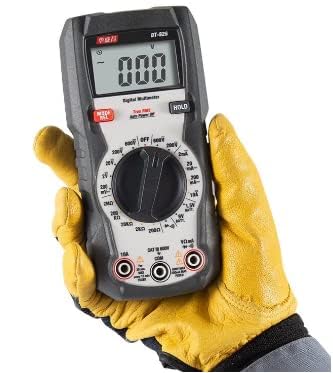
Figure 3.1: DT-926 Auto-ranging Digital Multimeter. This image shows the DT-926 Auto-ranging Digital Multimeter, highlighting its display, rotary dial for function selection, input jacks, and hold button. The device is designed for comfortable handheld use.
Key Features:
- Auto-ranging: Automatically selects the correct measurement range.
- True RMS: Provides accurate readings for non-sinusoidal waveforms.
- Non-Contact Voltage (NCV) Detection: For identifying live wires without direct contact.
- Data Hold: Freezes the displayed reading for easy recording.
- Diode and Continuity Test: Essential for circuit diagnostics.
- Backlight: Improves visibility in dimly lit environments.
- Auto Power Off: Conserves battery life.
- Full Range Protection: Enhances durability and safety.
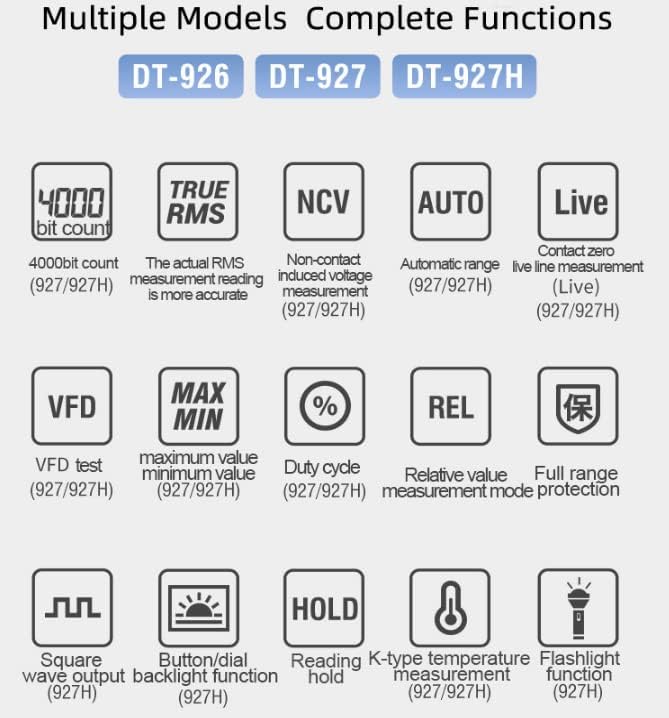
Figure 3.2: Multimeter Features Overview. This diagram illustrates key functions available across the DT-926, DT-927, and DT-927H models, including 4000-bit count, True RMS, Non-Contact Voltage (NCV), Auto-ranging, Live wire detection, VFD test, MAX/MIN, Duty Cycle, Relative value, Full range protection, Square wave output, Backlight, HOLD, K-type temperature measurement, and Flashlight function.

Figure 3.3: Detailed Features Comparison Table. This table provides a detailed comparison of features across various DT series multimeter models, including digital display counts, True RMS, range selection (manual/auto), MAX/MIN hold, duty cycle, diode & continuity check, auto power off, display backlight, data hold/REL, capacitance measurement, NCV & ACV Live detection, knob switch, flashlight, battery test, full ranges protection, drop test, square wave signal output, low input impedance, and Bluetooth interface.
4. Setup
4.1 Battery Installation
The DT-926 is powered by a 9V battery. To install or replace the battery:
- Ensure the multimeter is turned off and all test leads are disconnected from the input terminals.
- Locate the battery compartment cover on the back of the unit.
- Unscrew the retaining screw(s) and remove the cover.
- Insert a new 9V battery, observing the correct polarity (+ and -).
- Replace the battery cover and secure it with the screw(s).
4.2 Connecting Test Leads
Always connect the black test lead to the "COM" (common) jack. Connect the red test lead to the appropriate input jack based on the measurement you intend to make:
- VΩmA: For voltage, resistance, continuity, diode, capacitance, and small current measurements.
- 10A: For high current measurements (up to 10 Amperes).
5. Operating Instructions
Before each measurement, ensure the multimeter is set to the correct function and range. The DT-926 features auto-ranging for most functions, simplifying operation.
5.1 Power On/Off
Rotate the function dial from the "OFF" position to any desired measurement function to turn the multimeter on. To turn it off, rotate the dial back to "OFF". The meter also features an auto power-off function to conserve battery life after a period of inactivity.
5.2 Measuring DC Voltage (V–)
- Connect the red test lead to the VΩmA jack and the black test lead to the COM jack.
- Set the rotary switch to the V– position.
- Connect the test leads across the component or circuit to be measured, observing polarity.
- Read the voltage value on the display.
5.3 Measuring AC Voltage (V∼)
- Connect the red test lead to the VΩmA jack and the black test lead to the COM jack.
- Set the rotary switch to the V∼ position.
- Connect the test leads across the component or circuit to be measured.
- Read the voltage value on the display.
5.4 Measuring Resistance (Ω)
- Disconnect power to the circuit before measuring resistance.
- Connect the red test lead to the VΩmA jack and the black test lead to the COM jack.
- Set the rotary switch to the Ω position.
- Connect the test leads across the resistor or circuit to be measured.
- Read the resistance value on the display.
5.5 Continuity Test
- Disconnect power to the circuit.
- Connect the red test lead to the VΩmA jack and the black test lead to the COM jack.
- Set the rotary switch to the continuity position (often shared with diode/resistance).
- Touch the test leads to the points you want to check for continuity. A continuous beep indicates a complete circuit (low resistance).
5.6 Data Hold Function
Press the "HOLD" button to freeze the current reading on the display. Press it again to release the hold and resume live readings.
6. Maintenance
6.1 Cleaning
Wipe the case with a damp cloth and mild detergent. Do not use abrasives or solvents. Keep the input terminals free of dirt and moisture.
6.2 Battery Replacement
When the battery symbol appears on the display, the battery needs to be replaced. Refer to section 4.1 for battery installation instructions.
6.3 Storage
If the meter is not to be used for a long period, remove the battery to prevent leakage and damage to the meter.
7. Troubleshooting
| Problem | Possible Cause | Solution |
|---|---|---|
| No display or dim display | Low or dead battery | Replace the 9V battery. |
| "OL" (Overload) displayed | Input value exceeds selected range or meter's maximum capacity. | Switch to a higher range (if not auto-ranging) or ensure the measurement is within the meter's specifications. |
| Incorrect readings | Incorrect function/range selected; poor test lead connection; damaged test leads. | Verify function/range; ensure secure connections; inspect and replace test leads if necessary. |
| Meter does not turn on | Battery not installed correctly; battery dead; rotary switch not fully engaged. | Check battery installation and charge; replace battery; ensure rotary switch clicks into position. |
8. Specifications
Below are the general specifications for the DT-926 Auto-ranging Digital Multimeter. For detailed measurement ranges and accuracies, please refer to the product's technical data sheet.
| Parameter | Value |
|---|---|
| Product Dimensions | 6 x 3 x 4 inches |
| Weight | 1.1 Pounds |
| Power Source | Battery Powered (9V) |
| Color | Gray |
| Manufacturer | CEM |
| Display Count | 2000 (for DT-926) |
| True RMS | Yes |
| Auto Power Off | Yes |
| Backlight | Yes |
| Data Hold | Yes |
| Non-Contact Voltage (NCV) | Yes |
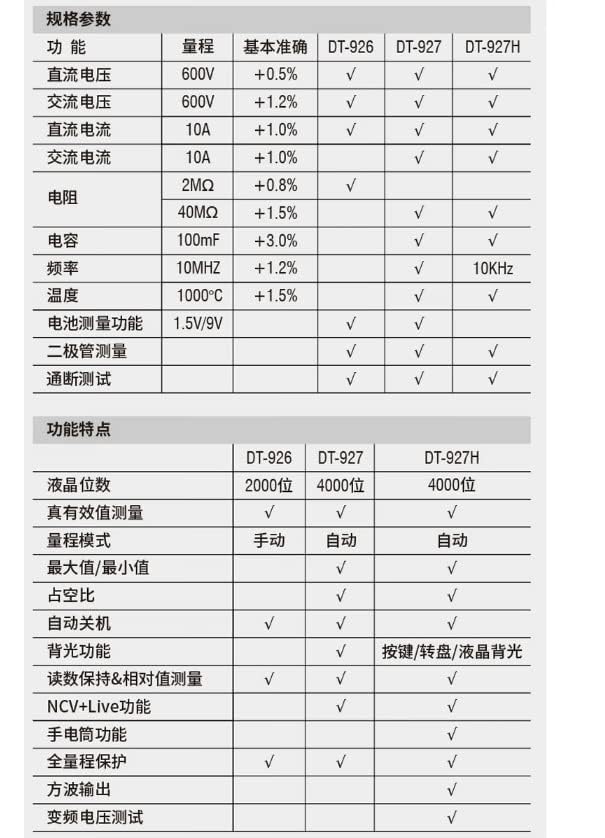
Figure 8.1: Technical Specifications Table (Chinese). This image displays a technical specification table for the DT-926, DT-927, and DT-927H multimeters, detailing measurement ranges and basic accuracy for DC Voltage, AC Voltage, DC Current, AC Current, Resistance, Capacitance, Frequency, and Temperature. It also lists functional features like display digits, True RMS, range mode, MAX/MIN, duty cycle, auto power off, backlight, data hold/relative measurement, NCV+Live, flashlight, full range protection, square wave output, and VFD test.
9. Applications
The DT-926 Digital Multimeter is suitable for a variety of applications, including but not limited to:
- Electrical installation and maintenance
- HVAC system diagnostics
- Electronic circuit testing and repair
- Automotive electrical troubleshooting
- General household electrical checks

Figure 9.1: Typical Application Scenarios. This image collage shows various professional applications for the multimeter, including electrical power construction, HVAC system maintenance, electronic manufacturing, and petrochemical refining, demonstrating its versatility in different industrial settings.
10. Warranty and Support
For warranty information and technical support, please refer to the manufacturer's official website or contact your point of purchase. Keep your purchase receipt as proof of purchase for any warranty claims.
Documents and downloads
Ask a question about this manual
Ask about setup, troubleshooting, compatibility, parts, safety, or missing instructions. Manuals+ will review the question and use this page’s manual context to help answer it.