
1. Introduction
This manual provides essential information for the safe and efficient operation of your PowMr 6200W Solar Inverter. This off-grid hybrid inverter integrates an inverter, MPPT solar charger, and battery charger to provide uninterruptible power support. Please read this manual thoroughly before installation and use, and retain it for future reference.

Figure 1: Front view of the PowMr 6200W Solar Inverter. This image displays the main unit with its display screen and control buttons, highlighting its compact design and the 'Solar Inverter Charger' branding.
2. Safety Information
Always adhere to local electrical codes and regulations. Installation should be performed by qualified personnel. Observe the following safety precautions:
- Ensure the inverter is disconnected from all power sources (solar, battery, utility) before performing any maintenance or wiring.
- Do not attempt to disassemble or repair the inverter yourself. Refer to qualified service personnel.
- Avoid contact with live terminals. High voltages are present inside the inverter.
- Install the inverter in a well-ventilated area, away from flammable materials and direct sunlight.
- Ensure proper grounding of the inverter.
3. Product Overview
3.1 Key Features
- All-in-One Design: Combines inverter, MPPT solar charger, and battery charger.
- Pure Sine Wave Output: Provides stable 220V-230V AC power suitable for sensitive electronics.
- High Power Capacity: 6200W maximum main AC output.
- Advanced MPPT Technology: 120A MPPT solar charge controller for efficient solar energy harvesting.
- Wide Battery Compatibility: Supports 48V Lead-Acid (Seal, AGM, Gel, Flooded) and Lithium batteries.
- Dual AC Output: Main output up to 6200W, second output range 1240W to 4340W.
- RGB Light Indicators: Visual indication of working modes (Stationary, PV, Battery, Utility).
- One-Click Restore: Simplifies system settings restoration in case of errors.
- Comprehensive Protection: Includes overload, over-temperature, short-circuit, over-current, over-voltage, under-voltage, backfill, and over-charge protection.
- Anti-Dust Kit: Enhances reliability in harsh environments.

Figure 2: Overview of the PowMr 6.2KW Hybrid Solar Inverter's key specifications. This image highlights the 6.2KW AC output power, 120A max AC charging current, 500Vdc max PV array open circuit voltage, 150V starting voltage, and 50W no-load power consumption.
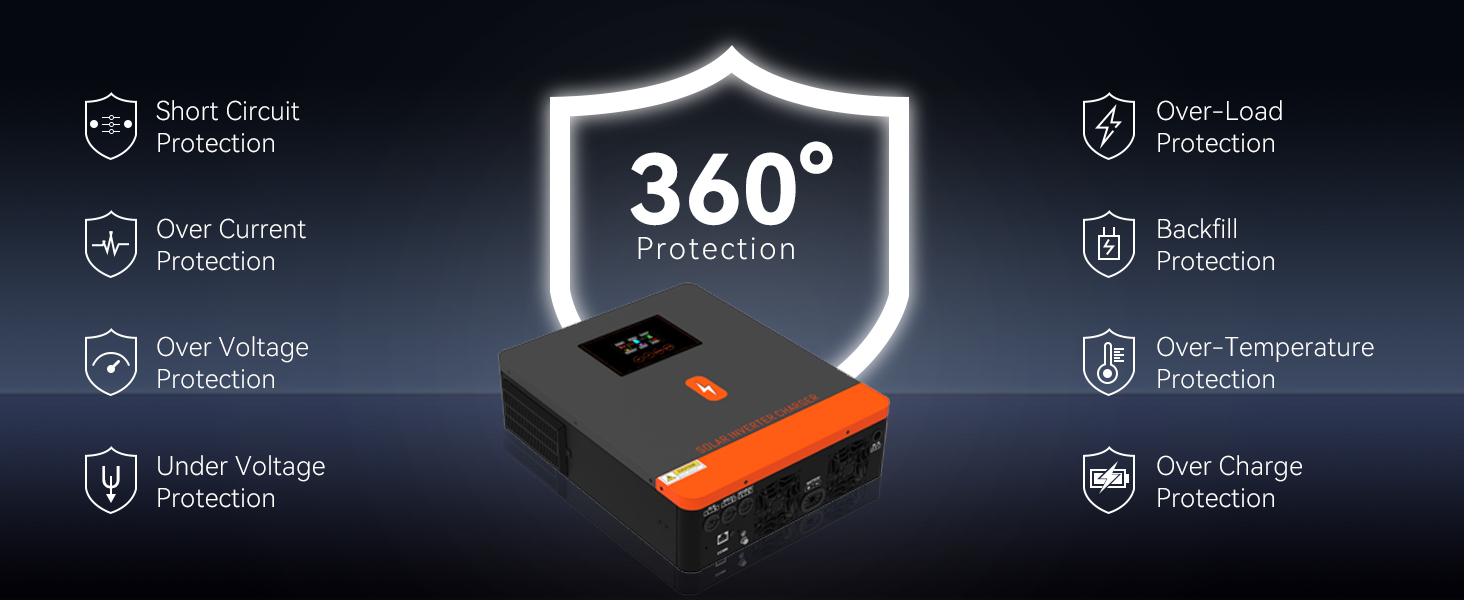
Figure 3: Illustration of the inverter's smart protection system. This image details various protection modes including charge low/high temperature, discharge low/high temperature, discharge overcurrent, charging overcurrent, charging undervoltage, short-circuit, solar panel reverse connection, battery overvoltage, over temperature, and overload protection.
3.2 Component Identification

Figure 4: Detailed component identification for the PowMr Solar Inverter. Key components include: 1. LCD display, 2. Status indicator, 3. Charging indicator, 4. Fault indicator, 5. Touch Function buttons, 6. Power ON/OFF switch, 7. AC input, 8. Main output, 9. Second output, 10. PV 1 and PV 2 input, 11. RS232/WIFI/Remote LCD Communication Port, 12. Battery input, 13. Anti-dust cover.
4. Setup and Installation
Before installation, ensure the mounting surface is sturdy and the environment is suitable (well-ventilated, dry, and free from corrosive gases). The inverter should be installed vertically.
4.1 Wiring Connections
- Battery Connection: Connect the 48V battery bank to the battery input terminals (12). Ensure correct polarity.
- PV Array Connection: Connect solar panels to PV 1 and PV 2 inputs (10). Verify that the PV array voltage (VOC) does not exceed 500V DC and the MPPT voltage range is 60-450VDC.
- AC Input Connection: Connect the utility grid or generator to the AC input (7).
- AC Output Connection: Connect your loads to the Main output (8) and Second output (9). Note that this inverter provides a 220V/230V single-phase output. If your loads require 110V, a step-down transformer is necessary.
- Communication Port: Connect optional RS232/WIFI/Remote LCD communication modules to port (11) for monitoring.
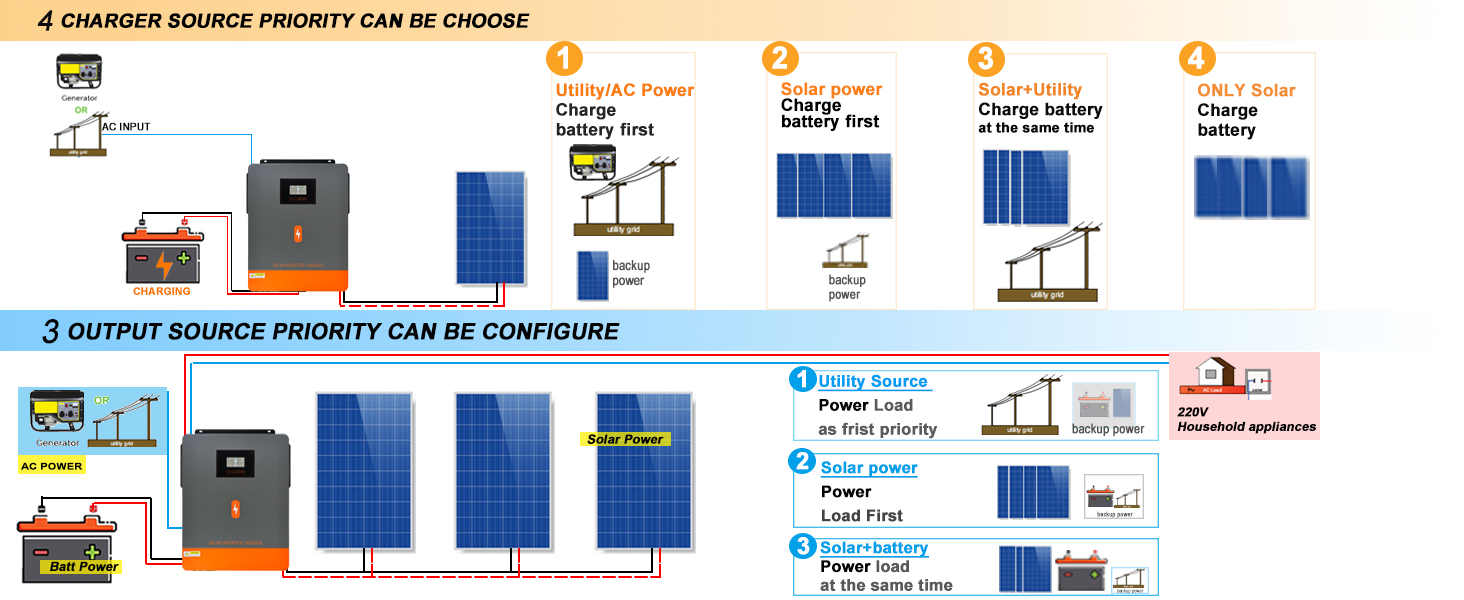
Figure 5: Diagram illustrating the four selectable charger source priorities. Options include: 1. Utility/AC Power (charge battery first), 2. Solar power (charge battery first), 3. Solar+Utility (charge battery at the same time), and 4. ONLY Solar (charge battery).

Figure 6: Diagram illustrating the three configurable output source priorities. Options include: 1. Utility Source (power load as first priority), 2. Solar power (power load first), and 3. Solar+Battery (power load at the same time).
4.2 Battery Type Configuration
The inverter is compatible with various 48V battery types. Ensure the correct battery type is selected in the inverter settings for optimal charging and discharge performance. For Lithium batteries, if solar energy is present, setting the battery type to 'LiB' will activate the battery after 3 seconds.

Figure 7: Visual representation of battery type compatibility. The inverter supports AGM, GEL, FLD (Flooded), LI (Lithium), SLD (Sealed Lead-Acid), and USER-defined battery types.
5. Operating Instructions
5.1 Powering On/Off
To power on the inverter, press the Power ON/OFF switch (6). To power off, press and hold the switch until the unit shuts down.
5.2 LCD Display and Control Buttons
The LCD display (1) shows system status, parameters, and error codes. Use the touch function buttons (5) (ESC, UP, DOWN, ENTER) to navigate menus and adjust settings.
5.3 RGB Light Working Mode Indicators
The PowMr Hybrid Inverter logo displays different colors to indicate its current working mode:
- White Light: Stationary Mode
- Purple Light: PV Mode (operating from solar power)
- Red Light: Battery Mode (operating from battery power)
- Blue Light: Utility Mode (operating from utility grid power)

Figure 8: Visual guide to the RGB light patterns indicating different working modes of the inverter: Stationary (white), PV (purple), Battery (red), and Utility (blue).
5.4 Remote Monitoring
The inverter supports remote monitoring and control via the "SMARTESS" application. An optional WiFi module and GPRS data module are required and must be purchased separately. Once connected, you can monitor system performance and adjust settings from your smartphone.

Figure 9: Illustration of remote monitoring capabilities using the "SMARTESS" app. This image shows a smartphone displaying inverter data and an optional WiFi module connected to the inverter's communication port.
6. Maintenance
Regular maintenance ensures the longevity and optimal performance of your inverter.
- Dust Removal: The inverter features a built-in anti-dust kit. Periodically inspect and clean the exterior to prevent dust accumulation, especially around ventilation openings.
- Ventilation: Ensure the cooling fan and ventilation areas are unobstructed for efficient heat dissipation.
- Connection Checks: Annually inspect all electrical connections for tightness and signs of corrosion.
- Battery Inspection: Follow the manufacturer's guidelines for battery maintenance.
7. Troubleshooting
The inverter is equipped with various protection mechanisms. If an issue occurs, the fault indicator (4) may illuminate, and an error code might be displayed on the LCD. Refer to the full user manual for a complete list of error codes and their solutions.
- Overload Protection: If the connected load exceeds the inverter's capacity, it will shut down. Reduce the load and restart the inverter.
- Over-Temperature Protection: If the internal temperature is too high, the inverter will reduce output or shut down. Ensure adequate ventilation.
- Short Circuit Protection: The inverter will protect itself from short circuits on the output. Identify and clear the short circuit before restarting.
- Incorrect Settings: If incorrect settings cause operational issues, use the one-click restore function to revert to default settings.
- Battery Cold Start: The inverter supports battery cold start at 46V.
- AC Recovery: The inverter features an automatic restart function when AC power is restored.
8. Specifications
| Specification | Value |
|---|---|
| Model Name | HVM6.2M |
| Item Model Number | POW-HVM6.2M-48V-N |
| Wattage | 6200 watts |
| Power Source | Solar and Battery Powered |
| Recommended Uses | Home, Office, Vehicle |
| Brand | PowMr |
| Manufacturer | PowMr |
| Product Dimensions | 17.4 x 4.57 x 14 inches |
| Item Weight | 17.6 pounds |
| Output Voltage | 220V-230V AC |
| Max. PV Array Power | 6500W |
| Max. PV Input VOC | 500V DC |
| PV Array MPPT Voltage Range | 60-450VDC |
| Max Charging Current (AC charger plus solar charger) | 180A |
| Max AC Input | 100A/230V |
| Battery Voltage | 48V |
9. Warranty and Support
For warranty information and technical support, please contact PowMr directly or refer to the official product documentation provided at the time of purchase. Keep your purchase receipt as proof of purchase for warranty claims.
Manufacturer: PowMr
Website: PowMr Official Store on Amazon