
1. Introduction
Thank you for choosing the Jugeman Smartwatch Y88/P99. This manual provides essential information for setting up, operating, and maintaining your smartwatch. Please read it carefully to ensure optimal performance and longevity of your device.
The Jugeman Smartwatch Y88/P99 is designed to be a versatile companion for your daily life, offering features such as Bluetooth calling, health monitoring, notification alerts, and various sports modes.
2. Package Contents
Upon unpacking your Jugeman Smartwatch Y88/P99, please verify that all the following items are included:
- Jugeman Smartwatch Y88/P99
- Charging Cable
- User Manual (this document)

Image 2.1: The image displays the Jugeman Smartwatch Y88/P99, its dimensions (45.7mm height, 36.3mm width, 22mm strap width), and the contents of the product box, which include the smartwatch, a charging cable, and a user manual.
3. Product Overview
The Jugeman Smartwatch Y88/P99 features a 1.96-inch vibrant display and a sleek design. It integrates various functionalities to support your health, communication, and fitness needs.
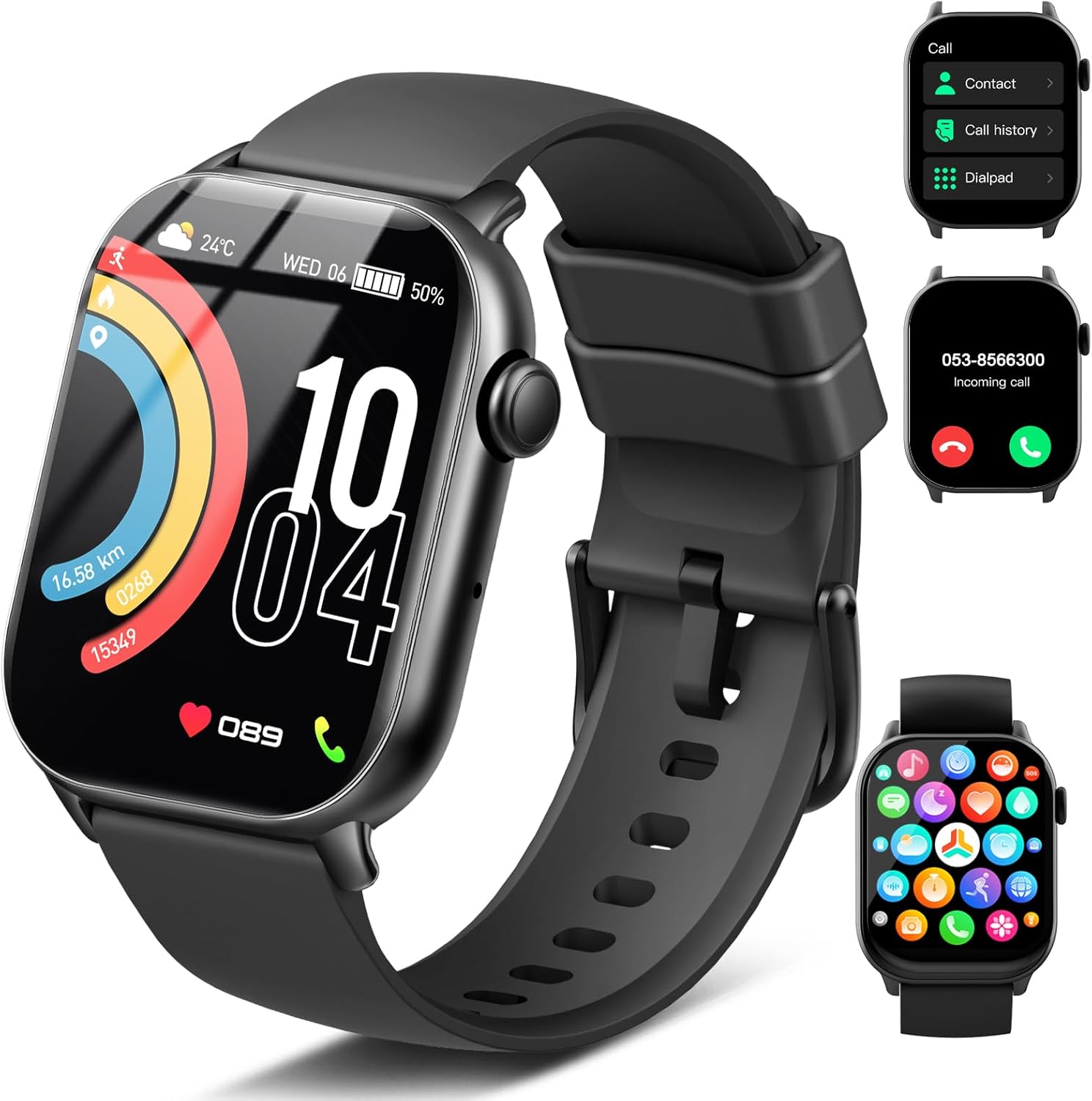
Image 3.1: This image shows the main view of the Jugeman Smartwatch Y88/P99. The watch face displays time, date, weather, battery level, and activity metrics like distance, steps, and calories. Insets illustrate the call interface, including contacts, call history, and dialpad, as well as an incoming call screen and the main app menu.
4. Setup Guide
4.1. Charging the Smartwatch
Before initial use, fully charge your smartwatch. Connect the magnetic charging cable to the charging points on the back of the watch and plug the USB end into a standard USB power adapter (not included).
- A full charge typically takes approximately 2.5 hours.
- The watch has a battery life of up to 7 days with normal use and 30 days standby time.

Image 4.1: This image highlights the long battery life of the Jugeman Smartwatch Y88/P99, indicating 7 days of normal use, 30 days of standby time, and 2.5 hours for a fast charge. It also emphasizes the IP68 waterproof rating, suitable for rainy conditions, bathing, and sweat.
4.2. App Installation and Pairing
To unlock the full functionality of your smartwatch, download and install the companion application on your smartphone. Refer to the quick start guide or the watch screen for the specific app name and QR code.
- Scan the QR code on the watch screen or in the quick start guide to download the app.
- Install the app and create an account if prompted.
- Enable Bluetooth on your smartphone.
- Open the app, navigate to the device pairing section, and select your smartwatch from the list of available devices.
- Follow the on-screen instructions to complete the pairing process. Ensure the watch is close to your phone during pairing.
5. Operating Instructions
5.1. Basic Navigation
- Swipe Up/Down: Access quick settings or notifications.
- Swipe Left/Right: Navigate through widgets and main functions.
- Tap: Select an item or open an application.
- Press Side Button: Return to the home screen or power on/off.
5.2. Making and Answering Calls
The smartwatch supports Bluetooth calls, allowing you to make and receive calls directly from your wrist when connected to your smartphone.
- To Make a Call: Access the "Call" menu, select "Contact" for synced contacts, "Call History" for recent calls, or "Dialpad" to enter a number.
- To Answer a Call: When an incoming call notification appears, tap the green answer icon on the watch screen.
- To Reject a Call: Tap the red reject icon on the watch screen.

Image 5.1: This image illustrates the Bluetooth call and message notification capabilities of the Jugeman Smartwatch Y88/P99. It shows an incoming call screen and various app icons (Instagram, Gmail, Facebook, Telegram, Snapchat, WhatsApp, Twitter, Messenger) indicating support for message notifications. Features like ringtone, built-in mic, call history, contacts, and dialpad are also highlighted.
5.3. Health Monitoring
The smartwatch provides 24-hour health monitoring features to help you track your well-being.
- Heart Rate Monitoring: Continuously tracks your heart rate. View real-time data on the watch or detailed history in the app.
- Sleep Monitoring: Automatically monitors your sleep patterns, including deep sleep, light sleep, and wake times.
- Blood Oxygen (SpO2) Monitoring: Measures your blood oxygen saturation levels.

Image 5.2: This image demonstrates the 24-hour health monitoring features of the Jugeman Smartwatch Y88/P99. It shows screens for heart rate (with a graph and min/max values), sleep tracking (duration and sleep stages), and blood oxygen saturation (SpO2) levels (with a graph and min/max values). The image also depicts individuals engaged in running, sleeping, and hiking, illustrating the watch's use in various scenarios.
5.4. Notifications
Receive notifications for calls, messages, and various social media apps directly on your smartwatch. Ensure the app is running in the background on your phone and notification permissions are granted.
5.5. Customizing Watch Faces
Personalize your smartwatch with over 250 custom watch faces available through the companion app.
- Open the companion app on your smartphone.
- Navigate to the "Watch Faces" or "Dial Market" section.
- Browse and select your preferred watch face to synchronize it with your smartwatch.

Image 5.3: This image highlights the 1.96-inch vibrant screen of the Jugeman Smartwatch Y88/P99 and the availability of over 250 custom watch faces. A variety of digital and analog watch face designs are displayed, including options with activity data, weather, and personalized backgrounds, demonstrating the extensive customization options.
5.6. Sports Modes
The smartwatch supports over 100 sports modes for comprehensive activity data tracking.
- Access the "Sports" or "Workout" menu on your watch.
- Select your desired activity (e.g., running, cycling, walking).
- The watch will track metrics such as heart rate, steps, distance, and calories burned.

Image 5.4: This image showcases the "100+ Sports Modes" feature of the Jugeman Smartwatch Y88/P99, emphasizing all-day activity data tracking. It displays key metrics like heart rate (108 bpm), steps (1288s), distance (3.8 Km), and calories (488 Kcal). The background features individuals engaged in various outdoor activities such as hiking, cycling, and exercising, with icons representing different sports modes at the bottom.
5.7. Other Functions
The Jugeman Smartwatch Y88/P99 offers a range of additional features:
- Music Control: Control music playback on your smartphone.
- Remote Camera: Use your watch as a remote shutter for your phone's camera.
- Alarm: Set alarms directly from your watch.
- Weather Display: View current weather conditions.
- Breathing Training: Guided breathing exercises for relaxation.
- Women's Health: Specific tracking features for women.
- Stopwatch & Timer: Built-in timing functions.
- Voice Assistant: Access your phone's voice assistant.
- Sedentary Notification: Reminds you to move after periods of inactivity.
- Find Phone: Helps locate your paired smartphone by making it ring.

Image 5.5: This image illustrates the multifunctional capabilities of the Jugeman Smartwatch Y88/P99. It shows the watch's app menu with icons for various features such as music control, find phone, remote camera, alarm, and future weather. Below, a list of additional functions is presented, including Bluetooth Call, Message Remind, Breathing Training, Women's Health, Stopwatch & Timer, Music Control, Camera Control, Weather Display, Luminance Regulation, Voice Assistant, Sedentary Notification, and Find Phone.
6. Maintenance
6.1. Water Resistance (IP68)
The Jugeman Smartwatch Y88/P99 is IP68 waterproof, meaning it is resistant to dust and can withstand immersion in water up to 1.5 meters for up to 30 minutes. It is suitable for daily use, including washing hands, rain, and showering. However, it is not recommended for hot water baths, saunas, or deep-sea diving, as steam and high pressure can compromise the seal.
6.2. Cleaning and Care
- Regularly clean your smartwatch and strap with a soft, dry cloth.
- If necessary, use a slightly damp cloth with mild soap, then wipe dry.
- Avoid using harsh chemicals or abrasive materials, as these can damage the device.
- Ensure the charging contacts are clean and dry before charging.
7. Troubleshooting
- Watch not turning on: Ensure the watch is fully charged. Connect it to the charger for at least 30 minutes.
- Cannot pair with phone:
- Ensure Bluetooth is enabled on your phone.
- Make sure the watch is within Bluetooth range (typically 10 meters).
- Restart both your phone and the smartwatch.
- Check if the companion app has necessary permissions.
- Notifications not received:
- Verify that notification permissions are enabled in your phone's settings for the companion app.
- Ensure the app is running in the background.
- Check if "Do Not Disturb" mode is active on either the watch or phone.
- Inaccurate health data: Ensure the watch is worn snugly on your wrist, not too tight or too loose. Avoid excessive movement during measurements.
8. Specifications
| Feature | Detail |
|---|---|
| Brand | Jugeman |
| Model Number | Y88 (also referred to as P99) |
| Screen Size | 1.96 Inches |
| Color | Black |
| Wireless Communication Standard | Bluetooth |
| Water Resistance Rating | IP68 |
| Battery Life (Normal Use) | Up to 7 Days |
| Standby Time | Up to 30 Days |
| Charging Time | Approx. 2.5 Hours |
| Included Components | Smartwatch, Charging Cable, User Manual |
9. Warranty and Support
For warranty information and customer support, please refer to the documentation provided with your purchase or contact Jugeman customer service through their official website. Keep your purchase receipt as proof of purchase.


