1. Introduction
This manual provides detailed instructions for the installation, operation, and maintenance of your PowMr 4200W Hybrid Solar Inverter. This pure sine wave inverter is designed for 24V off-grid systems, converting 24VDC to 220V/230VAC, and features a built-in 120A MPPT charge controller. It combines the functions of an inverter, solar charger, and battery charger to provide uninterruptible power support for various applications, including home, RV, and office use.

Figure 1: Front view of the PowMr 4200W Hybrid Solar Inverter.
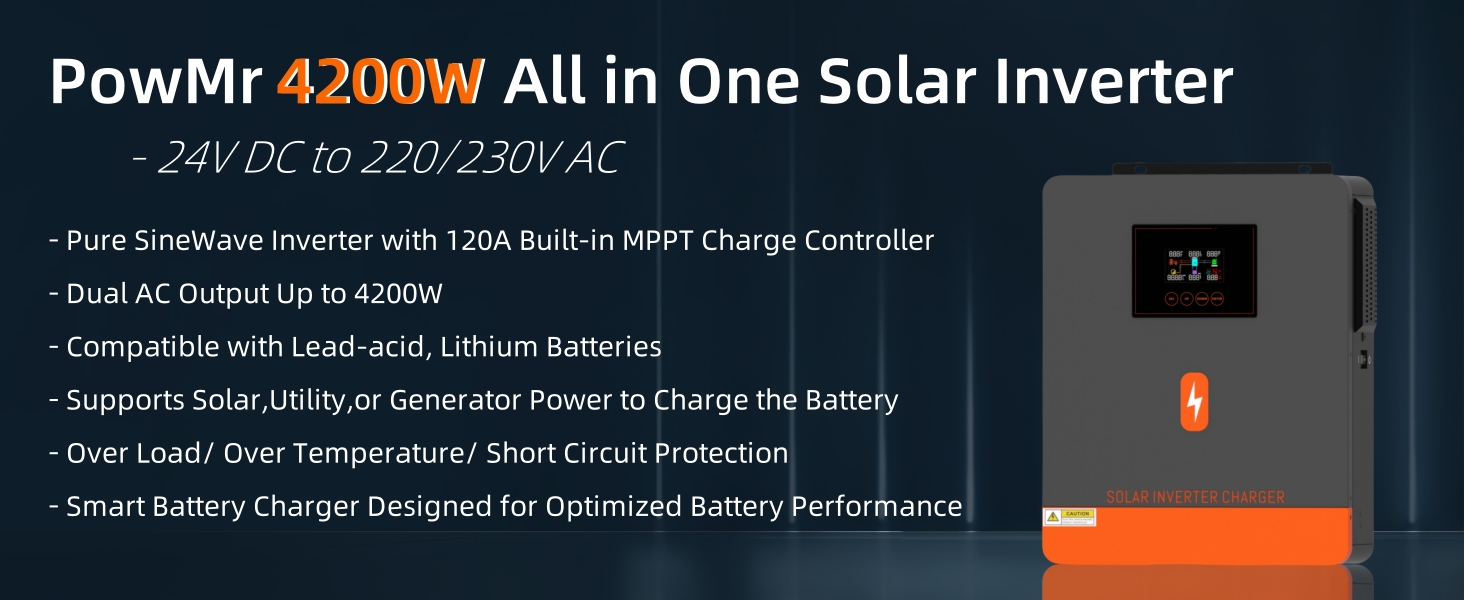
Figure 2: Overview of the PowMr 4200W All-in-One Solar Inverter's key features.
2. Safety Information
Please read all instructions and warnings carefully before installation and operation. Failure to follow these instructions may result in electric shock, fire, or severe injury.
- Installation must be performed by qualified personnel.
- Ensure all wiring is correctly sized and properly connected.
- Do not disassemble the inverter. There are no user-serviceable parts inside.
- Keep the inverter away from flammable materials and ensure adequate ventilation.
- Wear appropriate personal protective equipment (PPE) during installation and maintenance.
- Disconnect all power sources (solar, battery, AC input) before performing any maintenance or wiring.
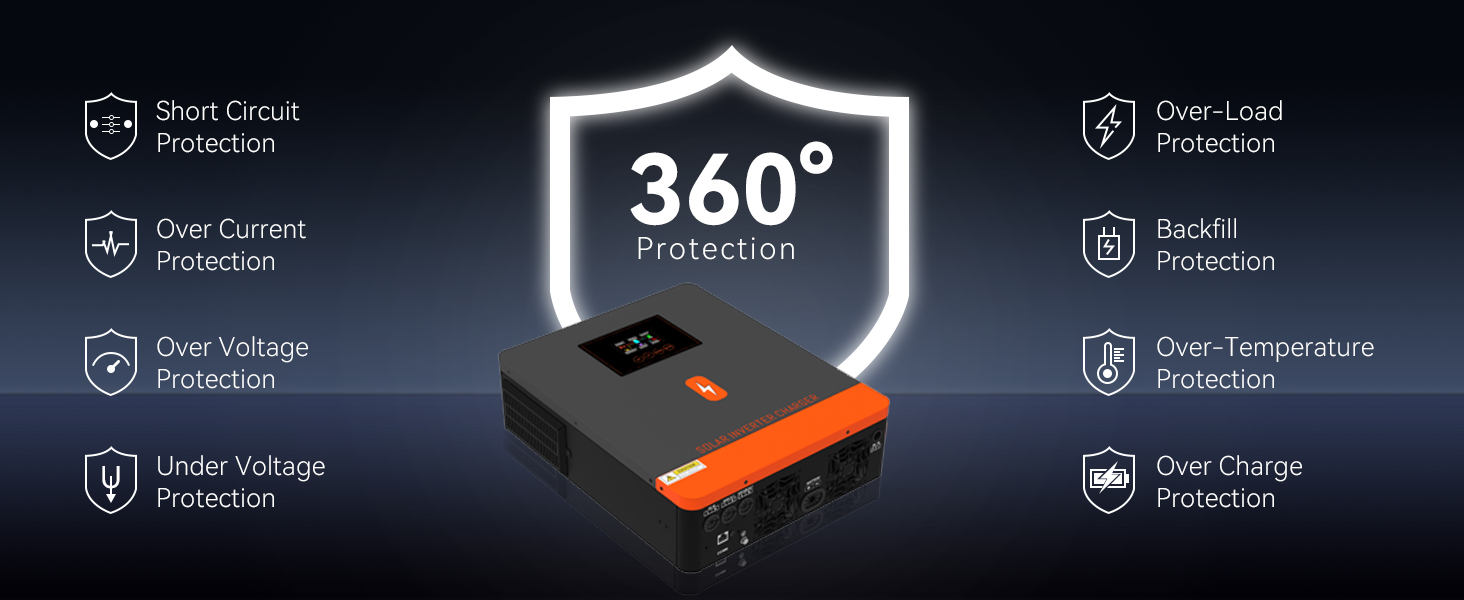
Figure 3: The inverter includes comprehensive protection features such as short circuit, overload, over current, over voltage, under voltage, backfill, over temperature, and over charge protection.
3. Product Overview
The PowMr 4200W Hybrid Solar Inverter is an all-in-one unit designed for efficient power management in off-grid solar systems. It integrates an inverter, a 120A MPPT solar charger, and a battery charger.
3.1 Key Features
- Pure Sine Wave Inverter with 220V/230VAC single-phase output.
- Built-in 120A MPPT Charge Controller.
- Dual AC Output: Max. 4200W main output, 840W-2940W second output.
- Compatible with 24V Lead-Acid (Seal, AGM, Gel, Flooded) and Lithium batteries.
- Max. PV Array Power: 6500W; Max. PV Input VOC: 500V DC.
- RGB light indicator for different working modes.
- One-click restore default settings function.
- Built-in Anti-dust Kit for enhanced reliability.

Figure 4: Key specifications and features of the 4.2KW Hybrid Solar Inverter.
3.2 Component Identification

Figure 5: Front and side view with labeled components.
- LCD display
- Status indicator
- Charging indicator
- Fault indicator
- Touch Function buttons
- Power ON/OFF switch
- AC input
- Main output
- Second output
- PV 1 and PV 2 input
- RS232/WIFI/Remote LCD Communication Port
- Battery input
- Anti dust cover
4. Setup and Installation
Proper installation is crucial for the safe and efficient operation of the inverter. Ensure all connections are secure and follow local electrical codes.
4.1 Mounting the Inverter
- Choose a dry, well-ventilated area, away from direct sunlight and heat sources.
- Ensure sufficient clearance around the inverter for proper airflow.
- Mount the inverter vertically on a sturdy surface using appropriate fasteners.
4.2 Wiring Connections
Refer to the wiring diagram below for connecting solar panels, batteries, and AC loads.
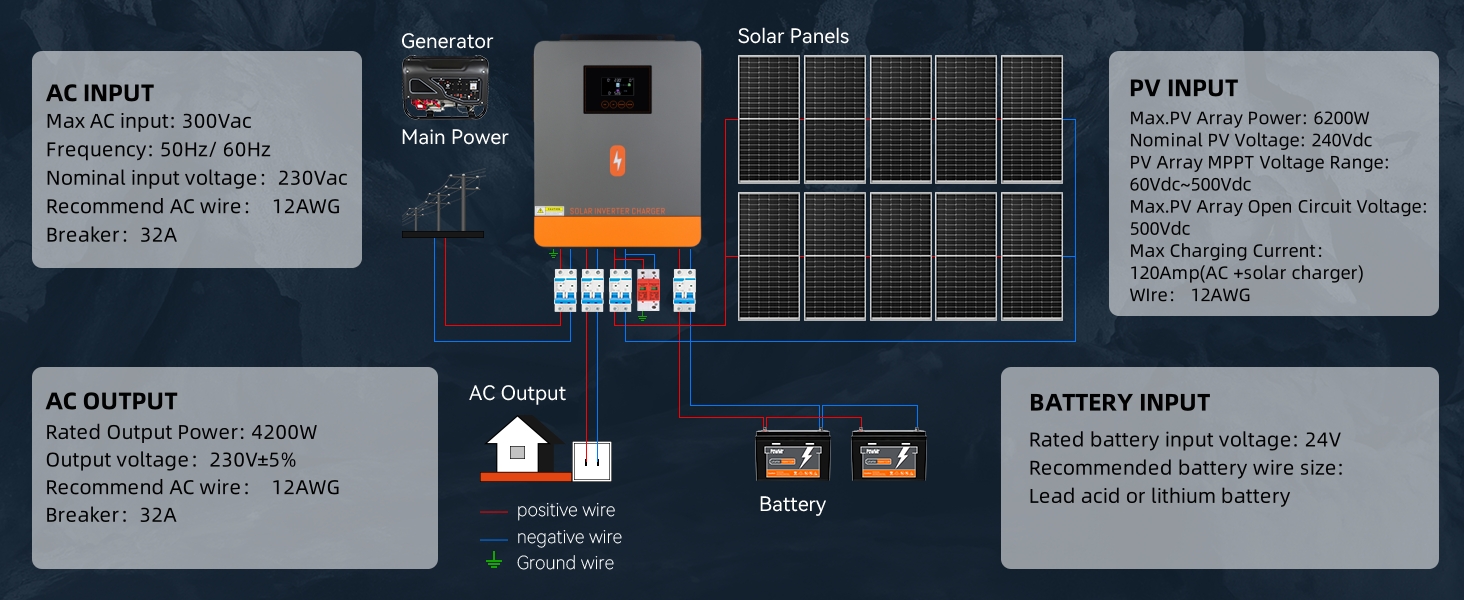
Figure 6: Wiring diagram showing connections for AC input, PV input, AC output, and battery input.
- Battery Connection: Connect the 24V battery bank to the battery input terminals. Ensure correct polarity (positive to positive, negative to negative). The inverter is compatible with Lead-Acid (Seal, AGM, Gel, Flooded) and Lithium batteries.
- PV Input Connection: Connect your solar panels to the PV 1 and PV 2 input terminals. Ensure the PV array voltage and current are within the inverter's specifications (Max. PV Input VOC: 500V DC, MPPT Voltage Range: 60-450VDC).
- AC Input Connection: Connect the AC utility grid or a generator to the AC input terminals.
- AC Output Connection: Connect your household or office appliances to the main and second AC output terminals. The inverter provides a single-phase 220V/230V output. If 110V output is required, an external transformer is necessary.

Figure 7: The inverter supports various battery types including AGM, GEL, FLD (Flooded), LI (Lithium), SLD, and USER-defined. For Lithium batteries, ensure the battery type is set to 'LI' for activation by solar energy after 3 seconds.
5. Operating Instructions
Once installed, the inverter can be powered on and configured for operation.
5.1 Powering On/Off
- Ensure all connections are correct before turning on the inverter.
- Press the Power ON/OFF switch (component 6 in Figure 5) to power on the unit.
- The LCD display will illuminate, and the inverter will begin its startup sequence.
5.2 Working Modes and RGB Light Indicator
The PowMr Hybrid Inverter features an RGB light logo that indicates its current working mode:
- White Light: Stationary Mode
- Purple Light: PV Mode (Solar power is actively used)
- Red Light: Battery Mode (Power is drawn from the battery)
- Blue Light: Utility Mode (Power is drawn from the AC grid/generator)

Figure 8: Visual representation of RGB light patterns indicating different working modes.
5.3 Charger Source Priority Configuration
The inverter allows you to configure the priority of charging sources:
- Utility/AC Power First: Charges the battery primarily from the AC grid/generator.
- Solar Power First: Charges the battery primarily from solar panels.
- Solar + Utility/AC Power: Charges the battery from both solar and AC sources simultaneously.
- ONLY Solar: Charges the battery exclusively from solar panels.
5.4 Output Source Priority Configuration
You can also configure the priority of power sources for your loads:
- Utility Source First: Prioritizes AC grid/generator power for loads.
- Solar Power First: Prioritizes solar power for loads.
- Solar + Battery: Uses solar power and battery power for loads simultaneously.
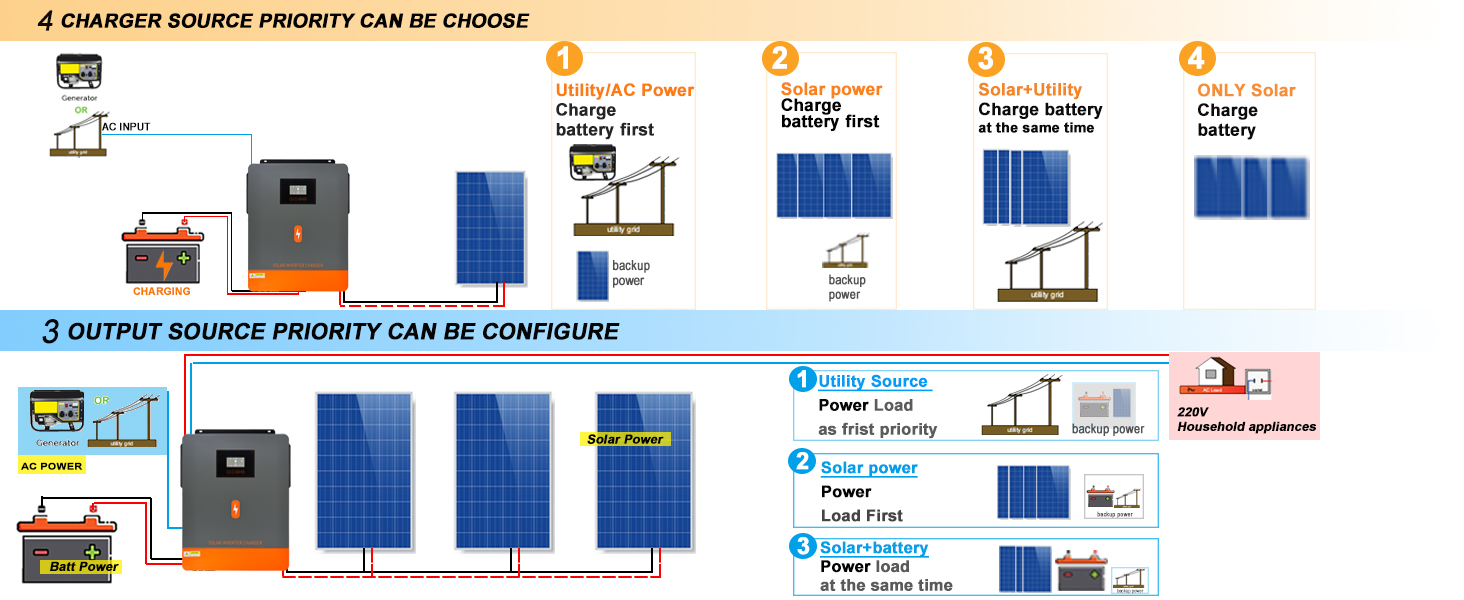
Figure 9: Diagrams illustrating the configurable charger source and output source priorities.
5.5 Remote Monitoring
The inverter supports remote monitoring and control via the 'SMARTESS' application. A Wi-Fi module and GPRS data module are required and must be purchased separately.

Figure 10: Remote monitoring setup using the 'SMARTESS' app and an optional Wi-Fi module. The Wi-Fi module has an identifier Q2721100111238.

Figure 11: The inverter can power a wide range of household and office appliances, with a maximum AC power output of 4200W.
6. Maintenance
Regular maintenance ensures the longevity and optimal performance of your inverter.
- Cleaning: Periodically clean the exterior of the inverter with a dry cloth. Ensure the cooling fan vents are free from dust and obstructions. The built-in anti-dust kit helps maintain cleanliness in harsh environments.
- Connections: Routinely check all electrical connections for tightness and signs of corrosion.
- Ventilation: Ensure the inverter's surroundings remain well-ventilated to prevent overheating.
- Battery Health: Monitor battery voltage and health according to battery manufacturer guidelines.
7. Troubleshooting
This section provides guidance for common issues. For complex problems, contact customer support.
- Inverter Not Powering On: Check battery connections, battery voltage, and the power switch.
- No AC Output: Verify AC output connections, check for overload conditions, and ensure the inverter is in an operational mode.
- Charging Issues: Check solar panel connections, PV input voltage, and AC input if using utility charging. Ensure battery type settings are correct.
- Fault Indicator On: Refer to the LCD display for specific error codes. The inverter has comprehensive protection features.
- Incorrect Settings: The inverter features a one-click restore default settings function to revert to factory settings if configuration errors occur.
- Automatic Restart: The inverter is designed to automatically restart when AC power is restored after an outage.
8. Specifications
Detailed technical specifications for the PowMr 4200W Hybrid Solar Inverter.

Figure 12: Detailed specifications label found on the inverter. The serial number is 920422405060107.
| Category | Specification |
|---|---|
| Model Name | POW-HVM4.2M-24V-N |
| Product Dimensions | 17.4 x 14 x 4.5 inches |
| Item Weight | 17.64 pounds |
| Brand | PowMr |
| Recommended Uses | Home, Office, Vehicle |
| Power Source | Solar and Battery Powered |
| Wattage | 4200 watts |
| Nominal Operating Voltage | 24VDC |
| Max. PV Array Power | 6500W |
| Max. PV Input VOC | 500V DC |
| PV Array MPPT Voltage Range | 60-450VDC |
| Max. Charging Current (AC + Solar) | 120A |
| Max. AC Input Current | 100A |
| Output Voltage | 220V-230V AC |
| Operating Temperature Range | 10 - 50°C |
9. Warranty and Support
For warranty information, technical support, or service inquiries, please contact PowMr customer service through their official website or the retailer where the product was purchased. Keep your purchase receipt and product serial number (e.g., 920422405060107) for reference.


