
Introduction
Welcome to the user manual for your new TCL 50Q7C 50-inch QLED 4K QD-Mini LED Google TV. This manual provides essential information for setting up, operating, maintaining, and troubleshooting your television. Please read it carefully to ensure optimal performance and longevity of your device.
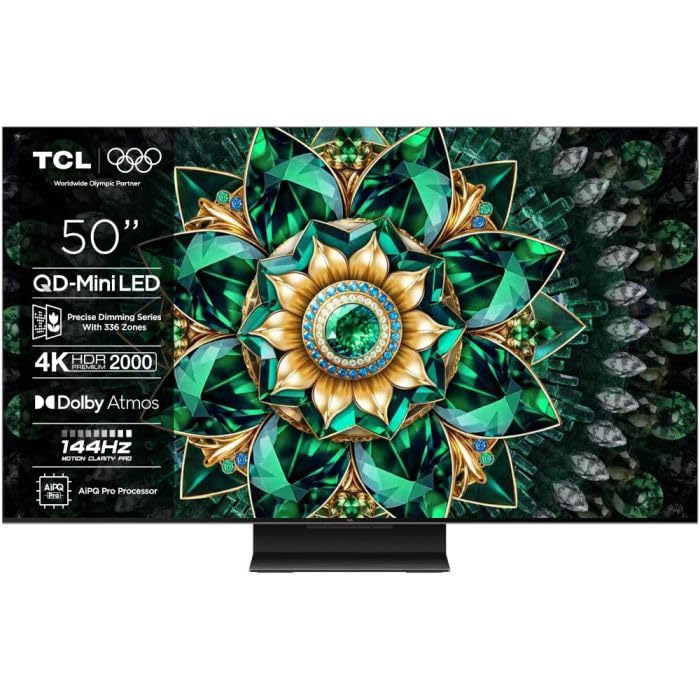
Image: The TCL 50Q7C 50-inch QLED 4K QD-Mini LED Google TV, showcasing its sleek design.
Setup
1. Unpacking and Inspection
Carefully remove the TV and all accessories from the packaging. Ensure all components are present and undamaged.
- Included Components: Power cable, User Manual, Remote Control, Stand.
2. Stand Installation
Follow the instructions provided in the quick start guide for securely attaching the TV stand. Ensure the TV is placed on a stable, level surface.
3. Connecting to Power
Connect the power cable to the TV's power input and then to a suitable electrical outlet.
4. Initial Setup
Upon first power-on, the TV will guide you through the initial setup process for Google TV. This includes:
- Language Selection: Choose your preferred language.
- Network Connection: Connect to your Wi-Fi network or use an Ethernet cable for a wired connection.
- Google Account Sign-in: Sign in with your Google account to access Google TV features, apps, and personalized recommendations.
- Channel Scan: Scan for available TV channels if you are using an antenna or cable connection.
- Bluetooth Pairing: Pair your remote control and other Bluetooth devices as prompted.
Operating Instructions
1. Remote Control Usage
The included remote control allows you to navigate the Google TV interface, adjust settings, and control playback. Familiarize yourself with the button layout for easy operation.
2. Google TV Interface
Google TV organizes your favorite content from various streaming services into one personalized home screen.
- Home Screen: Access recommended content, installed apps, and settings.
- Apps: Download and manage applications from the Google Play Store.
- Inputs: Switch between connected devices (HDMI, USB, etc.).
3. Smart Features
- Google Assistant Hands-Free: Use voice commands to control your TV, search for content, and manage smart home devices without the remote.
- Apple AirPlay 2: Stream content directly from your Apple devices to the TV.
- Alexa Compatibility: Integrate your TV with Amazon Alexa for voice control via an Alexa-enabled device.
4. Picture Settings
Your TCL 50Q7C features advanced display technologies for an exceptional viewing experience.
- QD-Mini LED & QLED Panel: Delivers precise backlighting, vibrant colors, and deep contrasts.
- HDR Premium 2000 & Dolby Vision IQ: Enhances brightness, contrast, and color detail for HDR content, adapting to room lighting.
- HVA Panel: Provides sharper contrasts, improved energy efficiency, and wide viewing angles.
- AiPQ Processor Pro: Optimizes image quality for smooth motion, sharp contrasts, and precise details.
- Refresh Rate 144Hz, VRR, MEMC: Ensures smooth motion for fast-paced content and gaming.
Access the picture settings menu to customize brightness, contrast, color, and other display options to your preference.
5. Sound Settings
The TV features Onkyo audio systems and Dolby Atmos support for immersive sound. Adjust sound modes and equalizer settings in the audio menu.
6. Gaming Features
The Game Master feature, along with 144Hz refresh rate, VRR (Variable Refresh Rate), MEMC (Motion Estimation, Motion Compensation), and AMD FreeSync, provides a smooth and responsive gaming experience. Ensure your gaming console is connected to an HDMI 2.1 port for full functionality.
Maintenance
1. Cleaning the TV
- Screen: Gently wipe the screen with a soft, dry, lint-free cloth. For stubborn marks, slightly dampen the cloth with water or a specialized screen cleaner. Avoid harsh chemicals.
- Frame and Stand: Use a soft, dry cloth to clean the TV frame and stand.
- Ventilation: Ensure the ventilation openings on the back of the TV are not blocked to prevent overheating.
2. Software Updates
Your TV may receive software updates to improve performance and add new features. Ensure your TV is connected to the internet to receive these updates automatically. You can also manually check for updates in the TV's settings menu.
Troubleshooting
If you encounter issues with your TV, refer to the following common troubleshooting steps.
| Problem | Solution |
|---|---|
| No power | Check if the power cable is securely connected to both the TV and the power outlet. Ensure the outlet is functional. |
| No picture, but sound is present | Verify the correct input source is selected. Check cable connections from external devices. Try restarting the TV. |
| No sound, but picture is present | Check the volume level and mute status. Ensure audio cables are correctly connected. Check TV audio output settings. |
| Remote control not working | Replace batteries. Ensure there are no obstructions between the remote and the TV. Re-pair the remote if it's a Bluetooth model. |
| Network connection issues | Restart your router and modem. Reconnect to the Wi-Fi network in the TV settings. Try a wired Ethernet connection if possible. |
For more detailed troubleshooting or persistent issues, please refer to the official TCL support website or contact customer service.
Specifications
| Feature | Detail |
|---|---|
| Brand | TCL |
| Screen Size | 50 Inches |
| Display Technology | Mini LED |
| Resolution | 4K |
| Refresh Rate | 144 Hz |
| Special Features | AMD FreeSync, QD Miniled, Google System, Onkyo Audio Systems, VRR and MEMC 144 Hz |
| Connectivity Technology | Bluetooth, Ethernet, HDMI, USB, Wi-Fi |
| Total USB Ports | 1 |
| Included Components | Power cable, User Manual, Remote Control, Stand |
| Aspect Ratio | 16:9 |
| Product Dimensions (DxWxH) | 27D x 111.3W x 71.2H centimeters |
| Model Number | 50Q7C |
| Manufacturer | TCL |
| Country of Origin | China |
| Software Updates Guaranteed Until | Information not available |
| Spare Parts Availability | Information not available |
Warranty and Support
Warranty Information
For detailed warranty terms and conditions, please refer to the warranty card included with your product or visit the official TCL website. Warranty coverage may vary by region and retailer.
Customer Support
If you require further assistance, technical support, or have questions not covered in this manual, please contact TCL customer service. You can typically find contact information on the official TCL website or in your product documentation.
- Online Support: Visit the official TCL support website for FAQs, drivers, and software downloads.
- Phone Support: Refer to your regional TCL website for local customer service phone numbers.


