
OMTech SH-G570
Contents
OMTech Maker 60W CO2 Laser Engraver & Cutter Instruction Manual
Model: SH-G570
1. Introduction
This manual provides essential information for the safe and efficient operation of your OMTech Maker 60W CO2 Laser Engraver & Cutter, model SH-G570. Please read this manual thoroughly before operating the machine to ensure proper usage and to prevent damage or injury. This device is designed for precision engraving and cutting a variety of materials.

Image 1.1: Overview of the OMTech Maker 60W CO2 Laser Engraver highlighting its features including 60W laser power, 20"x28" working area, software compatibility, autofocus, 600mm/s engraving speed, 4-way pass-through, and honeycomb/blade workbeds.
2. Setup
Proper setup is crucial for the performance and safety of your laser engraver. Follow these steps carefully.
2.1 Unpacking and Placement
- Carefully remove all packaging materials. Inspect the machine for any signs of damage during transit.
- Place the laser engraver on a stable, level surface capable of supporting its weight. Ensure adequate clearance around the machine for ventilation and access.
- Ensure the operating environment is clean, well-ventilated, and free from flammable materials.
2.2 Connecting the Water Chiller
The included water chiller is essential for cooling the CO2 laser tube. Connect it as follows:
- Fill the water chiller with distilled water or a recommended coolant solution.
- Connect the chiller's inlet and outlet hoses to the corresponding ports on the laser tube. Ensure connections are secure to prevent leaks.
- Power on the chiller and verify that water is circulating properly through the laser tube before operating the laser.

Image 2.1: Illustration of a water chiller, crucial for maintaining the optimal temperature of the laser tube during operation.
2.3 Exhaust System Installation
An efficient exhaust system is vital for removing smoke, fumes, and debris generated during laser processing.
- Connect the exhaust hose from the machine to an external ventilation system or a dedicated fume extractor.
- Ensure the exhaust path is clear and unobstructed to maintain optimal airflow.

Image 2.2: Depiction of an efficient exhaust system with a blue illuminated fan and metal ducting, designed to remove hazardous debris and fumes.
2.4 Software Installation and Compatibility
The OMTech Maker 60W is compatible with various design and control software:
- Install the necessary drivers and software (e.g., RDWorks, LightBurn) on your computer.
- The machine also supports CorelDRAW and AutoCAD for design creation.

Image 2.3: The digital control panel of the laser engraver, alongside icons for compatible software: RDWorks, LightBurn, CorelDRAW, and AutoCAD.
3. Operating Instructions
Familiarize yourself with the operational procedures to achieve optimal results and ensure safety.
3.1 Powering On and Initial Checks
- Ensure all connections (power, water chiller, exhaust) are secure.
- Turn on the water chiller first, then the laser engraver.
- Verify that the laser head moves freely and the workbed is clear.
3.2 Material Placement and Work Area
The machine features a 28" x 20" work area and includes both honeycomb and blade workbeds for versatile material support.
- Place your material securely on the appropriate workbed.
- Utilize the 4-way pass-through doors for processing larger materials that exceed the workbed dimensions.
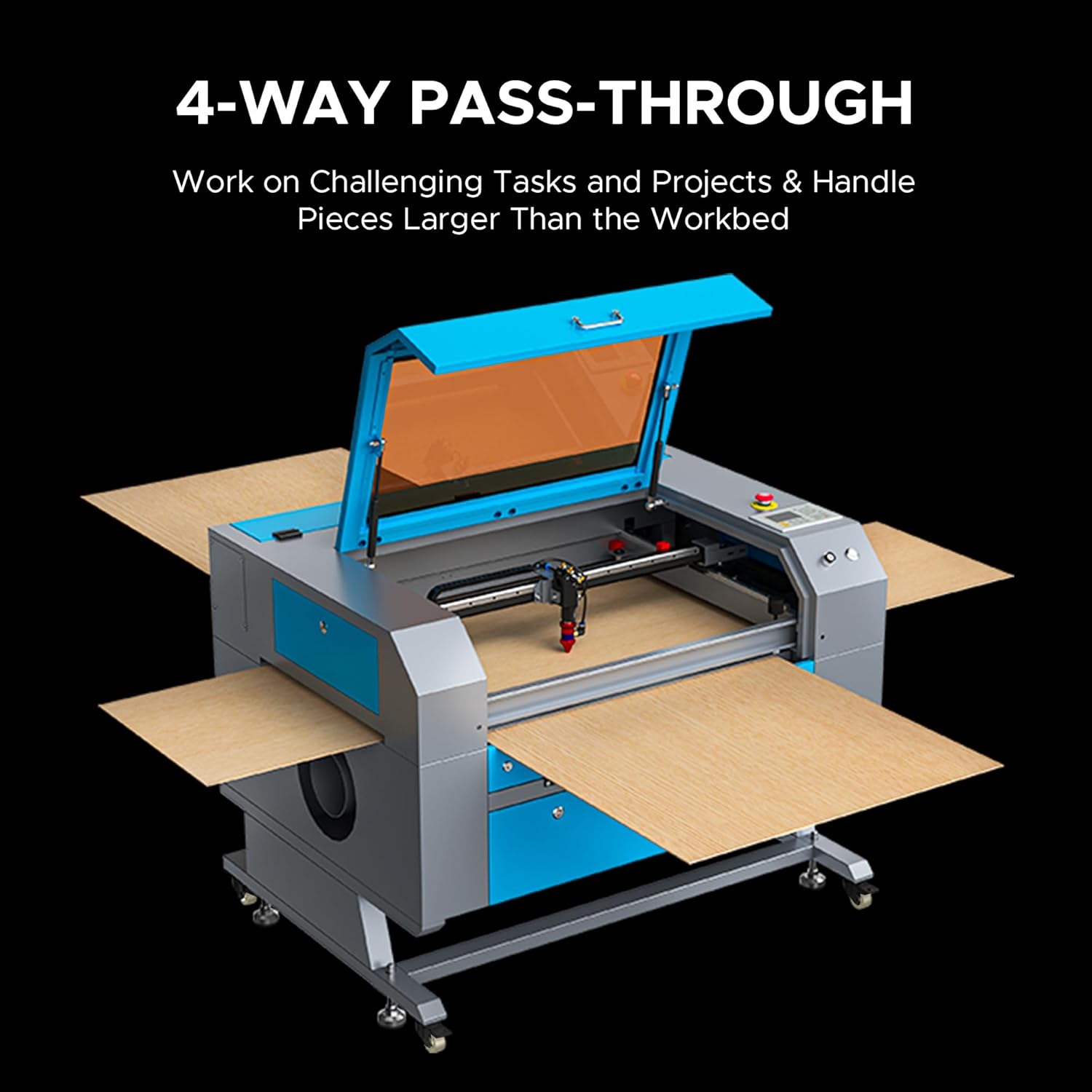
Image 3.1: The laser engraver demonstrating its 4-way pass-through capability, allowing for the processing of materials larger than the internal work area.
3.3 Autofocus Function
The integrated autofocus system simplifies setup and ensures precise laser focus.
- Position the laser head over the material.
- Activate the autofocus function via the control panel or software. The laser head will automatically adjust to the correct focal distance.

Image 3.2: A close-up view of the laser head's nozzle, illustrating the built-in autofocus and air assist features for sharper and cleaner results.
3.4 Engraving and Cutting Operations
The 60W CO2 laser can engrave and cut various materials at speeds up to 600 mm/s, with cutting depths up to 0.4 inches in materials like wood and acrylic.
- Load your design into the laser software.
- Adjust power and speed settings according to the material type and desired outcome. Refer to the material compatibility table for guidance.
- Initiate the engraving or cutting process. Monitor the operation through the flame-resistant observation window.

Image 3.3: The laser engraver actively cutting into a piece of wood, demonstrating its capability to cut up to 0.4 inches deep.
3.5 Material Compatibility
The OMTech Maker 60W supports a wide range of materials for both engraving and cutting:
| Material | Engraving | Cutting | Material | Engraving | Cutting |
|---|---|---|---|---|---|
| Wood | ✓ | ✓ | Mylar | ✓ | ✓ |
| Acrylic | ✓ | ✓ | Cork | ✓ | ✓ |
| Leather | ✓ | ✓ | Glass | ✓ | ❌ |
| Plastic | ✓ | ✓ | Fiberglass | ✓ | ❌ |
| Cardboard | ✓ | ✓ | Ceramic | ✓ | ❌ |
| Pressboard | ✓ | ✓ | Brick | ✓ | ❌ |
| Fabric | ✓ | ✓ | Stone | ✓ | ❌ |
| MDF | ✓ | ✓ | Jade | ✓ | ❌ |
| Rubber | ✓ | ✓ | Marble | ✓ | ❌ |
| PVC | ✓ | ✓ | Shale | ✓ | ❌ |
| Bamboo | ✓ | ✓ | Cement | ✓ | ❌ |
| Kraft Paper | ✓ | ✓ | Corian | ✓ | ❌ |
| Corrugated Paper | ✓ | ✓ | Coated Metal | ✓ | ❌ |
| Felt | ✓ | ✓ | Electroplated Metal | ✓ | ❌ |
| Delrin | ✓ | ✓ | Painted Metal | ✓ | ❌ |
| Melamine | ✓ | ✓ | Anodized Metal | ✓ | ❌ |
Table 3.1: Material compatibility for engraving and cutting with the OMTech Maker 60W CO2 Laser Engraver.

Image 3.4: A collage of various items showcasing the engraving and cutting capabilities of the laser machine on different materials like wood, leather, and acrylic.
4. Maintenance
Regular maintenance ensures the longevity and optimal performance of your laser engraver.
4.1 Laser Tube Care
The high-performance Yongli H2 tube offers a long lifespan, up to 12,000 hours, with proper care.
- Ensure the water chiller is always operational during laser use to prevent overheating.
- Periodically check the coolant level and quality in the chiller. Replace or replenish as needed.
- Avoid physical shocks or impacts to the laser tube.

Image 4.1: A detailed view of the high-performance Yongli H2 laser tube, highlighting its internal structure and the laser beam path.
4.2 Cleaning Optics and Mirrors
- Regularly inspect and clean the laser lens and mirrors using appropriate optical cleaning solutions and lint-free wipes.
- Contaminated optics can reduce laser power and affect engraving/cutting quality.
4.3 Workbed and Interior Cleaning
- After each use, remove debris and dust from the work area and workbeds.
- Periodically clean the interior of the machine to prevent accumulation of dust and residue.
5. Troubleshooting
This section addresses common issues you might encounter. For problems not listed here, please contact OMTech support.
5.1 Laser Not Firing
- Check if the water chiller is running and circulating water.
- Verify all power connections to the machine and laser power supply.
- Ensure the emergency stop button is not engaged.
- Confirm that the laser tube is properly connected and not damaged.
5.2 Poor Engraving/Cutting Quality
- Check the focus of the laser. Re-run the autofocus function.
- Inspect and clean the laser lens and mirrors for any dust or residue.
- Adjust power and speed settings in your software for the specific material being used.
- Ensure the material is flat and securely placed on the workbed.
5.3 Machine Not Responding
- Restart the machine and your computer.
- Check the USB or network connection between the machine and your computer.
- Verify that the correct drivers are installed and the software is properly configured.
6. Specifications
Key technical specifications for the OMTech Maker 60W CO2 Laser Engraver & Cutter (Model SH-G570).
- Model Number: SH-G570
- Laser Power: 60W CO2
- Laser Class: 2
- Output Power: 0.874 mW
- Work Area: 28 inches x 20 inches (711 mm x 508 mm)
- Max. Engraving Speed: 600 mm/s
- Max. Cutting Depth: 0.4 inches (10 mm) in wood, acrylic, and similar materials
- Laser Tube Life: Up to 12,000 hours (Yongli H2 tube)
- Focus System: Autolift Autofocus
- Pass-Through: 4-way
- Workbeds: Honeycomb and Blade
- Software Compatibility: RDWorks, LightBurn, CorelDRAW, AutoCAD
7. Warranty and Support
OMTech is committed to providing reliable products and customer service.
7.1 Warranty Information
Your OMTech Maker 60W CO2 Laser Engraver & Cutter comes with a 12-month warranty from the date of purchase. This warranty covers manufacturing defects and ensures your product functions as intended under normal use. Please retain your proof of purchase for warranty claims.
7.2 Customer Support
For technical assistance, troubleshooting, or warranty inquiries, please contact OMTech customer support. We offer U.S.-based support to assist you with any questions or issues.
- Visit the OMTech Store on Amazon for product information and support resources.
- Join the Official OMTech Community to connect with other users and find helpful tips and advice.

Image 7.1: OMTech customer support representatives ready to assist with product inquiries.
Ask a question about this manual
Ask about setup, troubleshooting, compatibility, parts, safety, or missing instructions. Manuals+ will review the question and use this page’s manual context to help answer it.