
intelamp US-YL005-18GP20
intelamp Solar Flood Light Instruction Manual
Model: US-YL005-18GP20
Introduction
Thank you for choosing the intelamp Solar Flood Light. This manual provides detailed instructions for the proper setup, operation, and maintenance of your new solar floodlight. Designed for superior brightness and energy efficiency, this light features a 20000mAh battery, 4000LM output, dual motion sensors, and linkable functionality for enhanced security and convenience. Please read this manual thoroughly before installation and keep it for future reference.
Package Contents
Please verify that all components are present in your package:
- 1 x intelamp Solar Flood Light Unit
- 1 x Solar Panel
- 1 x Remote Control
- 1 x Sensor Box
- Mounting Hardware (screws, anchors, brackets)
- 1 x Instruction Manual (this document)
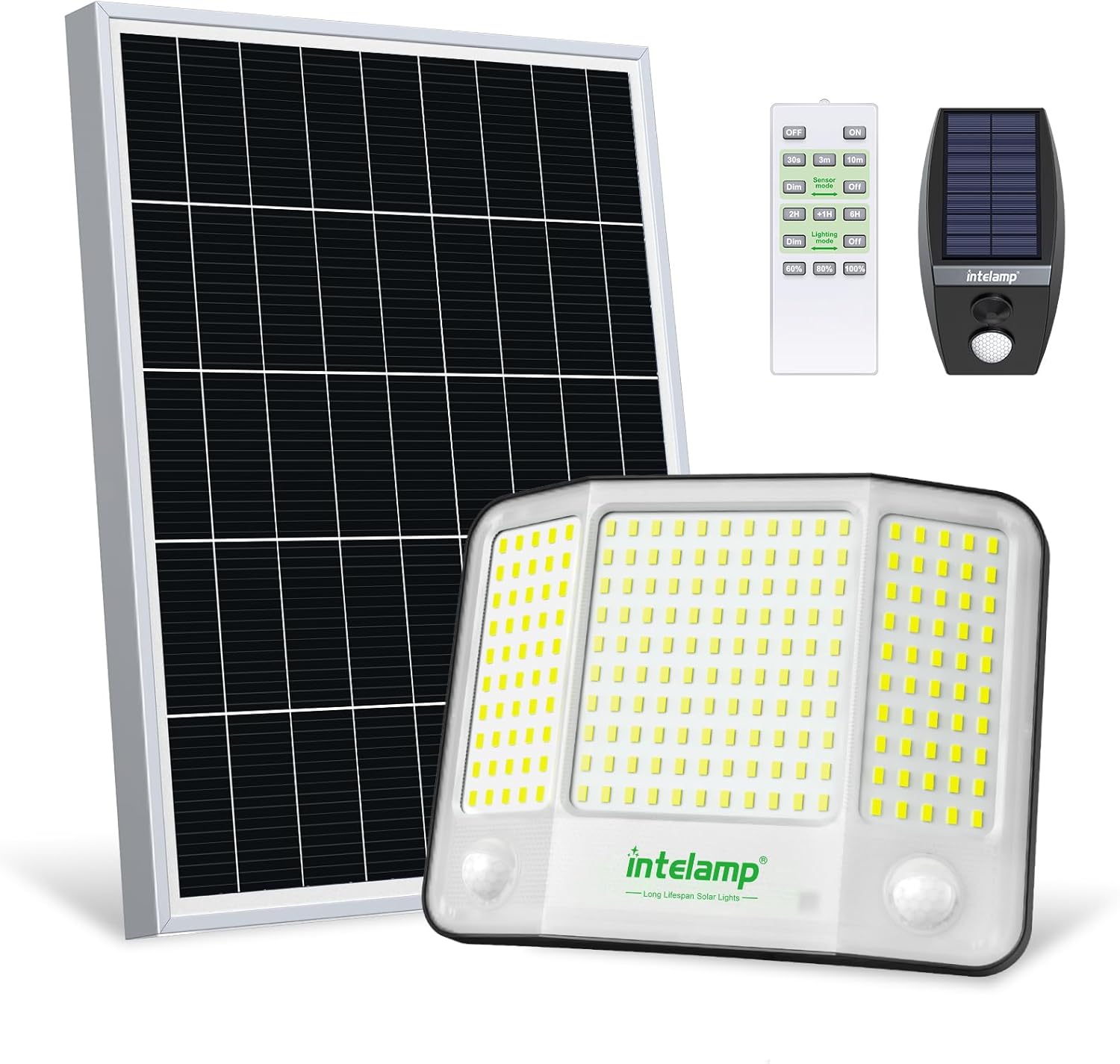
Image: Overview of the intelamp Solar Flood Light components.
Product Features
- Smart Linkable Light: Synchronized control allows the sensor box to signal the light to turn on, and the light to signal other lights within 100 feet to illuminate, ensuring a well-lit path and enhancing energy efficiency and safety.
- Super Brightness: Features 210 high-quality LED beads and a high-transparency PC lampshade, providing 4000LM brightness. The high-efficiency solar panel and 20000mAh battery ensure rapid charging in 5 hours of direct sunlight for all-night illumination.
- Convenient Remote Control: A 16.4 FT range remote allows selection of sensing mode or long lighting mode, and brightness level adjustment (60%, 80%, 100%).
- Wide Lighting Range: Three-sided lamp design offers a full 180° illumination range and can be adjusted up and down by 120 degrees for versatile coverage.
- Seamless Installation and Weatherproof Design: Includes a 16.4FT cable for flexible placement of the solar panel and light. IP65 waterproof rating ensures durability for diverse indoor and outdoor applications.
Setup and Installation
Proper placement of both the solar panel and the light unit is crucial for optimal performance. The 16.4 FT cable provides flexibility for installation.
- Choose a Location for the Solar Panel: Select a location that receives at least 5 hours of direct sunlight daily to ensure the battery is fully charged for all-night operation. The solar panel can be mounted on walls, roofs, or poles.
- Mount the Solar Panel: Use the provided mounting hardware. Mark the drill points using the bracket, drill pilot holes, and secure the solar panel bracket. Adjust the angle of the solar panel to maximize sun exposure.
- Choose a Location for the Light Unit: Identify an area requiring illumination. The light unit can be installed up to 16.4 feet away from the solar panel.
- Mount the Light Unit: Secure the light unit using its dedicated mounting bracket and hardware. Ensure it is positioned to cover the desired area. The light unit offers 120-degree vertical adjustment.
- Connect the Solar Panel to the Light Unit: Connect the cable from the solar panel to the input port on the light unit. Ensure the connection is secure and waterproof.

Image: Flexible installation with a 16.4ft cable, allowing the solar panel to be placed in direct sunlight and the light unit where needed.

Image: Illustration of pole mount and wall mount installation options.
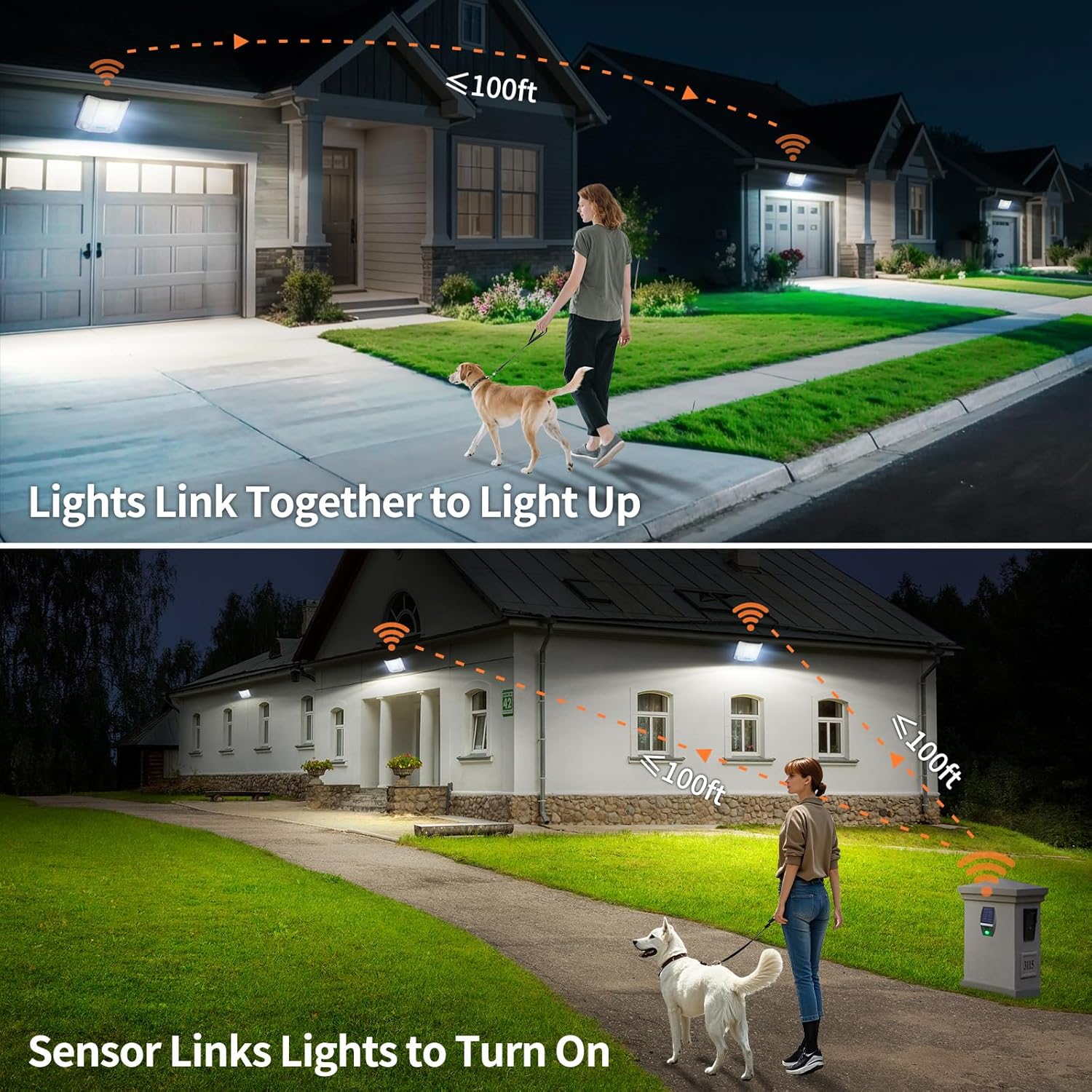
Image: The light unit is IP65 rated, ensuring durability against various weather elements.
Operating Instructions
Your intelamp Solar Flood Light comes with a remote control for convenient operation and multiple lighting modes.
Remote Control Functions
- ON/OFF: Turns the light on or off.
- Motion Sensor Mode (30s, 3m, 10m): The light activates at 4000LM brightness upon motion detection and stays on for the selected duration (30 seconds, 3 minutes, or 10 minutes) before dimming or turning off.
- Lighting Mode (2H, +1H, 6H): Sets the continuous lighting duration from 2 to 12 hours. The light will remain on at a set brightness for the programmed time.
- Dim/Off: In sensing mode, this button controls whether the light dims to a low brightness or turns completely off when no motion is detected. In long light mode, it controls dimming or turning off after the programmed lighting.
- Brightness Adjustment (60%, 80%, 100%): Adjusts the light output to conserve battery life on cloudy days or for desired illumination levels.

Image: Remote control layout with various operational settings.
Smart Linkable Function
The intelamp Solar Flood Light features a unique linkable function, allowing multiple lights to communicate and activate together.
- Sensor Box Activation: If a separate sensor box (included) is placed at an entry point (e.g., gate), it can detect motion and signal the main floodlight to turn on before you arrive.
- Light-to-Light Linking: When one intelamp floodlight detects motion, it can signal other linked intelamp lights within 100 feet to also illuminate, creating a continuous, well-lit path.

Image: The linkable solar sensor ensures lights turn on within 100 feet upon motion detection.

Image: Examples of lights linking together for extended illumination and a sensor activating multiple lights.
Maintenance
To ensure the longevity and optimal performance of your intelamp Solar Flood Light, follow these simple maintenance guidelines:
- Clean the Solar Panel: Regularly wipe the solar panel with a soft, damp cloth to remove dust, dirt, leaves, or snow. A clean panel ensures maximum sunlight absorption and charging efficiency.
- Check Connections: Periodically inspect all cable connections to ensure they are secure and free from corrosion or damage.
- Clear Obstructions: Ensure no trees, buildings, or other objects are blocking direct sunlight from reaching the solar panel, especially during peak charging hours.
- Battery Care: The built-in battery is designed for long life. Avoid prolonged storage of the light in a completely discharged state. If storing for an extended period, ensure the battery is fully charged.
Troubleshooting
If you encounter issues with your intelamp Solar Flood Light, refer to the following common problems and solutions:
| Problem | Possible Cause | Solution |
|---|---|---|
| Light does not turn on at night. | Insufficient solar panel charging. | Ensure the solar panel is in direct sunlight for at least 5 hours daily. Clean the solar panel surface. Check for obstructions. |
| Light flickers or has low brightness. | Partial charge or dirty solar panel. | Allow the solar panel to charge fully. Clean the solar panel. Check cable connections. |
| Remote control not working. | Battery in remote is dead or remote is out of range. | Replace the AAA battery in the remote control. Ensure you are within the 16.4 FT range. |
| Linkable function not working. | Lights are out of range or obstructions. | Ensure linked lights are within 100 feet of each other without significant obstructions. |
Specifications
| Feature | Detail |
|---|---|
| Brand | intelamp |
| Model Name | YL005-18GP20 |
| Item Model Number | US-YL005-18GP20 |
| Style | Motion Sensor Light |
| Light Output | 4000LM |
| Battery Capacity | 20000mAh |
| Solar Panel | 20W Topcon Solar Panel, 5V/4000mA |
| Charging Efficiency | 24% |
| Full Charge Time | 5 hours (direct sunlight) |
| Illumination Time | 12+ hours (all-night illumination) |
| LED Beads | 210 high-quality LED beads |
| Light Color | 6500K White Daylight |
| Lighting Angle | 180° (three-sided lamp design) |
| Adjustable Angle | 120 degrees (up and down) |
| Cable Length | 16.4 FT |
| Water Resistance | IP65 Waterproof |
| Material | Acrylonitrile Butadiene Styrene, Stainless Steel |
| Product Dimensions | 16.5"L x 13.1"W x 3.7"H |
| Item Weight | 2.68 Pounds |
| Control Method | Remote, Touch |
| Voltage | 3.2 Volts (DC) |
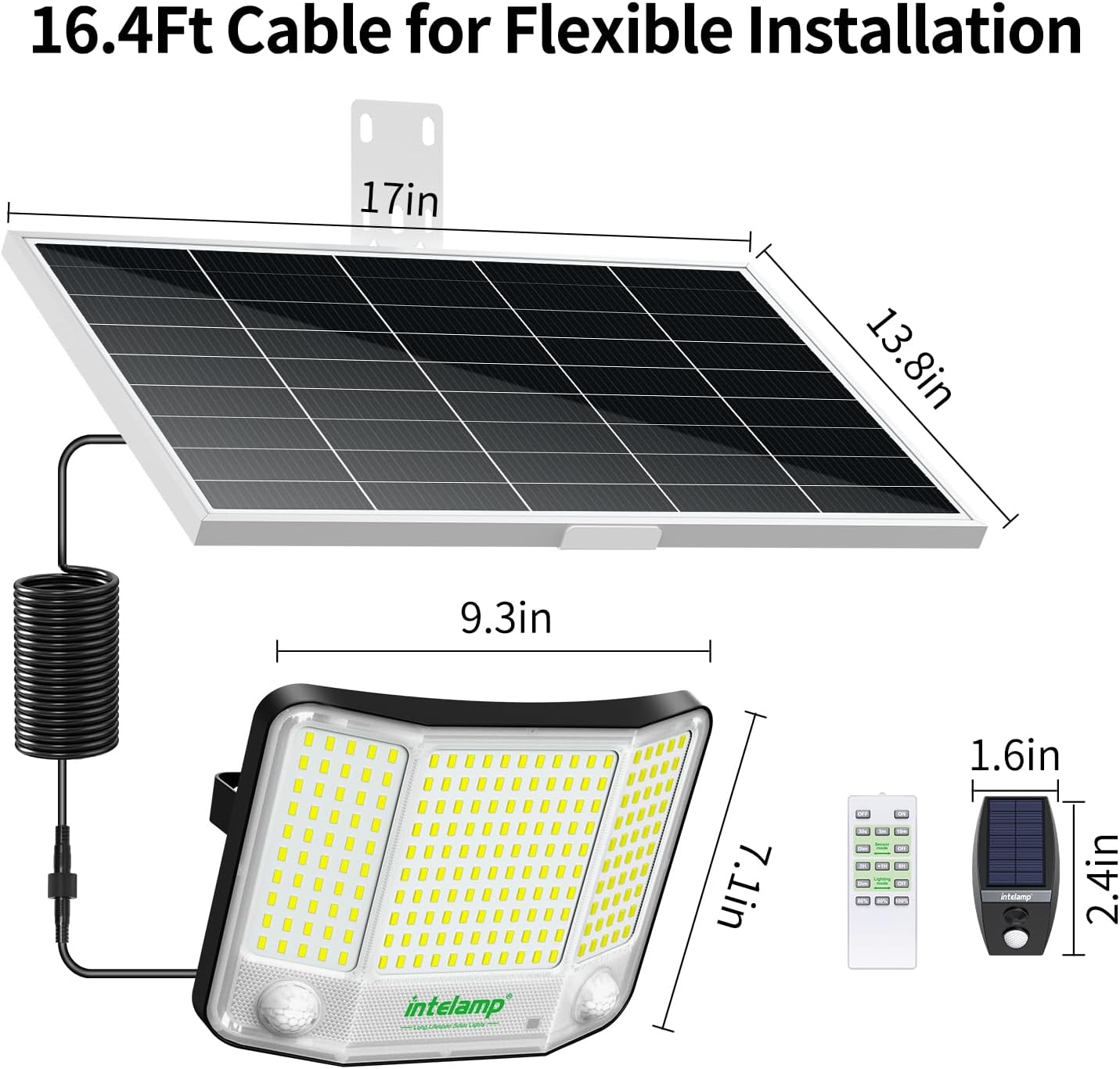
Image: Detailed dimensions of the solar panel, light unit, and remote control.
Warranty and Support
The intelamp Solar Flood Light comes with a Limited Warranty. For specific warranty terms and conditions, please refer to the warranty card included in your package or contact intelamp customer support.
If you require further assistance, have questions about installation, operation, or troubleshooting that are not covered in this manual, please contact intelamp customer support through the vendor information provided at your point of purchase or visit the official intelamp website.
Ask a question about this manual
Ask about setup, troubleshooting, compatibility, parts, safety, or missing instructions. Manuals+ will review the question and use this page’s manual context to help answer it.