Introduction
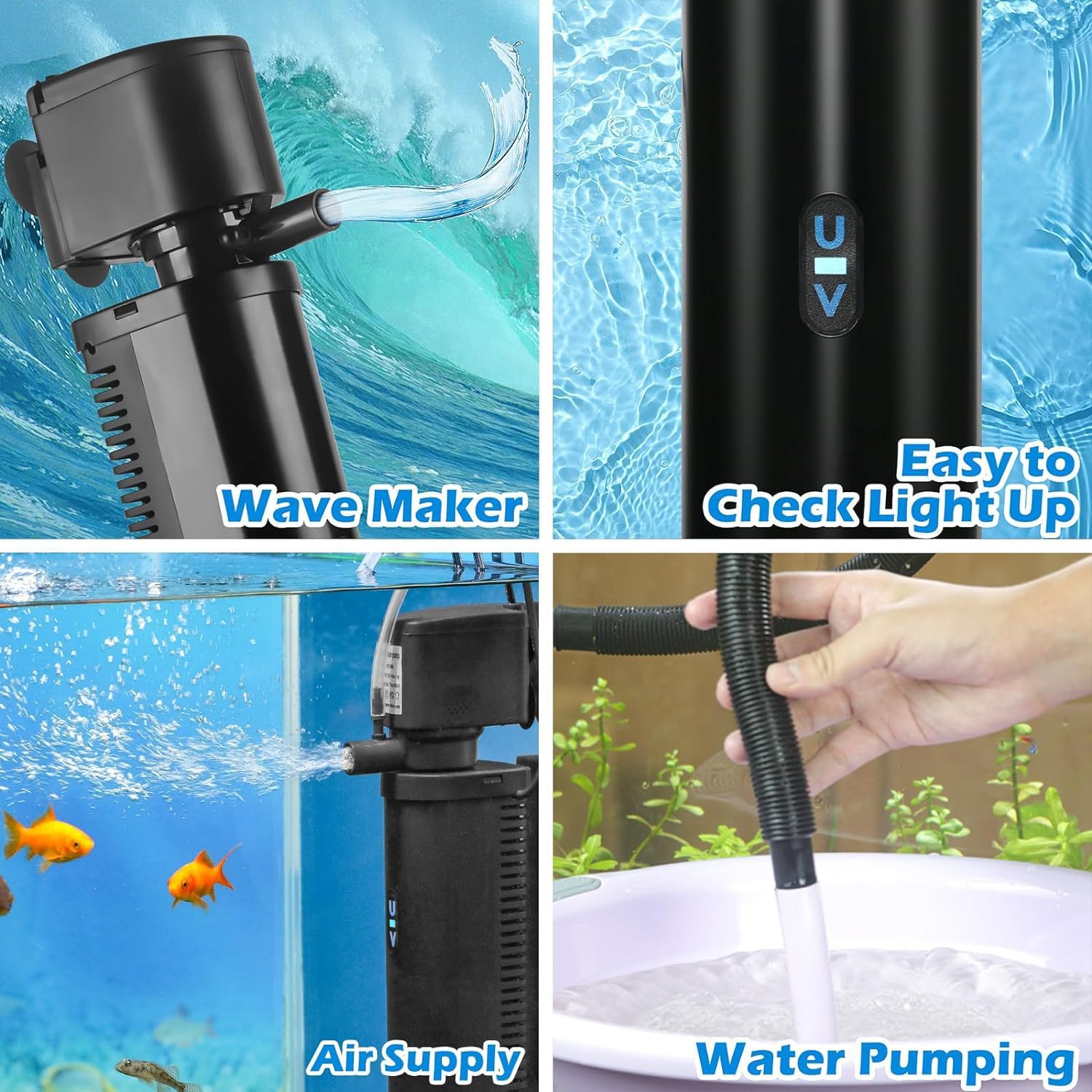
The TARARIUM WP-490F is an advanced all-in-one internal aquarium filter system designed to maintain a clean and healthy environment for your aquatic pets. This versatile device is suitable for 20-75 gallon fish and turtle tanks, integrating multiple essential functions: water filtration, UV sterilization, oxygenation, wave making, and water pumping. It effectively clears cloudy water, reduces odors, and minimizes the need for frequent water changes, ensuring optimal water quality.
Safety Information
Please read all safety instructions carefully before operating the TARARIUM WP-490F aquarium filter. Failure to follow these instructions may result in product damage, injury, or electric shock.
- Electrical Safety: Always disconnect the power supply before performing any maintenance, installation, or removal of the filter unit. Ensure your hands are dry when handling the power plug and outlet.
- Submersible Use Only: This filter is designed for full submersion in water. Do not operate the unit dry.
- UV Light Safety: The UV lamp emits ultraviolet radiation. Do not look directly at the UV light when it is active, as it can cause eye damage. The UV light is enclosed within the filter housing and is safe during normal operation.
- Children and Pets: Keep the filter and its components out of reach of children and pets to prevent accidental injury or ingestion.
- Proper Installation: Ensure the filter is securely installed in the aquarium according to the instructions to prevent it from falling or causing damage.
- Damage Inspection: Regularly inspect the power cord, plug, and filter unit for any signs of damage. Do not use if any part is damaged.
Package Contents
Verify that all items are present in the package:
- TARARIUM WP-490F Aquarium Filter Unit
- Air Tube
- Power Adapter with Timer Control
- Replacement Filter Sponges (4 pieces)

Product Features
The TARARIUM WP-490F filter offers a comprehensive solution for aquarium water management:
- All-in-One Functionality: Combines water filtration, UV sterilization, odor reduction, oxygenation, wave making, and water pumping into a single device.
- Dual-Stage Water Clarification:
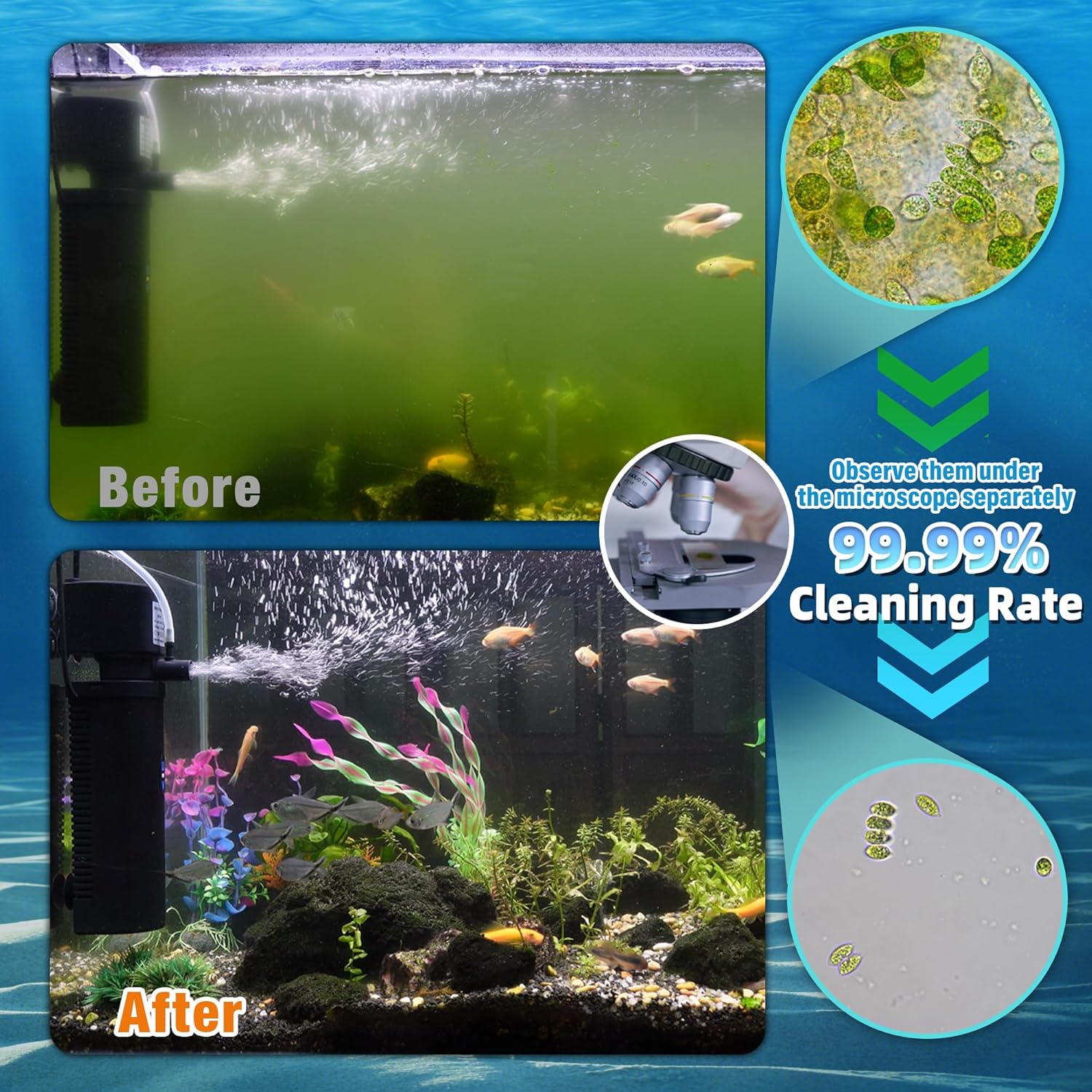
- Stage 1 (Mechanical/Biological Filtration): Biochemical filter sponges effectively remove debris, fish waste, and fine particles, while cultivating beneficial bacteria.
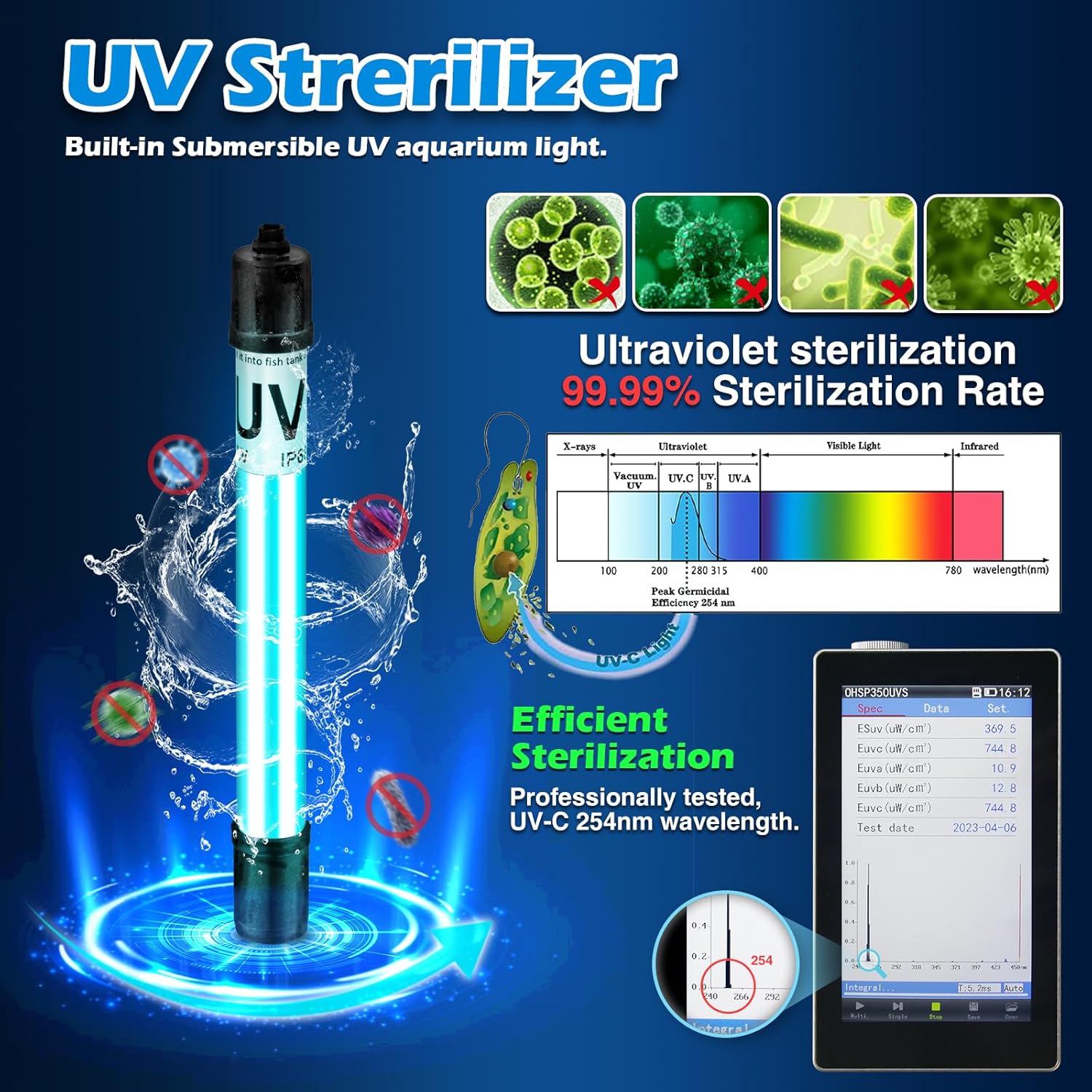
- Stage 2 (UV Sterilization): A built-in 254nm UV light diminishes odors and eradicates green water, contributing to a crystal-clear aquarium.
- Adjustable Airflow: Features adjustable airflow to meet varying oxygenation needs, ensuring a gentle environment for fish. The UV light housing is IPX8 waterproof.
- Easy Installation and Maintenance: Applicable for both marine and freshwater tanks. Can be used vertically or horizontally. Operates effectively at a minimum water level of 3.5 inches. The pump, UV lamp, and sponge components are designed for easy disassembly and assembly for simple maintenance.
- Automatic Daily Cycle Timer: The UV lamp and pump can operate independently. The timer allows setting working durations to 3, 6, 12, or 24 hours. The unit will automatically turn off after the set duration and repeat the cycle daily without manual adjustment.

Setup Instructions
- Unpack the Filter: Carefully remove all components from the packaging. Inspect for any damage.
- Assemble the Filter: Ensure the filter sponges are correctly inserted into the filter housing. The UV lamp should be securely in place within its protective casing.
- Position in Aquarium: Place the filter unit inside your aquarium. It can be positioned vertically or horizontally. Ensure the water level is at least 3.5 inches (8.9 cm) above the bottom of the filter for proper operation. The suction cups on the back of the filter can be used to secure it to the aquarium glass.
- Connect Air Tube (Optional): If you wish to utilize the air supply/oxygenation feature, connect one end of the provided air tube to the air intake nozzle on the top of the filter unit and the other end to the air stone (if included or desired). Adjust the air flow regulator on the tube as needed.
- Power Connection: Connect the filter unit's power cable to the timer control unit, and then plug the timer control unit into a standard electrical outlet.
- Initial Operation: Once plugged in, the filter pump will begin to circulate water. The UV light can be activated and timed using the control unit.

Operating Instructions
The TARARIUM WP-490F features an intelligent timer for its UV sterilization function.
- Power On/Off: Plug the unit into a power outlet to turn on the pump. Unplug to turn off.
- Setting the UV Timer:
- Locate the timer control unit. It has buttons for '3H', '6H', '12H', and '24H' (Cycle).
- Press the desired button to select the operating duration for the UV lamp. For example, pressing '3H' will activate the UV lamp for 3 hours.
- After the set time, the UV lamp will automatically turn off. It will then automatically reactivate for the same duration approximately 21, 18, or 12 hours later, depending on the initial setting, repeating the cycle daily.
- The UV lamp and pump operate separately, allowing continuous water circulation even when the UV lamp is off.
- UV Working Status Indicator: The filter housing has an indicator that illuminates when the UV lamp is active, allowing for easy visual confirmation of its operation.
- Adjusting Airflow: If the air tube is connected, use the air flow regulator on the tube to increase or decrease the amount of air bubbles produced.

Maintenance
Regular maintenance ensures the longevity and optimal performance of your TARARIUM WP-490F filter.
- Disconnect Power: Always unplug the filter from the power outlet before performing any maintenance.
- Cleaning Filter Sponges:
- Carefully remove the filter unit from the aquarium.
- Disassemble the filter housing to access the biochemical filter sponges.
- Rinse the sponges thoroughly with old aquarium water (not tap water, as chlorine can kill beneficial bacteria) to remove accumulated debris. If heavily soiled, they can be gently squeezed.
- Replace the sponges if they are severely degraded or no longer effective.
- UV Lamp Maintenance:
- The UV lamp should be replaced approximately every 6-12 months, depending on usage, to maintain its effectiveness.
- To replace, carefully remove the UV lamp assembly from the filter unit. Unscrew the old lamp and insert a new one, ensuring it is securely seated.
- Caution: Handle the UV lamp by its base, avoid touching the glass directly, as oils from your skin can reduce its lifespan.
- Cleaning the Pump Impeller: Periodically, the pump impeller may accumulate debris, reducing flow. Disassemble the pump head and clean the impeller and its chamber with a small brush.
- Cleaning the Filter Housing: Wipe down the exterior and interior of the filter housing to remove any algae or mineral buildup.
- Reassembly: Reassemble all components securely and place the filter back into the aquarium. Reconnect power.

Troubleshooting
If you encounter issues with your TARARIUM WP-490F filter, refer to the following common problems and solutions:
| Problem | Possible Cause | Solution |
|---|---|---|
| Filter not running / No water flow |
|
|
| Water not clearing / Poor filtration |
|
|
| UV light not turning on |
|
|
| Reduced airflow / No bubbles |
|
|
Specifications
| Feature | Detail |
|---|---|
| Model | WP-490F |
| Brand | TARARIUM |
| Flow Rate (GPH) | 200 GPH |
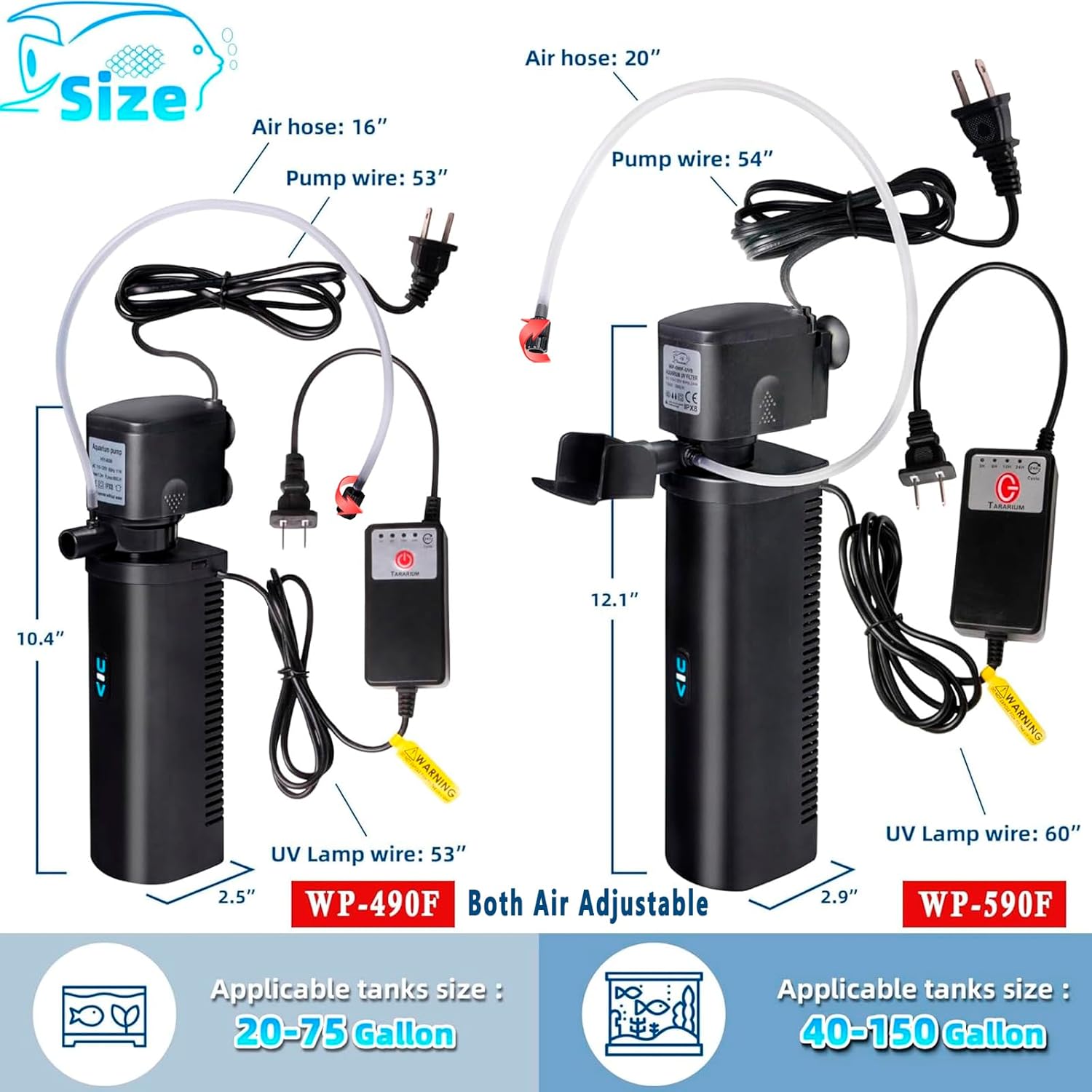
| Recommended Tank Size | 20-75 Gallons |
| UV Wavelength | 254nm |
| Minimum Water Level | 3.5 inches (8.9 cm) |
| UV Timer Settings | 3H, 6H, 12H, 24H Daily Cycle |
| Filter Dimensions (approx.) | Height: 10.4 inches, Width: 2.5 inches |
| Air Hose Length (approx.) | 16 inches |
| Pump Wire Length (approx.) | 53 inches |
| UV Lamp Wire Length (approx.) | 53 inches |
Warranty Information
TARARIUM products are manufactured to high-quality standards. This product comes with a limited warranty against defects in materials and workmanship from the date of purchase. Please retain your proof of purchase for warranty claims. The warranty does not cover damage resulting from improper installation, misuse, neglect, unauthorized repairs, or normal wear and tear of consumable parts like filter sponges and UV lamps.
Customer Support
For further assistance, technical support, or warranty inquiries, please contact TARARIUM customer service through the retailer where the product was purchased or visit the official TARARIUM website for contact information. When contacting support, please have your product model number (WP-490F) and purchase details ready.


