
1. Product Overview
The TARARIUM WP-490F is an all-in-one internal aquarium filter system designed to maintain clear and healthy water in fish and turtle tanks ranging from 20 to 75 gallons. It integrates multiple functions including filtration, UV sterilization, oxygenation, wave making, and water pumping. This device helps reduce cloudy water, eliminate green water, and minimize odors, contributing to a stable aquatic environment.

Image 1.1: The TARARIUM WP-490F aquarium filter system, showing the main filter unit, external controller with timer, and UV lamp.
Key Features:
- Multi-functional Design: Combines filtration, UV sterilization, oxygenation, wave making, and water pumping.
- Two-Stage Water Clarification: Bio sponge filtration for debris and a 254nm UV light for green water and odor reduction.
- Adjustable Airflow: Customizable bubble output for varying oxygenation needs.
- Intelligent Timer: UV lamp and pump can be set to operate on a daily cycle of 3, 6, 12, or 24 hours.
- Versatile Installation: Suitable for marine and freshwater tanks, with vertical or horizontal placement options, including low water levels (minimum 3.5 inches).
- Easy Maintenance: Components are designed for simple disassembly and cleaning.
2. Safety Information
Please read and understand all safety instructions before operating this device. Failure to follow these instructions may result in injury or damage to the product.
- Electrical Safety: Ensure the power outlet matches the voltage requirements of the device. Do not operate with a damaged cord or plug. Keep electrical connections dry.
- UV Light Warning: The UV light emits ultraviolet radiation. DO NOT EXPOSE FISH OR OTHER AQUATIC LIFE DIRECTLY TO THE UV LIGHT. The UV lamp is designed to operate safely within the sealed filter housing. Direct exposure can cause harm.
- Water Immersion: The filter unit is designed for submersible use. Ensure it is fully submerged to the minimum water level indicated during operation. The UV light housing is IPX8 rated for water resistance.
- Maintenance: Always unplug the device from the power source before performing any maintenance, cleaning, or assembly/disassembly.
- Children and Pets: Keep the device and its components out of reach of children and pets to prevent accidental injury or damage.

Image 2.1: The UV lamp and its controller, highlighting the important safety warning regarding UV light exposure.
3. Product Components
The TARARIUM WP-490F system includes the following main components:
- Filter Unit: The main body containing the pump, filter media compartment, and UV lamp housing.
- UV Lamp: A 6W UV-C lamp (254nm wavelength) for sterilization.
- External Controller: Features timer settings (3H, 6H, 12H, 24H) and power indicator lights.
- Air Tube: For oxygenation and adjustable bubble supply.
- Bio Sponge: Mechanical and biological filter media.
- Power Cord and Plug: For electrical connection.
4. Setup Instructions
Follow these steps to properly set up your TARARIUM WP-490F aquarium filter:
- Unpack Components: Carefully remove all items from the packaging and inspect for any damage.
- Assemble Filter Unit: Ensure the UV lamp is securely placed within its housing inside the filter unit. The bio sponge should also be correctly positioned in the filter media compartment.
- Connect Air Tube (Optional): If oxygenation is desired, connect the provided air tube to the designated inlet on the filter unit. The other end of the air tube can be positioned above the water surface or connected to an air stone (not included) for finer bubbles.
- Position in Tank: Place the filter unit inside your aquarium. It can be installed vertically or horizontally. Ensure the water level is at least 3.5 inches (8.9 cm) above the bottom of the filter for proper operation. The suction cups on the filter unit can be used to secure it to the tank wall.
- Connect Power: Plug the filter's power cord into the external controller, then plug the controller's power cord into a suitable electrical outlet.

Image 4.1: The WP-490F filter installed in an aquarium, demonstrating water flow and the effect of the UV light on water clarity.
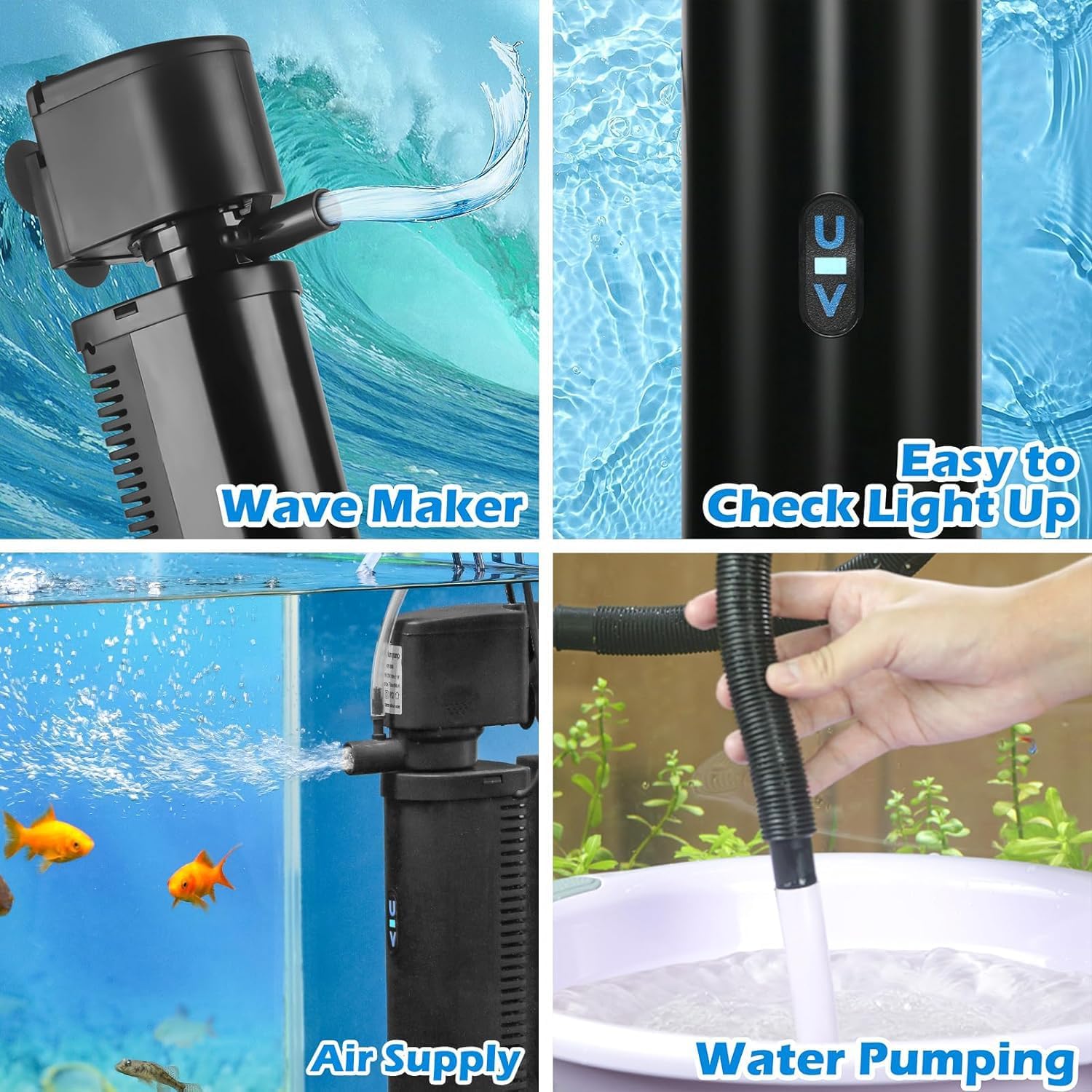
Image 4.2: Visual representation of the filter's various functions, including wave making, air supply, water pumping, and the indicator light for UV operation.
5. Operating Instructions
The TARARIUM WP-490F offers flexible operation modes, particularly for the UV lamp.
5.1. Power On/Off
Once plugged in, the filter pump will begin operating. The UV lamp's operation is controlled by the external timer.
5.2. Setting the UV Lamp Timer
The external controller allows you to set an automatic daily cycle for the UV lamp. The pump operates continuously, while the UV lamp can be timed.
- Press the 'Cycle' button on the controller to select the desired operating duration for the UV lamp.
- Available settings are 3 hours, 6 hours, 12 hours, or 24 hours (continuous operation).
- The corresponding indicator light on the controller will illuminate to show the selected setting.
- The UV lamp will operate for the set duration and then turn off. It will automatically repeat this cycle daily at the same time it was initially activated.

Image 5.1: Diagram illustrating the intelligent timing function of the UV lamp, showing how to set the daily operating cycle.
5.3. Adjusting Airflow
If the air tube is connected, you can adjust the airflow to control the amount of bubbles and oxygenation provided to the tank. Refer to the filter unit for the specific adjustment mechanism, typically a small valve or slider.
5.4. Water Pumping Function
The filter can also function as a water pump by unplugging the air tube. This can be useful for water circulation or other specific needs within the aquarium.
6. Maintenance
Regular maintenance ensures optimal performance and longevity of your TARARIUM WP-490F filter. Always unplug the device before performing any maintenance.
6.1. Cleaning the Bio Sponge
The bio sponge is crucial for mechanical and biological filtration. It should be cleaned regularly, typically every 2-4 weeks, depending on tank conditions.
- Unplug the filter from the power outlet.
- Carefully remove the filter unit from the aquarium.
- Disassemble the filter unit to access the bio sponge.
- Rinse the bio sponge in old aquarium water (from a water change) to preserve beneficial bacteria. Avoid using tap water directly, as chlorine can kill these bacteria.
- Reassemble the filter unit and place it back in the aquarium.
6.2. Replacing the UV Lamp
The UV lamp has a limited lifespan and its effectiveness diminishes over time. It is recommended to replace the UV lamp every 6-12 months for optimal performance.
- Unplug the filter from the power outlet.
- Carefully remove the filter unit from the aquarium.
- Disassemble the filter unit to access the UV lamp housing.
- Gently remove the old UV lamp. Handle with care as it contains glass.
- Insert the new TARARIUM 6W replacement UV lamp (model 490F Replacement Lamp 6w) into the housing. Ensure it is seated correctly.
- Reassemble the filter unit and place it back in the aquarium.

Image 6.1: Diagram illustrating the double deep filtration process, showing the bio sponge and UV sterilizer components within the filter unit.
7. Troubleshooting
If you encounter issues with your TARARIUM WP-490F filter, refer to the following common problems and solutions:
| Problem | Possible Cause | Solution |
|---|---|---|
| Filter pump not working | No power; Impeller jammed; Air in pump. | Check power connection. Unplug and clean impeller. Ensure pump is fully submerged and free of air. |
| UV lamp not lighting up | UV lamp expired; Incorrect timer setting; Faulty connection. | Check timer setting on controller. Replace UV lamp if expired. Ensure all connections are secure. |
| Water remains cloudy/green | Filter media clogged; UV lamp ineffective/off; Tank overstocked; Insufficient water changes. | Clean or replace bio sponge. Check UV lamp operation and replace if needed. Reduce fish load. Perform regular water changes. |
| Weak water flow/bubbles | Pump intake clogged; Air tube blocked; Airflow adjustment closed. | Clean pump intake. Clear air tube. Adjust airflow control. |
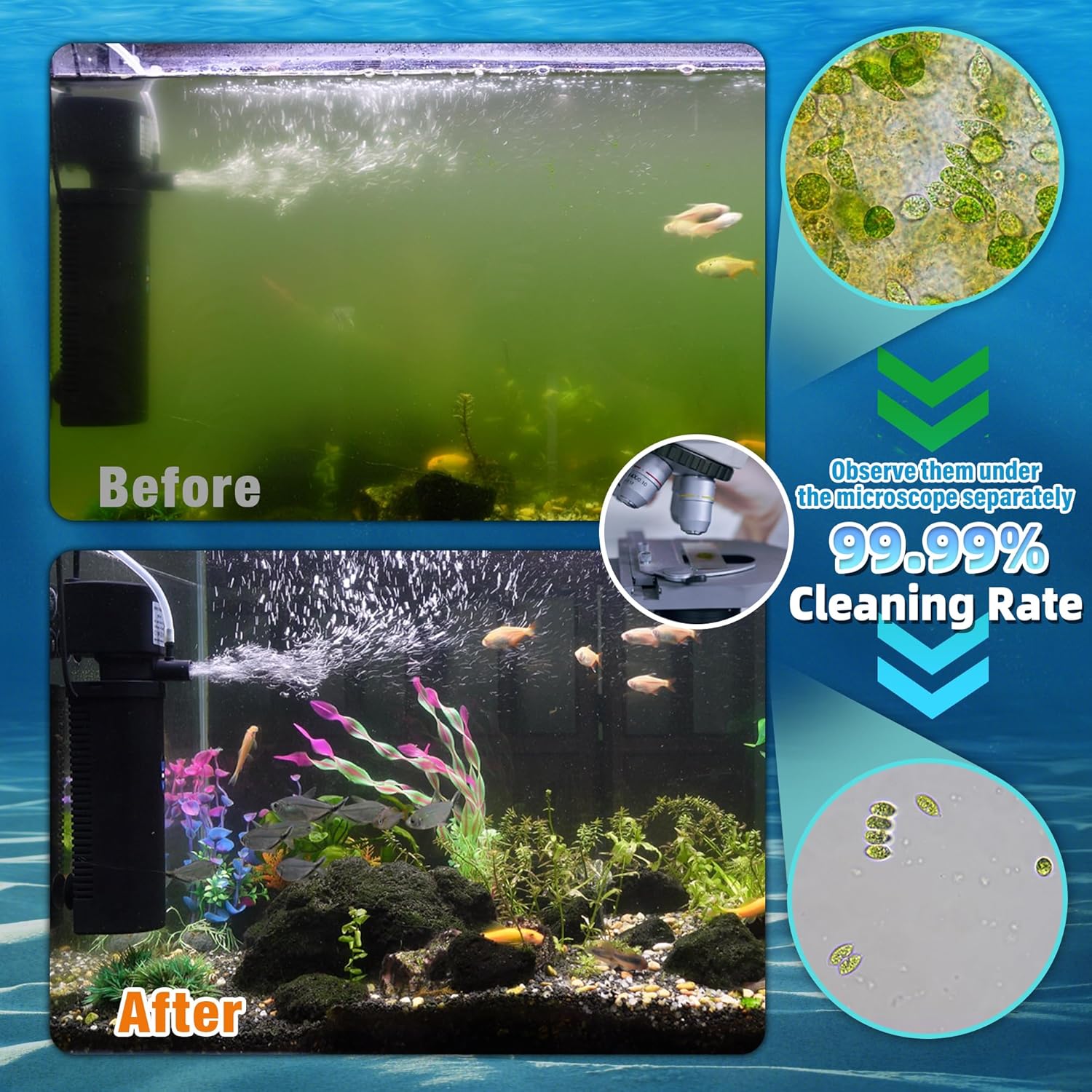
Image 7.1: A visual comparison showing an aquarium with green, cloudy water before using the filter, and clear water after use, demonstrating the filter's effectiveness.
8. Specifications
| Feature | Specification |
|---|---|
| Model | WP-490F |
| UV Lamp Power | 6W |
| UV Wavelength | 254nm |
| Maximum Flow Rate | 200 GPH (Gallons Per Hour) |
| Recommended Tank Size | 20-75 Gallons |
| Minimum Water Level | 3.5 inches (8.9 cm) |
| Timer Settings | 3H, 6H, 12H, 24H Daily Cycle |
| Water Type | Freshwater and Marine |
| Water Resistance Rating | IPX8 (UV light housing) |
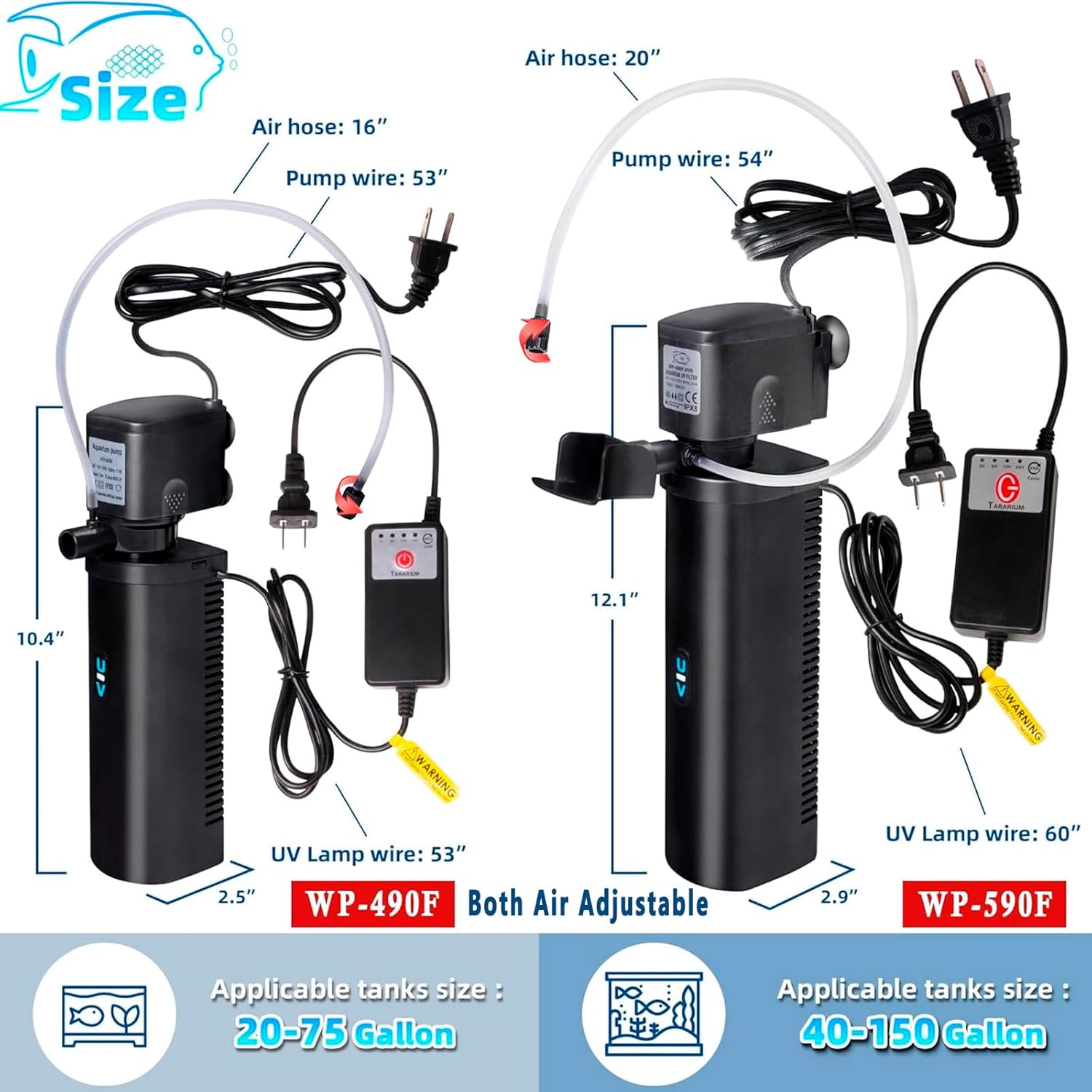
Image 8.1: A comparison of the WP-490F and WP-590F models, showing their respective dimensions and recommended tank sizes.
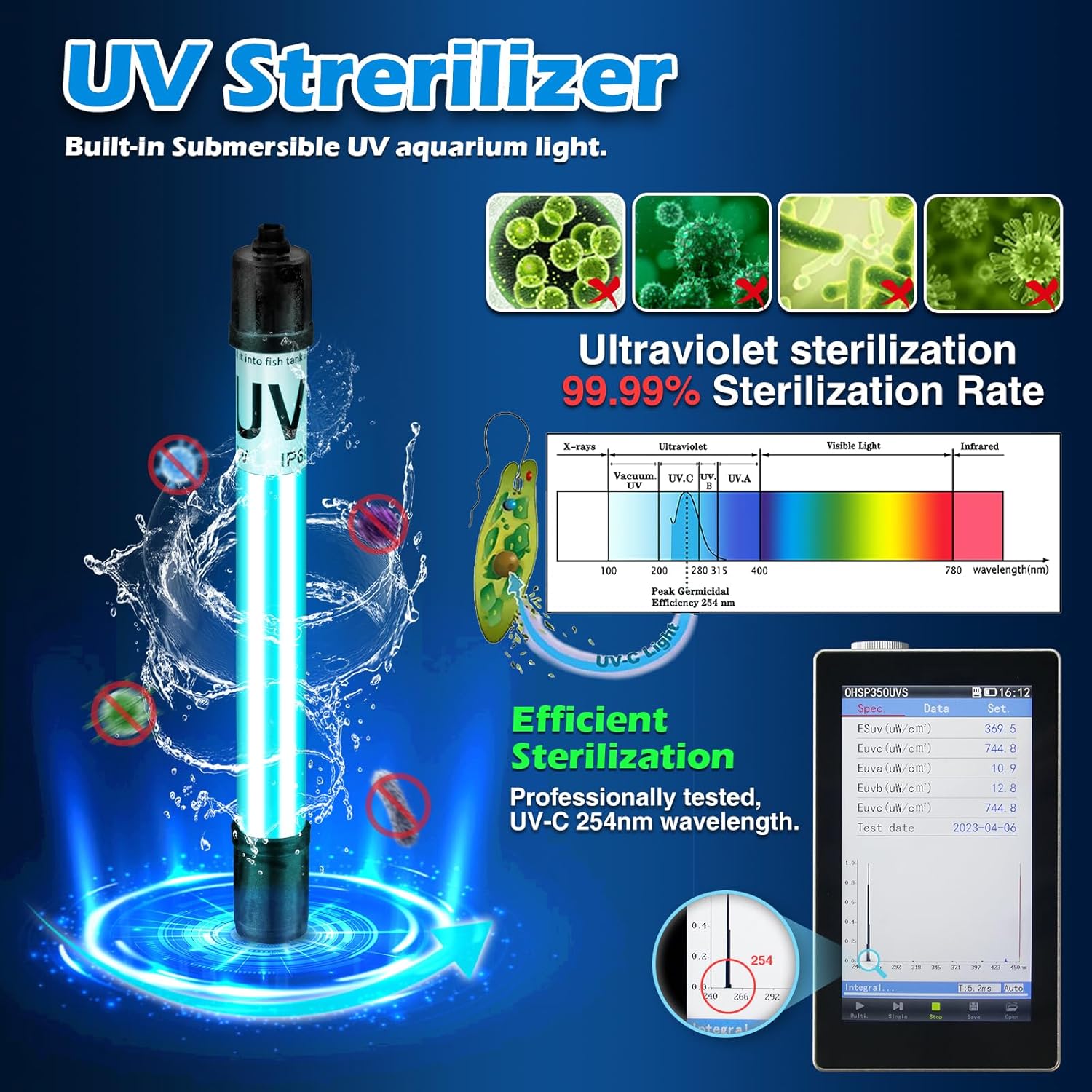
Image 8.2: Detailed view of the UV sterilizer, highlighting its 254nm wavelength and 99.99% sterilization rate for effective water purification.
9. Warranty and Support
For warranty information, technical support, or replacement parts, please contact TARARIUM customer service. Refer to the product packaging or the official TARARIUM website for contact details.