
Introduction
This manual provides essential instructions for the proper setup, operation, and maintenance of your Hotsmtbang IPROXX 65921 68534 13-Pin Handheld Remote Control. This remote is specifically designed as a replacement for Okin Dewert electric hospital and nursing beds, compatible with control boxes such as the MC15. It features a 13-pin plug for direct connection and requires no programming or internal batteries for operation.
Safety Information
- Compatibility: This remote control is not universal. It is designed for specific Okin Dewert electric hospital and nursing bed models, particularly those using a 13-pin connector and an MC15 control box. Verify your bed's control box model before use.
- Connection: Ensure the 13-pin plug is inserted correctly and securely into the corresponding port on your bed's control box. Improper connection may prevent functionality or cause damage.
- Power Source: The remote control draws power directly from the bed's control box via the 13-pin connection. It does not require or use internal batteries.
- Handling: Handle the remote control with care. Avoid dropping it or exposing it to excessive moisture or extreme temperatures.
Product Overview
The Hotsmtbang IPROXX 65921 68534 remote control features an ergonomic design for comfortable handheld use, equipped with intuitive buttons for bed adjustments and a robust 13-pin connector for reliable power and signal transmission.
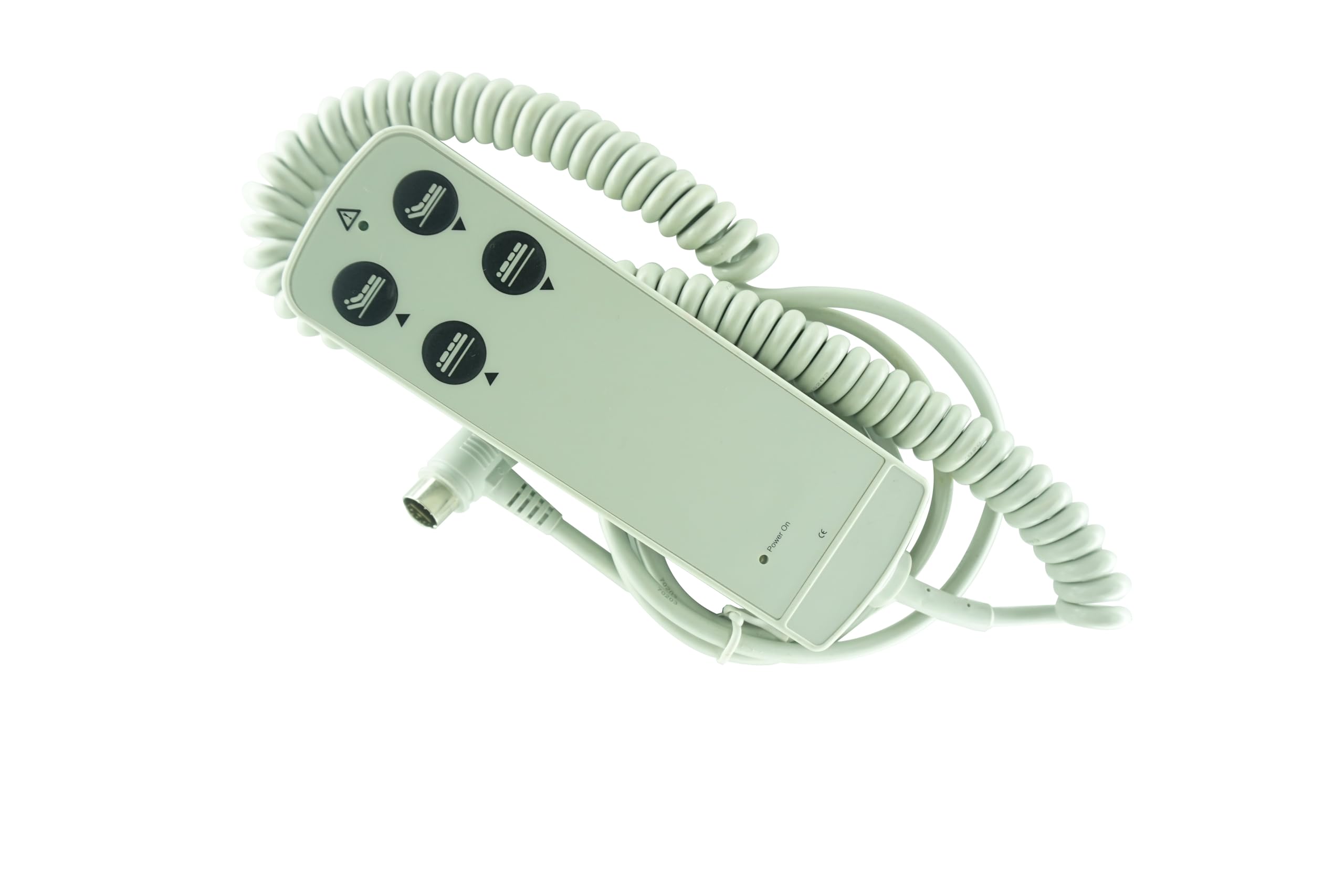
Figure 1: Front view of the remote control, displaying the 'Power On' indicator and control buttons for bed adjustments.

Figure 2: Side view of the remote control, highlighting the integrated clip for convenient attachment to bed rails or other surfaces.

Figure 3: Detailed view of the 13-pin connector, which connects the remote to the bed's control box.
Setup
- Verify Compatibility: Before connecting, ensure your electric hospital or nursing bed uses a 13-pin connector and is compatible with the IPROXX 65921 68534 model, especially if your control box is an MC15.
- Locate Port: Identify the corresponding 13-pin port on your bed's control box. This port is typically located on the side or underside of the bed frame.
- Connect Remote: Align the 13-pin plug of the remote control with the port on the control box. Gently push the plug into the port until it is fully seated and secure. Do not force the connection.
- Power On: Once connected, the remote control should receive power from the bed's system. The "Power On" indicator light on the remote (if present) may illuminate. No additional power source or programming is required.
Operating Instructions
The remote control provides intuitive buttons for adjusting various positions of the electric bed. The specific functions may vary slightly depending on your bed model, but generally include adjustments for the head, foot, and overall height.
- Head Section Adjustment: Use the buttons with the head icon (often depicting a person's upper body) and up/down arrows to raise or lower the head section of the bed.
- Foot Section Adjustment: Use the buttons with the foot icon (often depicting a person's lower body) and up/down arrows to raise or lower the foot section of the bed.
- Overall Bed Height Adjustment: Use the buttons with the full bed icon and up/down arrows to raise or lower the entire bed frame.
- Stop Function: Releasing any button will immediately stop the bed's movement.
Note: The remote control provides smooth and precise control. Press and hold buttons for continuous adjustment, or tap for minor adjustments.
Maintenance
- Cleaning: To clean the remote control, wipe it with a soft, damp cloth. Do not use abrasive cleaners, solvents, or immerse the remote in water.
- Storage: When not in use, store the remote control in a dry place, away from direct sunlight and extreme temperatures. Utilize the integrated clip to secure it to the bed frame or a convenient location to prevent misplacement or damage.
- Cable Care: Periodically inspect the cable and 13-pin connector for any signs of wear, fraying, or damage. If damage is observed, discontinue use and seek a replacement.
Troubleshooting
| Problem | Possible Cause | Solution |
|---|---|---|
| Remote control is unresponsive. |
|
|
| Bed movements are erratic or incomplete. |
|
|
If troubleshooting steps do not resolve the issue, or if you are unsure about compatibility, please contact customer support with your bed's control box model information.
Specifications
- Model: PROXX 65921 68534
- Brand: Hotsmtbang
- Connector Type: 13-Pin Plug
- Compatibility: Okin Dewert Electric Hospital Beds, Delivery Beds, Nursing Beds (e.g., with MC15 control box)
- Special Feature: No Programming Required
- Power Source: Powered by bed's control box (no internal batteries)
- Connectivity Technology: Wired
- Maximum Number of Supported Devices: 1
Warranty Information
This Hotsmtbang remote control comes with a 90-day quality warranty. We perform a thorough check before shipping to ensure product quality. In case of any quality issues within the warranty period, a hassle-free return and unconditional refund are offered.
Customer Support
For further assistance, compatibility inquiries, or if your specific bed model is not explicitly listed, please contact Hotsmtbang customer support. Providing the model number of your bed's control box will help us assist you more efficiently.