
1. Introduction
Thank you for choosing the DEWENWILS Matter Pool Pump Timer. This heavy-duty smart timer is designed for reliable control of high-load outdoor equipment such as pool pumps, water heaters, fountains, and lighting. Featuring Matter compatibility, it integrates seamlessly with various smart home ecosystems including Apple HomeKit, Alexa, Google Home, and SmartThings, requiring a Matter-certified hub for operation. Its robust, weather-resistant design ensures dependable performance in diverse outdoor conditions.
Please read this manual thoroughly before installation and operation to ensure safe and efficient use of your device.
2. Safety Information
- WARNING: Risk of Electric Shock. Installation should be performed by a qualified electrician or service personnel.
- Disconnect power at the circuit breaker before installing or servicing the timer or the equipment it controls.
- Ensure all wiring connections are secure and comply with local electrical codes.
- This device is rated for 120VAC, 2HP, 40A. Do not exceed these ratings.
- The enclosure is ETL certified and designed for outdoor use, but ensure proper sealing of conduits and knockouts to maintain weather resistance.
- Only use 2.4GHz Wi-Fi networks for connectivity. 5GHz networks are not supported.
3. Package Contents
- DEWENWILS Matter Pool Pump Timer (Model PTW05)
- Instruction Manual
- Mounting Hardware (screws, anchors)
4. Product Overview
The DEWENWILS Matter Pool Pump Timer is housed in a durable, weather-resistant enclosure. Key components include:
- Wi-Fi Antenna: For wireless communication.
- Power Indicator: Shows the power status.
- Power & Programming Button: For manual control and pairing.
- Wi-Fi Indicator/Load Indicator: Displays Wi-Fi connection status and load operation.
- Terminal Blocks: For electrical wiring connections.
- Knockouts: Pre-drilled holes for conduit entry.
- IP44 Weatherproof Rated Enclosure: Protects against dust and water splashes.
5. Setup
5.1 Matter Compatibility Requirements
This is a Matter-certified timer and requires a Matter-compatible hub to function. It is not a standalone Wi-Fi device. Ensure you have one of the following Matter-certified hubs:
- Apple Home: HomePod, HomePod mini, Apple TV
- Amazon Alexa: Echo Dot (3rd Gen and later), Echo Studio, Echo Show
- Google Home: Nest Hub, Nest Mini
- SmartThings: SmartThings Hub (2018 Hub, 2015 Hub, Aeotec Smart Home Hub)
Your smartphone must be connected to a 2.4GHz Wi-Fi network during the pairing process. 5GHz networks are not supported.

5.2 Wiring Installation
IMPORTANT: Ensure power is OFF at the circuit breaker before proceeding with any wiring.
- Mount the timer box securely to a wall or suitable surface using the provided mounting hardware.
- Remove the necessary knockouts for conduit entry. Ensure proper conduit fittings are used to maintain the weatherproof rating.
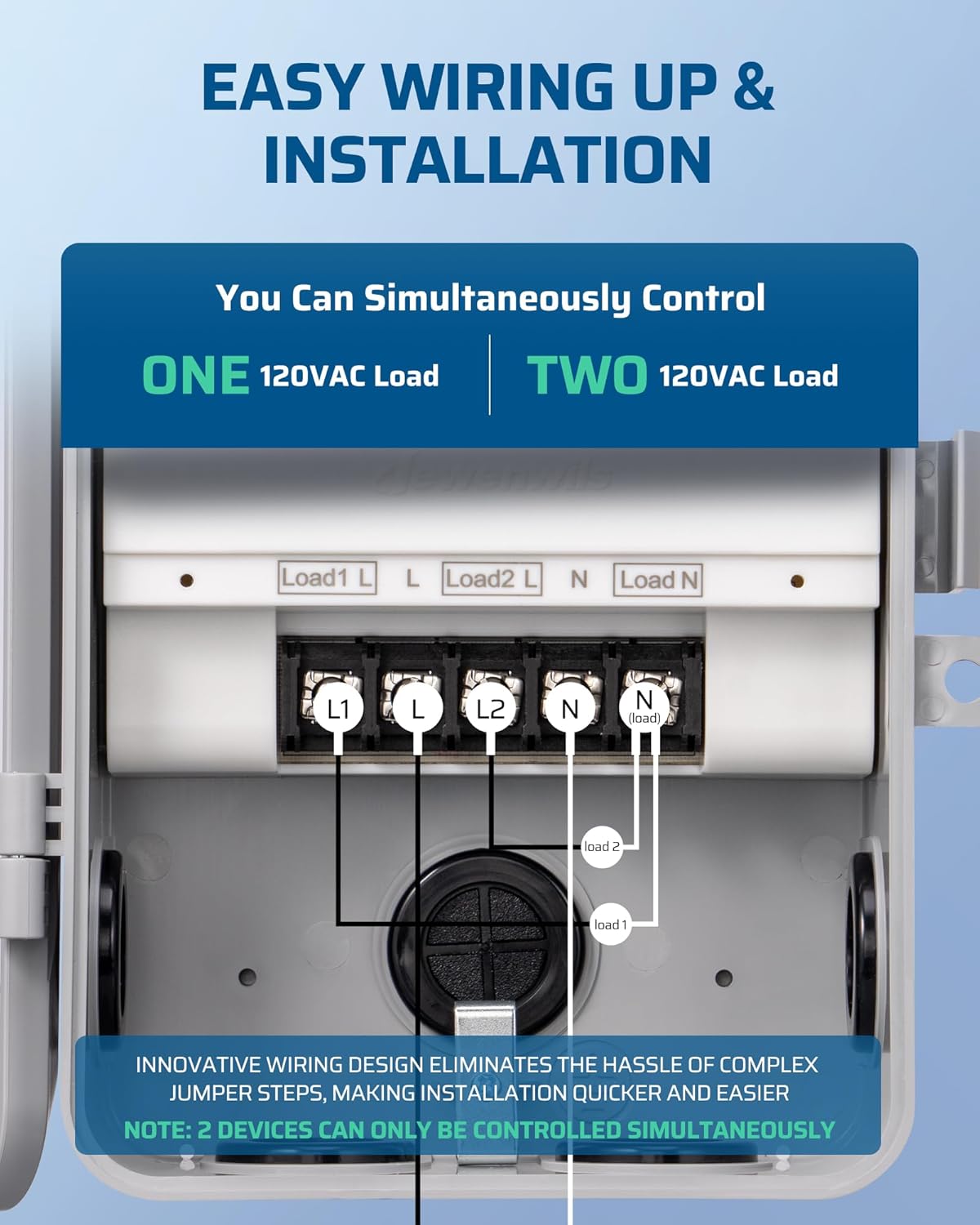
- Connect the electrical wiring to the terminal blocks inside the timer box. The streamlined wiring system is designed for ease of installation. Refer to the wiring diagrams below for single or dual load configurations.
- Ensure all connections are tight and secure. Replace the insulating panel after wiring.

Note: This timer can simultaneously control one 120VAC load or two 120VAC loads. For two loads, ensure the combined current does not exceed 40A.
5.3 Pairing with Your Smart Home System
- Ensure your Matter-compatible hub is set up and connected to your 2.4GHz Wi-Fi network.
- Power on the DEWENWILS Matter Pool Pump Timer. The Wi-Fi indicator should begin flashing, indicating it's in pairing mode.
- Open your preferred smart home app (Apple Home, Alexa, Google Home, or SmartThings).
- Select the option to "Add Accessory" or "Add Device".
- Scan the Matter QR code located inside the timer's cover or on the device itself. The QR code is also provided in this manual.
- Follow the on-screen prompts in your smart home app to complete the pairing process.
- If pairing fails, ensure your phone is on a 2.4GHz Wi-Fi network and your smart home app and hub firmware are up to date. You may need to restart your phone or hub.

Matter QR Code: MT:4CDA0SQ614X30P6W.00
Recommended App Versions:
- Alexa (Android): 2.2.521848.0 OR later (build version 2023.15 for APP version)
- Alexa (iOS): 2.2.548660 OR later (build version 2023.15 for APP version)
- Apple Home (iOS): 16.4 or later
- SmartThings (Android): 1.8.01.22 or later
- SmartThings (iOS): 1.7.02.16 or later

6. Operating Instructions
6.1 Manual Control
Press the Power & Programming button on the timer to manually turn the connected device ON or OFF. The Load Indicator will illuminate when the load is active.
6.2 App Control
Once paired, you can control your DEWENWILS Matter Pool Pump Timer remotely using your smart home app. This allows you to:
- Turn devices ON/OFF from anywhere.
- Create custom schedules for automated operation.
- Set countdown timers.

6.3 Voice Control
Integrate your timer with voice assistants like Alexa, Siri, or Google Assistant through your Matter-compatible hub. Use simple voice commands to control your connected devices.
- Example: "Alexa, turn on the pool pump."
- Example: "Hey Google, turn off the outdoor lights."

6.4 Scheduling and Automation
Utilize your smart home app to set up automated schedules for your connected devices. This allows for energy savings and convenience.
- Set daily or weekly schedules for your pool pump to run during off-peak hours.
- Automate outdoor lighting to turn on at dusk and off at dawn.

7. Maintenance
- Regularly inspect the timer enclosure for any signs of damage or wear.
- Ensure all conduit connections and the enclosure door are properly sealed to maintain weather resistance.
- Keep the exterior of the timer clean from dirt and debris. Use a soft, damp cloth for cleaning. Do not use harsh chemicals.
- Periodically check electrical connections for tightness, especially after initial installation.

8. Troubleshooting
- Device not powering on: Check the circuit breaker to ensure power is supplied to the timer. Verify all wiring connections are correct and secure.
- Cannot pair with smart home app:
- Ensure your smartphone is connected to a 2.4GHz Wi-Fi network.
- Verify your Matter-compatible hub is online and functioning correctly.
- Update your smart home app and hub firmware to the latest versions.
- Try restarting your smartphone, hub, and the timer (by cycling power at the breaker).
- Ensure the timer is within range of your Matter hub.
- Losing connectivity: Ensure the timer is within optimal range of your Wi-Fi router and Matter hub. Check for potential interference from other wireless devices.
- Manual control not working: Ensure the timer is receiving power. If the device is paired, check the app for any conflicting schedules or automations.
9. Specifications
| Feature | Specification |
|---|---|
| Model Number | PTW05 |
| Voltage | 120VAC |
| Horsepower (HP) | 2HP |
| Current Rating | 40A |
| Compatibility | Matter Certified (Apple HomeKit, Alexa, Google Home, SmartThings) |
| Wireless Connectivity | 2.4GHz Wi-Fi only |
| Operating Temperature | -40°F to 140°F (-40°C to 60°C) |
| Enclosure Rating | ETL Certified, IP44 Weatherproof |
| Dimensions (D x W x H) | 9.75"D x 4.21"W x 7.63"H |
| Color | Gray |
10. Official Product Videos
Control your pool pump easily with this timer
This video demonstrates how to easily control your pool pump using the DEWENWILS Matter Pool Pump Timer, showcasing its smart features and convenience. (Duration: 2:35)
Save Money Control This Timer From Your Phone
Learn how to save money by efficiently controlling your DEWENWILS Matter Pool Pump Timer directly from your smartphone, highlighting the benefits of smart scheduling. (Duration: 1:06)
11. Warranty and Support
DEWENWILS products are designed for reliability and performance. This product comes with a standard manufacturer's warranty. For specific warranty details, please refer to the warranty card included with your purchase or visit the official DEWENWILS website.
For technical support, troubleshooting assistance, or any questions regarding your DEWENWILS Matter Pool Pump Timer, please contact our customer service team:
- Website: www.dewenwils.com
- Email: support@dewenwils.com (example email, please verify actual support contact)
- Phone: 1-800-XXX-XXXX (example phone, please verify actual support contact)
Please have your model number (PTW05) and purchase date ready when contacting support.