
1. Product Overview
The CATLINK PRO X is an advanced self-cleaning automatic cat litter box designed to simplify pet care for single or multiple cat households. It integrates smart technology for health monitoring, offers multiple cleaning modes, and prioritizes pet safety with various sensors.

Image: The CATLINK PRO X Automatic Cat Litter Box in grey, shown with a cat, litter liners, and a smartphone displaying the companion app.
2. Setup and Initial Use
2.1 Unpacking and Placement
- Carefully remove all components from the packaging.
- Place the litter box on a flat, stable surface in a location accessible to your cat(s) and near a power outlet.
2.2 Power Connection
- Connect the power adapter to the litter box and then plug it into a wall outlet.
- The unit will perform an initial self-check.
2.3 Litter Filling
- Ensure the waste drawer is empty and properly inserted.
- Fill the globe with clumping cat litter, ensuring it does not exceed the maximum fill line. The CATLINK PRO X is compatible with bentonite, mineral stone, and mixed litters.

Image: Illustration showing the CATLINK PRO X is compatible with bentonite, mineral stone, and mixed litters.
2.4 App Connection (Optional but Recommended)
- Download the CATLINK app from your smartphone's app store.
- Follow the in-app instructions to connect your device to the litter box via Wi-Fi. This enables remote control and health monitoring features.

Image: A hand holding a smartphone displaying the CATLINK app interface, showing various control and monitoring options for the litter box.
3. Operating Modes and Features
3.1 Self-Cleaning Modes
The CATLINK PRO X offers four automatic cleaning modes to suit your preferences:
- Auto Mode: Automatically cleans after your cat exits the litter box.
- Timer Mode: Schedule cleaning cycles at specific times.
- Manual Mode: Initiate a cleaning cycle manually via the control panel or app.
- Empty Mode: Fully empties the globe for litter changes or deep cleaning.
3.2 Health Monitoring
The integrated health monitoring system tracks your cat's bathroom habits, weight, temperature, and humidity. Real-time updates and daily/weekly reports are sent to your smartphone via the CATLINK app, providing insights into your cat's well-being.

Image: A cat inside the litter box, with a smartphone displaying health data such as weight, frequency, and duration of use.
3.3 Multi-Cat Identification
The system can adapt to and identify multiple cats, providing individualized data for each pet based on weight sensing. This feature is ideal for households with more than one feline companion.

Image: Two cats, one inside the litter box and one outside, illustrating the multi-cat identification feature.
3.4 Remote Control
Manage your litter box remotely using the CATLINK App. You can activate cleaning cycles, monitor waste levels, and receive alerts from anywhere with an internet connection.

Image: A person using the CATLINK app on a smartphone to control the litter box remotely, with the litter box and a cat in the background.
4. Safety Features
The CATLINK PRO X is equipped with multiple safety mechanisms to ensure your cat's well-being:
- Radar and Infrared Sensors: Detect the presence of a cat, automatically pausing cleaning cycles to prevent injuries.
- Pinch-Free Design: Engineered to eliminate pinch points during operation.
- Gravity Sensors: Monitor weight changes, activating safety protocols if unexpected movement is detected.
- Ambient Light: A soft ambient light helps older cats navigate the litter box at night.

Image: Diagram illustrating the various safety sensors within the CATLINK PRO X, including anti-pinch, infrared, motor blocked, and gravity sensors.
5. Maintenance and Cleaning
5.1 Odor Control
The litter box features a powerful carbon filter system that eliminates up to 90% of odors, contributing to a fresh home environment.
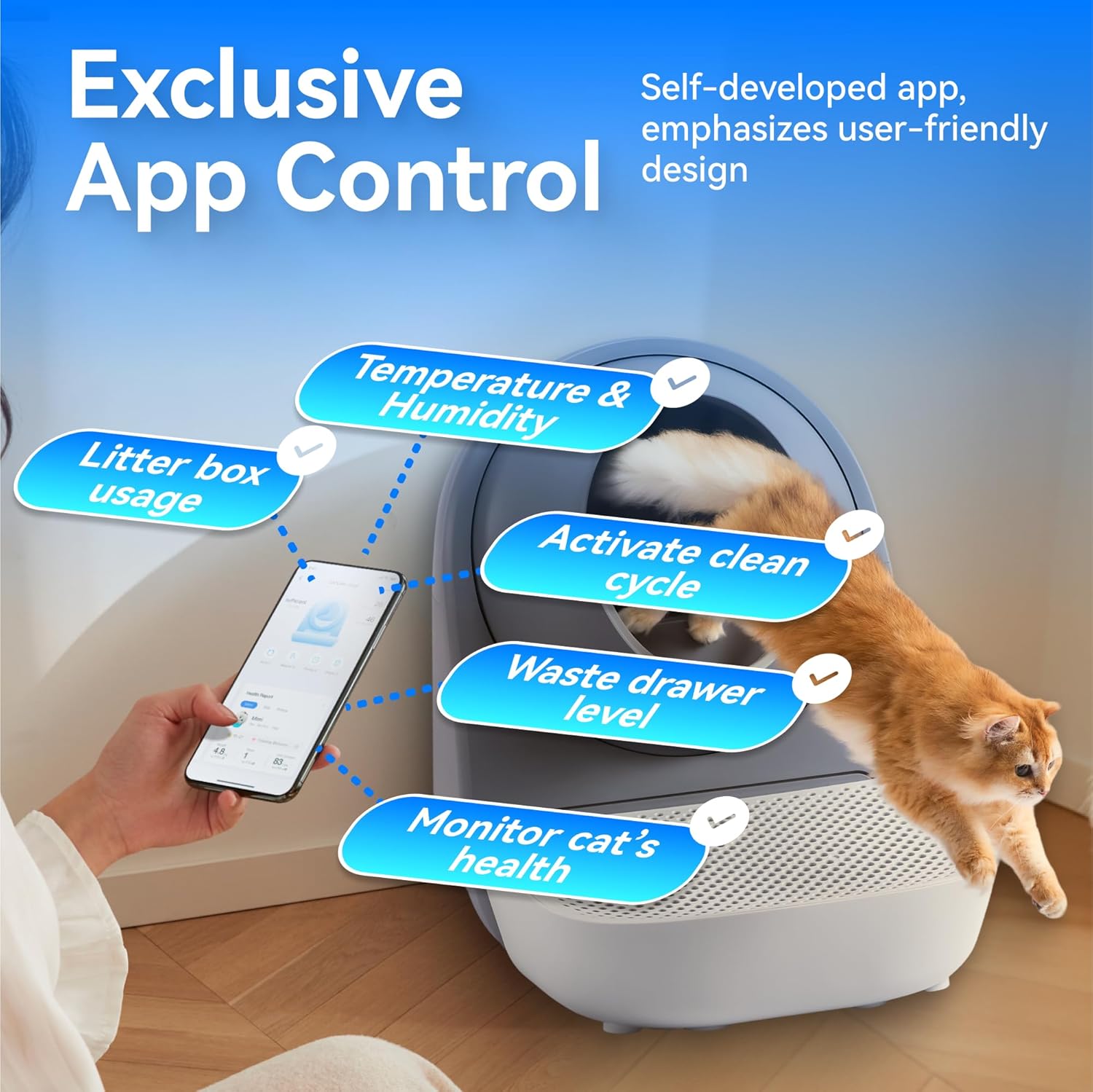
Image: Two cats near the litter box, with visual effects indicating odor elimination and a close-up of the carbon filter component.
5.2 Waste Bin Management
The large 13-liter waste bin can hold up to 7 days of waste for two cats or 14 days for one cat, reducing the frequency of emptying. The app will notify you when the waste bin is full.
5.3 Cleaning the Unit
The smooth, dust-resistant globe chamber is designed for easy cleaning. For thorough cleaning, the globe can be disassembled and washed. Ensure all components are completely dry before reassembly.
Video: A step-by-step tutorial demonstrating how to replace the globe liner of the CATLINK litter box, including disassembly and reassembly of the main components.
6. Product Specifications
| Feature | Specification |
|---|---|
| Brand | CATLINK |
| Model Name | PRO X (CL-06) |
| Dimensions (LxWxH) | 23.62" x 23.62" x 27.95" |
| Item Weight | 22 Pounds |
| Material | Acrylonitrile Butadiene Styrene (ABS) |
| Litter Box Type | Automated Self-Cleaning Litter Box |
| Waste Bin Capacity | 13 Liters |
| Chamber Capacity | 65 Liters |
| Target Audience | Cats |
7. Troubleshooting
If you encounter any issues with your CATLINK PRO X, please consider the following common solutions:
- Unit Not Responding: Ensure the power cord is securely plugged into both the unit and a working electrical outlet.
- Cleaning Cycle Interruption: Check if a cat is detected by the sensors. Remove any obstructions from the entry or inside the globe.
- App Connectivity Issues: Verify your Wi-Fi connection and ensure the litter box is within range of your router. Restarting both the litter box and your router may resolve the issue.
- Odor Persistence: Replace the carbon filter regularly. Ensure the waste bin is emptied and cleaned as needed.
- Litter Sticking: Ensure you are using a high-quality clumping litter. Allow sufficient time for litter to clump before a cleaning cycle initiates.
For persistent issues not covered here, please refer to the comprehensive troubleshooting section in the full user manual or contact customer support.
8. Warranty and Support
The CATLINK PRO X comes with a 1-year warranty from the date of purchase, covering manufacturing defects and malfunctions under normal use.
For any questions, technical assistance, or warranty claims, please contact CATLINK customer support. Our team is available 24/7 online to provide reliable support and ensure a seamless experience with your product.
Contact information can typically be found on the product packaging, the official CATLINK website, or within the CATLINK mobile application.


