
Introduction
The PWNAGE Stormbreaker Max CF is an ultralight wireless gaming mouse designed for high-performance esports. Featuring a carbon fiber composite construction, a custom XERO PAW3950 optical sensor with up to 36,000 DPI, and an 8000Hz polling rate, this mouse offers precision and responsiveness. Its ergonomic design and adjustable sensor position technology aim to enhance gaming accuracy and comfort.
Package Contents
Verify that all items are present in your package:

Image: The Stormbreaker Max CF mouse in Solar Blitz color, along with its accessories including the USB receiver pyramid, USB-C paracord cable, black grips, extra 100% PTFE skates, universal dot skates, and universal grips.
- PWNAGE Stormbreaker Max CF Mouse (Solar Blitz)
- USB Receiver & Pyramid High-Speed Polling Rate Dongle
- USB Type-C Paracord Cable (Black)
- Black Grips
- Extra 100% PTFE Skates
- Universal Dot Skates (Rounded 100% PTFE)
- Universal Grips
- User Manual
Setup
1. Initial Connection
The Stormbreaker Max CF can be used in both wireless and wired modes.
- Wireless Mode: Connect the USB Receiver Pyramid to an available USB port on your computer. Ensure the mouse is powered on. The mouse will automatically pair with the receiver. For optimal signal, place the receiver close to the mouse and away from other interfering devices.
- Wired Mode: Connect the provided USB Type-C Paracord Cable to the front port of the mouse and to an available USB port on your computer. The mouse will function immediately and begin charging.
2. Charging
The mouse is equipped with a rechargeable Lithium Ion battery. Connect the mouse via the USB Type-C cable to charge. The battery indicator will show charging status.
3. Software Installation (Pwnage Hub)
The Stormbreaker Max CF utilizes the Pwnage Hub, a web-based software platform for customization. No downloads are required. Access the Pwnage Hub via your web browser to configure settings such as DPI, polling rate, motion sync, macros, and key bindings. Settings are saved directly to the mouse's onboard memory.

Image: The Pwnage Hub web interface, illustrating the seamless customization options available for the Stormbreaker Max CF mouse without requiring software downloads.
Unboxing and Demo Video
Video: An unboxing and demonstration of the Pwnage Stormbreaker Max CF Solar Blitz mouse, showcasing its contents and initial setup.
Operating Instructions
Basic Functions
The Stormbreaker Max CF features 5 programmable buttons and a scroll wheel. Default functions are standard for a gaming mouse (left click, right click, scroll click, forward/back side buttons). These can be customized via the Pwnage Hub.
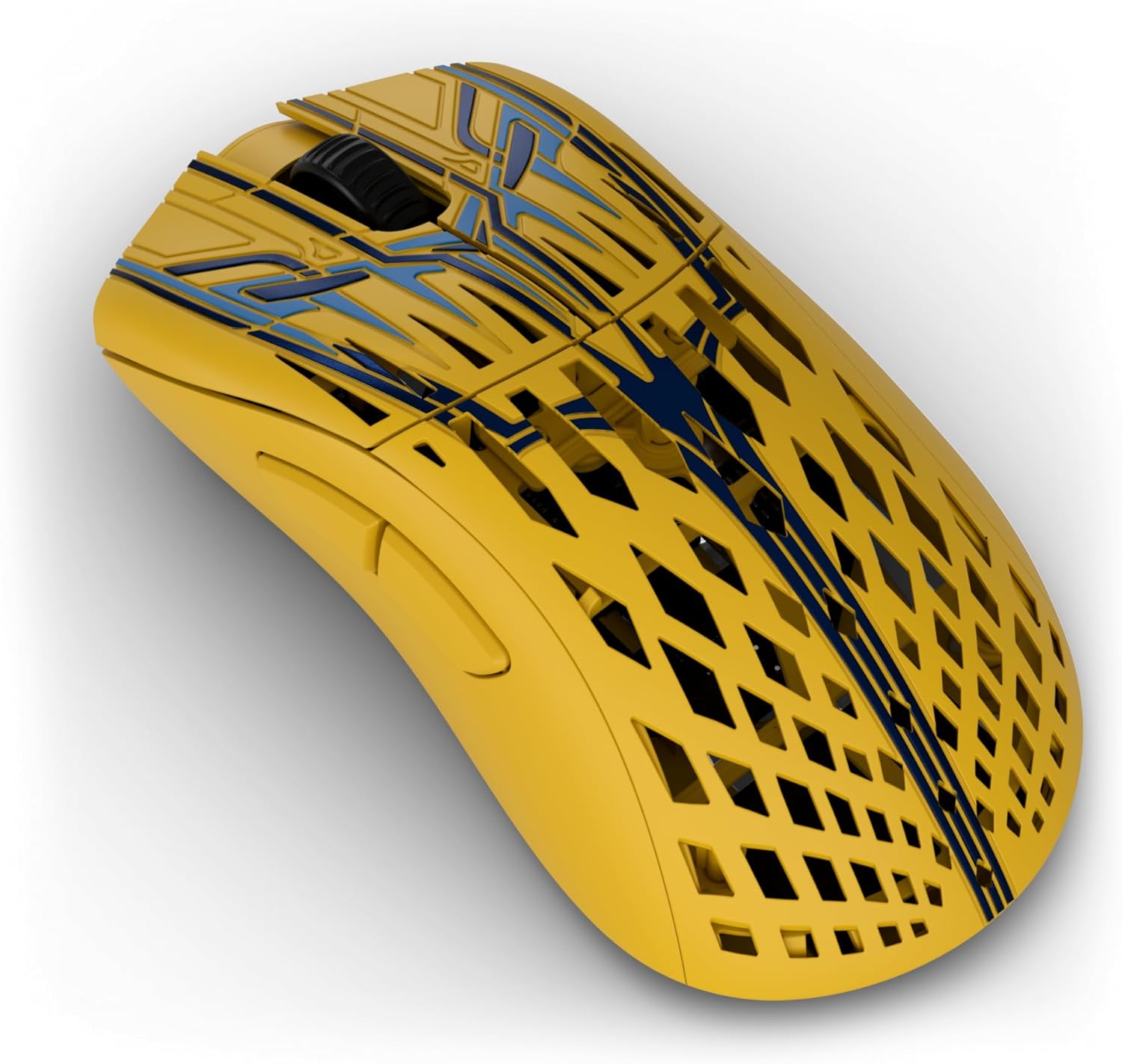
Image: A top-down view of the Stormbreaker Max CF mouse, showing the left and right click buttons, scroll wheel, and the intricate carbon fiber pattern.
DPI and Polling Rate Adjustment
The mouse features a XERO PAW3950 optical sensor with a maximum sensitivity of 36,000 DPI and supports an 8000Hz polling rate in both wired and wireless modes. These settings are adjustable through the Pwnage Hub to suit your preferences and game requirements.

Image: A visual representation of the Pwnage XERO PixArt 3950 custom sensor, emphasizing its high tracking accuracy and DPI capabilities.

Image: A setup demonstrating the 8kHz wireless and wired polling rate, with the mouse on a mousepad and the receiver pyramid positioned for optimal signal.
Customization
Adjustable Sensor Position Technology
The Stormbreaker Max CF features patented adjustable sensor position technology. This allows you to fine-tune the sensor's placement from front-to-back, optimizing it for your unique grip and aiming style. This customization can lead to increased speed and accuracy, and reduced path deviation while aiming.

Image: An illustration detailing the adjustable sensor position feature, explaining how different sensor placements can optimize aim for various hand sizes and grip styles, leading to improved throughput speed and reduced path deviation.
Grips and Skates
The mouse comes with interchangeable grips and PTFE skates. You can apply the included grips for enhanced control and comfort. The 100% PTFE skates provide a smooth glide, and extra sets are included for replacement.

Image: The underside of the Stormbreaker Max CF mouse, displaying the placement of the 100% PTFE skates for smooth movement.
Maintenance
Cleaning
To maintain optimal performance, regularly clean your mouse. Use a soft, dry cloth to wipe the surface. For stubborn dirt, a slightly damp cloth can be used, ensuring no moisture enters the internal components. Avoid harsh chemicals or abrasive materials.
Skate Replacement
Over time, the PTFE skates may wear down. Replace them with the included extra skates for consistent glide performance. Carefully peel off the old skates and apply the new ones, ensuring a clean surface for adhesion.
Troubleshooting
- Mouse not responding:
- Ensure the mouse is charged.
- Check if the USB receiver is securely plugged into a working USB port.
- Try connecting the mouse in wired mode to confirm functionality.
- Restart your computer.
- Intermittent connection/lag:
- Ensure the USB receiver is placed close to the mouse and away from other wireless devices (e.g., Wi-Fi routers, other wireless peripherals) that might cause interference.
- Update your computer's USB drivers.
- Tracking issues:
- Clean the mouse sensor with a soft, dry cloth.
- Ensure you are using a clean, suitable mousepad.
- Adjust DPI settings via the Pwnage Hub.
- Buttons not working:
- Check button assignments in the Pwnage Hub.
- Ensure no debris is lodged under the buttons.
For further assistance, please visit the official PWNAGE support website.
Specifications
| Brand | PWNAGE |
| Model Name | Stormbreaker Max CF |
| Model Number | sbmax-cf-solar |
| Connectivity Technology | Lag Free 2.4GHz Wireless |
| Movement Detection Technology | Optical (XERO PAW3950) |
| Mouse Maximum Sensitivity | 36,000 DPI |
| Polling Rate | 8000Hz (Wired & Wireless) |
| Item Weight | 45 grams (approx.) |
| Enclosure Material | Carbon Fiber Composite |
| Button Quantity | 5 |
| Hand Orientation | Right |
| Compatible Devices | Personal Computer |
| Operating System | Windows, macOS |
| Wireless Range | 10 meters |
| Battery | 1 Lithium Ion battery (included) |
| UPC | 810178740215 |
Warranty and Support
Warranty Information
The PWNAGE Stormbreaker Max CF Wireless Gaming Mouse comes with a 1-year warranty from the date of purchase. This warranty covers manufacturing defects under normal use. Please retain your proof of purchase for warranty claims.
Customer Support
For technical support, warranty claims, or general inquiries, please visit the official PWNAGE website or contact their customer service department. Detailed contact information can be found on the PWNAGE brand store page or the product packaging.
You can visit the PWNAGE Store for more information: PWNAGE Store
