
Introduction
This manual provides comprehensive instructions for the assembly, operation, and maintenance of your Klaxon Office Table. Designed as an ideal workstation for home offices, study rooms, and gaming setups, this versatile table offers ample space, a sturdy build, and ergonomic features for various needs.
Safety Information
- Ensure all components are securely fastened before and during use to prevent instability.
- Do not overload the table or shelves beyond their stated weight capacity to avoid damage or injury.
- Keep small parts and packaging materials away from children and pets during assembly.
- Avoid exposing the table to excessive moisture, direct sunlight, or extreme temperature changes, which can affect material integrity.
Package Contents
Please verify that all parts listed below are present and undamaged before beginning assembly. If any items are missing or damaged, please contact Klaxon customer support.
- Tabletop panels (Main, Monitor Stand, Side Shelves)
- Metal frame components (Legs, Support Bars)
- Keyboard tray with sliding rails
- Assembly hardware (screws, bolts, nuts, Allen key)
- Instruction manual (this document)

Image: Overview of the Klaxon Office Table highlighting its various components like the monitor stand, keyboard tray, and storage shelves.
Setup and Assembly (DIY Installation)
This Klaxon Office Table is designed for DIY installation. An average assembly time is approximately 2-3 hours, though individual experience may vary. It is recommended to have a second person assist with assembly for easier handling of larger components.
Tools Required
- Phillips Head Screwdriver (not included)
- Allen Key (included)
Assembly Steps
Step 1: Unpack and Identify Components. Carefully remove all parts from the packaging. Lay them out on a clean, soft surface (like a rug or blanket) to prevent scratches. Refer to the provided parts diagram to ensure all components are present and correctly identified.
Step 2: Assemble the Main Frame. Connect the vertical metal frame components using the provided screws and Allen key. Ensure all connections are snug but do not overtighten until all parts are aligned.
Step 3: Attach Side Shelves. Secure the wooden side shelves to the assembled metal frame. Pay close attention to the orientation of the shelves as indicated in the diagrams to ensure proper fit and stability.
Step 4: Install the Main Tabletop. Carefully place the main tabletop onto the frame and secure it with the designated screws. Ensure it is aligned properly and flush with the frame.
Step 5: Mount the Keyboard Tray. Attach the sliding rails to the underside of the main tabletop according to the instructions. Then, slide the keyboard tray onto the rails. Test its smooth operation by pulling it out and pushing it back in.
Step 6: Position the Monitor Stand. Place the monitor stand on the main tabletop. This component is typically not fixed and can be moved for optimal positioning based on your monitor setup and ergonomic needs.
Step 7: Final Check. Once assembled, gently shake the table to ensure stability. Tighten any loose screws if necessary. Your Klaxon Office Table is now ready for use.

Image: A person demonstrating the assembly process of the Klaxon Office Table, highlighting the DIY installation aspect.
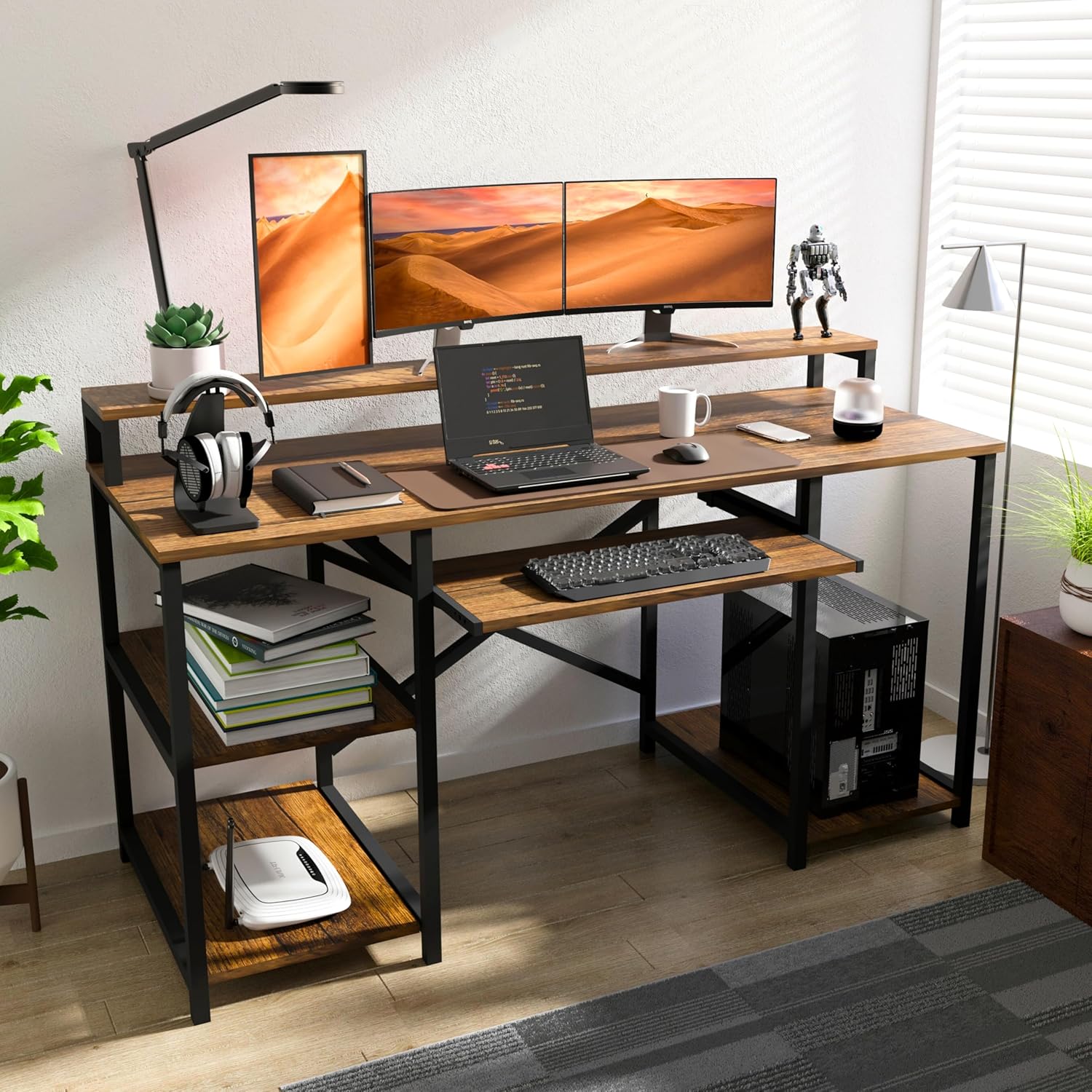
Image: The Klaxon Office Table fully assembled and set up with a computer, monitors, and accessories, showcasing its functionality.
Operating Instructions
Your Klaxon Office Table is designed for versatile use in various settings, providing an organized and ergonomic workspace.
Workstation Setup
Utilize the spacious main tabletop for your computer, laptop, or other work essentials. The integrated monitor stand elevates your screen to an ergonomic eye level, promoting better posture and reducing neck discomfort during long hours of work or gaming.
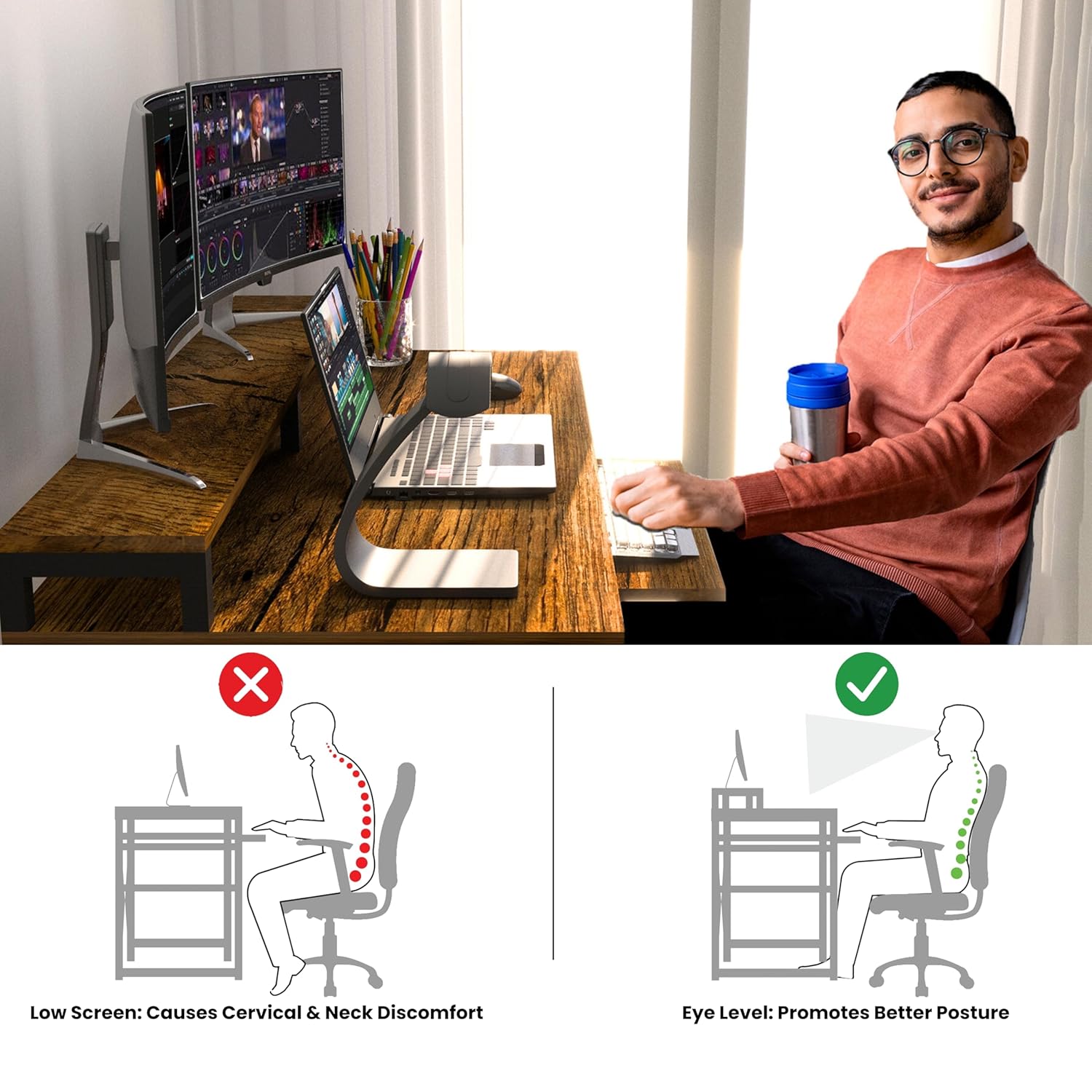
Image: An illustration demonstrating the benefits of the table's ergonomic design for maintaining proper posture while working.
Keyboard Tray Usage
The smooth-sliding keyboard tray provides a dedicated space for your keyboard and mouse, keeping your main desktop clear and organized. Simply pull it out when needed and push it back in for a tidy workspace.

Image: A close-up view of the Klaxon Office Table's smooth sliding keyboard tray.
Storage and Organization
The multi-functional design includes additional storage shelves on the side, perfect for books, office supplies, CPU towers, or gaming consoles. These shelves help keep your workspace organized and clutter-free, enhancing both functionality and visual appeal.

Image: The Klaxon Office Table showcasing its ample storage shelves for organizing various items.
Maintenance
To ensure the longevity and appearance of your Klaxon Office Table, follow these simple maintenance guidelines:
Cleaning: Wipe the surfaces with a dry, soft cloth regularly to remove dust and dirt. For stubborn marks, use a slightly damp cloth and immediately dry the surface. Avoid abrasive cleaners, harsh chemicals, or excessive water, as these can damage the laminated finish.
Spills: In case of liquid spills, wipe them immediately with a dry cloth to prevent moisture absorption and potential damage to the wood and finish.
Stability Check: Periodically check all screws and fasteners to ensure they remain tight. Retighten if necessary to maintain the table's stability and structural integrity.
Environmental Conditions: Avoid placing the table in direct sunlight or near heat sources, as prolonged exposure can cause warping, fading, or discoloration over time. Maintain a stable room temperature and humidity.
Troubleshooting
- Table is wobbly after assembly.
- Ensure all screws and bolts are fully tightened. Check that the table is placed on a flat, even surface. If the floor is uneven, consider using furniture pads or shims to level the table.
- Keyboard tray does not slide smoothly.
- Check the alignment of the sliding rails. Ensure no debris or obstructions are present in the rails. A small amount of silicone lubricant can be applied to the rails if needed, but avoid oil-based lubricants.
- Missing parts during assembly.
- Double-check all packaging materials and the parts list. If parts are still missing, contact Klaxon customer support with your purchase details and the specific part numbers required.
Specifications
| Feature | Detail |
|---|---|
| Brand | Klaxon |
| Model Number | 150 CM-Forest Dark |
| Product Dimensions | 60D x 150W x 85H Centimeters |
| Colour | Forestdark |
| Style | Modern |
| Finish Type | Laminated |
| Special Feature | Computer table with storage space, gaming table for PC with monitor stand, office table for home with leg room |
| Room Type | Office, Bedroom, Living Room |
| Recommended Uses | Working, Studying, Gaming |
| Mounting Type | Floor Mount |
| Item Weight | 35 Kilograms |
| Included Components | Keyboard Tray |
| Assembly Required | Yes |
| Manufacturer | Krios Building Materials Pvt Ltd |
| Country of Origin | India |
Warranty and Support
For any issues, missing parts, or support inquiries regarding your Klaxon Office Table, please contact Klaxon customer service. Refer to your purchase documentation for specific warranty terms and contact information.
You can also visit the official Klaxon store on Amazon for more information and support resources:


