
KAIY C39HD
KAIY Bluetooth Receiver for Home Stereo - User Manual
Model: C39HD
Introduction
This user manual provides detailed instructions for the KAIY Bluetooth Receiver (Model C39HD). This device is designed to transform any standard sound system into a Bluetooth-ready setup, allowing seamless wireless audio streaming from your smart devices. It supports multiple audio input options including 3.5mm AUX, Optical, and Coaxial, and features TF card playback for versatile music enjoyment.

Image: The KAIY Bluetooth Receiver (C39HD) connected to a home stereo system, demonstrating its use for wireless music streaming from a smartphone.
What's in the Box
Please check the package contents to ensure all items are present:
- Bluetooth Receiver (Model C39HD)
- 3.5mm AUX Data Cable
- Optical Data Cable
- Coaxial Data Cable
- Type-C Power Cable
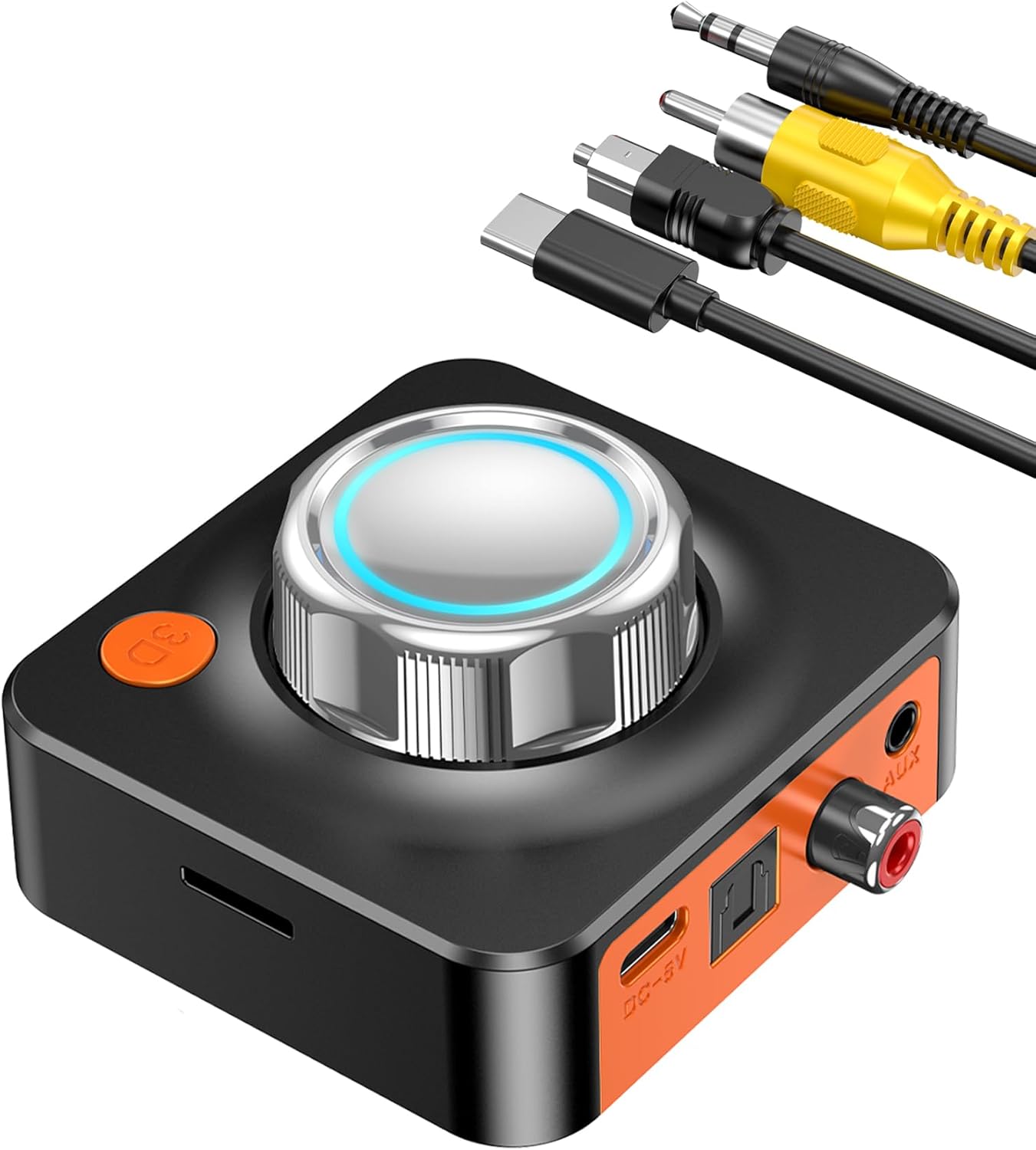
Image: The KAIY Bluetooth Receiver shown with its various connection cables, including 3.5mm AUX, Optical, Coaxial, and the Type-C power cable.
Product Overview
The KAIY Bluetooth Receiver is a compact and versatile audio adapter designed to bring wireless capabilities to your existing audio equipment. It features a prominent control knob with an illuminated ring, a 3D surround sound button, and multiple input/output ports for broad compatibility.

Image: A diagram illustrating how the KAIY Bluetooth Receiver can connect to various devices (phones, tablets, laptops) and output audio to different systems (home stereo, AV receiver, car audio), highlighting its versatility.
Key Features:
- Bluetooth 5.1: Ensures stable, low-latency, and high-fidelity audio transmission.
- Multiple Audio Inputs: Supports 3.5mm AUX, Optical, and Coaxial connections for wide compatibility with various audio systems.
- TF Card Playback: Allows direct music playback from a TF (MicroSD) card.
- 3D Surround Sound: One-click activation for an immersive audio experience.
- Compact Design: Portable size for easy placement and transport.

Image: A close-up view of the KAIY Bluetooth Receiver, highlighting its compact dimensions of 2.48 inches by 2.75 inches, demonstrating its portability.
Setup Instructions
Follow these steps to set up your KAIY Bluetooth Receiver:
- Connect to Power: Insert the included Type-C power cable into the DC-5V port on the receiver and connect the other end to a USB power adapter (not included) or a USB port on your audio system.
- Connect to Audio System:
- For 3.5mm AUX: Use the 3.5mm AUX data cable to connect the receiver's AUX output to your speaker's 3.5mm input.
- For Optical: Use the Optical data cable to connect the receiver's Optical output to your speaker's Optical input.
- For Coaxial: Use the Coaxial data cable to connect the receiver's Coaxial output to your speaker's Coaxial input.
- Power On: The device will power on automatically once connected to power.
- Pair with Bluetooth Device:
- Enable Bluetooth on your smartphone, tablet, or computer.
- Search for available Bluetooth devices.
- Select "C39HD" from the list to pair. A successful connection will be indicated by the illuminated ring on the control knob.
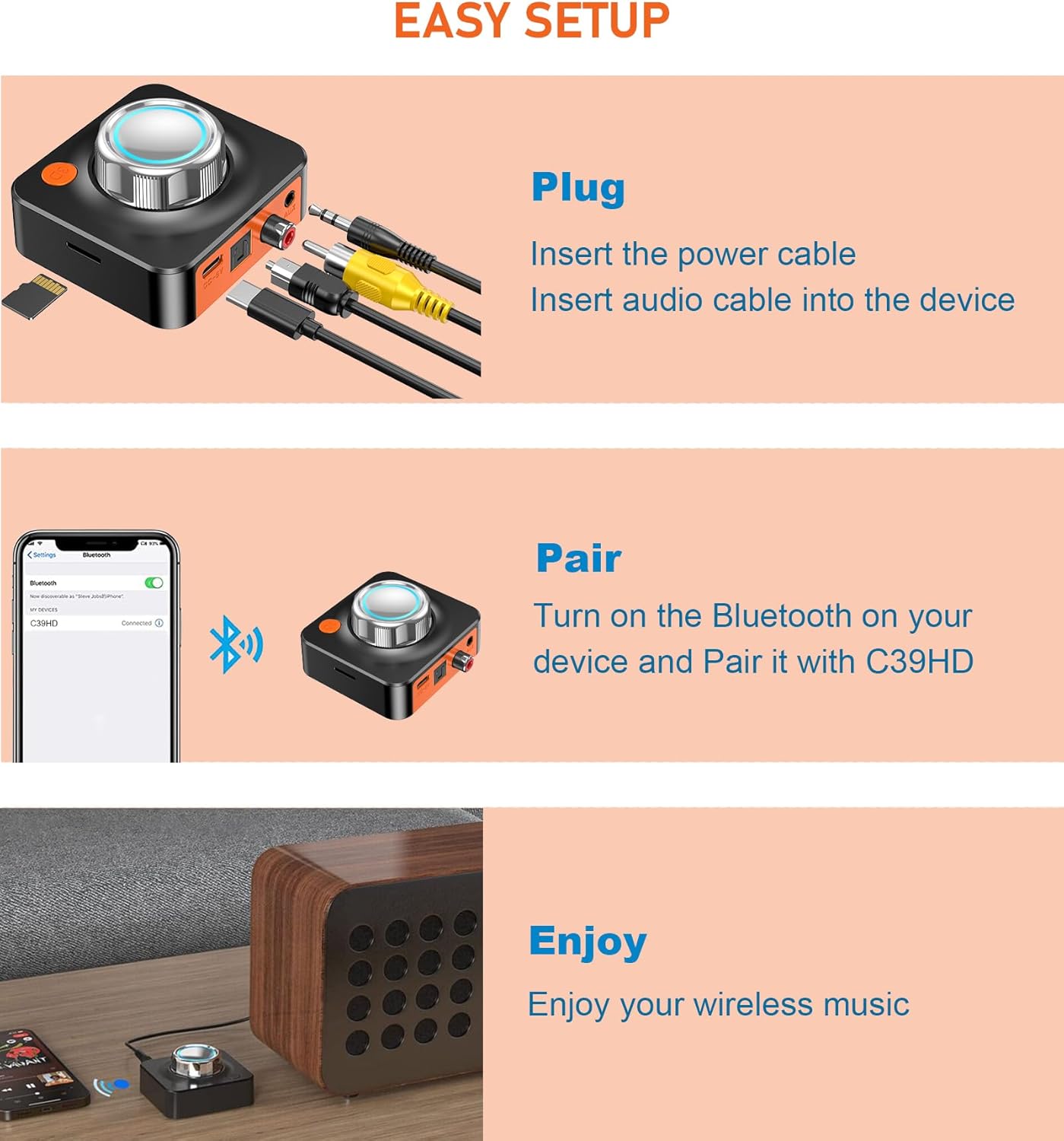
Image: A visual guide demonstrating the simple three-step setup process: plugging in cables, pairing the device via Bluetooth on a smartphone, and then enjoying wireless music.

Image: Detailed views of the 3.5mm AUX, Optical, and Coaxial input ports on the KAIY Bluetooth Receiver, illustrating the various connection options for high-fidelity audio.
Operating Instructions
Bluetooth Audio Streaming:
Once paired, your audio from the connected Bluetooth device will stream wirelessly to your audio system through the KAIY receiver. Use your connected device to control playback (play, pause, skip tracks) and volume.
3D Surround Sound:
Press the "3D" button on the receiver to activate or deactivate the 3D surround sound effect. This feature enhances the audio experience, providing a more immersive soundstage.

Image: The KAIY Bluetooth Receiver with its "3D" button prominently displayed, indicating the one-click activation for an immersive 3D audio experience.
TF Card Playback:
Insert a TF (MicroSD) card containing your music files into the designated slot on the receiver. The device will automatically switch to TF card playback mode. Use the control knob or connected device (if applicable) to navigate tracks.

Image: A detailed view of the KAIY Bluetooth Receiver's TF card slot, with a MicroSD card being inserted, illustrating its capability for direct music playback from a TF card.
Volume Control:
Adjust the volume using the large control knob on the top of the receiver. Rotate clockwise to increase volume and counter-clockwise to decrease volume.
Video: An official product video demonstrating the Bluetooth receiver's function, including connection and usage. This video is provided by the seller, KAIY.
Maintenance
- Keep the device dry. Avoid exposure to moisture or liquids.
- Clean the device with a soft, dry cloth. Do not use abrasive cleaners or solvents.
- Store the device in a cool, dry place when not in use.
- Avoid dropping or subjecting the device to strong impacts.
Troubleshooting
| Problem | Possible Cause | Solution |
|---|---|---|
| No power | Power cable not connected properly or power source issue. | Ensure the Type-C power cable is securely connected to both the receiver and a working USB power source. |
| Cannot pair via Bluetooth | Device not in pairing mode, or too far from the receiver. | Ensure Bluetooth is enabled on your source device and it is within 33 feet (10 meters) of the receiver. Restart both devices and try pairing again. |
| No sound output | Incorrect audio cable connection or wrong input selected on your audio system. | Verify the audio cable (3.5mm AUX, Optical, or Coaxial) is correctly connected to both the receiver and your audio system. Ensure your audio system's input is set to the corresponding connection. Check volume levels on both the receiver and your audio system. |
| Sound quality is poor | Interference or source audio quality. | Move the receiver closer to the Bluetooth source device. Avoid placing the receiver near other electronic devices that may cause interference. Try a different audio source or cable. |
| TF card not playing | TF card not inserted correctly or unsupported file format. | Ensure the TF card is fully inserted into the slot. Check if the music files on the TF card are in a supported format (e.g., MP3). |
Specifications
| Feature | Detail |
|---|---|
| Model Number | C39HD |
| Bluetooth Version | 5.1 |
| Connectivity Technology | Auxiliary, Bluetooth, Coaxial, Optical |
| Wireless Range | Up to 33 feet (10 meters) |
| Power Source | Corded Electric (USB DC-5V) |
| Product Dimensions | 2.75 x 0.8 x 2.48 inches |
| Item Weight | 4.2 ounces |
| Material | Metal, Plastic |
| Special Features | 3D Surround Sound, TF Card Playback |
Warranty and Support
For warranty information and technical support, please refer to the contact details provided with your purchase or visit the official KAIY website. Keep your purchase receipt as proof of purchase for any warranty claims.
Ask a question about this manual
Ask about setup, troubleshooting, compatibility, parts, safety, or missing instructions. Manuals+ will review the question and use this page’s manual context to help answer it.