
1. Introduction
This manual provides essential information for the safe and effective operation of your Warmdance 180W LED COB Wall Washer Light Bar. Please read these instructions thoroughly before installation and use, and retain them for future reference.
2. Safety Instructions
- Ensure the power supply voltage matches the product's requirements (AC110-240V, 50/60Hz).
- Always disconnect power before cleaning, maintenance, or installation.
- Do not operate the device if the power cord is damaged.
- Avoid direct eye exposure to the light source.
- Install in a well-ventilated area, away from heat sources.
- This product is designed for indoor use unless otherwise specified (IP66 rating indicates dust-tight and protection against powerful water jets, but always verify specific outdoor suitability).
- Securely mount the fixture to prevent accidental falls.
3. Package Contents
Verify that all items are present upon unpacking:
- Light kit (Machine) *1
- Power Cord *1
- Signal Cable *1
- Hook *1
- Knob Gasket *2
- Instruction Manual *1

Image: Contents of the product package.
4. Product Features
- Durable Construction: Made from all-aluminum material, ensuring durability, lightweight design, and ease of transport and installation. Supports up to 4 units connected in series.
- Powerful Color Combinations: Features six 30W amber COB light sources for 0-100% linear dimming, high brightness, and uniform light effect. Also includes 120 RGB LEDs for diverse color mixing.
- Versatile Design: Functions as a wall washer, retro light, background light, strobe light, or atmosphere light. Precision control ensures even light distribution.
- Multiple Control Modes: Supports self-propelled (auto), voice control (sound-activated), master-slave, and DMX control modes (8/13 channels).
- Dynamic Effects: Offers a flicker effect of 1-20Hz, 25 static color options, and 50 dynamic lighting effects with adjustable speed. Sound control mode includes adjustable MIC sensitivity.
- Wide Application: Suitable for stage performances, concerts, bars, stadiums, nightclubs, hotel lobbies, exhibition halls, and home gatherings.
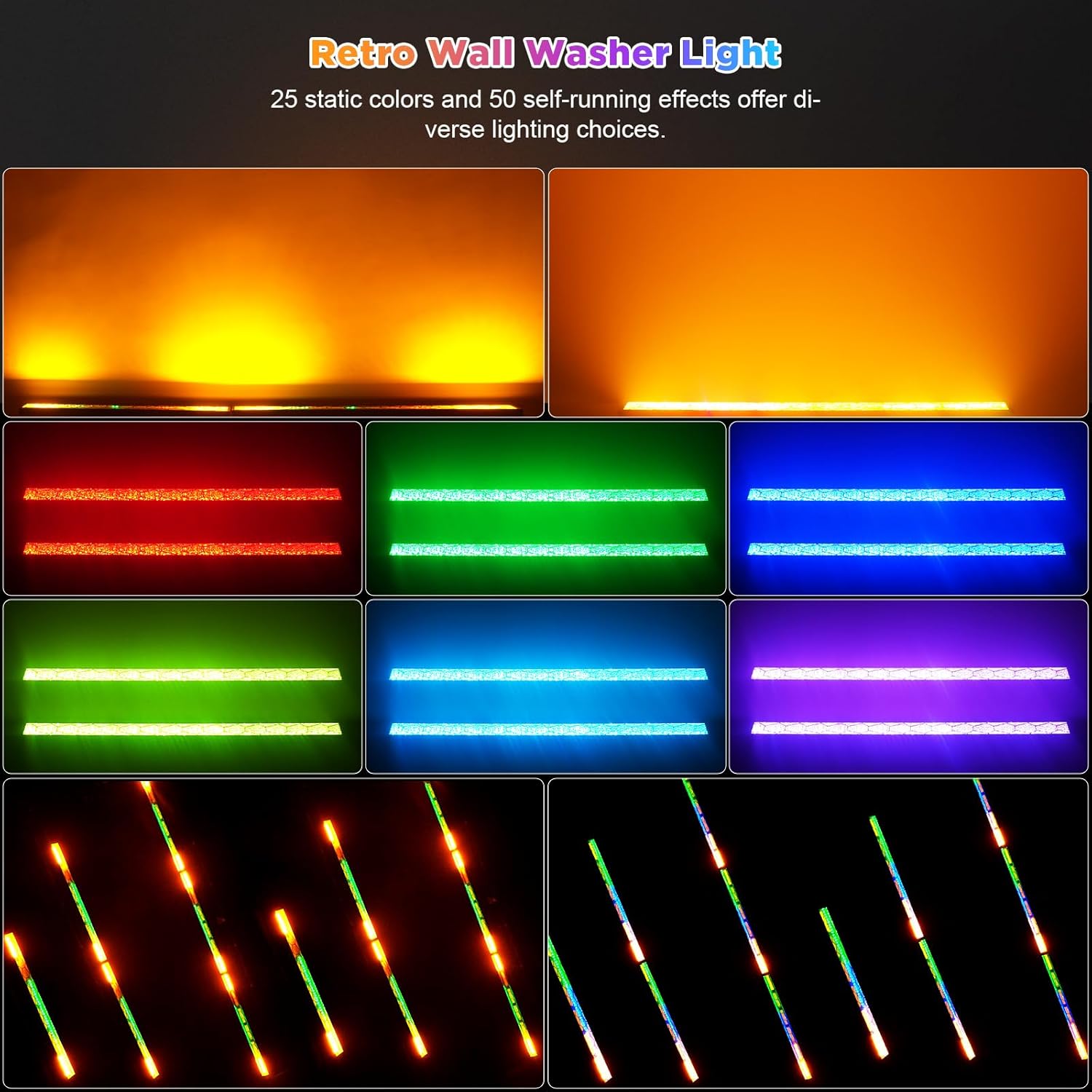
Image: The Warmdance LED COB Wall Washer Light Bar showcasing its diverse lighting capabilities.

Image: Detailed view of the COB and RGB LEDs, emphasizing color rendering and light quality.
5. Setup
5.1 Physical Installation
The light bar can be placed on a flat surface or mounted using the included hooks and knob gaskets. Ensure the mounting surface is stable and can support the weight of the fixture(s).
- Attach the mounting brackets to the light bar using the provided screws.
- Adjust the angle of the light bar using the adjustable brackets (180° adjustable).
- For hanging installations, use appropriate clamps and safety cables (not included) to secure the fixture to a truss or ceiling.
5.2 Power Connection
Connect the provided power cord to the 'POWER IN' port on the back of the unit and then to a suitable power outlet. For multiple units, use the 'POWER OUT' port to daisy-chain power to subsequent fixtures.
5.3 DMX Connection (Optional)
To control the light bar via DMX, connect a DMX cable from your DMX controller to the 'DMX IN' port of the first fixture. For multiple fixtures, connect from the 'DMX OUT' of the first fixture to the 'DMX IN' of the next, and so on. Ensure the last fixture in the chain has a DMX terminator (not included) connected to its 'DMX OUT' port for stable signal transmission.

Image: Multiple light bars connected for synchronized DMX control.
6. Operating Modes
The light bar features a 4-digit display and four control buttons (MENU, UP, DOWN, ENTER) on the back panel for mode selection and parameter adjustment.

Image: Control panel details with display and buttons.
6.1 Control Panel Operation
- MENU: Press to cycle through main menu options (e.g., DMX address, operating modes).
- UP/DOWN: Use to navigate through options or adjust parameter values.
- ENTER: Confirm selection or save changes.
6.2 Auto Mode (Self-Propelled)
In Auto Mode, the light bar cycles through its built-in programs and effects automatically. Use the control panel to select different auto programs or adjust speed.
6.3 Sound-Activated Mode (Voice Control)
The light bar will react to ambient sound and music. Use the control panel to adjust the microphone sensitivity to suit the environment.
Video: Demonstration of the Warmdance LED COB Wall Washer Light Bar's sound-activated mode, showing the light reacting to audio cues.
6.4 Master-Slave Mode
Connect multiple units via DMX cables. Set one unit as the 'Master' and the others as 'Slave' units. The Master unit will control all connected Slave units, synchronizing their effects.
6.5 DMX Control
The light bar supports 8-channel and 13-channel DMX modes. Refer to the DMX channel chart in the full product manual for specific functions of each channel. Set the DMX address for each fixture using the control panel. Ensure each fixture has a unique address if independent control is desired, or the same address for synchronized control.
Video: Overview of the Warmdance LED COB Wall Washer Light Bar's features, including DMX control, linear dimming, and strobe effects.
7. Maintenance
7.1 Cleaning
Regular cleaning helps maintain optimal light output and extends product life. Use a soft, lint-free cloth to wipe the exterior and lenses. Do not use abrasive cleaners or solvents.
7.2 Storage
When not in use, store the light bar in a dry, dust-free environment. Disconnect all cables and pack it in its original packaging or a protective case.
8. Troubleshooting
| Problem | Possible Cause | Solution |
|---|---|---|
| Light does not turn on | No power supply; Damaged power cord; Internal fault | Check power connection; Replace power cord; Contact support |
| No DMX control | Incorrect DMX address; Faulty DMX cable; No DMX terminator | Verify DMX address; Check/replace DMX cables; Add DMX terminator |
| Sound-activated mode not working | Microphone sensitivity too low; No sound input | Increase MIC sensitivity; Ensure sound is present |
| Lights flicker or behave erratically | Unstable power; DMX signal interference; Overheating | Ensure stable power supply; Check DMX connections; Ensure proper ventilation |
9. Specifications
| Parameter | Value |
|---|---|
| Rated Voltage | AC110 - 240V, 50 / 60Hz |
| Lamp Beads | 6 COB LED + 120 RGB LED |
| Light Angle | 120 Degrees |
| Optimal Projection Distance | 5-10M |
| Lighting Effects | COB Wall Wash Effects + RGB Horse Running Effects |
| Dimming | 0-100% Linear Dimming |
| Strobe | 1 - 20Hz |
| Working Mode | D-M-X512 Signal / Master-Slave / Self-Propelled / Voice Control |
| Channels | 8 / 13CH |
| Surface Display | 4-digit Display |
| Protection Level | IP66 |
| Product Size | 96 x 8 x 9 cm (37.8 x 3.2 x 3.5 in) |
| Product Net Weight | 2.8 kg / 6.17 lb |
| Material | Aluminum |
| Color | Black |

Image: Visual representation of technical specifications and dimensions.
10. Warranty and Support
This product is covered by a standard manufacturer's warranty. For specific warranty details, claims, or technical support, please refer to the documentation included with your purchase or contact the seller directly. Keep your proof of purchase for warranty purposes.