
1. Introduction
The HUAWEI Watch FIT 4 is a versatile smartwatch designed to enhance your daily life with its advanced features and sleek design. It offers comprehensive health and fitness tracking, long battery life, and broad compatibility with both Android and iOS devices.
Key features include a vibrant 1.82-inch AMOLED display, up to 10-day battery life, dual-band GPS for precise positioning, and over 100 sports modes. The watch also provides wrist-based health insights and emotional assistance through the HUAWEI Health app.

Figure 1.1: HUAWEI Watch FIT 4 Smartwatch (White)
2. What's in the Box
- HUAWEI Watch FIT 4 Smartwatch × 1
- Charging Cradle (including charging cable) × 1
- Quick Start Guide & Safety Information & Warranty Card × 1
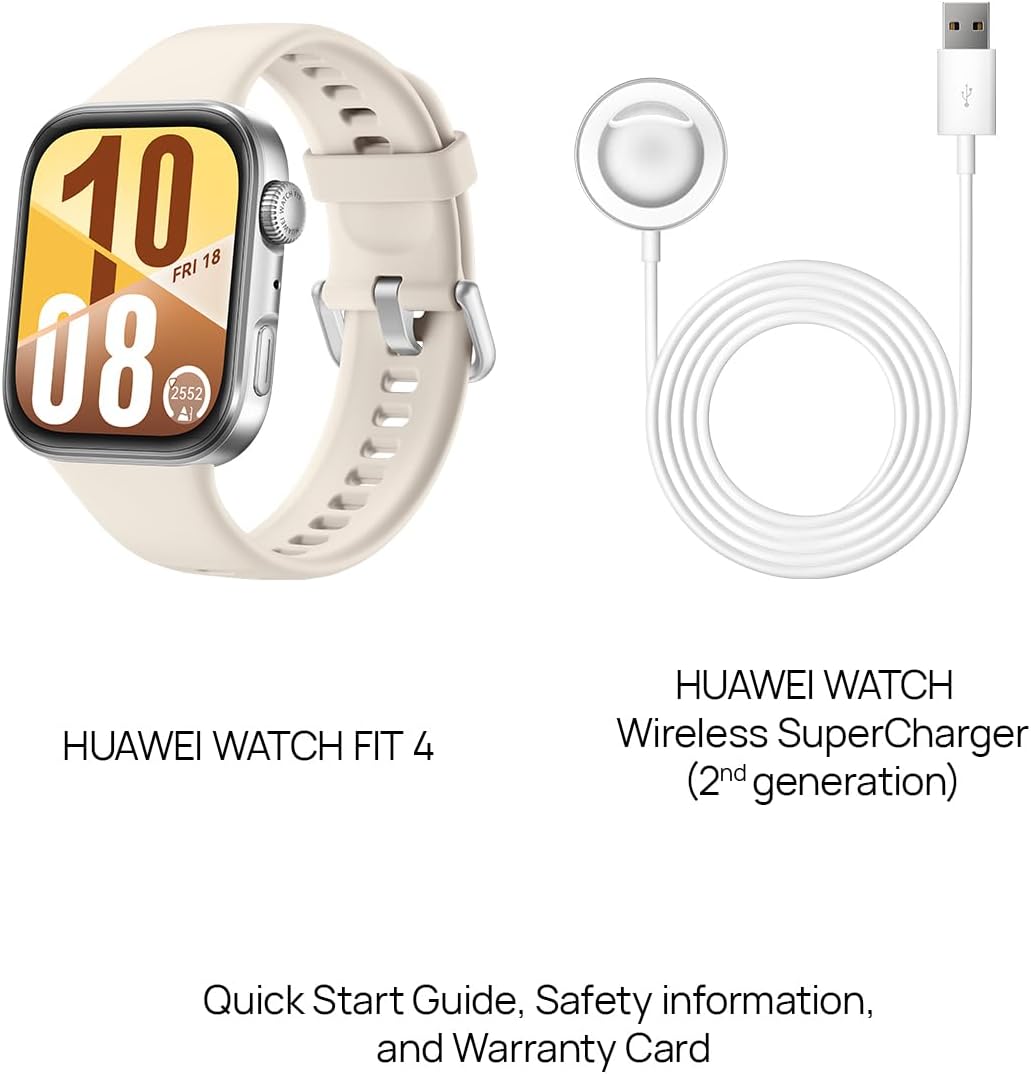
Figure 2.1: Included items in the product packaging.
3. Setup
3.1 Initial Charging
Before first use, fully charge your HUAWEI Watch FIT 4. Connect the charging cradle to a power source and attach the watch to the magnetic charging pins. A full charge takes approximately 75 minutes. A 10-minute charge can provide up to a full day's use.

Figure 3.1: Charging the HUAWEI Watch FIT 4. The watch supports 2nd-gen Wireless SuperCharger.
3.2 Pairing with Your Smartphone
The HUAWEI Watch FIT 4 is broadly compatible with both iOS and Android devices. To pair:
- Download the HUAWEI Health app from your device's app store (App Store for iOS, Google Play Store or HUAWEI AppGallery for Android).
- Open the HUAWEI Health app and follow the on-screen instructions to add a new device.
- Select "HUAWEI Watch FIT 4" from the list of available devices.
- Confirm the pairing request on both your smartphone and the watch.

Figure 3.2: Seamless pairing with iOS and Android devices via the HUAWEI Health app.
4. Operating Instructions
4.1 Navigating the Display
The HUAWEI Watch FIT 4 features a 1.82-inch AMOLED touchscreen display. Swipe left/right, up/down, and tap to navigate menus and select options. The watch also has a rotating crown and a side button for quick access to features and enhanced navigation.

Figure 4.1: The slim 9.5mm design and physical controls for easy interaction.
4.2 Health Tracking
Utilize the HUAWEI Health app to access detailed health insights. The watch tracks various metrics:
- Heart Rate: Continuous monitoring with alerts for abnormal readings.
- Blood Oxygen (SpO2): Automatic and on-demand SpO2 measurements.
- Sleep Tracking: HUAWEI TruSleep™ provides detailed sleep quality analysis, including deep sleep, light sleep, REM sleep, and awake times. It also offers sleep breathing awareness.
- Stress Monitoring: Tracks stress levels throughout the day and offers relaxation exercises.
- Activity Rings: Visual representation of daily activity goals (steps, active hours, calories burned).

Figure 4.2: Wrist-based health insights provide tailored guidance for well-being.
4.3 Sports Modes and GPS
The watch supports over 100 sports modes, including walking, running, cycling, hiking, and swimming. The Dual Band GPS (L1: GPS + GLONASS + GALILEO + BDS + QZSS; L5: GPS + GALILEO + BDS + QZSS) ensures precise tracking of your outdoor activities.
- Precise Positioning: The advanced Sunflower Positioning System provides accurate route tracking even in challenging environments.
- Barometer: Supports altitude, depth, and elevation measurements, useful for outdoor adventures.

Figure 4.3: Precise positioning for accurate tracking of various activities.

Figure 4.4: Barometer support for elevation and air pressure monitoring.
5. Maintenance
5.1 Cleaning and Care
Regularly clean your watch and strap to prevent skin irritation and maintain device performance. Use a soft, lint-free cloth. For stubborn dirt, slightly dampen the cloth with water. Avoid harsh chemicals or abrasive materials.
5.2 Battery Life Optimization
To maximize battery life (up to 10 days typical usage):
- Adjust screen brightness to an appropriate level.
- Limit continuous heart rate monitoring to 'Smart' mode instead of 'Real-time' if not needed 24/7.
- Disable unnecessary notifications.
- Turn off Always On Display when not required.
6. Troubleshooting
6.1 Pairing Issues
If your watch fails to pair with your smartphone:
- Ensure Bluetooth is enabled on your smartphone.
- Make sure the watch is sufficiently charged.
- Restart both the watch and your smartphone.
- Clear the Bluetooth cache on your smartphone (Android).
- Try unpairing and re-pairing the device through the HUAWEI Health app.
6.2 GPS Accuracy Problems
If GPS tracking is inaccurate:
- Ensure you are in an open area with a clear view of the sky.
- Wait for the watch to acquire a strong GPS signal before starting your activity.
- Update the watch firmware via the HUAWEI Health app to ensure the latest positioning algorithms.
7. Specifications
| Feature | Detail |
|---|---|
| Product Dimensions | 1.57 x 1.18 x 0.31 inches |
| Item Weight | 27 Grams (0.952 ounces) |
| Item Model Number | Seiya-B09F |
| Display Size | 1.82 Inches AMOLED |
| Operating System | HarmonyOS |
| Battery Capacity | 400 Milliamp Hours |
| Battery Life | Up to 10 days (typical usage) |
| Connectivity | Bluetooth 5.2, GNSS (L1: GPS + GLONASS + GALILEO + BDS + QZSS; L5: GPS + GALILEO + BDS + QZSS), NFC (Grey version only) |
| Special Features | Touchscreen, Lightweight, Multisport Tracker, Activity Tracker, Always On Display |
| Water Resistance | 5ATM (suitable for swimming) |
8. Warranty and Support
Your HUAWEI Watch FIT 4 comes with a manufacturer's warranty. Please refer to the included "Warranty Card" for detailed terms and conditions regarding warranty coverage and duration.
For further assistance, technical support, or service inquiries, please consult the "Quick Start Guide & Safety Information" booklet provided in the box or visit the official HUAWEI support website.
Online Support: consumer.huawei.com/en/support/


