1. Introduction
The LewanSoul MechDog Pro is an advanced AI robot dog designed for STEM education, offering a comprehensive platform for learning mechanics, electronics, programming, automation, and artificial intelligence. This manual provides detailed instructions for assembly, operation, programming, and maintenance to ensure optimal use of your MechDog Pro.

Image 1.1: The LewanSoul MechDog Pro AI Robot Dog.
Video 1.1: Overview of the programmable mechanical robot dog's features and movements.
2. What's in the Box
Verify that all components are present before beginning assembly and operation.
- MechDog Pro Robot Dog (assembled)
- Head expansion bracket
- Robot arm
- Micro-USB cable (1000mm)
- ESP32-S3 vision module + mounting bracket
- MP3 module (TF card included)
- Dot matrix module
- Touch sensor
- Light sensor
- Voice interaction module
- WiFi module
- Card reader
- Colored balls
- Type-C cable (1000mm)
- Module wires (200mm)
- 8.4V 2A charger
- Mini micro:bit adapter board
- Block servos
- Blocks
- Accessory bag
- User manual

Image 2.1: Visual representation of the MechDog Pro packing list.
Video 2.1: Unboxing and initial walk test of the MechDog Pro robot dog.
3. Setup
3.1 Initial Assembly
The MechDog Pro comes largely pre-assembled. Attach the robotic arm and any desired expansion modules following the detailed instructions provided in the included user manual. Ensure all connections are secure.

Image 3.1: MechDog Pro with the 3DOF robotic arm attached, ready for gripping and handling tasks.
Video 3.1: Demonstration of the robot dog with robotic arm, voice control, AI vision, and programming capabilities.
3.2 Powering On
- Ensure the 7.4V 1500mAh Lipo Battery is fully charged using the provided 8.4V 2A charger.
- Connect the battery to the designated port on the MechDog Pro.
- Flip the power switch to the "ON" position. The indicator lights should illuminate.
3.3 Software and App Installation
The MechDog Pro can be controlled via PC software or a mobile application. Refer to the official LewanSoul website for the latest software downloads and installation guides.
- PC Software: Download and install the PC software for advanced control and action editing.
- Mobile App: Download the "LewanSoul" app from your device's app store for convenient control via smartphone.

Image 3.2: PC software interface for controlling and editing MechDog Pro actions.

Image 3.3: Mobile app interface for controlling the robotic arm and autonomous gripping functions.
4. Operating Instructions
4.1 Basic Movements and Posture Adjustment
The MechDog Pro features inverse kinematics, allowing for real-time adjustments of walking direction, speed, height, and posture. These can be controlled via the PC software or mobile app to achieve agile and lifelike movements.

Image 4.1: Visual guide to adjusting the MechDog Pro's walking speed, height, pose angle, and turning.
4.2 AI Voice Interaction
The WonderEcho AI voice interaction module enables voice control, speech broadcasting, and customizable commands. Interact with your MechDog Pro using predefined phrases or by setting your own.
- Voice Control: Issue commands like "Move backward" or "Copy that" to control the robot's actions.
- Speech Broadcast: The robot can broadcast messages such as "Hello, welcome!" or "The light is now on."
- Voice-Enhanced Vision: Combine voice commands with vision tasks, e.g., "Start color recognition" for specific colors.
- Voice Distance Notification: Receive audio alerts like "There is an obstacle ahead" based on sensor data.

Image 4.2: Examples of AI voice interaction capabilities including voice control, broadcast, and vision integration.
Video 4.1: Demonstration of AI voice interaction for programming, broadcasting, and control.
4.3 AI Vision Recognition and Tracking
Equipped with an ESP32-S3 vision module, MechDog Pro supports various AI vision functions:
- Color Recognition: Identify and react to specific colors.
- Face Recognition: Detect and track human faces.
- Vision Line Following: Follow designated lines on a surface.
- WiFi Video Streaming: Real-time monitoring of high-definition camera video via app or PC.

Image 4.3: The WiFi vision module enables adjustable angle, color recognition, face recognition, and vision line following.
Video 4.2: Demonstration of automatic sensing AI visual capabilities, including IMU and ultrasonic sensor integration.
4.4 Robotic Arm Operation
The optional 3DOF mini-robot arm allows for autonomous object gripping and transportation. Control the arm precisely using the mobile app or programmed sequences.
Video 4.3: Smart Robot Dog demonstrating gripping and object manipulation with its robotic arm.
4.5 Sensor Expansion and IoT Control
MechDog Pro supports various sensor modules and IoT functions:
- Touch Control: Respond to touch inputs.
- Light Perception: Detect changes in ambient light.
- Dot Matrix Display: Show custom patterns or text.
- Singing and Dancing: Perform pre-programmed entertainment routines.
- IoT Functions: Face detection alerts, unknown object alerts, color detection, distance measurement, and RGB light customization via WiFi module.
- Obstacle Avoidance: The glowy ultrasonic sensor measures distances and emits light, providing real-time feedback and enabling obstacle avoidance.

Image 4.4: Sensor expansion features including touch control, light perception, dot matrix display, and singing/dancing.
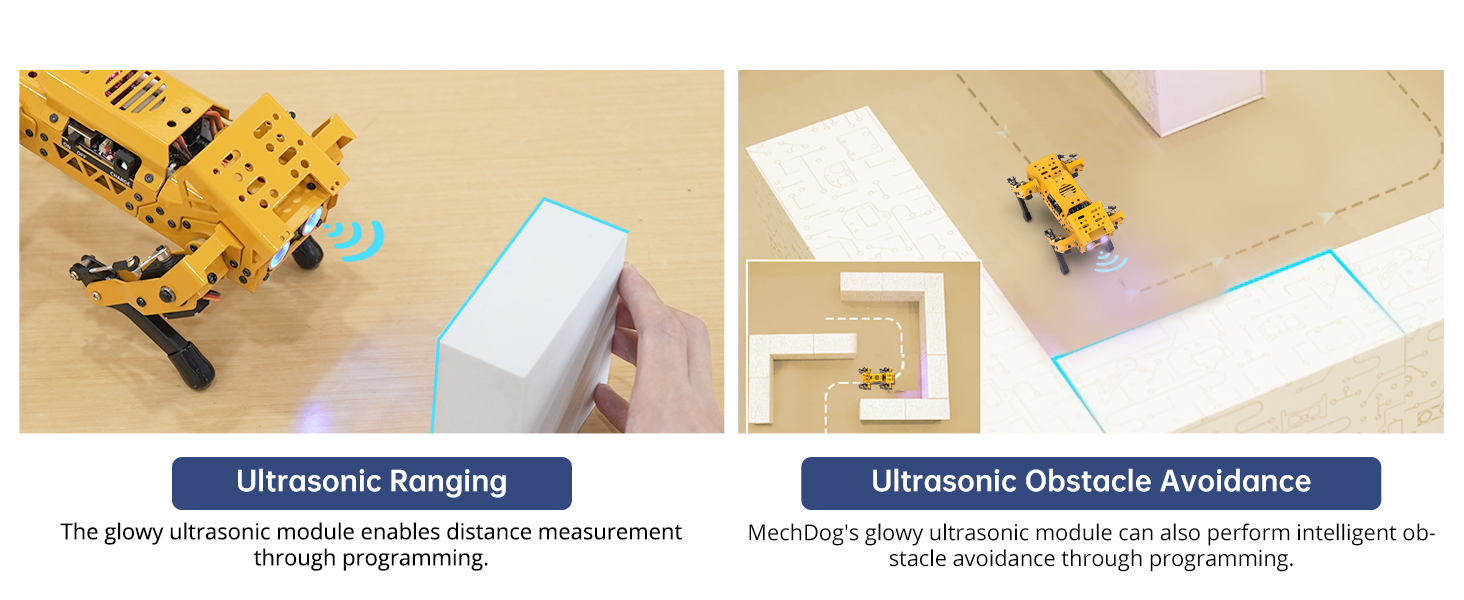
Image 4.5: MechDog Pro demonstrating obstacle avoidance using its ultrasonic sensor.
4.6 Group Control
Through the mobile app, multiple MechDog Pro units can be controlled simultaneously to perform synchronized actions, facilitating complex robotic demonstrations or projects.

Image 4.6: The mobile app interface showing options for controlling multiple MechDog Pro units in a group.
5. Programming
The MechDog Pro supports multiple programming languages, making it accessible for various skill levels:
- Scratch: A visual block-based programming language ideal for beginners.
- Python: A text-based language suitable for intermediate to advanced users, offering powerful capabilities for AI and robotics.
- Arduino: For direct hardware control and custom sensor integration.
Comprehensive learning resources, source codes, and software are available on the LewanSoul website to assist with programming.

Image 5.1: Examples of programming interfaces for Scratch, Python, and Arduino, demonstrating code snippets for MechDog Pro.
Video 5.1: Robot dog programming demonstration using Arduino, Scratch, and Python, including micro:bit expansion.
6. Expansion Capabilities
6.1 LEGO Expansion
The MechDog Pro is compatible with LEGO building blocks, allowing for creative expansion and customization. Build various exciting models and integrate them with the robot's functions.
- Examples include: Ejection System, Smart Transporter, Greeting Dog, Angry Bull, Smart Wings, and Robotic Arm for gripping.

Image 6.1: MechDog Pro demonstrating various LEGO expansions, including a robotic arm and other creative attachments.
Video 6.1: Demonstration of 6-in-1 LEGO building block expansion for creative projects with the robot dog.
6.2 Micro:bit Expansion
The MechDog Pro supports micro:bit expansion, allowing for enhanced and innovative development. Integrate micro:bit for functions such as touch control, expressive feedback, directional cruising, and temperature sensing.
- Micro:bit Programming: Utilize micro:bit's capabilities for custom behaviors.
- Micro:bit Control: Use a Handlebit for remote control, providing a convenient operating experience.

Image 6.2: MechDog Pro with micro:bit attached, demonstrating micro:bit programming and control via Handlebit.
Video 6.2: AI Vision & Voice Interaction Smart Robot Dog with Arduino, Scratch, Python, and Micro:bit expansion.
7. Maintenance
- Cleaning: Use a soft, dry cloth to clean the robot's exterior. Avoid using liquids or harsh chemicals.
- Battery Care:
- Always use the provided charger.
- Do not overcharge or fully discharge the battery.
- Store the battery in a cool, dry place when not in use.
- Servo Inspection: Periodically check the servos for smooth operation and ensure they are free from obstructions. The high-performance brushless servos are designed for durability.
- Software Updates: Regularly check the LewanSoul website for firmware and software updates to ensure optimal performance and access to new features.
8. Troubleshooting
| Problem | Possible Cause | Solution |
|---|---|---|
| Robot does not power on. | Battery is not charged or not connected properly. | Ensure battery is fully charged and securely connected. Check power switch position. |
| Robot movements are erratic or unresponsive. | Loose servo connections, low battery, or software glitch. | Check all servo connections. Recharge battery. Restart the robot and control application. |
| App/PC software cannot connect to the robot. | Bluetooth/WiFi not enabled, incorrect connection settings, or interference. | Ensure Bluetooth/WiFi is active on both devices. Verify connection settings in the app/software. Try connecting in a different environment to reduce interference. |
| Robotic arm does not grip objects. | Arm servo issue, object too large/small, or incorrect programming. | Check arm servo connections. Ensure object is within gripping range and size. Review programming logic for arm control. |
9. Specifications
| Feature | Detail |
|---|---|
| Product Dimensions | 5 x 8 x 12 inches |
| Item Weight | 4.34 pounds |
| Item Model Number | MechDog-Pro |
| Manufacturer Recommended Age | 16 years and up |
| Batteries | 1 Lithium Ion battery required (included) |
| Main Controller | Open-source ESP32-S3 dual-mode SoC chip with built-in IMU sensors, 10-channel PWM servo interfaces, buzzer, customizable button, multiple IIC interfaces, and GPIO interfaces. |
| Servos | 8 high-speed, high-performance brushless servos (HPS-0618SG) with anti-blocking algorithm. |
| Vision Module | ESP32-S3 with 2-megapixel HD camera, supporting WiFi video streaming, facial recognition, color recognition, and line tracking. |
| Voice Module | WonderEcho AI voice interaction module with 2MB storage, 100+ pre-set voice commands, and custom command support. |
| Programming Languages | Python, Scratch, Arduino |
| Expansion | Robotic arm (3DOF), Micro:bit, LEGO blocks, various sensors (touch, light, dot matrix, ultrasonic). |

Image 9.1: Detailed product dimensions and key specifications of the MechDog Pro.
Video 9.1: Overview of the quadruped smart AI robot dog's high-quality hardware and high-performance servo motors.
10. Warranty and Support
LewanSoul products are designed for quality and performance. For detailed warranty information, technical support, and additional resources, please visit the official LewanSoul website or contact their customer service.
- Online Resources: Access tutorials, FAQs, and programming guides.
- Customer Service: Contact for assistance with product issues or inquiries.
LewanSoul is committed to making programming, robotics, and AI accessible, providing abundant learning resources and online support.


