
1. Introduction
This manual provides essential information for the safe and effective operation, maintenance, and troubleshooting of your JEXUGK Brushless Cordless Wood Router, Model JCWR-G1. This compact and portable tool is designed for various woodworking tasks, featuring a brushless motor, 6-speed control, and powered by 21V 4.0Ah lithium-ion batteries. Please read this manual thoroughly before first use and retain it for future reference.
2. Important Safety Instructions
Always follow basic safety precautions to reduce the risk of fire, electric shock, and personal injury when using power tools.
- Work Area Safety: Keep your work area clean and well-lit. Cluttered or dark areas invite accidents. Do not operate power tools in explosive atmospheres, such as in the presence of flammable liquids, gases, or dust.
- Electrical Safety: Avoid body contact with earthed or grounded surfaces. Do not expose power tools to rain or wet conditions.
- Personal Safety: Always wear eye protection and hearing protection. Use dust masks when working in dusty conditions. Dress properly; avoid loose clothing or jewelry. Secure long hair.
- Tool Use and Care: Do not force the power tool. Use the correct power tool for your application. Disconnect the battery pack from the power tool before making any adjustments, changing accessories, or storing power tools. Store idle power tools out of the reach of children.
- Battery Tool Use and Care: Recharge only with the charger specified by the manufacturer. Use power tools only with specifically designated battery packs.
- Service: Have your power tool serviced by a qualified repair person using only identical replacement parts.
3. Package Contents
Verify that all items listed below are included in your package. If any parts are missing or damaged, contact your retailer.
- 1 x JEXUGK Cordless Wood Router
- 2 x 4.0Ah Lithium-Ion Batteries
- 1 x Battery Charger
- 15 x 1/4" Router Bits
- 1 x Dust Collection Hood
- 2 x Wrenches
- 1 x Direct Conductor
- 3 x Nuts
- 1 x Packaging Box
- 1 x Instruction Manual

Image: Complete JEXUGK Cordless Wood Router kit, showing the router, two 4.0Ah batteries, charger, various router bits, wrenches, and other accessories neatly arranged in a carrying case.
4. Specifications
| Feature | Specification |
|---|---|
| Brand | JEXUGK |
| Model Number | JCWR-G1 |
| Power Source | Battery Powered |
| Voltage | 21 Volts (DC) |
| Amperage | 4 Amps |
| Maximum Rotational Speed | 35,000 RPM |
| Base Type | Fixed |
| Base Diameter | 3.54 Inches |
| Battery Type | Lithium-Ion (4.0Ah) |
| Material | Aluminum, Metal, Nylon, Plastic |
| Color | Gray |
| Item Weight | 4.39 Kilograms |
| Product Dimensions (W x H) | 3.54" x 9.05" |
5. Setup
5.1. Battery Installation and Charging
The JEXUGK router uses 21V 4.0Ah Lithium-Ion batteries. Ensure batteries are fully charged before use.
- Charging: Connect the charger to a power outlet. Slide the battery pack onto the charger until it clicks into place. The indicator light on the charger will show the charging status. A full charge typically takes a few hours.
- Installation: Align the battery pack with the battery port on the router handle. Slide the battery into place until it locks securely.
- Removal: Press the battery release button (usually located on the side of the battery) and slide the battery pack off the router.

Image: Two JEXUGK 4.0Ah 21V Lithium-Ion batteries, one showing internal cells and a charging indicator, highlighting their high capacity and durability.
5.2. Router Bit Installation
Always ensure the router is turned off and the battery is removed before installing or changing bits.
- Loosen Collet Nut: Use the provided wrenches to loosen the collet nut on the router base.
- Insert Bit: Insert the shank of the desired router bit into the collet. Ensure the bit is inserted far enough to provide a secure grip, but do not bottom it out.
- Tighten Collet Nut: While holding the spindle lock button (if present) or using the second wrench, firmly tighten the collet nut with the wrench. Do not overtighten.

Image: A three-step visual guide demonstrating how to effortlessly change the cutter head (router bit) using wrenches to loosen and tighten the collet nut.
5.3. Depth Adjustment
Adjusting the routing depth is crucial for precise cuts.
- Unlock Base: Loosen the locking lever or knob on the router base that secures the motor housing.
- Set Depth: Lower or raise the motor housing until the router bit reaches the desired depth relative to the base plate. Use the depth scale and fine adjustment knob for accuracy.
- Lock Base: Securely tighten the locking lever or knob to fix the depth setting.

Image: Close-up view of the JEXUGK router's adjustable depth mechanism, showing the scale and locking lever for precise depth setting up to 15/16 inch.
6. Operating Instructions
6.1. Powering On/Off
To turn the router ON, press the power button. To turn it OFF, press the power button again. Always ensure a firm grip on the tool before starting.
6.2. Speed Control
The JEXUGK router features a 6-speed variable control, allowing you to match the speed to the material and bit type for optimal results. The speed can be adjusted from 0 to 35,000 RPM.
- Lower Speeds (1-2): Suitable for larger diameter bits, softer woods, or when more control is needed.
- Medium Speeds (3-4): Ideal for general routing tasks and medium-density woods.
- Higher Speeds (5-6): Best for smaller diameter bits, harder woods, and fine detail work.
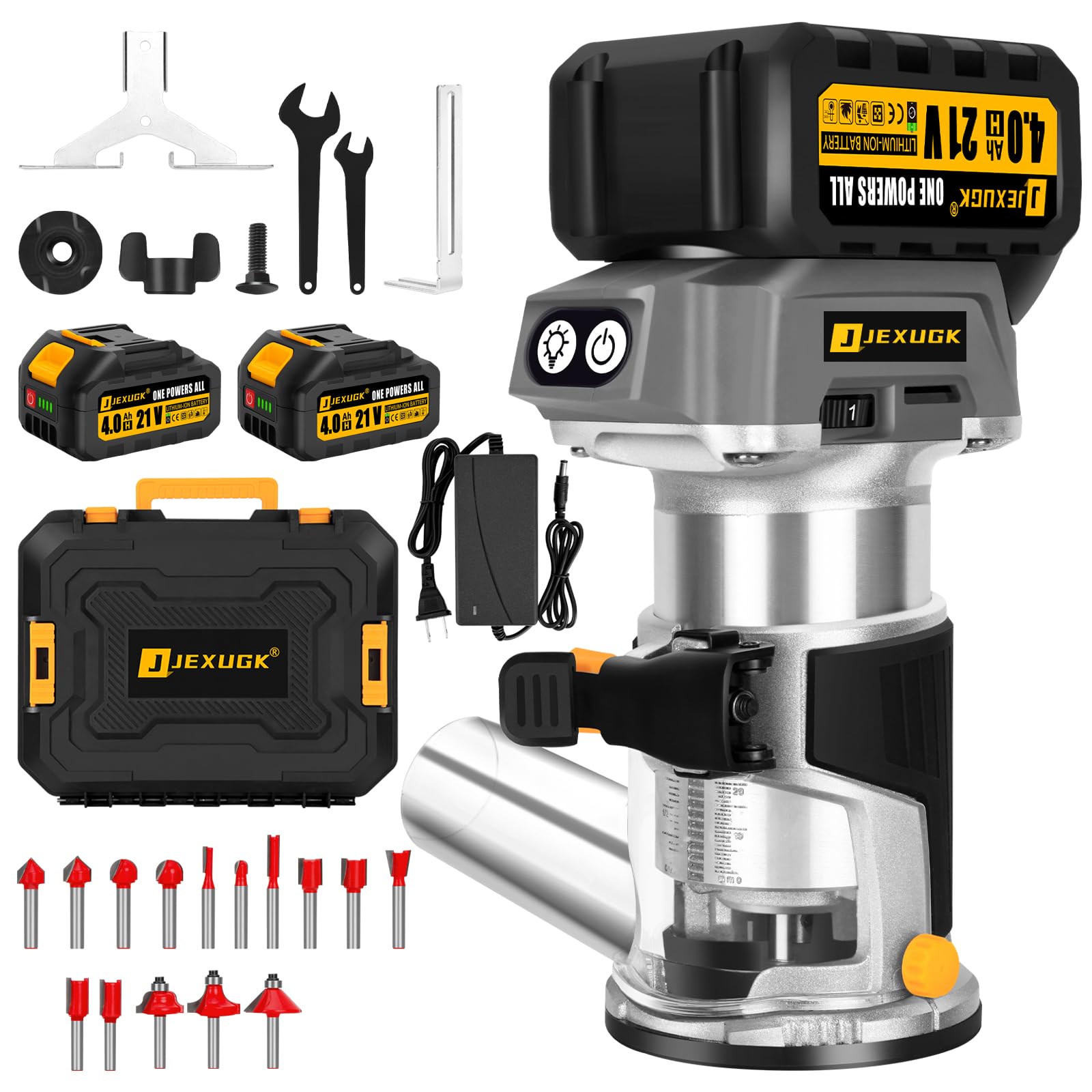
Image: The JEXUGK cordless wood router in operation, highlighting the 6-variable speed dial (1-6 gear) located on the top, allowing users to adjust the speed up to 35,000 RPM for various tasks.
6.3. General Operation
Always perform a test cut on scrap material before routing your final workpiece.
- Workpiece Securement: Ensure your workpiece is securely clamped to prevent movement during routing.
- Starting the Cut: Hold the router firmly with both hands. Start the router before the bit contacts the workpiece.
- Direction of Feed: Always feed the router against the rotation of the bit. This provides better control and prevents the router from running away.
- Dust Collection: Attach the dust collection hood to minimize sawdust and maintain a clear view of your work.
- Applications: This router is suitable for edge trimming, surface polishing, slot cutting, furniture rounding, mortise and tenon construction, and various DIY woodworking projects.

Image: A collage demonstrating the wide application of the JEXUGK wood router for precision trimming, including edge trimming, door frame trimming, curved edges, grooves, and rounded shapes.
7. Maintenance
Regular maintenance ensures the longevity and optimal performance of your router. Always disconnect the battery before performing any maintenance.
- Cleaning: After each use, clean the router body, base, and collet area with a soft, dry cloth. Use compressed air to clear dust from vents. Do not use harsh chemicals or abrasive cleaners.
- Router Bits: Keep router bits sharp and clean. Dull bits can cause kickback and poor cut quality. Clean resin and pitch buildup from bits using a specialized bit cleaner.
- Battery Care: Store batteries in a cool, dry place away from direct sunlight and extreme temperatures. Do not store fully discharged batteries for extended periods.
- Inspection: Periodically inspect the power cord (if using a corded charger), switches, and housing for any damage. Replace damaged parts immediately.
8. Troubleshooting
Refer to the table below for common issues and their solutions.
| Problem | Possible Cause | Solution |
|---|---|---|
| Router does not start | Battery not charged or improperly installed. | Ensure battery is fully charged and correctly seated. |
| Poor cut quality or burning wood | Dull router bit; incorrect speed setting; feeding too slowly. | Replace or sharpen bit; adjust speed; maintain consistent feed rate. |
| Excessive vibration | Loose bit; damaged bit; worn bearings. | Ensure bit is securely tightened; replace damaged bit; contact service for bearing issues. |
| Battery not charging | Charger not plugged in; faulty battery or charger. | Check power connection; test with another battery/charger if available; contact support. |
| Router stops during operation | Overload protection activated; battery depleted. | Reduce load; replace with a charged battery. |
9. Warranty and Support
JEXUGK products are manufactured to high-quality standards and are warranted against defects in materials and workmanship. Specific warranty terms and duration may vary by region and retailer. Please retain your proof of purchase for warranty claims.
For technical support, service, or warranty inquiries, please contact your retailer or visit the official JEXUGK website for contact information.