
1. Introduction
Thank you for choosing the CG MOBILE Guess Mini Magnetic Bluetooth Speaker. This portable speaker is designed to provide high-quality audio with the convenience of Bluetooth 5.3 connectivity and a magnetic attachment system. Please read this manual carefully to ensure proper use and maintenance of your device.
2. Package Contents
Verify that all items are present in your package:
- Guess Mini Magnetic Bluetooth Speaker
- USB Charging Cable (Type-C, implied by image)
- User Manual

Image: The product packaging, showing the speaker and branding. The EAN/UPC 3666339220723 is visible on the box.
3. Product Overview
The Guess Mini Magnetic Bluetooth Speaker features a compact design with intuitive controls and a magnetic base for versatile placement.
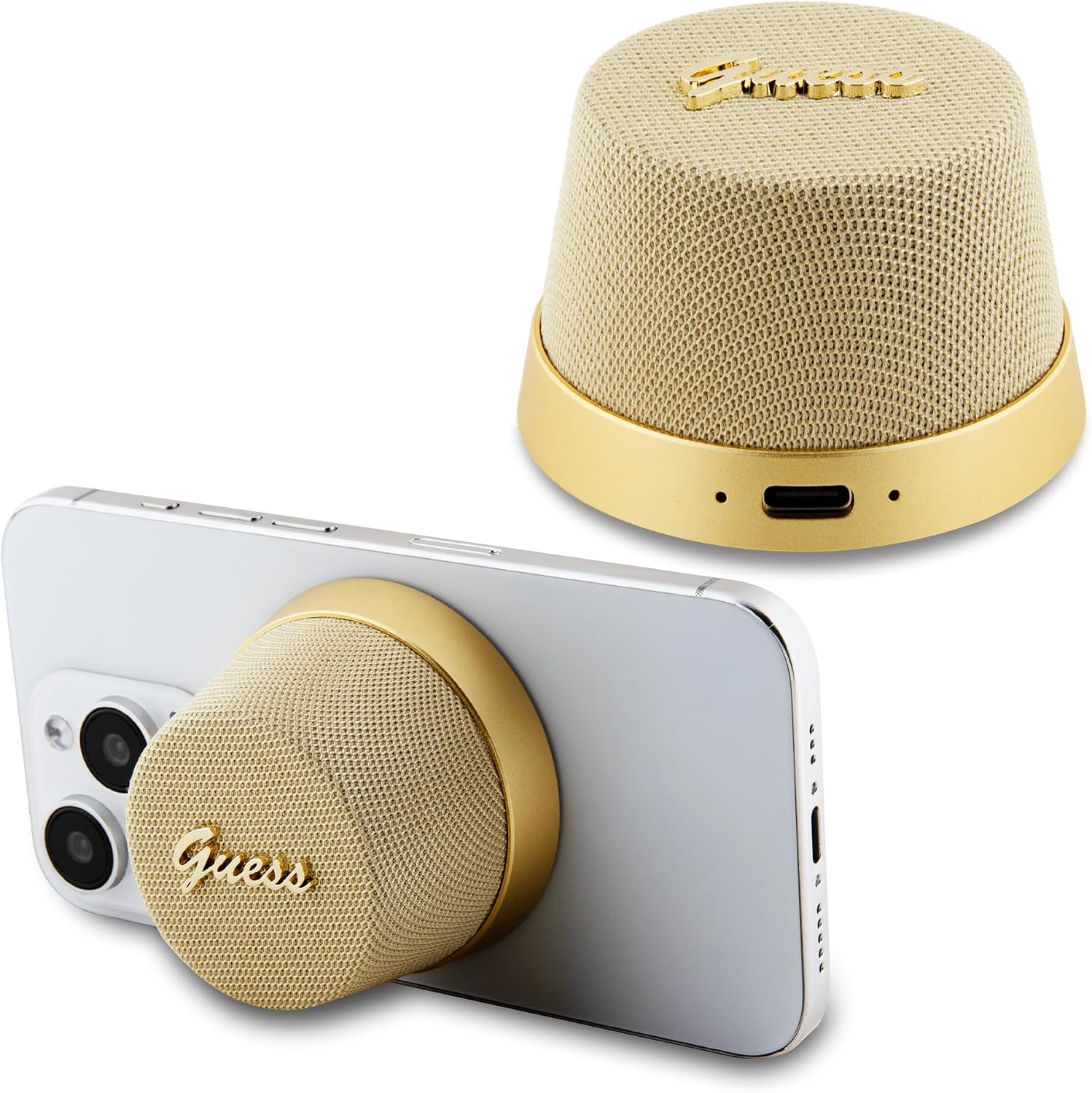
Image: General view of the Guess Mini Magnetic Bluetooth Speaker, showcasing its gold color and compact design.

Image: Front view of the speaker, highlighting the speaker grille and Guess logo.

Image: Back view of the speaker, showing the USB-C charging port and indicator lights.

Image: Side view of the speaker, illustrating its conical shape.
4. Setup
4.1 Charging the Speaker
- Connect the provided USB charging cable to the speaker's charging port.
- Connect the other end of the cable to a USB power adapter (not included) or a computer's USB port.
- The indicator light will show charging status (e.g., red for charging, off or blue for fully charged).
- A full charge takes approximately 2 hours and provides up to 4 hours of playback.
4.2 Bluetooth Pairing
- Ensure the speaker is fully charged.
- Press and hold the power button (location implied by touch control) to turn on the speaker. The indicator light will flash, indicating it's in pairing mode.
- On your smartphone or tablet, go to Bluetooth settings and enable Bluetooth.
- Search for available devices and select "Guess Speaker" (or similar name) from the list.
- Once paired, the indicator light will stop flashing and remain solid, and you will hear a confirmation tone.
5. Operating Instructions
5.1 Power On/Off
- To power on: Press and hold the power button until the indicator light turns on.
- To power off: Press and hold the power button until the indicator light turns off.
5.2 Playing Music
- After successful Bluetooth pairing, open your music application on your connected device.
- Music will play through the speaker.
- Use the controls on your connected device to adjust volume, skip tracks, or pause/play. The speaker supports touch control for basic functions (e.g., play/pause, answer calls).
5.3 Answering Calls
- When a call comes in, the speaker will ring.
- Tap the touch control area on the speaker to answer the call.
- Tap again to end the call.
5.4 Magnetic Attachment
The speaker features a magnetic base allowing it to attach securely to compatible surfaces, such as the back of a smartphone or other metallic objects.

Image: The speaker magnetically attached to the back of a smartphone, demonstrating its portable use.

Image: Another view of the speaker magnetically attached to a smartphone, showing its secure fit.
6. Maintenance
- Cleaning: Use a soft, dry cloth to clean the speaker. Do not use abrasive cleaners or solvents.
- Storage: Store the speaker in a cool, dry place away from direct sunlight and extreme temperatures.
- Water Resistance: This speaker is not waterproof. Avoid exposure to water or excessive moisture.
7. Troubleshooting
- Speaker does not turn on: Ensure the battery is charged. Connect the speaker to a power source using the USB cable.
- Cannot pair with Bluetooth device:
- Ensure the speaker is in pairing mode (indicator light flashing).
- Make sure Bluetooth is enabled on your device and it is within 10 meters of the speaker.
- Forget the device from your phone's Bluetooth list and try pairing again.
- Restart both the speaker and your Bluetooth device.
- No sound or low volume:
- Increase the volume on both the speaker and your connected device.
- Ensure the speaker is properly paired.
- Check if the music source is playing.
- Poor sound quality:
- Move the speaker closer to your Bluetooth device to reduce interference.
- Ensure there are no obstructions between the speaker and your device.
- Check the audio quality of the source material.
8. Specifications
| Feature | Specification |
|---|---|
| Model Number | GUWWSC3ALSMD |
| Bluetooth Version | 5.3 |
| Speaker Output Power | 3 Watts |
| Battery Life | Up to 4 hours |
| Charging Time | Approx. 2 hours |
| Wireless Range | Up to 10 meters |
| Control Method | Touch |
| Power Source | Battery Powered (Lithium Ion) |
| Product Dimensions | 3D x 10W x 8H centimetres |
| Item Weight | 0.2 Kilograms |
| Color | Gold |
| Waterproof | No |
| Connectivity Technology | USB (for charging) |
| Compatible Devices | Smartphones, Tablets |
9. Warranty and Support
This product is covered by a standard manufacturer's warranty. For specific warranty details, please refer to the warranty card included with your purchase or contact your retailer. For technical support or inquiries, please visit the official CG MOBILE website or contact their customer service department.
Manufacturer: CG MOBILE