
1. Introduction
This manual provides essential instructions for the safe and effective use of your Cholas 5-Head Red Light Therapy Lamp. This device is designed to deliver red and near-infrared light therapy for various applications on the face and body. Please read this manual thoroughly before initial use and retain it for future reference.
2. Safety Information
Important Safeguards:
- Always wear the provided protective eyewear during operation to shield your eyes from direct light exposure.
- Do not use this device if you are pregnant, have epilepsy, or are sensitive to light. Consult a healthcare professional if you have any pre-existing medical conditions or concerns.
- Keep the device away from water and moisture. Do not operate with wet hands.
- Ensure the power cord is not damaged and is properly connected to a suitable power outlet.
- This device is not a heating lamp and will not cause skin heating when used as directed.
- Keep out of reach of children.
Legal Disclaimer: Statements regarding this device have not been evaluated by the FDA and are not intended to diagnose, treat, cure, or prevent any disease or health condition.
3. Package Contents
Verify that all items are present in the package:
- 1 x Infrared Light with Controller
- 1 x Tripod Stand
- 1 x User Manual
- 1 x Power Adapter
- 1 x Remote Control (AAA batteries not included)
- 1 x Eye Mask
- 1 x Protective Goggles

Image: Illustration of all components included in the Cholas Red Light Therapy Lamp package, such as the lamp unit, tripod, remote, power adapter, and protective eyewear.
4. Setup Instructions
Follow these steps to assemble your Cholas Red Light Therapy Lamp:
- Open Tripod Stand: Extend the legs of the tripod stand to create a stable base.
- Secure Main Pole: Insert the main pole into the tripod stand and rotate clockwise to secure it.
- Adjust Stand Height: Loosen the adjustment knob on the main pole, extend to your desired height (20-59 inches), and tighten the knob to lock.
- Connect Controller: Link the wired controller to the main light unit.
- Adjust Light Heads: Position the five flexible gooseneck light heads to direct the light as needed. Each head can be adjusted 360 degrees.
- Power Connection: Connect the power adapter to the wired controller and then plug it into a power outlet.

Image: Visual guide demonstrating the five steps for assembling the Cholas Red Light Therapy Lamp, including opening the tripod, adjusting height, connecting the controller, and positioning the light heads.

Image: Close-up view highlighting the adjustable height mechanism, 360-degree flexible goosenecks, and stable tripod base of the Cholas Red Light Therapy Lamp.
5. Operating Instructions
Your Cholas Red Light Therapy Lamp can be operated using either the wired controller or the remote control.
5.1. Power On/Off
- Press the 'ON' button on the remote control or the power button on the wired controller to turn the device on.
- Press the 'OFF' button on the remote control or the power button on the wired controller again to turn the device off.
5.2. Light Mode Selection (7 Colors)
The device features 7 different light wavelengths. Use the 'Color adjustment' button on the wired controller or the dedicated color buttons (R, G, B, W, P, C, Y) on the remote control to cycle through or select specific colors:
- Red Light (660nm): Whitens and reduces wrinkles.
- Yellow Light (590nm): Reduces redness and smoothes skin.
- Green Light (525nm): Reduces skin oil secretion.
- Cyan Light (500nm): Soothes skin irritation.
- White Light (440nm): Improves fine lines and sagging skin.
- Purple Light (425nm): Lightens skin pigmentation.
- Blue Light (415nm): Enhances skin firmness.

Image: Visual representation of the seven different LED light therapy colors (Red, Blue, Green, Cyan, Yellow, Purple) and their associated benefits for skin.
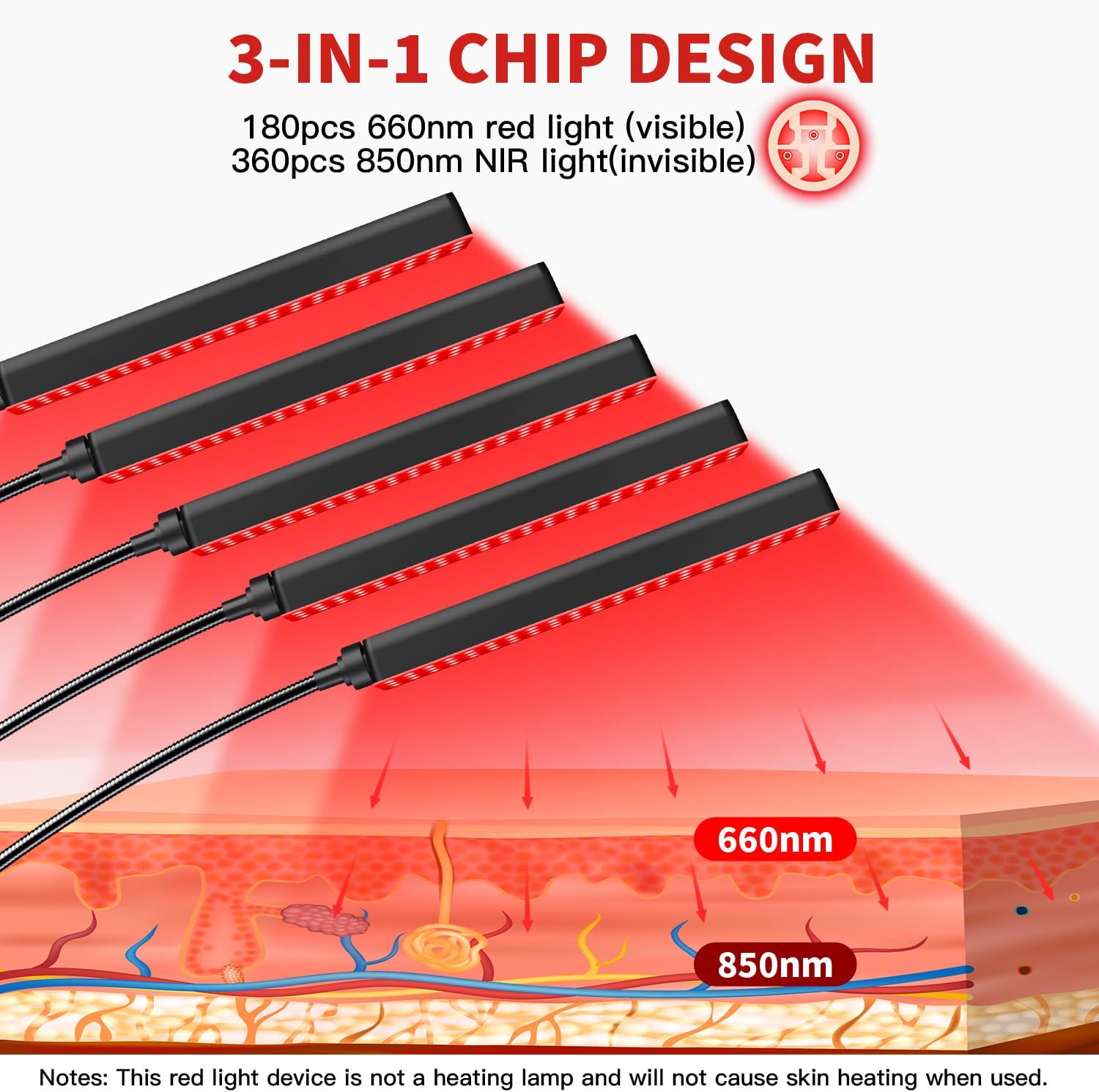
Image: Diagram illustrating the 3-in-1 chip design, showing 180 pieces of 660nm visible red light and 360 pieces of 850nm invisible near-infrared (NIR) light, and how they penetrate different layers of the skin.
5.3. Brightness Adjustment
Use the 'Brightness adjustment' buttons (+/-) on the wired controller or the 'Brightness +' and 'Brightness -' buttons on the remote control to adjust the light intensity. The device offers 10 levels of energy regulation.

Image: A woman meditating with the Cholas Red Light Therapy Lamp, illustrating the concept of 10 gears energy regulation for high-energy LEDs, medium distance irradiation, and uniform illumination.
5.4. Timing Function
Set the treatment duration using the timer function. Press the 'Timing' button on the wired controller or the '10M', '20M', or '30M' buttons on the remote control to select 10, 20, or 30 minutes. The device will automatically shut off after the selected time. To cancel the timer, press the 'Cancel Timer' button on the wired controller.

Image: A woman relaxing on a couch and reading, with the Cholas Red Light Therapy Lamp in the background, illustrating the customizable auto-off timer function (10, 20, or 30 minutes).
5.5. Remote Control and Wired Controller Overview

Image: Detailed view of the wired controller and the remote control for the Cholas Red Light Therapy Lamp, showing buttons for power, timing, brightness adjustment, and color selection. Note: Remote requires AAA batteries.
5.6. Usage Recommendations
- It is recommended to use the device for 15-20 minutes per session.
- Use 3-5 times a week for optimal results.
- Position the light heads to cover the desired treatment area. The flexible goosenecks allow for precise targeting.
- Wear protective goggles during each session.

Image: Collage showing different body parts (shoulder, belly, head, neck, waist, ankle) benefiting from red light therapy, indicating full body application.

Image: A series of images depicting the Cholas Red Light Therapy Lamp being used in various settings such as a bedroom, during yoga, in an office, and in a beauty salon, highlighting its versatility.
6. Maintenance
6.1. Cleaning
- Ensure the device is unplugged before cleaning.
- Wipe the surface of the light heads and stand with a soft, dry cloth.
- Do not use abrasive cleaners or immerse the device in water.
6.2. Storage
- Store the device in a cool, dry place when not in use.
- Keep the original packaging for safe storage and transport.
7. Troubleshooting
If you encounter issues with your device, refer to the following common problems and solutions:
| Problem | Possible Cause | Solution |
|---|---|---|
| Device does not power on. | Power cord not properly connected; power outlet malfunction; remote control batteries depleted. | Check power cord connection. Try a different power outlet. Replace AAA batteries in the remote control. |
| Lights are dim or flickering. | Low power supply; brightness setting too low. | Ensure stable power supply. Increase brightness using the controller or remote. |
| Remote control not responding. | Batteries depleted or incorrectly inserted; obstruction between remote and device. | Replace AAA batteries. Ensure clear line of sight to the device's receiver. |
| Timer function not working. | Timer not set correctly. | Re-select the desired time (10, 20, or 30 minutes) using the timer buttons. |
8. Specifications
- Brand: Cholas
- Model: 5-Head Red Light Therapy Device
- LED Count: 180 LEDs (660nm Red Light), 360 LEDs (850nm Near-Infrared Light)
- Wavelengths: 660nm (Red), 850nm (Near-Infrared), plus 7 selectable colors (Red, Yellow, Green, Cyan, White, Purple, Blue)
- Timer Settings: 10, 20, 30 minutes
- Brightness Levels: 10 adjustable levels
- Adjustable Height: 20 - 59 inches
- Package Dimensions: 16.97 x 7.01 x 4.33 inches
- Weight: 3.9 Pounds
- Manufacturer: Cholas
- ASIN: B0F32KY79Y
9. Warranty and Support
Cholas is committed to providing quality products and customer satisfaction.
- Warranty: This product comes with a 24-month hassle-free warranty.
- Returns: A 30-day unconditional return guarantee is provided.
- Customer Support: For any questions, technical assistance, or warranty claims, please contact Cholas customer support. Lifetime customer and technical support are available.

Image: The official Cholas brand logo.