
iScooter X-02
Contents
iScooter 4-Wheel Mobility Scooter User Manual
Model: X-02
1. Introduction
This manual provides essential information for the safe and efficient operation, maintenance, and troubleshooting of your iScooter 4-Wheel Mobility Scooter. Please read this manual thoroughly before first use to ensure proper handling and to maximize the lifespan of your device.
2. Safety Information
Your iScooter mobility scooter is designed with safety in mind. Always adhere to the following guidelines:
- Always operate the scooter on stable, level surfaces.
- Utilize the LED headlights for visibility, especially during low-light conditions.
- Be aware of the reverse safety warning bell when backing up to alert others.
- The scooter is equipped with anti-roll wheels to prevent tipping; however, exercise caution on inclines.
- Ensure the maximum load capacity of 300 lbs is not exceeded.

3. Setup and Assembly
The iScooter mobility scooter is designed for easy assembly and disassembly, making it convenient for transport and storage.
3.1 Initial Charging
Before your first ride, ensure the battery is fully charged for optimal performance. The removable battery can be charged directly on the scooter or detached for charging.
3.2 Component Assembly/Disassembly
The scooter features a folding joystick and a body that is easy to disassemble and assemble. This allows for convenient storage, such as in a car trunk.
- Tiller Angle Adjustment: Use the knob to adjust the tiller to a comfortable position.
- Seat Installation/Removal: Insert or withdraw the seat tube as needed. The seat can swivel for easy access.
- Seat Adjustment: Adjust the seat height and position for comfort.
- Basket Adjustment: Position the front storage basket as desired.


4. Operating Instructions
Operating your iScooter mobility scooter is intuitive and straightforward.
4.1 Controls Overview

- Key Switch: Insert and turn the key to power on/off the scooter.
- Speed Dial: Adjust the maximum speed from 0 to 5 mph according to your preference and environment.
- Throttle Control Lever: Use the left lever for forward movement and the right lever for reverse.
- Horn Switch: Press to activate the horn for alerting others.
- Headlight Switch: Turn on the LED headlight for illumination.
- Battery Indicator: Displays the current battery charge level.
4.2 Driving and Maneuvering
To drive, turn the key to the 'ON' position. Use the throttle levers to control your speed and direction. The scooter offers flexible steering with its left and right swivel seats, making it easy to get on and off in narrow spaces.
For safety, the scooter is equipped with a reverse safety warning bell that activates when moving backward.
4.3 Conquering Hills
The iScooter is designed to handle inclines with ease. When going downhill, the sensitive braking system ensures a safe descent.
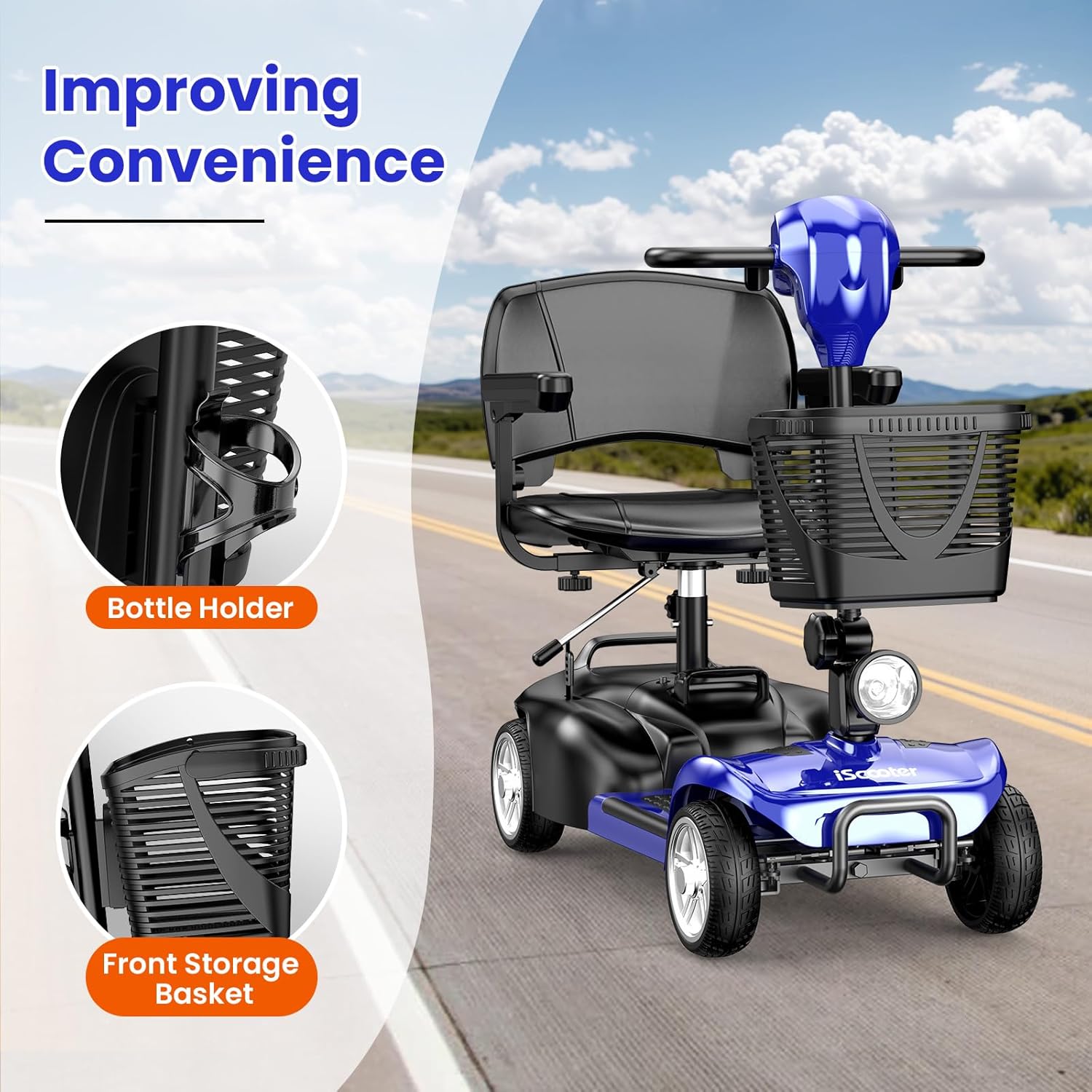
4.4 Convenience Features
- Fixed Cup Holder: A stable, spill-proof cup holder allows for easy access to beverages while riding.
- Front Storage Basket: Provides convenient storage for personal items.
- Adjustable Armrests: Two upward-adjustable armrests, combined with the comfortable seat cushion, provide long-lasting support.
4.5 Product Video
Official product video demonstrating the iScooter mobility scooter in various settings, highlighting its ease of use and features for a peaceful journey.
5. Battery and Range
The iScooter mobility scooter is equipped with a removable battery, offering convenience and extended range options.
- Range: The scooter provides a range of 12.4 miles on a single charge.
- Extended Range: An option for an extra battery is available to further extend your travel range.
- Charging: The battery can be charged while installed in the scooter or removed for charging.

6. Maintenance
Regular maintenance ensures the longevity and optimal performance of your iScooter mobility scooter.
- Battery Care: Always fully charge the battery before the first ride. For prolonged storage, ensure the battery is charged periodically to maintain its health.
- Cleaning: Wipe down the scooter with a damp cloth. Avoid using harsh chemicals or direct water spray.
- Component Check: Periodically inspect all moving parts, connections, and fasteners to ensure they are secure and free from damage.
7. Troubleshooting
If you encounter any issues with your iScooter mobility scooter, refer to the following common problems and solutions:
| Problem | Possible Cause | Solution |
|---|---|---|
| Scooter makes a "click, click, click" sound. | Potentially loose wheels or an issue within the gear mechanism. | Ensure all wheel nuts are tightened. If the sound persists, contact customer support for inspection of the gear system. |
| Battery does not hold charge or drains quickly. | Battery not fully charged, aging battery, or charging issue. | Ensure the battery is fully charged before use. If the issue persists after proper charging, the battery may need replacement. Contact support for battery testing or replacement. |
| Reverse beeping sound is too loud. | Volume setting or internal speaker issue. | Check if there is a volume adjustment for the reverse warning. If not, or if the issue persists, contact customer support. |
| Missing a piece for the seat. | Component missing from packaging. | Immediately contact customer support with your purchase details to arrange for the missing part to be sent. |
For issues not listed here or if solutions do not resolve the problem, please contact iScooter customer support.
8. Specifications
Key technical specifications for the iScooter 4-Wheel Mobility Scooter (Model X-02):
- Model Name: X-02
- Brand: iScooter
- Color: Sapphire Blue (as per current variant)
- Maximum Speed: Up to 5 MPH
- Range: Approximately 12.4 Miles per charge
- Maximum Load Capacity: 300 lbs
- Wheel Size: 7.76 Inches
- Manufacturer: WUYI AICHI INDUSTRY AND TRADE CO., LTD
- Features: LED Headlight, Detachable Basket, Cup Holder, Swivel Seat, Folding Joystick, Anti-Skid Pedal, Bumper Bar
9. Warranty
iScooter stands by the quality of its products. We offer a warranty on different parts of your mobility scooter:
- General Warranty: 360 days on certain parts.
- Specific Parts Warranty: 180 days on other parts.
Please refer to your purchase documentation or contact customer support for specific warranty details pertaining to individual components.
10. Customer Support
Your satisfaction is our top priority. For fast and professional service, please contact iScooter customer support:
- Call Center: +1 (855) 916-2366
- Live Chat/Email Support: support@iscooterglobal.com
Our team is ready to assist you with any inquiries, technical support, or warranty claims.
Ask a question about this manual
Ask about setup, troubleshooting, compatibility, parts, safety, or missing instructions. Manuals+ will review the question and use this page’s manual context to help answer it.