
XINFUTE MYB-A1C
Contents
User Manual
XINFUTE MYB-A1C Air Conditioner Remote Control
Model: MYB-A1C
Product Overview
This manual provides instructions for the XINFUTE MYB-A1C remote control, designed for use with TCL LED Backlight ECO AC Air Conditioners. This remote control offers essential functions for managing your air conditioner's settings, including temperature, mode, fan speed, and more. It is an original replacement unit, ready for use without complex pairing.
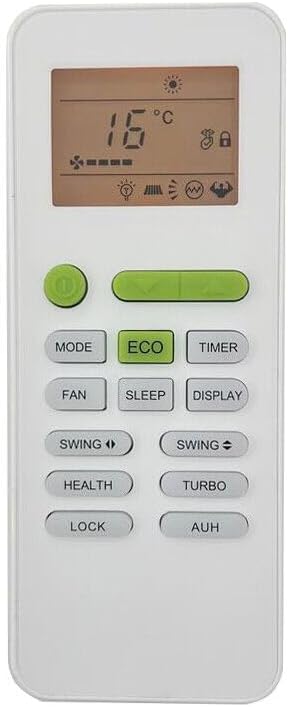
Figure 1: Front view of the MYB-A1C remote control with Celsius temperature display.
Setup and Battery Installation
The XINFUTE MYB-A1C remote control requires two AAA batteries (not included) for operation. No pairing or complex setup is required; simply insert the batteries, and the remote is ready to use.

Figure 2: Back view of the MYB-A1C remote control with the battery compartment closed.
- Locate the battery compartment on the back of the remote control.
- Press down on the "PUSH" tab and slide the battery cover downwards to open the compartment.
- Insert two AAA batteries, ensuring the positive (+) and negative (-) terminals align correctly with the markings inside the compartment.
- Slide the battery cover back into place until it clicks securely.
Important Battery Information: Do not mix new and worn batteries, or different types of batteries. If the remote control will not be used for an extended period, remove the batteries to prevent leakage and damage.

Figure 3: Back view of the MYB-A1C remote control with the battery compartment open.
Operating Instructions
Point the remote control directly at the air conditioner's receiver. Ensure there are no obstructions between the remote and the air conditioner.
| Button | Function |
|---|---|
| Power Button | Turns the air conditioner ON or OFF. |
| MODE | Cycles through operating modes (e.g., Cool, Heat, Fan, Dry, Auto). |
| ECO | Activates or deactivates the energy-saving ECO mode. |
| TIMER | Sets the timer for automatic ON/OFF operation. |
| FAN | Adjusts the fan speed. |
| SLEEP | Activates the sleep mode for quiet operation and optimized temperature control during sleep. |
| DISPLAY | Controls the display on the air conditioner unit. |
| SWING ◀ / SWING ► | Controls the horizontal or vertical swing of the air outlet. |
| HEALTH | Activates health-related functions (e.g., air purification, ionizer), if available on your AC model. |
| TURBO | Activates maximum cooling/heating for rapid temperature change. |
| LOCK | Locks the remote control buttons to prevent accidental changes. |
| AUH | Specific function, refer to your air conditioner's main manual for details. |
Special Functions:
- Changing Temperature Display (℃ / ℉): To switch between Celsius (℃) and Fahrenheit (℉) temperature display, press the MODE button and the SWING ► button simultaneously.
- Locking the Remote Control: To lock the remote control buttons and prevent unintended operation, press and hold the LOCK button for approximately 3 seconds. Repeat the action to unlock.
- Silent Mode: To enter Silent Mode, press and hold the FAN button for approximately 3 seconds. This mode reduces fan noise for quieter operation.

Figure 4: Front view of the MYB-A1C remote control with Fahrenheit temperature display.
Maintenance
Proper maintenance ensures the longevity and optimal performance of your remote control.
- Cleaning: Wipe the remote control with a soft, dry cloth. Do not use liquid cleaners, sprays, or abrasive materials, as these can damage the surface or internal components.
- Battery Replacement: Replace batteries when the remote's range decreases or buttons become unresponsive. Always replace both batteries at the same time with new ones of the same type (AAA).
- Storage: Store the remote control in a cool, dry place away from direct sunlight and extreme temperatures. If storing for an extended period, remove the batteries.
Troubleshooting
If you experience issues with your remote control, try the following steps:
- Remote Not Responding:
- Check if the batteries are inserted correctly with the correct polarity.
- Replace the batteries with fresh AAA batteries.
- Ensure there are no obstructions between the remote control and the air conditioner's receiver.
- Verify that you are within the effective operating range of the air conditioner.
- Buttons Not Working:
- Check if the remote control is in "Lock" mode. If so, press and hold the LOCK button for 3 seconds to unlock it.
- Ensure the remote's infrared emitter is clean and not obstructed.
If the issue persists after following these steps, please refer to the Warranty and Support section for further assistance.
Specifications
| Feature | Detail |
|---|---|
| Model Number | MYB-A1C |
| Brand | XINFUTE |
| Compatible With | TCL LED Backlight ECO AC Air Conditioners |
| Material | ABS Material |
| Color | As Shown (White) |
| Power Source | 2 x AAA Batteries (not included) |
| Product Dimensions | 4 x 3 x 1 inches (approximate) |
| Item Weight | 2.4 ounces (approximate) |
Warranty and Support
Warranty: This product comes with a one-year warranty from the date of purchase.
Customer Support: All products are inspected before shipment. If you are not satisfied with your purchase or encounter any issues, please contact the seller within 24 hours of receipt. For further assistance or warranty claims, please reach out to XINFUTE customer service through the platform where the purchase was made.
Documents and downloads
Ask a question about this manual
Ask about setup, troubleshooting, compatibility, parts, safety, or missing instructions. Manuals+ will review the question and use this page’s manual context to help answer it.