1. Product Overview
The Nitehop 200W Dual-Color COB Stage Light is designed for professional lighting applications, offering versatile illumination for various events. This fixture features advanced LED technology, providing adjustable color temperatures and dimming capabilities. Its robust construction ensures durability and efficient heat dissipation.
Key Features:
- Efficient LED Technology: 200W dual-color COB LED for energy savings, 0-100% linear dimming, and adjustable color temperatures from 3200K to 6500K.
- Smart Temperature Control System: Ensures optimal performance and extends LED bulb lifespan to over 50,000 hours.
- Versatile 4-Leaf Adjustable Shade (Barn Doors): Allows for 180° flexible adjustment for precise light projection.
- Durable and Lightweight Design: Constructed with an all-aluminum chassis for excellent heat dissipation, easy transport, and setup.
- Multi-Purpose Application: Suitable for banquet halls, wedding receptions, theaters, and concert stages.

Image 1.1: The Nitehop 200W Dual-Color COB Stage Light with its adjustable barn doors.
2. Product Components
The following items are included with your Nitehop 200W Dual-Color COB Stage Light:
- Stage Light x 1
- Power Cord x 1
- Handle Screws x 2
- Lamp Handle x 1
- User's Guide x 1

Image 2.1: Visual representation of the included components: stage light, power cord, handle screws, lamp handle, and user's guide.
3. Setup Instructions
3.1 Attaching the Handle and Barn Doors
- Unpack all components from the box.
- Attach the lamp handle to the sides of the stage light using the provided handle screws. Ensure it is securely fastened.
- The 4-leaf adjustable shade (barn doors) are pre-attached to the front of the light. Adjust them to your desired position to control light spread.

Image 3.1: The stage light with its barn doors open, demonstrating light control capabilities.
3.2 Power Connection
- Locate the POWER IN port on the rear control panel.
- Connect the provided power cord to the POWER IN port. Twist to lock the connector in place.
- Plug the other end of the power cord into a suitable power outlet.
- The digital display on the rear panel will illuminate, indicating the unit is powered on.
3.3 DMX Connection (Optional)
For DMX control, connect a DMX cable from your DMX controller to the DMX IN port on the stage light. If linking multiple lights, use the DMX OUT port to connect to the DMX IN port of the next fixture.
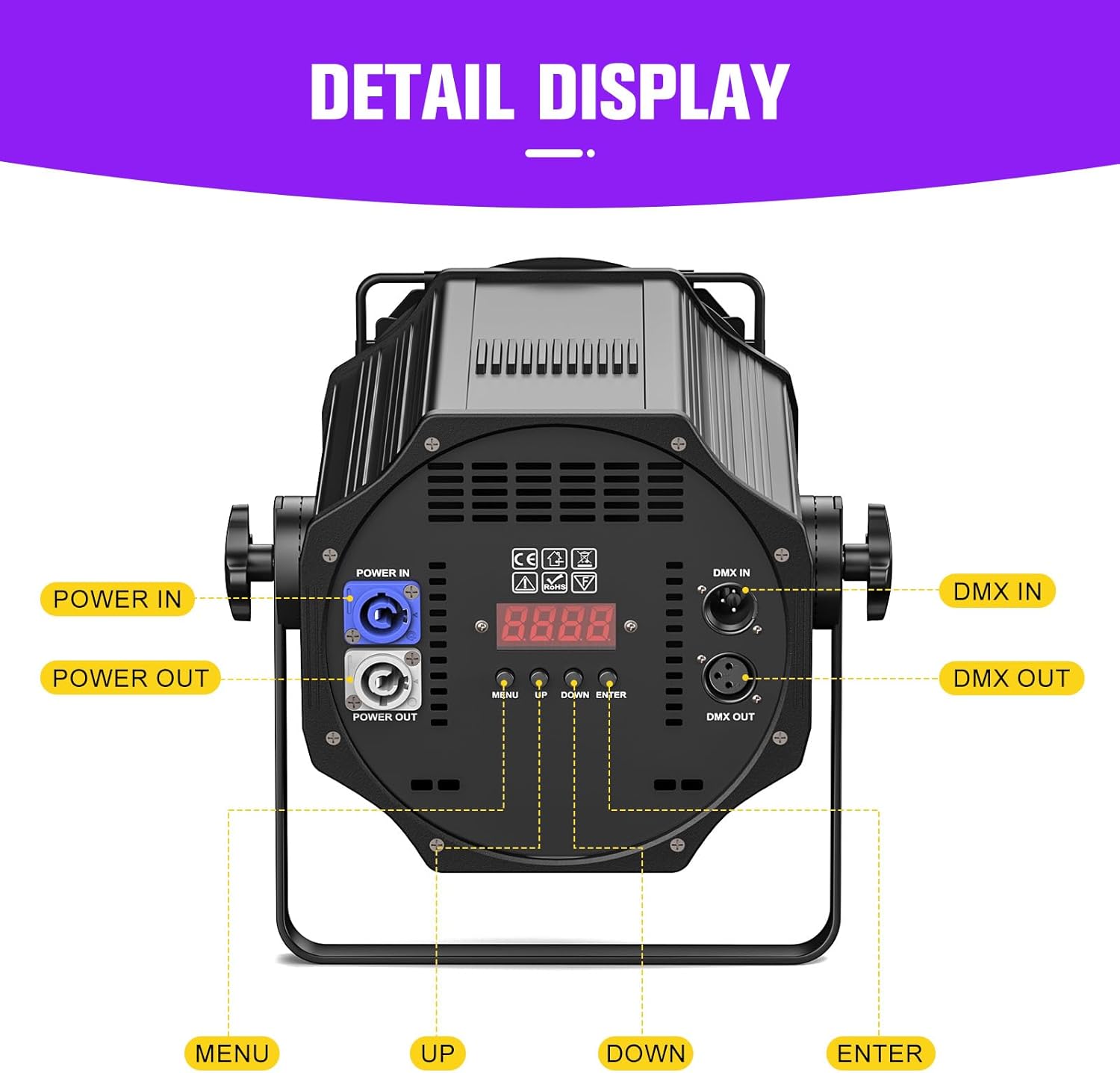
Image 3.2: Detailed view of the rear control panel, showing POWER IN/OUT, DMX IN/OUT, and the digital display with control buttons.
4. Operating Instructions
The Nitehop 200W Dual-Color COB Stage Light offers multiple operating modes, accessible via the rear control panel.
4.1 Control Panel Navigation
- MENU: Press to cycle through different operating modes and settings.
- UP/DOWN: Use to adjust values or select options within a mode.
- ENTER: Confirm your selection or save changes.
4.2 Operating Modes
- DMX Mode: Allows external control via a DMX controller. Refer to the DMX Channel List in the user manual for specific channel functions.
- Master/Slave Mode: Link multiple units where one acts as the master, controlling the others.
- Sound-Activated Mode: The light reacts to ambient sound, creating dynamic effects.
- Auto Mode: Cycles through pre-programmed light shows automatically.
- Strobe Mode: Produces a flashing light effect.
- Fade Mode: Smooth transitions between different light intensities or colors.
Video 4.1: Demonstration of various stage light effects and operating modes, including warm white, cool white, 2-in-1 mix, auto mode, strobe mode, and fade mode.
4.3 Color Temperature and Brightness Adjustment
In manual modes or via DMX, you can adjust the color temperature from 3200K (warm white) to 6500K (cool white) and dim the brightness from 0% to 100%.

Image 4.2: Illustrates the adjustable color temperature range of the stage light.

Image 4.3: Shows the dimmable brightness feature of the stage light.
5. Maintenance
Regular maintenance ensures the longevity and optimal performance of your Nitehop Stage Light.
- Cleaning: Periodically clean the lens and exterior with a soft, dry cloth. Do not use harsh chemicals or abrasive materials.
- Ventilation: Ensure the ventilation openings on the unit are clear of dust and debris to maintain proper heat dissipation.
- Storage: When not in use, store the light in a cool, dry place, protected from dust and extreme temperatures.
- Cable Inspection: Regularly check power and DMX cables for any signs of wear or damage. Replace damaged cables immediately.

Image 5.1: Illustration of the efficient heat dissipation design, crucial for product longevity.
6. Troubleshooting
If you encounter issues with your Nitehop Stage Light, refer to the following common troubleshooting steps:
- No Power: Check if the power cord is securely connected to both the light and the power outlet. Ensure the power outlet is functional.
- No Light Output: Verify that the light is not in a 'blackout' or 'standby' mode. Check brightness settings.
- DMX Control Issues: Ensure DMX cables are correctly connected (DMX IN to DMX OUT). Check the DMX address setting on the light and your controller. Refer to the DMX channel table in the full user manual.
- Incorrect Color/Dimming: Reset the light to factory defaults or re-enter the desired settings via the control panel.
- Overheating: Ensure the light has adequate ventilation and is not obstructed. Allow the unit to cool down if it feels excessively hot.
7. Specifications
| Feature | Specification |
|---|---|
| Brand | Nitehop |
| Model Number | ZQ09012 |
| Power | 200 Watts |
| Light Source Type | LED (COB) |
| Color Temperature | 3200K-6500K (Adjustable) |
| Brightness | 10000 Lumens (Maximum) |
| Dimming | 0-100% Linear Dimming |
| Beam Angle | 65 Degrees |
| Material | Aluminum, Metal |
| Finish Type | Painted |
| Product Dimensions | 9.83"L x 8.65"W x 8.25"H |
| Item Weight | 24.9 pounds |
| Average Life | 50000 Hours |
| Mounting Type | Wall Mount |
| Bulb Features | Dimmable, Color Adjustable, DMX Control, Voice Control |
8. Warranty and Support
For warranty information and technical support, please refer to the contact details provided in the full user manual included with your product or visit the official Nitehop website. Protection plans may be available for purchase separately to extend coverage.