
LALFPET 8OSjQ41ehP_y6hp8Ge9xw64
Contents
LALFPET Mid-Century Modern TV Stand with LED Lighting Instruction Manual
Model: _8OSjQ41ehP_y6hp8Ge9xw64
1. Introduction
Thank you for purchasing the LALFPET Mid-Century Modern TV Stand with LED Lighting. This versatile entertainment center is designed to accommodate TVs up to 65 inches, offering stylish storage and enhancing your living space. This manual provides essential information for assembly, operation, maintenance, and troubleshooting to ensure optimal use of your new TV stand.

Image 1.1: The LALFPET Mid-Century Modern TV Stand with LED Lighting, showcasing its design and functionality in a living room environment.
2. Safety Information
Please read all instructions carefully before assembly and use. Retain this manual for future reference.
- Ensure all parts are present and undamaged before assembly. Do not use if any parts are missing or broken.
- Assemble the unit on a soft, clean surface to prevent scratches.
- Do not overtighten screws during assembly, as this may damage the material.
- Place the TV stand on a level, stable surface to prevent tipping.
- Do not exceed the maximum weight capacity of 250 lbs (113 kg) for the top surface.
- Keep small parts and packaging materials away from children and pets.
- For LED lighting, ensure proper electrical connections and avoid exposing the LED strip to water or excessive moisture.
3. Package Contents
Verify that all components listed below are included in your package. If any parts are missing or damaged, please contact customer support.
- Particleboard panels (various sizes for top, sides, shelves, doors)
- Glass panels for cabinet doors
- Hardware kit (screws, dowels, cam locks, hinges, handles, etc.)
- LED lighting strip with remote control and power adapter
- Instruction manual
4. Assembly Instructions
Assembly is required for this TV stand. It is recommended to have two people for assembly. Please follow the step-by-step diagrams provided in the separate assembly guide included in your package. The general steps are outlined below:
- Unpack and Identify Parts: Carefully remove all components from the packaging. Lay them out and compare them against the parts list in the assembly guide to ensure everything is present.
- Assemble the Base: Attach the side panels to the bottom panel using the provided hardware.
- Install Shelves and Dividers: Insert the fixed and adjustable shelves into their designated slots.
- Attach Back Panels: Secure the back panels to the frame. Ensure cable management holes are correctly oriented.
- Assemble and Attach Doors: Assemble the cabinet doors, including the glass panels. Attach the hinges to the doors and then to the main unit. Adjust hinges for proper alignment.
- Install Handles: Attach the metal handles to the cabinet doors.
- Install LED Lighting: Adhere the LED strip to the designated area, typically along the top edge of the open compartments. Connect the power adapter and remote receiver.
- Final Inspection: Ensure all connections are secure and the stand is stable.

Image 4.1: Product dimensions (58.2" W x 15.8" D x 34.4" H) and weight capacity (250 lbs) for the LALFPET TV Stand.
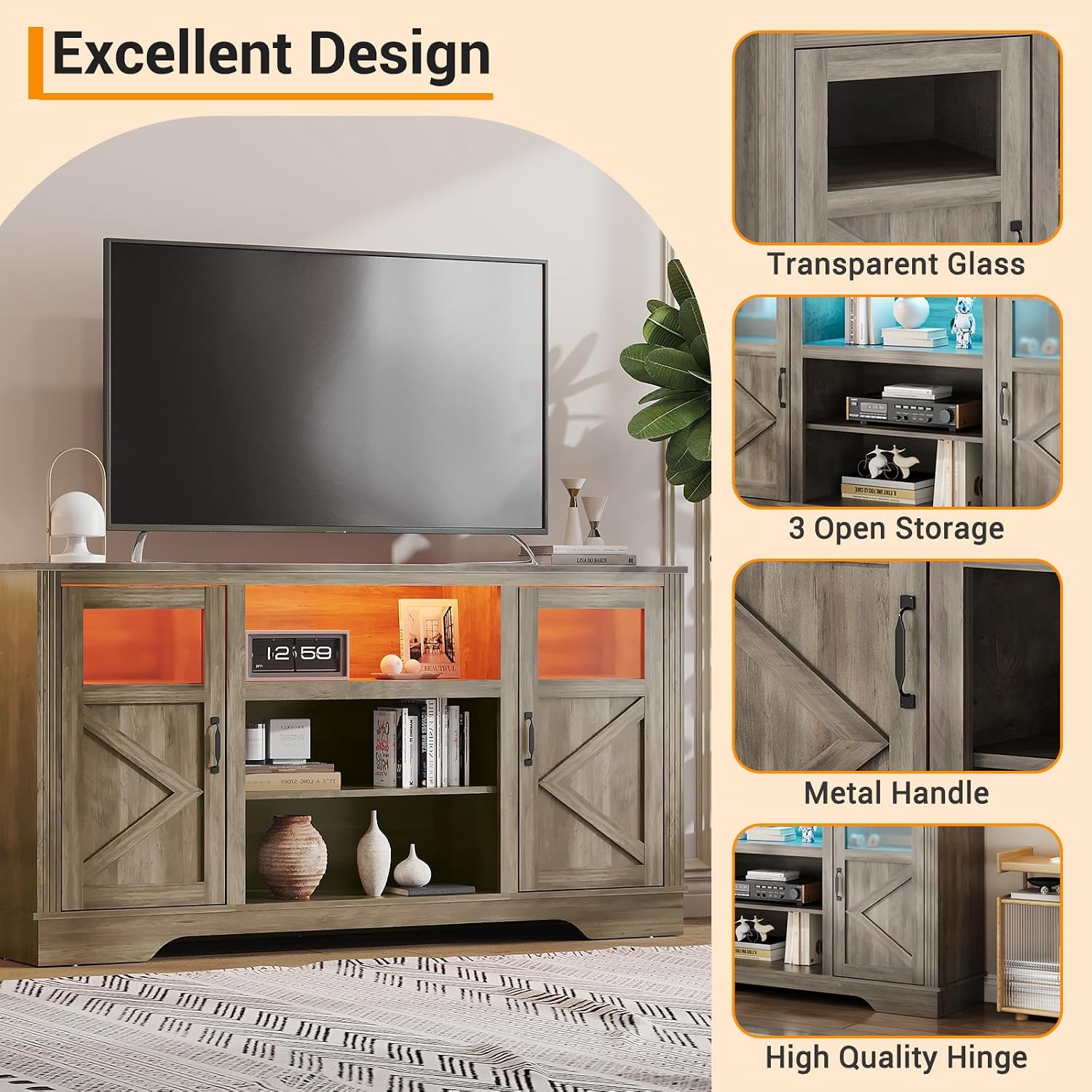
Image 4.2: Close-up of design elements such as transparent glass doors, three open storage compartments, durable metal handles, and robust hinges.
5. Operating Instructions
5.1 LED Lighting System
The integrated RGB LED lighting system enhances the ambiance of your entertainment area. Use the provided remote control to operate the lights.
- Power On/Off: Press the power button on the remote to turn the lights on or off.
- Color Selection: Choose from over 6000 colors using the color wheel or preset color buttons.
- Brightness Adjustment: Increase or decrease brightness using the dedicated buttons.
- Dynamic Modes: Select various dynamic modes for light effects, such as fading, jumping, or strobing.
- Music Mode: The lights can synchronize with music or sound detected by the built-in microphone.
- Timing Function: Set a timer for the lights to automatically turn off.

Image 5.1: The TV stand with its RGB LED lighting system active, highlighting various operational modes.

Image 5.2: Visual representation of the LED lighting system's capabilities, including a wide color spectrum and various control modes via a smartphone app or remote.
5.2 Cable Management
The TV stand features integrated cable management holes to keep your wires organized and out of sight, contributing to a cleaner aesthetic.
- Route power cords and signal cables through the pre-drilled holes in the back panel of the open compartments.
- Utilize cable ties (not included) to bundle wires for a tidier appearance.

Image 5.3: Detail showing the metal handle and the strategically placed hole for cable management, designed to keep wires organized.
6. Maintenance and Care
Proper care will extend the life and appearance of your TV stand.
- Cleaning: Wipe surfaces with a soft, damp cloth. Avoid harsh chemicals or abrasive cleaners, which can damage the finish.
- Spills: Clean spills immediately with a dry cloth to prevent staining or water damage.
- Dusting: Regularly dust with a soft, dry cloth.
- LED Lights: Ensure the LED strip and connections remain dry. If the lights malfunction, check the power connection and remote control battery.
- Hardware: Periodically check and tighten all screws and fasteners to ensure stability.
7. Troubleshooting
If you encounter issues with your TV stand, refer to the following common problems and solutions:
| Problem | Possible Cause | Solution |
|---|---|---|
| Stand is wobbly/unstable | Loose fasteners; uneven floor | Tighten all screws and bolts. Ensure the stand is on a level surface; use shims if necessary. |
| LED lights not working | Power connection issue; remote battery dead; faulty LED strip | Check if the power adapter is securely plugged in. Replace remote control battery. Ensure LED strip is properly connected to the receiver. |
| Cabinet doors do not align | Hinges not adjusted correctly | Adjust the screws on the hinges to align the doors. Refer to the assembly guide for hinge adjustment details. |
8. Specifications
- Brand: LALFPET
- Model Name: _8OSjQ41ehP_y6hp8Ge9xw64
- Color: Grey
- Material: Engineered Wood, Glass
- Product Dimensions: 63.39 x 19.09 x 7.09 inches (L x W x H)
- Item Weight: 109 Pounds
- Weight Capacity (Top Surface): Up to 250 lbs
- Maximum TV Size: Up to 65 inches
- Assembly Required: Yes
- Included Components: Particleboard and glass panels, hardware, LED lighting kit

Image 8.1: Illustration of the diverse storage capabilities, including two cabinet doors with glass and internal classified partitions for organization.
9. Warranty and Support
For warranty information, missing parts, or technical support, please contact the manufacturer or your retailer directly. Keep your purchase receipt as proof of purchase.
Manufacturer: LALFPET
Documents and downloads
Ask a question about this manual
Ask about setup, troubleshooting, compatibility, parts, safety, or missing instructions. Manuals+ will review the question and use this page’s manual context to help answer it.