
1. Introduction
This manual provides detailed instructions for the safe and effective use of the SEEIRIR KKM198 Digital Multimeter. This device is a versatile tool designed for measuring various electrical parameters, including DC/AC voltage, DC/AC current, resistance, capacitance, and temperature. It features a 4.4-inch touch screen for intuitive operation and includes a VFC (Variable Frequency Control) function for accurate measurements in variable frequency environments.
2. Safety Information
Always adhere to the following safety precautions to prevent personal injury or damage to the multimeter:
- Do not exceed the maximum input values specified for each measurement range.
- Ensure test leads are in good condition and properly connected before making any measurements.
- Do not use the multimeter if it appears damaged or if the battery cover is not securely closed.
- Exercise extreme caution when working with voltages above 30V AC RMS, 42V peak, or 60V DC. These voltages pose a shock hazard.
- Always disconnect power to the circuit and discharge all high-voltage capacitors before measuring resistance, capacitance, or continuity.
- Replace batteries promptly when the low battery indicator appears to ensure accurate readings.
3. Product Overview
The SEEIRIR KKM198 Digital Multimeter is equipped with a large touch screen display and intuitive controls for ease of use. Below is an image illustrating the device.
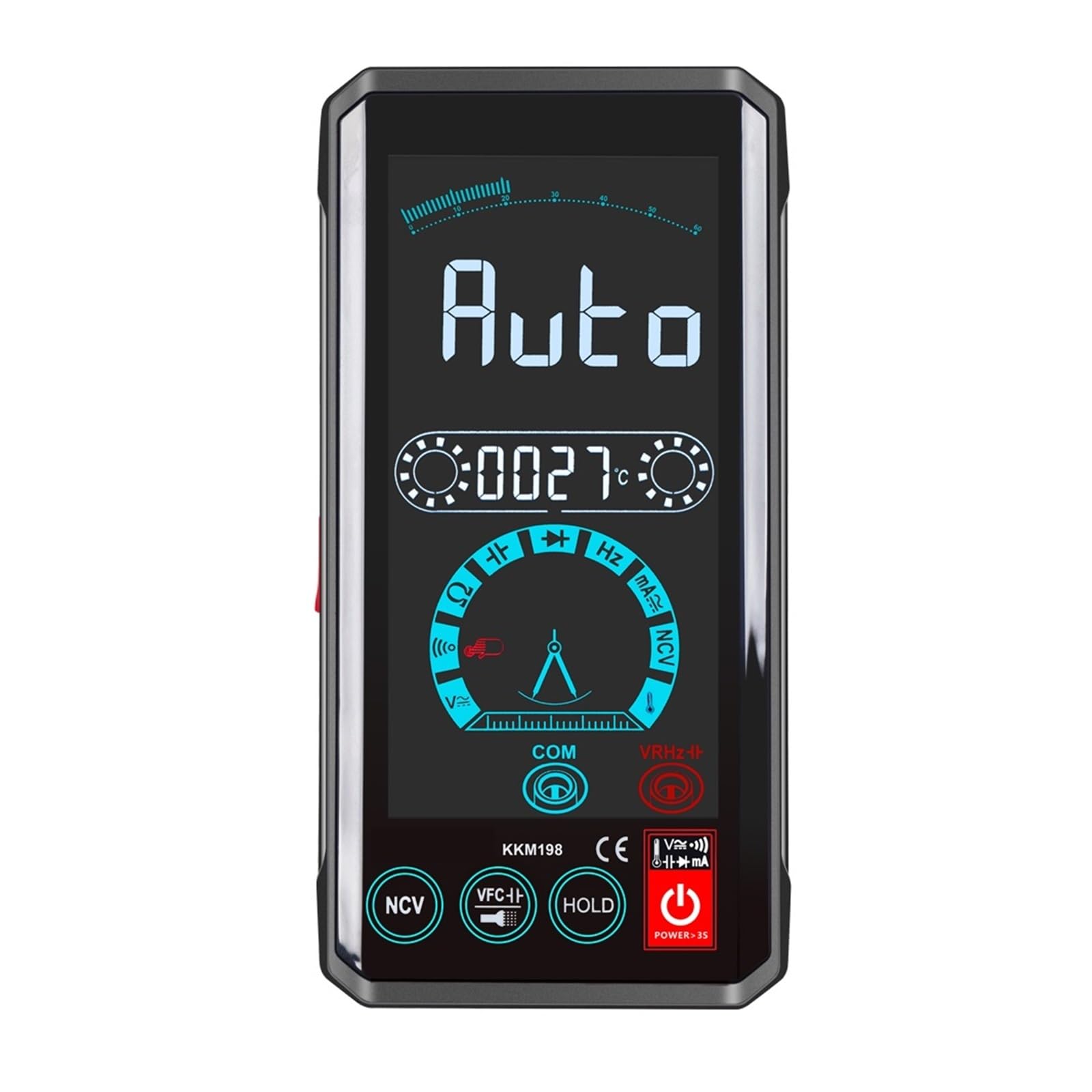
Figure 3.1: Front view of the SEEIRIR KKM198 Digital Multimeter, showing its 4.4-inch touch screen interface and connected test leads.
4. Setup
4.1. Battery Installation
The KKM198 Multimeter requires batteries for operation. To install or replace batteries:
- Ensure the multimeter is powered off and disconnect all test leads.
- Locate the battery compartment on the rear of the device.
- Open the battery compartment cover.
- Insert new batteries, observing correct polarity (+ and -).
- Securely close the battery compartment cover.
4.2. Connecting Test Leads
Connect the test leads to the appropriate input jacks on the multimeter:
- Insert the black test lead into the COM (common) jack.
- For most voltage, resistance, capacitance, and temperature measurements, insert the red test lead into the VΩCAPHzTemp jack.
- For current measurements (mA), insert the red test lead into the mA jack.
5. Operating Instructions
The KKM198 features a touch screen interface for mode selection and function control.
5.1. Power On/Off
Press and hold the power button on the device to turn it on or off. The 4.4-inch touch screen will illuminate upon power-on.
5.2. DC/AC Voltage Measurement
To measure voltage:
- Connect the red test lead to the VΩCAPHzTemp jack and the black lead to the COM jack.
- Select the DC Voltage (VDC) or AC Voltage (VAC) mode on the touch screen.
- Connect the test probes in parallel to the circuit or component being measured.
- Read the voltage value displayed on the screen.
5.3. DC/AC Current Measurement
To measure current:
- Important: Disconnect power to the circuit before connecting the multimeter.
- Connect the red test lead to the mA jack and the black lead to the COM jack.
- Select the DC Current (ADC) or AC Current (AAC) mode on the touch screen.
- Connect the multimeter in series with the circuit where current is to be measured.
- Apply power to the circuit and read the current value.
5.4. Resistance Measurement
To measure resistance:
- Ensure the circuit is de-energized and all capacitors are discharged.
- Connect the red test lead to the VΩCAPHzTemp jack and the black lead to the COM jack.
- Select the Resistance (Ω) mode on the touch screen.
- Connect the test probes across the component to be measured.
- Read the resistance value.
5.5. Capacitance Measurement
To measure capacitance:
- Ensure the capacitor is fully discharged before measurement.
- Connect the red test lead to the VΩCAPHzTemp jack and the black lead to the COM jack.
- Select the Capacitance (CAP) mode on the touch screen.
- Connect the test probes across the capacitor terminals.
- Read the capacitance value.
5.6. Temperature Measurement
To measure temperature:
- Connect the red test lead to the VΩCAPHzTemp jack and the black lead to the COM jack.
- Select the Temperature (Temp) mode on the touch screen.
- Place the temperature probe (if included and connected) at the desired measurement point.
- Read the temperature value.
5.7. VFC Function
The VFC (Variable Frequency Control) function is designed for accurate voltage and frequency measurements in circuits with variable frequency drives or other non-sinusoidal waveforms. Activate this mode via the touch screen when measuring such signals.
6. Maintenance
6.1. Cleaning
To clean the multimeter, wipe the case with a damp cloth and a mild detergent. Do not use abrasives or solvents. Ensure the device is powered off and disconnected from all circuits before cleaning.
6.2. Storage
When not in use for extended periods, remove the batteries to prevent leakage. Store the multimeter in a cool, dry place, away from direct sunlight and extreme temperatures.
6.3. Battery Replacement
Replace the batteries as described in Section 4.1 when the low battery indicator appears on the display. Using a multimeter with low batteries can lead to inaccurate readings.
7. Troubleshooting
If you encounter issues with your KKM198 Digital Multimeter, refer to the following common problems and solutions:
- No Display: Check battery installation and ensure batteries are not depleted.
- Inaccurate Readings: Verify correct mode selection, proper test lead connection, and ensure batteries are not low. Calibrate if necessary (refer to service information).
- No Response from Touch Screen: Power cycle the device. If the issue persists, contact support.
- "OL" or Overload Indication: The measured value exceeds the selected range. Switch to a higher range or verify the circuit conditions.
8. Specifications
| Parameter | Value |
|---|---|
| Model Number | KKM198 |
| Display Type | Digital display |
| Screen Size | 4.4 inch |
| Button Type | Touch button |
| Sampling Rate | Approximately 3 times per second |
| DC Voltage Range | 6V / 60V / 600V / 1000V |
| AC Voltage Range | 2V / 20V / 200V / 750mV |
| DC Current Range | 600mA ±(1.2%+10) |
| AC Current Range | 600mA ±(1.2%+10) |
| Resistance Range | 600Ω / 6kΩ / 60kΩ / 600kΩ / 6MΩ / 60MΩ |
| Capacitance Range | 10nF / 100nF / 1uF / 10uF / 100uF / 1mF / 10mF / 60mF |
| Operating Temperature | 0 - 40 °C |
| Dimensions | 14 x 7 x 2.2 cm |
| Item Weight | Approximately 10.6 ounces (300 grams) |
| Inductance Measurement | Not supported |
9. Warranty and Support
The SEEIRIR KKM198 Digital Multimeter is designed for reliability and performance. For warranty information, please refer to the product packaging or the retailer's terms of sale. If you require technical assistance or have questions not covered in this manual, please contact your point of purchase or the manufacturer's customer support for further guidance.