
FOKEY Z2
Contents
FOKEY Z2 Wireless Indoor Outdoor Weather Station User Manual
Model: Z2
1. Introduction
Thank you for choosing the FOKEY Z2 Wireless Indoor Outdoor Weather Station. This device provides accurate measurements of indoor and outdoor temperature and humidity, barometric pressure, and features an atomic clock for precise timekeeping. This manual will guide you through the setup, operation, and maintenance of your weather station.

Image 1.1: The FOKEY Z2 Weather Station main display unit and its accompanying wireless remote sensor.
2. What's in the Box
Please check the package contents to ensure all items are present:
- One (1) FOKEY Z2 Weather Station Main Unit
- One (1) Wireless Remote Sensor
- One (1) Power Adapter
- One (1) User Manual (this document)
3. Product Features
- Superior Visual Precision: The 7.6-inch VA display offers enhanced color contrast and crystal-clear readability, suitable for all ages.
- Reliable Precision: Engineered with a thermal-stabilized professional chip, providing high accuracy for temperature and humidity readings.
- Readable Remote Sensor: The outdoor sensor includes a 2-inch digital screen for direct viewing of real-time readings. Its self-draining design ensures durability in various weather conditions.
- Effortless Time Sync: Features an atomic clock function that automatically synchronizes daily with WWVB signals for precise timekeeping. Supports multiple time zones (HAT/AKT/PST/MST/CST/EST/AST).
- Whole-Home Weather Monitoring: Utilizes quick-connect technology for reliable transmission between the main unit and up to three remote sensors, with a maximum wireless range of 328 feet.

Image 3.1: Exploded view of the display technology, highlighting the LED backlight, polarizer, TFT array, liquid crystal, color filter, and cover window for optimal clarity.

Image 3.2: The SHTC3 thermal-stabilized chip, indicating precision engineering for accurate measurements.
4. Setup Guide
4.1 Main Unit Setup
- Unpack the main weather station unit.
- Connect the provided power adapter to the main unit and plug it into a standard electrical outlet.
- For backup power during outages, you may insert three (3) AA batteries (not included) into the battery compartment on the back of the unit.
4.2 Remote Sensor Setup
- Open the battery compartment on the back of the remote sensor.
- Insert two (2) AA batteries (not included), observing the correct polarity (+/-).
- Close the battery compartment securely.
- Place the remote sensor in a suitable outdoor location, protected from direct sunlight and heavy precipitation, ensuring good ventilation. The self-draining design helps with moisture management.
4.3 Pairing the Sensor
The main unit and remote sensor should automatically pair upon initial power-up. If pairing does not occur:
- Ensure both the main unit and remote sensor have power.
- Press and hold the 'CHANNEL' button on the main unit for a few seconds to initiate a search for the remote sensor.
- Press the 'TX' button inside the remote sensor's battery compartment to send a signal.
- The outdoor temperature and humidity readings should appear on the main unit's display.
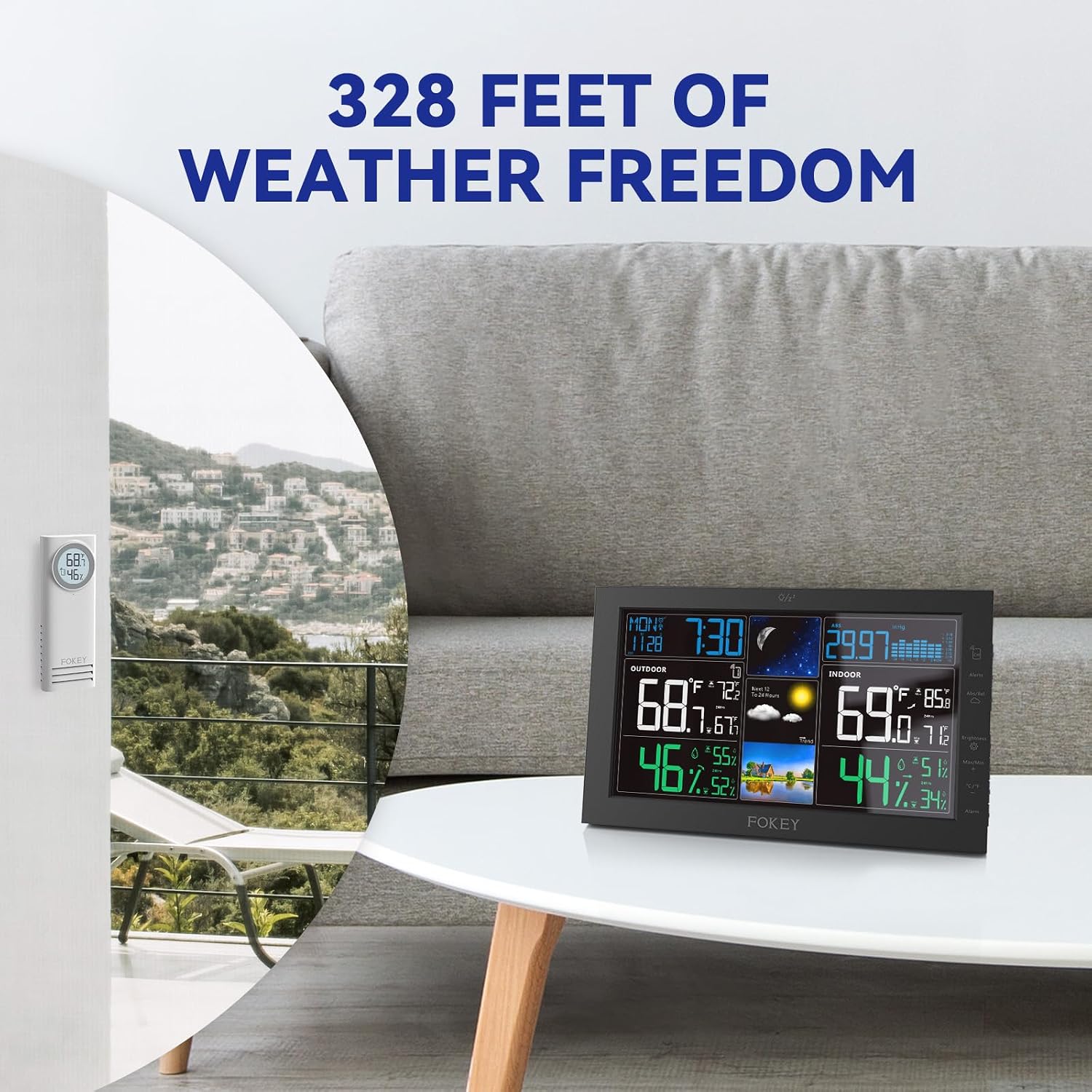
Image 4.1: Depiction of the wireless range, showing the main unit inside a home and the remote sensor placed outdoors on a balcony, indicating effective signal transmission.
5. Operation
5.1 Display Overview
The FOKEY Z2 display is organized to provide comprehensive weather and time information at a glance:
- Top Left: Day of the week, time, and date.
- Top Center: Moon phase and 12-24 hour weather forecast icons.
- Top Right: Barometric pressure readings.
- Middle Left: Outdoor temperature and humidity, including daily high/low records.
- Middle Right: Indoor temperature and humidity, including daily high/low records.

Image 5.1: A visual guide to the main display, detailing the location of atomic time, moon phase, barometric pressure, remote temperature and humidity, 12-24 hour forecast, and indoor temperature and humidity.
5.2 Button Functions
The main unit features several buttons on its side for various settings and adjustments:
- Alerts: Set temperature or humidity alerts.
- Brightness: Adjust display backlight intensity.
- Max/Min: View maximum and minimum recorded values.
- °C/°F: Switch between Celsius and Fahrenheit temperature units.
- Alarm: Set and manage alarms.
- Other buttons: For setting time, date, and other advanced functions as detailed in the full manual.
5.3 Time and Date Settings
The atomic clock function automatically synchronizes with WWVB signals. To ensure correct synchronization:
- Ensure the weather station is placed in an area with good reception.
- Manually set your correct time zone (HAT/AKT/PST/MST/CST/EST/AST) and daylight saving time (DST) status first. Refer to the full manual for specific button sequences.
- The unit will attempt to synchronize daily, typically overnight.
6. Maintenance
- Cleaning: Wipe the main unit and remote sensor with a soft, damp cloth. Do not use abrasive cleaners or solvents.
- Battery Replacement: Replace batteries in the remote sensor and main unit (if using backup batteries) when the low battery indicator appears on the display.
- Sensor Placement: Periodically check the remote sensor's placement to ensure it remains protected and provides accurate readings.
7. Troubleshooting
- No Outdoor Reading: Ensure the remote sensor has fresh batteries and is within the 328ft range. Try re-pairing the sensor as described in Section 4.3.
- Incorrect Time: Verify your time zone and DST settings are correct. Ensure the unit is in an area where it can receive WWVB signals for atomic clock synchronization.
- Inaccurate Readings: Ensure sensors are not exposed to direct sunlight, heat sources, or extreme moisture. Allow time for sensors to acclimate to new environments.
- Display Issues: Check power connection and backup batteries. Adjust display brightness using the side button.
8. Specifications
| Feature | Detail |
|---|---|
| Brand | FOKEY |
| Model Number | Z2 |
| Product Dimensions (Main Unit) | 0.83"D x 7.7"W x 4.8"H |
| Weight | 1.1 Pounds |
| Display Type | 7.6" VA Display |
| Wireless Range | Up to 328 feet (open air) |
| Sensor Support | Up to 3 remote sensors |
| Timekeeping | Atomic Clock (WWVB) with Multi-Time Zone Support |
| Power Source (Main Unit) | Power Adapter (included), 3x AA Batteries (backup, not included) |
| Power Source (Remote Sensor) | 2x AA Batteries (not included) |
| Included Components | Weather station, remote sensor, power adapter, user manual |
9. Warranty and Support
For warranty information or technical support, please refer to the contact details provided with your purchase documentation or visit the official FOKEY website. Keep your purchase receipt as proof of purchase.
Ask a question about this manual
Ask about setup, troubleshooting, compatibility, parts, safety, or missing instructions. Manuals+ will review the question and use this page’s manual context to help answer it.