
1. Introduction
This manual provides instructions for the safe and effective operation of the RuoShui 610B+ Digital Clamp Meter. This handheld, automatic range digital multimeter is battery-driven and designed for measuring DCV, ACV, ACA, DCA, Resistance, Continuity, Diode, Frequency, and other electrical parameters. It features a 5999-count display, True RMS, NCV, VFC, and a built-in flashlight.

Front view of the RuoShui 610B+ Digital Clamp Meter, showing the clamp jaw, rotary selector, display, and function buttons.
2. Safety Information
Always observe safety precautions when working with electricity to prevent electric shock or personal injury. Failure to follow safety guidelines may result in severe injury or damage to the meter.
- Do not exceed the maximum input values for any function as specified in the technical specifications.
- Ensure the meter is in the correct function mode before making measurements. Incorrect settings can lead to damage or inaccurate readings.
- Inspect test leads for damage (e.g., cracked insulation, exposed metal) before each use. Do not use damaged leads.
- Do not operate the meter if it appears damaged or if the case is open. Refer servicing to qualified personnel.
- Replace batteries promptly when the low battery indicator appears to ensure accurate measurements and proper operation.
- Avoid using the meter in environments with high humidity, extreme temperatures, or explosive gases.
- Always disconnect the test leads from the circuit before changing functions or ranges.
3. Product Overview
Familiarize yourself with the components of your RuoShui 610B+ Digital Clamp Meter for efficient and safe operation.

Diagram illustrating the various components of the RuoShui 610B+ Digital Clamp Meter, including the clamp head, trigger, function range knob, LCD display, and input jacks.
- Clamp Head: Used for non-contact measurement of AC/DC current. Maximum jaw opening is 40mm.
- Clamp Head Trigger: Opens and closes the clamp head.
- Function Range Knob: Rotary switch to select desired measurement function (e.g., V, A, Ω, Hz).
- Selection/Low Pass Filtering (SELECT/VFC): Button to switch between functions within a rotary knob position (e.g., AC/DC, Diode/Continuity) or activate VFC mode.
- Relative Value / Flashlight Lighting (REL/): Button to activate relative measurement mode or turn on the built-in flashlight.
- LCD Display: Shows measurement readings, units, and function indicators.
- Public Port (COM): Common input jack for test leads.
- Voltage, Resistance, and Other Jacks (VΩHz): Input jack for voltage, resistance, frequency, diode, and continuity measurements.
- Data Retention / Backlight (HOLD/B.L.): Button to hold the current display reading or activate the display backlight.
- Reset Key / Inrush Current (ZERO/INR): Button to zero the DC current reading or activate Inrush current measurement.

Image showing the 40mm jaw opening of the RuoShui 610B+ clamp meter, suitable for various wire measurements.
4. Setup
4.1 Battery Installation
The RuoShui 610B+ Digital Clamp Meter requires two 1.5V AAA batteries for operation.
- Ensure the meter is powered off.
- Locate the battery compartment cover on the back of the meter.
- Use a screwdriver to loosen the screw(s) securing the battery cover.
- Carefully remove the battery cover.
- Insert two 1.5V AAA batteries, ensuring correct polarity (+ and -) as indicated inside the compartment.
- Replace the battery cover and secure it with the screw(s).
Note: If the low battery indicator appears on the display, replace the batteries immediately to ensure accurate readings.
5. Operating Instructions
5.1 General Operation
- Power On/Off: Turn the Function Range Knob from the 'OFF' position to any desired measurement function to power on the meter. To power off, turn the knob back to 'OFF'.
- Auto Power Off (APO): The meter will automatically power off after approximately 15 minutes of inactivity to conserve battery life. Press any button or turn the rotary knob to reactivate.
- Backlight: Press and hold the 'HOLD/B.L.' button to turn the display backlight on or off.
- Flashlight: Press and hold the 'REL/' button to turn the built-in flashlight on or off.
5.2 Measurement Functions
Always ensure test leads are correctly connected and the function knob is set to the appropriate range before making measurements.
- DC Voltage (DCV) Measurement:
- Set the Function Range Knob to the 'V' position. The meter will default to ACV.
- Press the 'SELECT' button to switch to DCV mode.
- Insert the red test lead into the 'VΩHz' jack and the black test lead into the 'COM' jack.
- Connect the test leads in parallel to the circuit or component under test.
- Read the voltage value on the LCD display.
- AC Voltage (ACV) Measurement:
- Set the Function Range Knob to the 'V' position. The meter will default to ACV.
- Insert the red test lead into the 'VΩHz' jack and the black test lead into the 'COM' jack.
- Connect the test leads in parallel to the circuit or component under test.
- Read the voltage value on the LCD display.
- AC Current (ACA) Measurement (using Clamp):
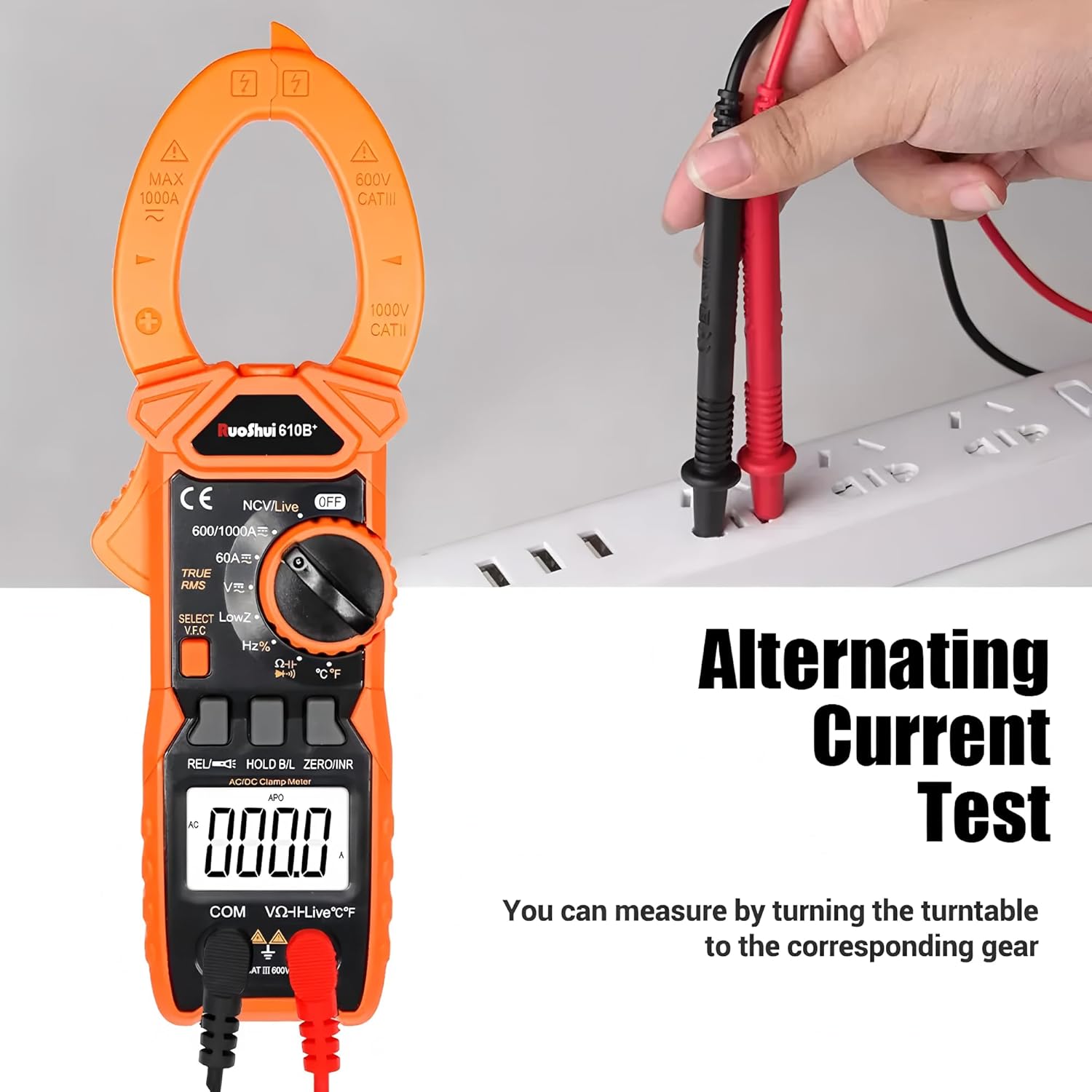
Illustration of how to perform an Alternating Current (AC) test using the clamp meter by clamping around a live wire.
- Set the Function Range Knob to the 'A' position (AC current).
- Press the clamp head trigger to open the clamp jaw.
- Enclose only one conductor of the circuit within the clamp jaw. Ensure the jaw is fully closed.
- Read the current value on the LCD display.
- DC Current (DCA) Measurement (using Clamp):
- Set the Function Range Knob to the 'A' position.
- Press the 'SELECT' button to switch to DC current mode.
- Press the 'ZERO/INR' button to zero the display before measurement.
- Open the clamp jaw and enclose only one conductor of the circuit.
- Read the current value on the LCD display.
- Resistance (Ω) Measurement:
- Set the Function Range Knob to the 'Ω' position.
- Insert the red test lead into the 'VΩHz' jack and the black test lead into the 'COM' jack.
- Ensure the circuit or component under test is de-energized.
- Connect the test leads across the component to measure its resistance.
- Read the resistance value on the LCD display.
- Continuity Test:
- Set the Function Range Knob to the 'Ω' position.
- Press the 'SELECT' button until the continuity symbol (buzzer icon) appears.
- Insert the red test lead into the 'VΩHz' jack and the black test lead into the 'COM' jack.
- Connect the test leads across the circuit or component.
- If resistance is below approximately 50Ω, the buzzer will sound, indicating continuity.
- Diode Test:
- Set the Function Range Knob to the 'Ω' position.
- Press the 'SELECT' button until the diode symbol appears.
- Insert the red test lead into the 'VΩHz' jack and the black test lead into the 'COM' jack.
- Connect the red test lead to the anode and the black test lead to the cathode of the diode.
- Read the forward voltage drop on the display. Reverse the leads to check for open circuit (OL).
- Frequency (Hz) / Duty Cycle (%) Measurement:
- Set the Function Range Knob to the 'Hz%' position.
- Press the 'SELECT' button to toggle between Frequency and Duty Cycle.
- Insert the red test lead into the 'VΩHz' jack and the black test lead into the 'COM' jack.
- Connect the test leads in parallel to the signal source.
- Read the frequency or duty cycle value on the LCD display.
- Non-Contact Voltage (NCV) Detection:
- Set the Function Range Knob to the 'NCV/Live' position.
- Bring the top of the clamp meter near a live conductor.
- The meter will emit an audible beep and the NCV indicator light will flash if AC voltage is detected.
- Live Wire Detection:
- Set the Function Range Knob to the 'NCV/Live' position.
- Press the 'SELECT' button to switch to Live mode.
- Insert the red test lead into the 'VΩHz' jack. The black test lead is not used for this function.
- Touch the red test lead to the wire or terminal to be tested.
- If a live wire is detected, the display will show 'LIVE' and an audible alarm will sound.
- VFC (Variable Frequency Control) Measurement:
- Set the Function Range Knob to the 'V' position.
- Press the 'SELECT' button until 'VFC' appears on the display.
- Connect the test leads to the variable frequency signal source.
- The meter will measure the true RMS voltage of the variable frequency signal.
- INRUSH Current Measurement:
- Set the Function Range Knob to the 'A' position (AC current).
- Press the 'ZERO/INR' button to activate Inrush mode. 'INRUSH' will appear on the display.
- Open the clamp jaw and enclose the conductor of the motor or load.
- Start the motor or load. The meter will capture the peak inrush current.
- Data Hold:
- During any measurement, press the 'HOLD/B.L.' button briefly to freeze the current reading on the display. 'HOLD' will appear.
- Press the button again to release the data hold function.

Visual summary of key features including NCV, Backlit display, Flashlight, Data hold, Auto range, Automatic shut-down, 5999 Digital Display, and Fire Wire Detection (Live).
6. Maintenance
6.1 Cleaning
To maintain the accuracy and longevity of your meter:
- Wipe the case with a damp cloth and mild detergent. Do not use abrasives or solvents.
- Ensure the meter is completely dry before use.
6.2 Battery Replacement
Refer to Section 4.1 for detailed instructions on battery replacement. Always replace both batteries at the same time with new ones of the same type (1.5V AAA).
6.3 Storage
- Remove the batteries if the meter is not used for an extended period (e.g., more than one month) to prevent battery leakage and damage to the meter.
- Store the meter in a cool, dry place, away from direct sunlight and extreme temperatures.
- Use the provided cloth bag for protection during storage and transport.
Contents of the RuoShui 610B+ package, including the clamp meter, packing box, product manual, cloth bag, test leads, and temperature probe.
7. Troubleshooting
If you encounter issues with your RuoShui 610B+ Digital Clamp Meter, refer to the following common problems and solutions:
- Meter does not power on:
- Check if the Function Range Knob is turned to an 'ON' position.
- Verify that the batteries are correctly installed with proper polarity.
- Replace the batteries with new ones if they are depleted.
- No reading or 'OL' (Overload) displayed:
- Ensure test leads are securely connected to the correct input jacks.
- Confirm the Function Range Knob is set to the appropriate measurement function and range.
- If 'OL' is displayed, the measured value exceeds the selected range. Switch to a higher range if available, or verify the circuit is within the meter's capabilities.
- For current measurements, ensure only one conductor is enclosed within the clamp jaw.
- Inaccurate readings:
- Check battery level; low batteries can affect accuracy.
- Ensure test leads are not damaged and have good contact.
- Verify the meter is operating within its specified environmental conditions (temperature, humidity).
- For DC current, ensure the meter is zeroed before measurement.
- Buzzer does not sound during continuity test:
- Ensure the meter is in continuity mode (buzzer symbol displayed).
- Check if the resistance of the circuit is above the continuity threshold (approx. 50Ω).
8. Specifications
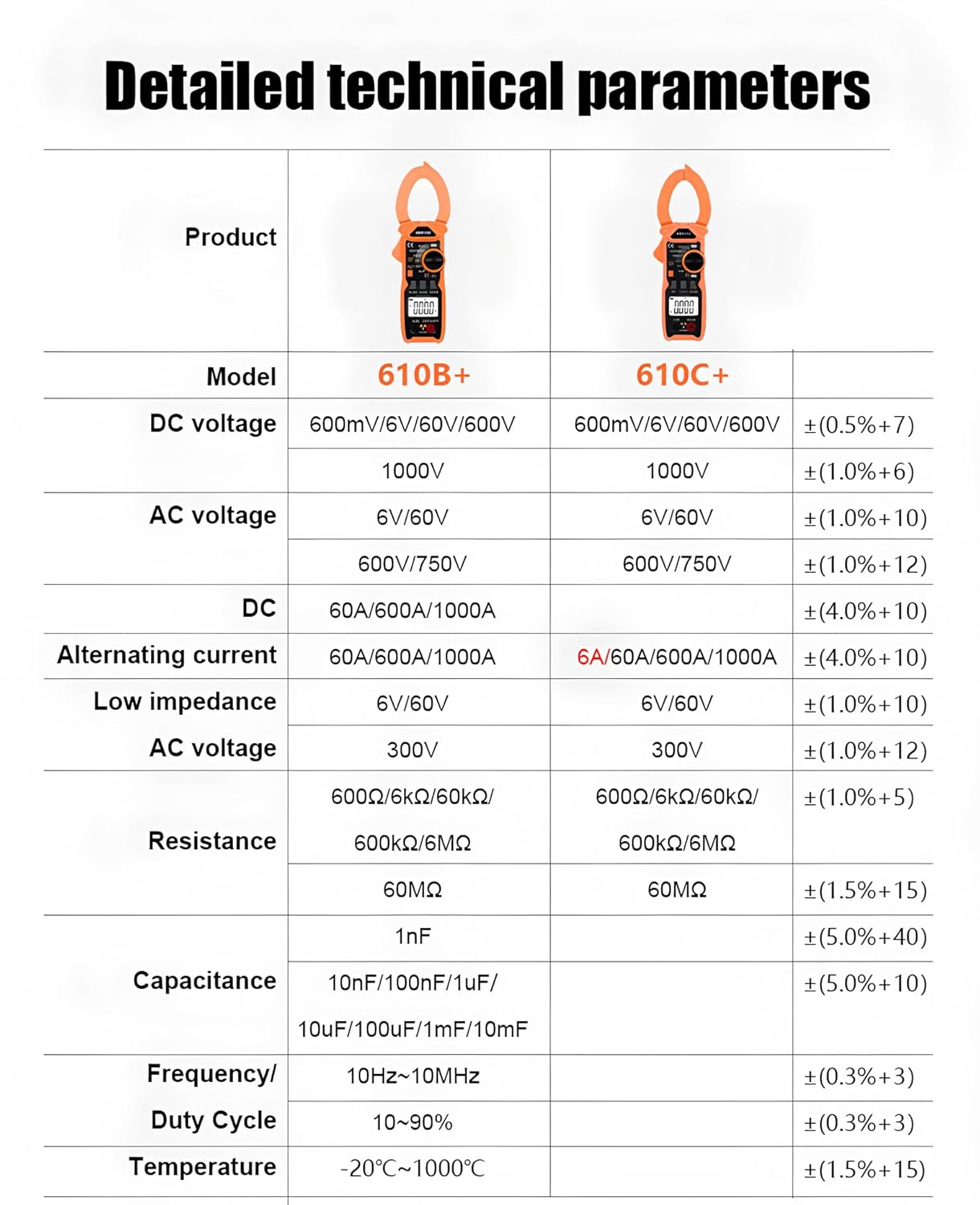
The following table details the technical parameters for the RuoShui 610B+ Digital Clamp Meter.

A comprehensive table outlining the detailed technical specifications for both the RuoShui 610B+ and 610C+ models, covering various measurement ranges and features.
| Parameter | RuoShui 610B+ | Accuracy |
|---|---|---|
| DC Voltage | 600mV/6V/60V/600V/1000V | ±(0.5%+7) |
| AC Voltage | 6V/60V/600V/750V | ±(1.0%+10) |
| DC Current | 60A/600A/1000A | ±(4.0%+10) |
| Alternating Current | 60A/600A/1000A | ±(4.0%+10) |
| Low Impedance AC Voltage | 6V/60V/300V | ±(1.0%+10) |
| Resistance | 600Ω/6kΩ/60kΩ/600kΩ/6MΩ/60MΩ | ±(1.0%+5) / ±(1.5%+15) |
| Capacitance | 10nF/100nF/1uF/10uF/100uF/1mF/10mF | ±(5.0%+40) / ±(5.0%+10) |
| Frequency | 10Hz~10MHz | ±(0.3%+3) |
| Duty Cycle | 10~90% | ±(0.3%+3) |
| Temperature | -20℃~1000℃ | ±(1.5%+15) |
| Display Method | LCD display | |
| Maximum Display | 5999 count | |
| Diode | ✓ | |
| Data Retention | ✓ | |
| NCV | ✓ | |
| Fire Detection (Live) | ✓ | |
| Low Voltage Warning | ✓ | |
| Flashlight Lighting | ✓ | |
| True Effective Value (True RMS) | ✓ | |
| INRUSH | 610B+ only | |
| VFC | 610B+ only | |
| Working Temperature and Humidity | (0~40)℃ <80% | |
| Storage Temperature and Humidity | (-10~50)℃ <80% | |
| Automatic Shut-down | About 15 minutes | |
| Over-range Display | The highest digit shows OL | |
| Unit Symbol | ✓ | |
| Open Jaws | 40mm | |
| Input Resistance | 10MΩ | |
| Sampling Rate | 3 times/sec | |
| Power Supply | Two AAA batteries | |
9. Warranty and Support
For warranty information, technical support, or service inquiries regarding your RuoShui 610B+ Digital Clamp Meter, please refer to the documentation provided with your purchase or contact the manufacturer directly through their official channels. Keep your purchase receipt as proof of purchase for warranty claims.


