
Introduction
Thank you for choosing ZIPFORCE True Wireless Earbuds. These semi-in-ear headphones feature Bluetooth 5.3 for an extremely fast and stable connection, along with the latest Environmental Noise Cancellation (ENC) technology for clear calls. Designed for comfort and extended use, they offer over 40 hours of total playtime with the charging case and are compatible with both iPhone and Android devices.

The image displays the ZIPFORCE True Wireless Earbuds, white in color, resting within their charging case. The case features a digital display indicating the battery levels for both the case and individual earbuds.
Setup
Charging the Earbuds and Case
Before first use, fully charge the earbuds and the charging case. Connect the provided Type-C cable to the charging port on the case and a compatible USB power source. The digital display on the case will show the charging status. A full charge for the earbuds takes approximately 1 hour, providing 4-5 hours of playtime. The charging case provides multiple additional charges, extending total playtime to over 40 hours.
Two scenes depict users enjoying the earbuds, one during the day and another in the evening, to convey the extended battery life of up to 30 hours with the charging case.
Pairing with Your Device
- Open the charging case and remove both earbuds. They will automatically enter pairing mode.
- On your device (smartphone, tablet, laptop), navigate to the Bluetooth settings.
- Select "Luna Pro+" from the list of available devices.
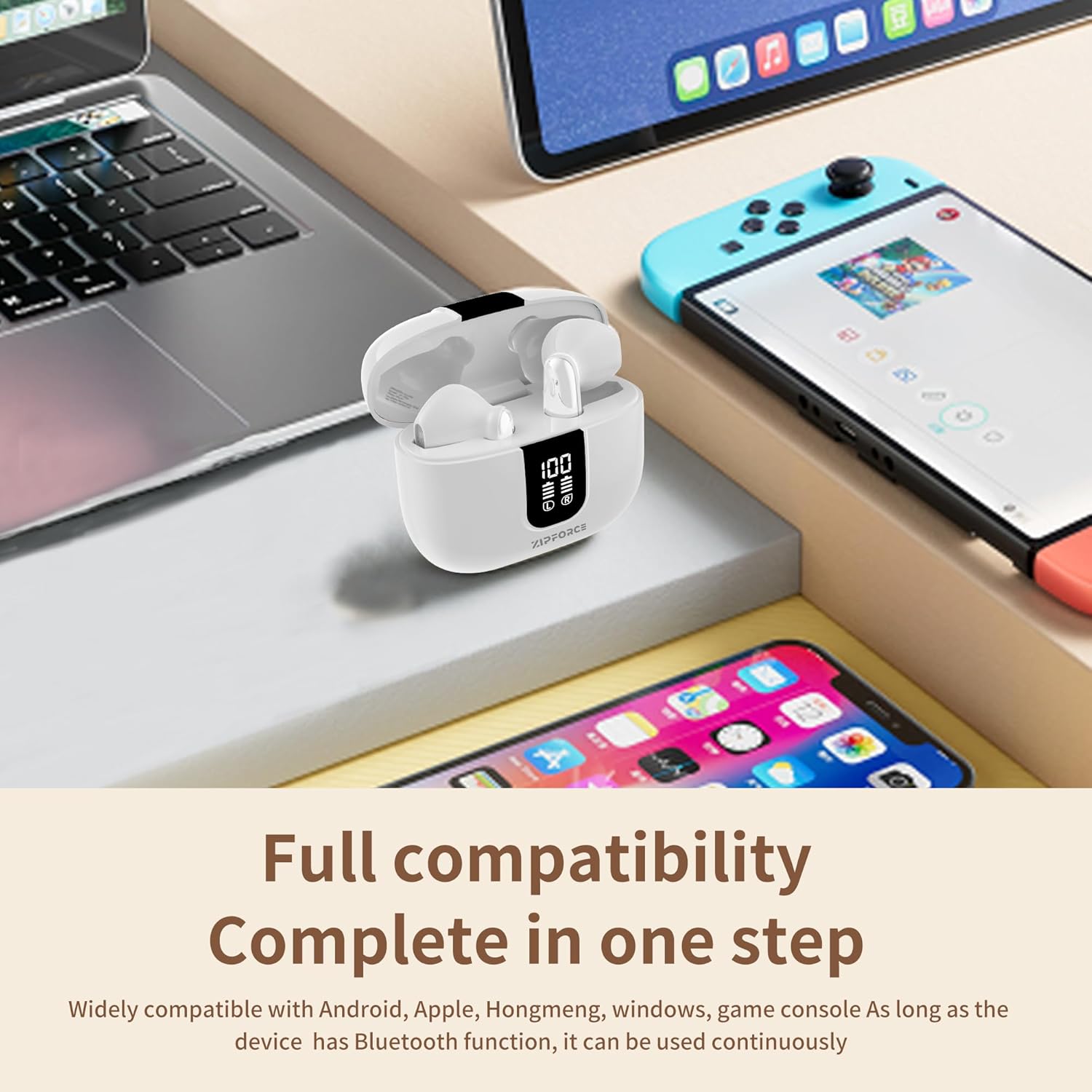
- Once connected, the earbuds are ready for use. They will automatically reconnect to the last paired device when removed from the case.

The image demonstrates the wide compatibility of the ZIPFORCE earbuds, showing them alongside a laptop, tablet, and smartphone, indicating seamless connection across different operating systems.
Operating Instructions
Touch Controls
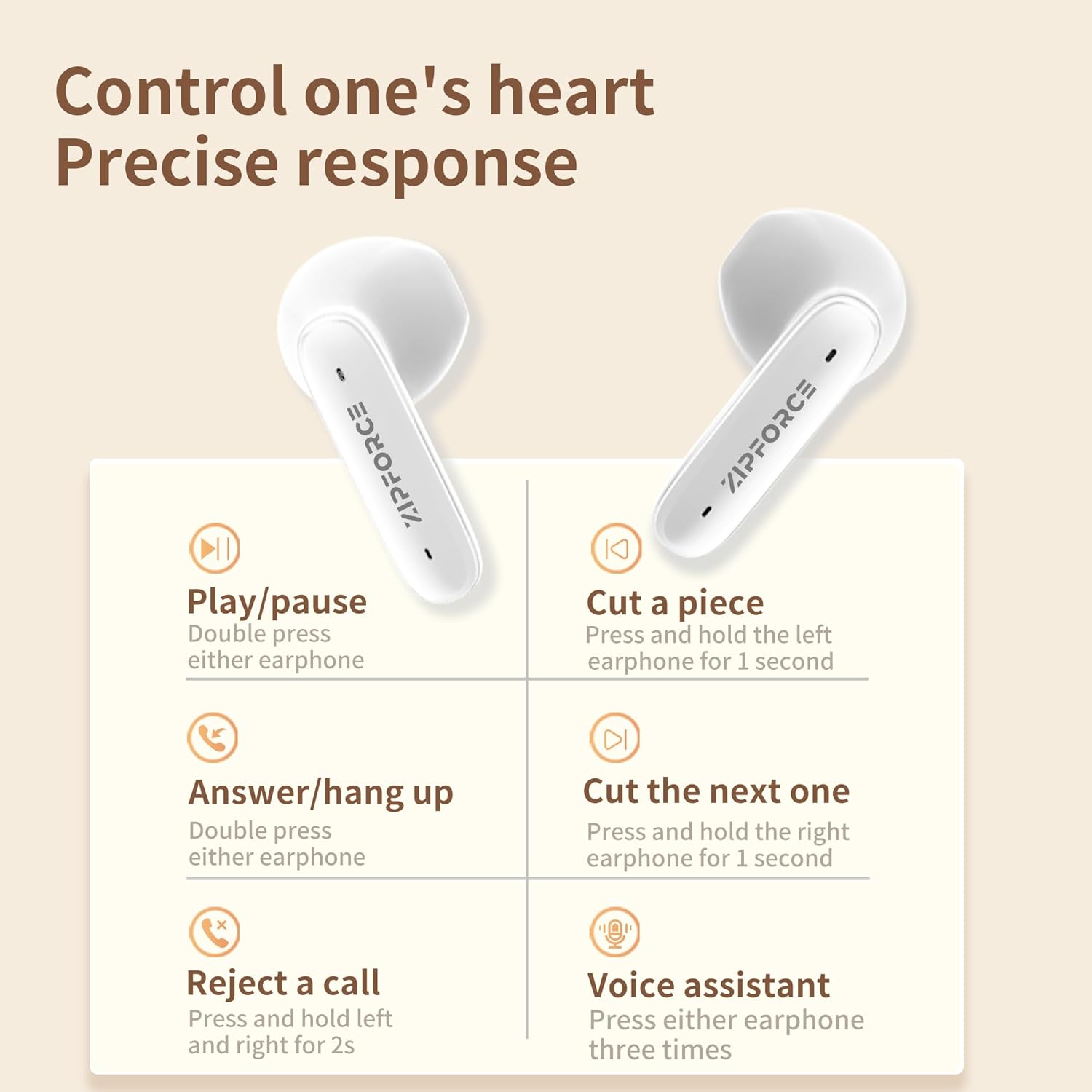
The ZIPFORCE earbuds feature intuitive touch controls for easy management of music and calls:
| Action | Control |
|---|---|
| Play/Pause Music | Double press either earphone |
| Answer/Hang Up Call | Double press either earphone |
| Reject a Call | Press and hold left and right for 2 seconds |
| Next Song | Press and hold the right earphone for 1 second |
| Previous Song | Press and hold the left earphone for 1 second |
| Activate Voice Assistant | Press either earphone three times |

This graphic provides a clear guide to the touch controls, illustrating how to play/pause music, answer/hang up calls, reject calls, skip tracks, and activate voice assistant using simple taps and presses on the earbuds.
Call Features
Each earbud is equipped with two built-in microphones and Environmental Noise Cancellation (ENC) technology. This system effectively suppresses up to 80% of background noise, ensuring clear voice transmission during calls, even in noisy environments.

This diagram highlights the advanced six-microphone system and Environmental Noise Cancellation (ENC) technology, which work together to reduce background noise for clearer calls. A graph compares noise levels with and without ENC.
Audio Playback
Experience immersive sound with the 13mm large speakers and composite diaphragm. The stereo dual-channel HiFi bass effect delivers rich, powerful, and clear audio, enhancing your listening experience for music, podcasts, and more.
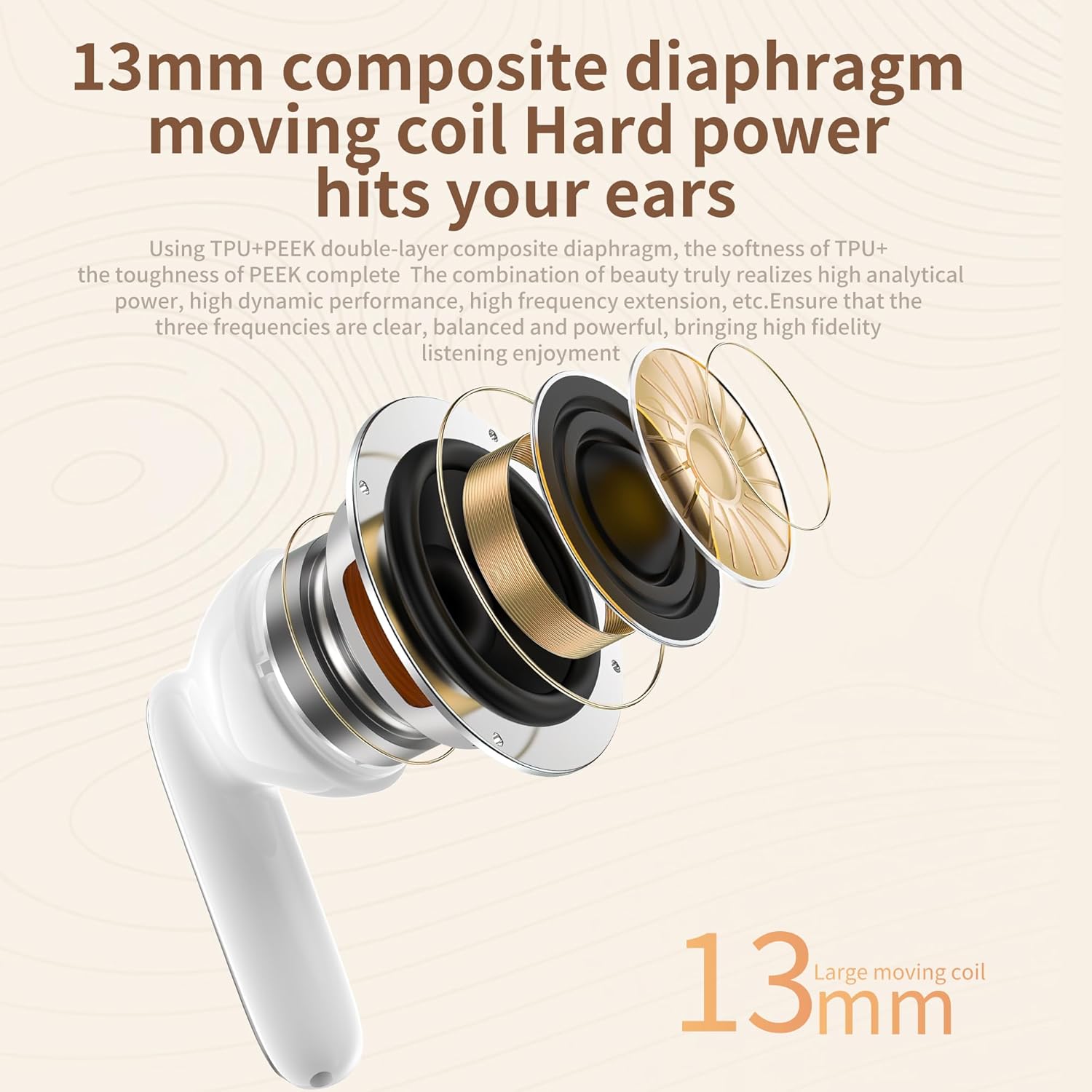
An exploded view of the earbud reveals the internal 13mm composite diaphragm speaker, designed to deliver powerful and high-fidelity audio with rich bass.
Comfort and Design
The ZIPFORCE earbuds are designed for optimal comfort with a 45-degree half-in-ear fit, ensuring a secure and pressure-free experience. Each earbud weighs approximately 3.7g, making them ultra-lightweight for extended wear without discomfort.

A woman is shown wearing one of the ZIPFORCE earbuds, highlighting its ergonomic 45-degree half-in-ear design which ensures a comfortable and secure fit without pressure on the ear canal.

This image focuses on the lightweight nature of the earbuds, with a woman wearing one earbud and text indicating its ultra-light weight of approximately 3.7 grams, contributing to comfortable long-term wear.
With an IPX6 waterproof rating, these earbuds are protected against sweat and light rain, making them suitable for various activities and daily use.
The image shows the earbuds with water droplets, visually representing their IPX5 waterproof and dustproof rating, making them suitable for daily use and resistant to sweat and light rain.
Maintenance
Cleaning
To maintain optimal performance and hygiene, regularly clean your earbuds and charging case. Use a soft, dry, lint-free cloth to wipe the surfaces. For stubborn dirt, slightly dampen the cloth with water. Avoid using abrasive materials or harsh chemicals.
Storage
When not in use, store the earbuds in their charging case to protect them from dust, dirt, and physical damage. Store the case in a cool, dry place away from direct sunlight and extreme temperatures.
Troubleshooting
| Issue | Possible Solution |
|---|---|
| Earbuds not pairing | Ensure earbuds are charged. Turn off and on Bluetooth on your device. Forget "Luna Pro+" in your device's Bluetooth settings and re-pair. |
| No sound from one earbud | Place both earbuds back in the charging case, close the lid, wait a few seconds, then take them out again. Check device's audio output settings. |
| Charging case not charging | Ensure the Type-C cable is securely connected to both the case and the power source. Try a different cable or power adapter. |
| Poor call quality | Ensure earbuds are clean. Move closer to your connected device. Avoid environments with excessive background noise. |
| Earbuds frequently disconnect | Ensure your device is within the 10m transmission range. Avoid physical obstructions between earbuds and device. |

This visual demonstrates the adaptive noise filtering capabilities of the earbuds across different environments: outdoor use with automatic noise filtering, daily use with human voice pickup, and indoor use with intelligent noise filtering for clear conversations.
Specifications
| Feature | Detail |
|---|---|
| Model Name | Luna Pro+ |
| Item Model Number | ZF-430P |
| Connectivity Technology | Wireless (Bluetooth 5.3) |
| Ear Placement | In Ear (Semi-in-ear) |
| Microphones | 4 Mics (2 per earbud) with ENC Noise Reduction |
| Speaker Size | 13mm |
| Impedance | 32 Ohm |
| Water-proof Rating | IPX6 |
| Earphone Battery Capacity | 30mAh |
| Charging Case Capacity | 400mAh |
| Playing Time | Approx. 4-5 hours (70% volume) |
| Total Playtime (with case) | Over 40 hours |
| Standby Time | Approx. 300 hours (connected) |
| Charging Type | Type-C |
| Product Dimensions | 6 x 3 x 5 cm |
| Net Weight (earbud) | 3.3g (without storage case) |
| Included Components | Cable, Charging Station, Protective Case, User Manual |
Warranty and Support
For warranty information and customer support, please refer to the documentation included with your purchase or visit the official ZIPFORCE website. You can also visit the ZIPFORCE Store on Amazon for additional product information and assistance.
