
1. Introduction
Thank you for choosing the VILTROX 28mm F4.5 Pancake Lens. This ultra-compact, full-frame autofocus wide-angle lens is designed for Fujifilm X-Mount mirrorless cameras, offering exceptional portability and optical performance. This manual provides essential information for the safe and effective use of your new lens. Please read it thoroughly before use and keep it for future reference.
2. Safety Information
- Do not look at the sun or other strong light sources through the lens, as this may cause permanent vision damage.
- Keep the lens away from water and moisture to prevent damage to internal components.
- Avoid dropping or subjecting the lens to strong impacts.
- Store the lens in a dry, cool place, away from direct sunlight and extreme temperatures.
- Keep out of reach of children.
3. Package Contents
Verify that all items are present in your package:
- VILTROX AF 28mm F4.5 Lens (1 PCS)
Note: Camera body is not included.
4. Product Overview
The VILTROX 28mm F4.5 Pancake Lens is designed for portability and high optical performance. Below are key views of the lens.

Figure 4.1: Front view of the VILTROX 28mm F4.5 Pancake Lens. This image shows the compact design and the front element of the lens.

Figure 4.2: Rear view of the VILTROX 28mm F4.5 Pancake Lens. This image highlights the Fujifilm X-Mount interface and electronic contacts for communication with the camera body.

Figure 4.3: Angled view of the VILTROX 28mm F4.5 Pancake Lens, showcasing its slim profile.
5. Setup
5.1 Attaching the Lens to Your Camera
- Ensure your camera is powered off before attaching or detaching the lens.
- Align the white dot on the lens barrel with the white dot on your Fujifilm X-Mount camera body.
- Gently insert the lens into the camera's lens mount.
- Rotate the lens clockwise until it clicks into place. Do not force the lens.
5.2 Detaching the Lens
- Ensure your camera is powered off.
- Press and hold the lens release button on your camera body.
- Rotate the lens counter-clockwise until it stops.
- Gently remove the lens from the camera body.
- Attach the rear lens cap to protect the lens mount and elements.
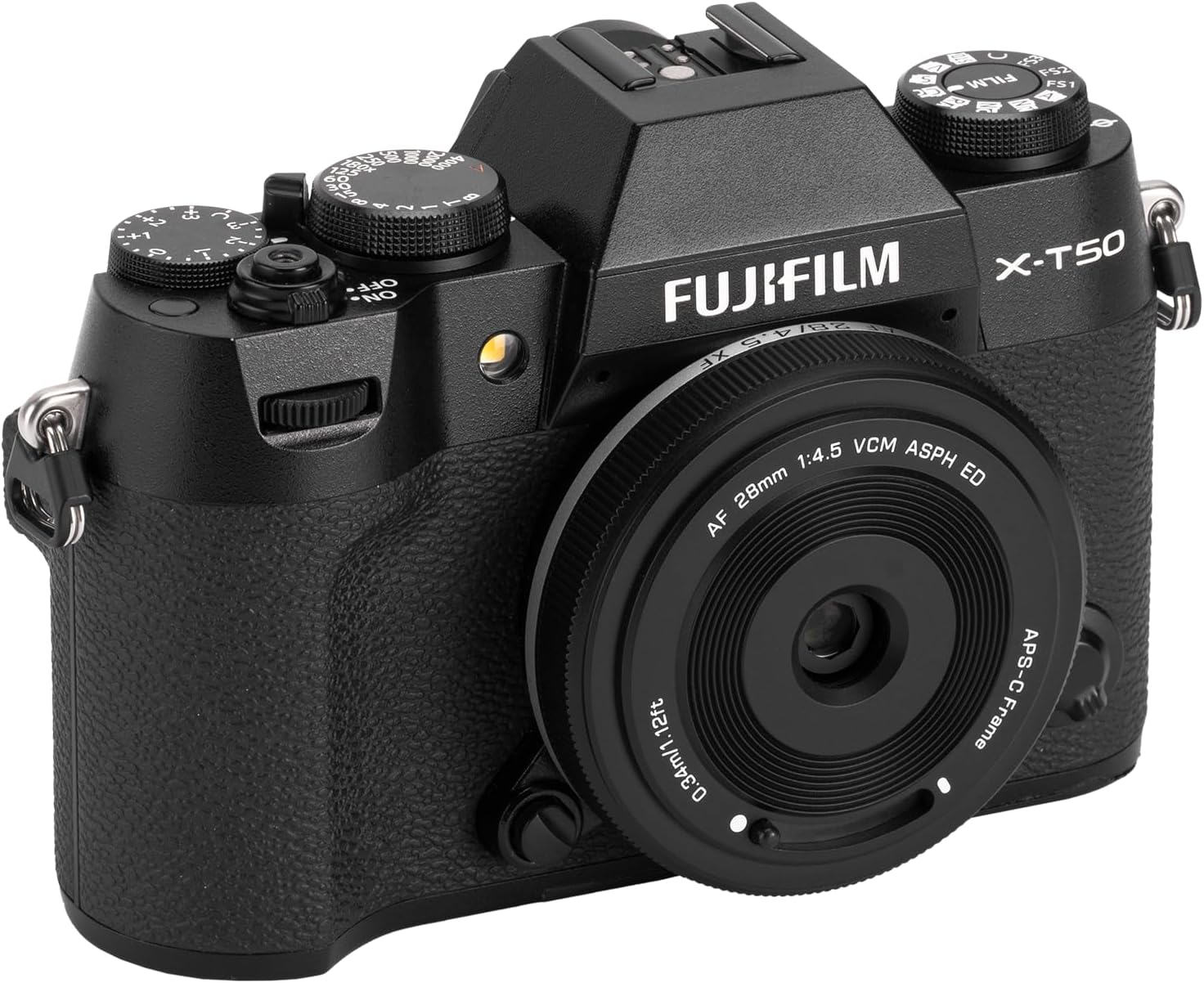
Figure 5.1: The VILTROX 28mm F4.5 lens mounted on a Fujifilm X-T50 camera, demonstrating its compact profile when attached.

Figure 5.2: The VILTROX 28mm F4.5 lens mounted on a Fujifilm X-M5 camera, showcasing its integration with a smaller camera body.
6. Operating the Lens
6.1 Autofocus (AF)
This lens features a VCM silent motor for fast and precise autofocus. It supports eye-detection AF when used with compatible camera bodies. To use autofocus:
- Set your camera's focus mode to AF (Autofocus).
- Point the camera at your subject and half-press the shutter button to activate autofocus.
- The lens will automatically adjust focus.
Note: This lens does not have a manual focus ring or an aperture ring. Focus and aperture (fixed at F4.5) are controlled electronically by the camera.
6.2 Aperture
The VILTROX 28mm F4.5 Pancake Lens has a fixed aperture of F4.5. This means the aperture cannot be adjusted. Your camera will automatically compensate for exposure by adjusting shutter speed and ISO.
6.3 Lens Protection Lever
Instead of a traditional lens cap, this lens features a small lever on the front barrel. Sliding this lever will deploy or retract a protective cover over the front element. Ensure the cover is retracted before shooting and deployed when storing the lens.
7. Maintenance
7.1 Cleaning the Lens
- Use a blower brush to remove dust and loose particles from the lens surface.
- For smudges or fingerprints, use a clean, soft microfiber cloth specifically designed for optical lenses. Apply a small amount of lens cleaning solution to the cloth, not directly to the lens.
- Clean the lens in a circular motion from the center outwards.
- Never use abrasive materials, solvents, or harsh chemicals.
7.2 Storage
- When not in use, always attach the rear lens cap and ensure the front protection lever is closed.
- Store the lens in a lens pouch or camera bag to protect it from dust and scratches.
- Avoid storing the lens in areas with high humidity or extreme temperature fluctuations.
8. Troubleshooting
| Problem | Possible Cause | Solution |
|---|---|---|
| Lens not recognized by camera. | Lens not properly mounted; dirty electronic contacts. | Re-mount the lens, ensuring it clicks into place. Clean the lens and camera electronic contacts with a clean, dry cloth. |
| Autofocus is slow or inaccurate. | Low light conditions; subject lacks contrast; camera settings. | Ensure adequate lighting. Focus on areas with good contrast. Check camera's AF mode and settings. Update camera firmware if available. |
| Images are blurry. | Incorrect focus; camera shake; dirty lens element. | Verify focus. Use a faster shutter speed or tripod. Clean the lens elements. |
| Front protection lever is stuck. | Debris or obstruction. | Gently check for any obstructions. Do not force the lever. If persistent, contact support. |
9. Specifications
| Feature | Detail |
|---|---|
| Brand | VONOV (VILTROX) |
| Model Name | VZ28 |
| Focal Length | 28mm (42mm full-frame equivalent on APS-C) |
| Maximum Aperture | F4.5 |
| Minimum Aperture | F4.5 (Fixed) |
| Lens Type | Pancake, Wide-Angle |
| Compatible Mountings | Fujifilm X-Mount |
| Focus Type | Auto Focus (VCM silent motor) |
| Optical Structure | Includes 3 ED elements and 2 high-refractive index elements |
| Lens Coating | Nano AR Coating |
| Image Stabilization | No image stabilization |
| Color | Black |
| Weight | Approximately 60g |
| Manufacturer | VONOV |
10. Warranty and Support
10.1 Warranty Information
This VILTROX lens comes with a 1-YEAR warranty from the date of purchase. This warranty covers manufacturing defects and malfunctions under normal use. It does not cover damage caused by misuse, accidents, unauthorized modifications, or natural disasters.
Please retain your proof of purchase for warranty claims.
10.2 Customer Support
For technical assistance, warranty claims, or any questions regarding your VILTROX 28mm F4.5 Pancake Lens, please contact VONOV customer support through the retailer where you purchased the product or visit the official VILTROX website for contact information.
Official VILTROX Website: www.viltrox.com