
1. Introduction
Thank you for choosing the dbsono Shower Speaker. This portable Bluetooth speaker is designed to deliver a 360° surround sound experience with robust waterproofing and versatile mounting options. Please read this manual carefully to ensure proper use and optimal performance of your device.

Image: The dbsono Shower Speaker in black, showcasing its compact design and vibrant RGB lighting.
2. What's in the Box
- Portable Speaker x1
- Removable Suction Cup x1
- Power Cable (USB-C) x1
- Quick Start Guide x1
- Carabiner x1
- Tearable Nano Clue Film x1

Image: A visual representation of all items included in the dbsono Shower Speaker package, including the speaker, suction cup, charging cable, carabiner, and manual.
3. Product Features
- 360° Surround Sound: Unique upward-firing driver unit for uniformly diffused sound.
- IPX7 Waterproof: Withstands immersion in 1 meter of water for 30 minutes, resistant to heavy rain, splashes, and humid environments.
- Removable Nano Silicone Suction Cup: Provides strong adhesion to smooth surfaces, washable and reusable.
- 2-in-1 Design: Use with suction cup for fixed placement or remove for portable use with carabiner.
- Advanced Bluetooth 5.4 & TWS Pairing: Stable and quick wireless connection, supports pairing two speakers for true wireless stereo sound.
- Vibrant RGB Lights: Mesmerizing light show with various colors to enhance your music experience.
- Long Battery Life: Up to 24 hours of playback on a single charge.
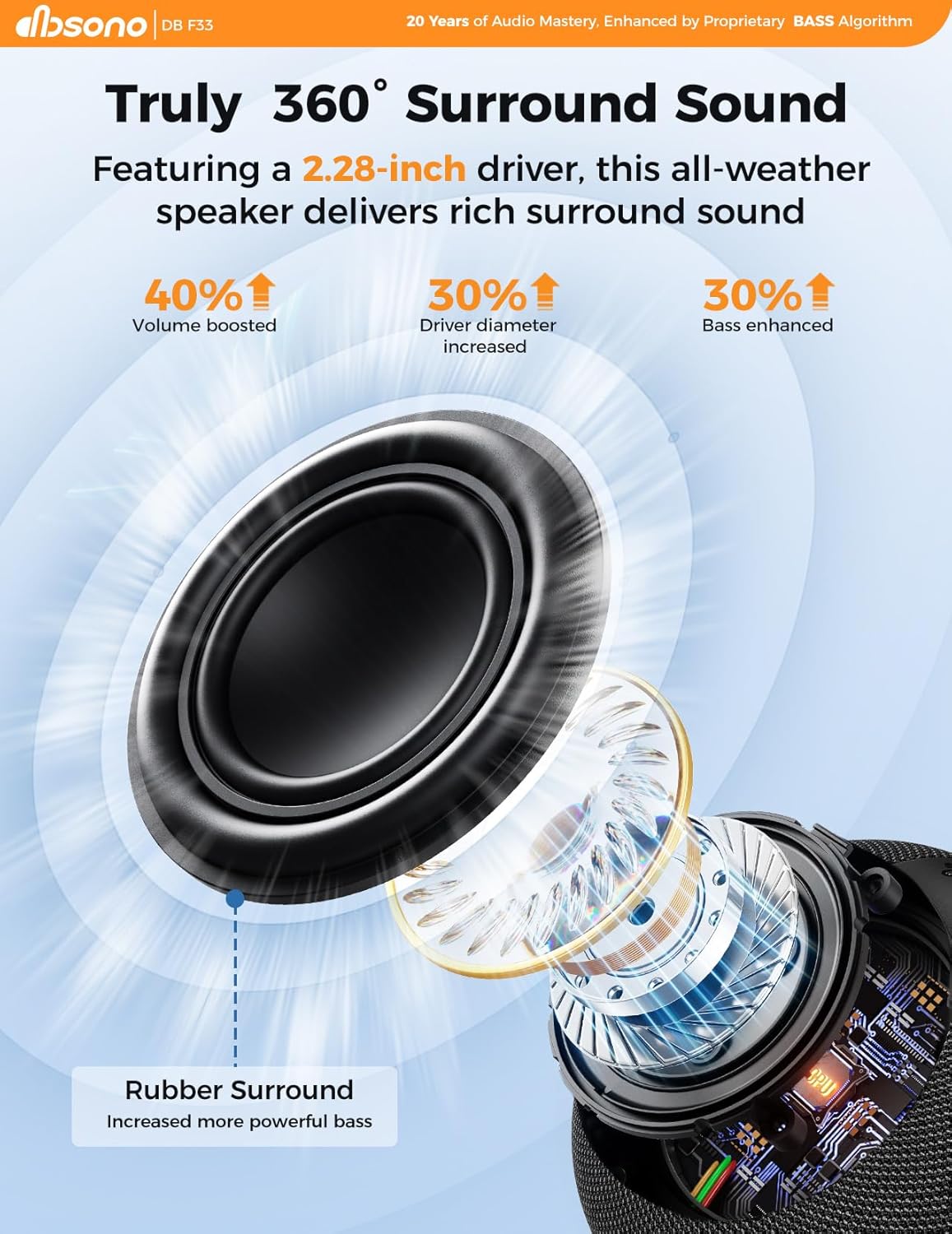
Image: An exploded view diagram highlighting the upward-firing driver and components that contribute to the 360° surround sound.
4. Setup & Installation
Attaching the Suction Cup:
- Clean the surface of the wall first. Remove the sticker from the suction cup. (Please keep the sticker and don't throw it away).
- Stick the suction cup on the surface of the smooth wall and press hard. Please do not stick it on uneven walls, as it may fall off easily. ("UP" logo facing upward).
- Tighten the vacuum exhaust knob of the suction cup in the "TIGHTEN" direction, then wait for 2 hours.
- Align the hole of the speaker with the buckle of the suction cup and push it down to install the speaker.

Image: Visual instructions detailing the four steps to properly install the removable nano silicone suction cup onto a smooth surface.
Removing the Suction Cup:
- Grasp the speaker and push upwards to remove it from the suction cup.
- Loosen the vacuum exhaust knob of the suction cup in the "LOOSEN" direction.
- Grasp the suction cup and pull hard outward to remove it from the wall, then put the original sticker on the suction cup.

Image: Visual instructions detailing the three steps to safely remove the suction cup from a surface.
5. Operating Instructions
Power On/Off:
- Press and hold the power button (⏻) to turn the speaker on or off.
Bluetooth Pairing:
- When powered on, the speaker will automatically enter pairing mode (indicated by a flashing blue light).
- Enable Bluetooth on your device and select "DB F33" from the list of available devices.
- A voice prompt will confirm successful pairing.
Volume Control:
- Press the "+" button to increase volume.
- Press the "-" button to decrease volume.
Playback Control:
- Press the play/pause button (▶) to play or pause music.
- Press and hold "+" to skip to the next track.
- Press and hold "-" to go to the previous track.
RGB Light Control:
- Press the light button (※) to cycle through different light modes or turn off the lights.
6. TWS (True Wireless Stereo) Pairing
To enjoy a true wireless surround sound experience, you can connect two dbsono F33 speakers together.
TWS Pairing Steps:
- Ensure both speakers are powered on and not connected to any other Bluetooth device.
- Double-tap the play/pause button (▶) on one of the speakers. You will hear an alarming sound, then a prompt tone indicating successful pairing.
- Connect your device to one of the paired speakers via Bluetooth. You can now enjoy synchronized audio from both speakers.
Video: A demonstration of how to connect two dbsono F33 speakers for True Wireless Stereo (TWS) sound, showing the simple pairing process.
7. Waterproofing & Suction Cup Usage
The dbsono F33 speaker boasts an IPX7 waterproof rating, making it ideal for use in wet environments like showers, pools, and beaches. Its high-density waterproof seal structure and multi-layer composite waterproof technology protect internal components from water damage.
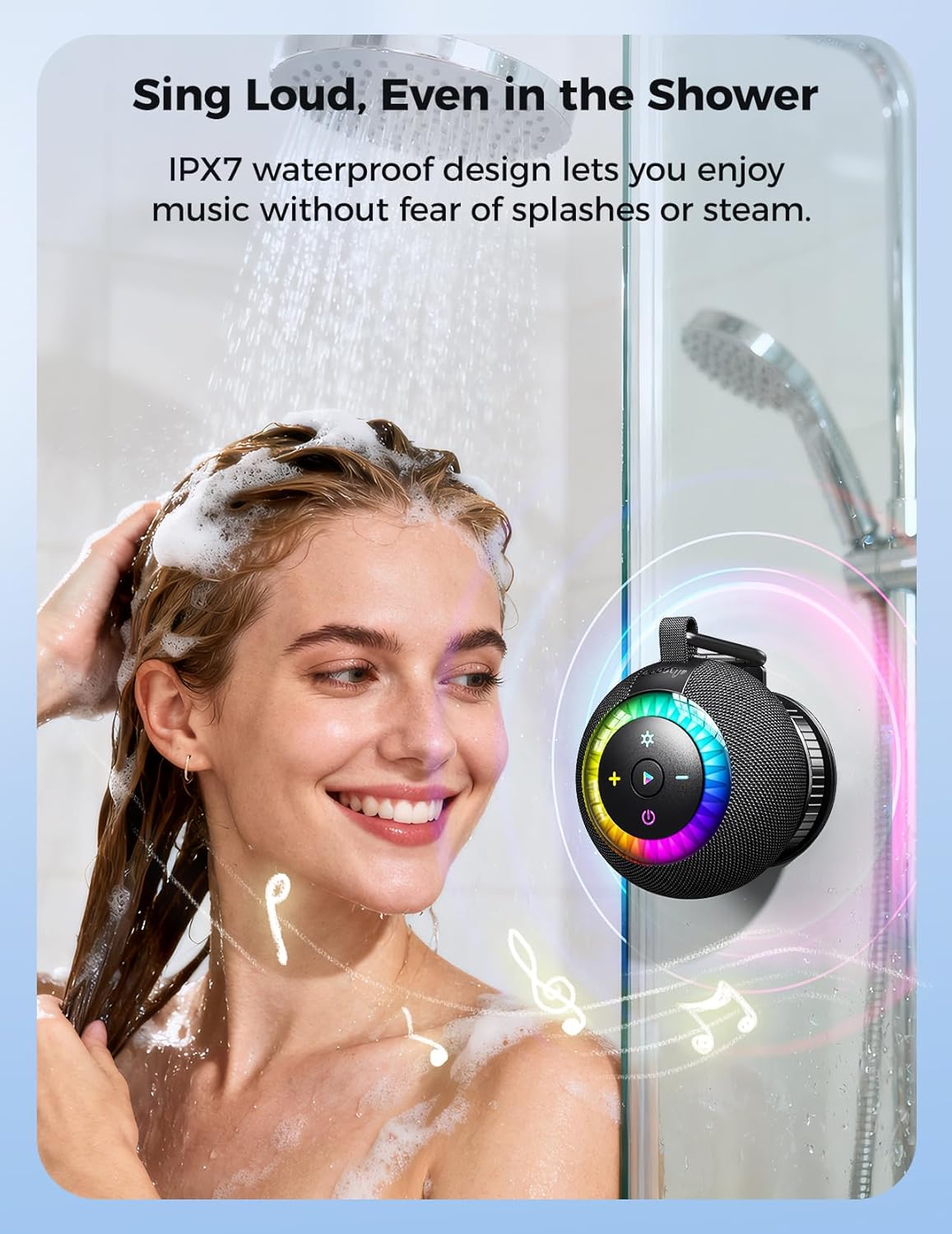
Image: A woman enjoying music from the dbsono shower speaker, which is securely attached to a shower wall, highlighting its waterproof design.
The removable nano silicone suction cup provides extremely strong adhesion, allowing the speaker to stick securely to smooth surfaces. It can support up to 11 lbs, ensuring your speaker stays in place.
Video: A demonstration of the dbsono speaker's suction cup adhering to various smooth surfaces like glass, tiles, and metal, showcasing its strong grip.
Video: A short clip demonstrating the strong suction power of the dbsono speaker, showing it holding a heavy water bottle.
8. Charging
The speaker is powered by a built-in rechargeable battery. Use the provided USB-C power cable to charge the device. A full charge provides up to 24 hours of battery life (at 35% volume with lights off).
- Connect the USB-C cable to the charging port on the speaker and the other end to a compatible USB power source.
- The LED indicator will show charging status.
9. Maintenance
- After using the speaker in water, ensure the charging port cover is securely closed to maintain waterproofing.
- The nano silicone suction cup can be washed repeatedly to restore its adhesion. After washing, allow it to dry naturally before reuse for the strongest bond.
- Clean the speaker with a soft, damp cloth. Do not use harsh chemicals or abrasive materials.
10. Troubleshooting
- No Power: Ensure the speaker is charged. Connect to a power source and try again.
- Cannot Pair: Make sure the speaker is in pairing mode (flashing blue light). Turn off Bluetooth on other devices that might be connected. Restart your device and the speaker.
- Poor Sound Quality: Ensure the speaker is within Bluetooth range (33 feet). Check the volume levels on both the speaker and your device.
- Suction Cup Not Sticking: Ensure the surface is clean, smooth, and dry. Tighten the vacuum exhaust knob fully. Allow 2 hours after tightening before attaching the speaker.
- TWS Pairing Failure: Ensure both speakers are fully charged and not connected to any other device before attempting TWS pairing.
11. Specifications
| Feature | Specification |
|---|---|
| Brand | dbsono |
| Model Number | F33 |
| Speaker Maximum Output Power | 10 Watts |
| Connectivity Technology | Bluetooth 5.4 |
| Audio Output Mode | Surround (360°) |
| Mounting Type | Wall Mount/Tabletop Mount |
| Enclosure Material | Waterproof Nylon and ABS |
| Water Resistance Level | IPX7 (Waterproof) |
| Battery Average Life | 24 Hours |
| Control Method | Touch |
| Speaker Size | 3.7 Inches |
| Bluetooth Range | 33 Feet |
| Item Dimensions (D x W x H) | 3.7"D x 3.7"W x 2.99"H |
| Item Weight | 0.6 Pounds |
| Audio Driver Type | Upward Firing Driver |
12. Warranty & Support
The dbsono Shower Speaker comes with a 24-month limited warranty. For any support or warranty claims, please refer to the contact information provided in your purchase documentation or visit the official dbsono website.
