1. Introduction
This manual provides detailed instructions for operating and maintaining your SKMEI Digital Watch, Model 2396. This watch is designed for durability and functionality, featuring multiple modes suitable for various activities.
Please read this manual carefully to ensure proper use and to maximize the lifespan of your watch.
2. Key Features
The SKMEI Model 2396 watch offers a range of features:
- Display: Analog-Digital
- Functions: Dual Time Zones, Chronograph Stopwatch, Alarm, Date, Week Display, 12/24-Hour Format
- Illumination: LED Backlight
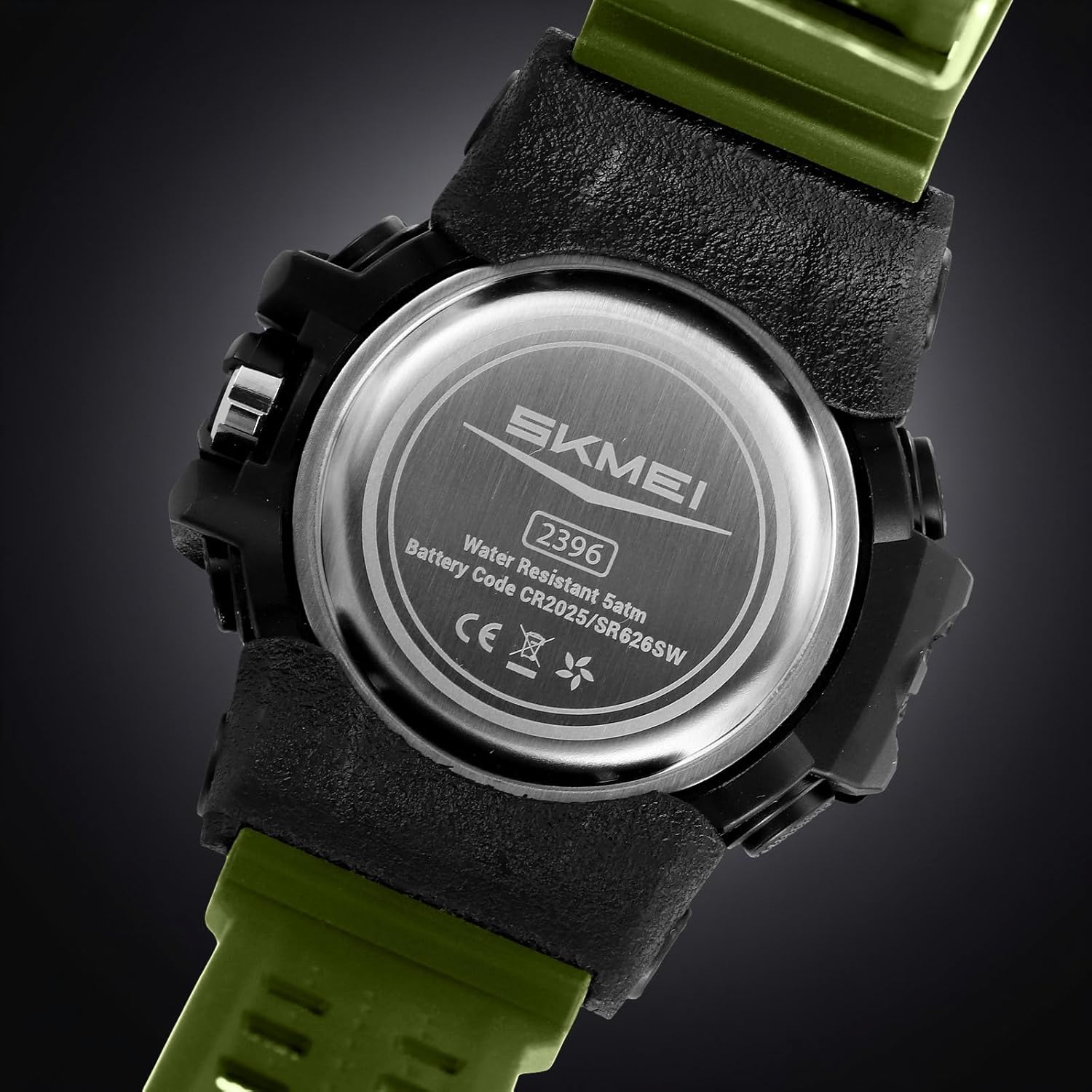
- Water Resistance: 50 Meters (5 ATM)
- Durability: Shock-Resistant ABS+TPU Case, Scratch-Resistant Resin Crystal
- Strap Material: Thermoplastic Polyurethane (TPU)

3. Watch Components and Button Functions
Familiarize yourself with the watch's buttons and their primary functions:
- Light Button: Activates the LED backlight.
- Mode Button: Cycles through different modes (Time, Chronograph, Alarm, Dual Time).
- Start/Stop Button: Used to start/stop functions in Chronograph mode, and adjust settings in setting modes.
- Reset Button: Used to reset functions in Chronograph mode, and adjust settings in setting modes.

Important: Before first use, remove any protective film from the watch face.
4. Operating Instructions
4.1. Setting Time and Date
- In normal time display mode, press the Mode button repeatedly until the time setting mode is activated (usually indicated by flashing digits).
- Use the Start/Stop and Reset buttons to adjust the flashing digits (hours, minutes, seconds, year, month, day).
- Press the Mode button again to confirm and move to the next setting, or to exit the setting mode.
- Ensure the 12/24-hour format is set according to your preference.
4.2. Using the Chronograph (Stopwatch)
- Press the Mode button until you reach the Chronograph mode. The display will show "00:00:00" or similar.
- Press the Start/Stop button to begin timing.
- Press the Start/Stop button again to pause timing.
- To resume, press the Start/Stop button.
- To reset the stopwatch to zero, press the Reset button while the stopwatch is paused.
4.3. Setting the Alarm
- Press the Mode button until you reach the Alarm mode.
- Use the Start/Stop and Reset buttons to set the desired alarm time.
- Press the Mode button to confirm the alarm setting.
- To activate/deactivate the alarm, refer to the specific instructions for your watch model, usually involving a combination of button presses in alarm mode.
4.4. Dual Time Zone Function
This feature allows you to display a second time zone. Consult the full manual for specific steps to set and view the dual time zone, as button sequences can vary.
4.5. Using the LED Backlight
Press the Light button to illuminate the watch face for a few seconds in low-light conditions.

5. Maintenance and Care
5.1. Water Resistance
Your SKMEI Model 2396 watch is water-resistant up to 50 meters (5 ATM). This means it is suitable for:
- Daily use
- Rain exposure
- Hand washing
- Shallow swimming
Caution:
- Do not press any buttons underwater.
- Not suitable for diving, snorkeling, or hot water activities (e.g., hot showers, saunas).
- Avoid exposing the watch to extreme temperature changes.

5.2. Cleaning
Wipe the watch case and strap with a soft, damp cloth. For stubborn dirt, use a mild soap solution and rinse thoroughly with clean water, then dry completely. Avoid harsh chemicals or abrasive materials.
5.3. Battery Replacement
The watch uses 1 C battery. The back of the watch indicates battery codes CR2025/SR626SW. When the display dims or functions become erratic, it may be time to replace the battery. It is recommended to have battery replacement performed by a qualified watch technician to ensure water resistance is maintained.
6. Troubleshooting
| Problem | Possible Cause | Solution |
|---|---|---|
| Display is dim or blank. | Low battery. | Replace the battery. |
| Buttons are unresponsive. | Watch may be in a locked mode or internal malfunction. | Try a soft reset (if applicable, consult full manual) or contact support. |
| Time is inaccurate. | Incorrect setting or battery issue. | Re-set the time. If problem persists, replace battery. |
| Water inside the watch. | Water resistance compromised (e.g., buttons pressed underwater, exposure to hot water). | Immediately take to a professional watch repair service. Do not attempt to dry it yourself. |
7. Specifications
| Feature | Detail |
|---|---|
| Model Number | 2396AG |
| Display Type | Analog-Digital |
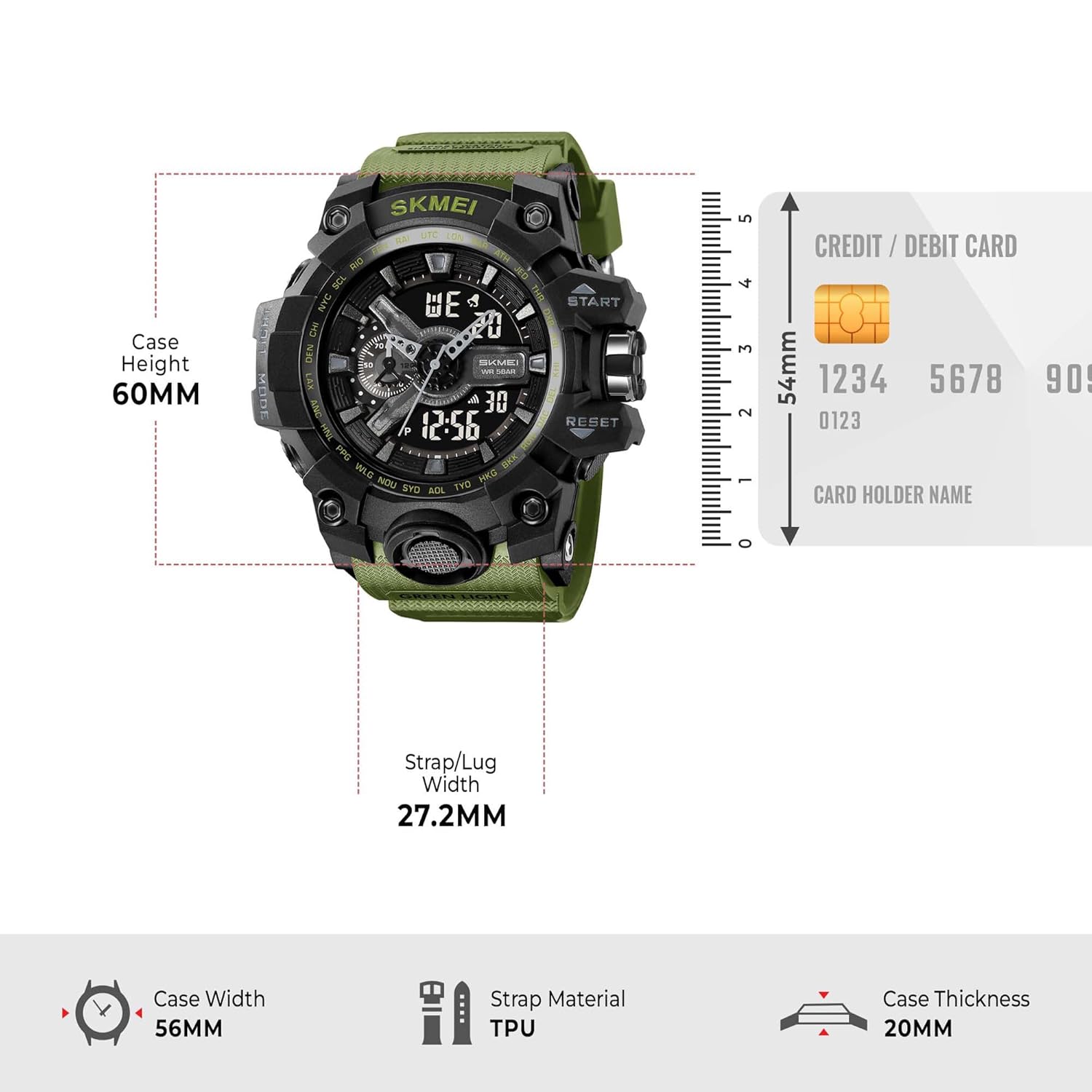
| Case Diameter | 56 Millimeters |
| Case Height | 60 Millimeters (approx.) |
| Case Thickness | 20 Millimeters (approx.) |
| Band Material Type | Thermoplastic Polyurethane (TPU) |
| Band Colour | Green (as per product details) |
| Strap/Lug Width | 27.2 Millimeters |
| Item Weight | 73.3 Grams |
| Water Resistance Depth | 50 Meters (5 ATM) |
| Movement Type | Quartz |
| Battery Type | 1 C battery (CR2025/SR626SW) |
8. Warranty and Support
Your SKMEI watch comes with a manufacturer's warranty. Please retain your purchase receipt for warranty claims.
For technical support, service, or warranty inquiries, please contact SKMEI customer service through their official website or the retailer where the watch was purchased. Provide your model number (2396AG) and a detailed description of the issue.
Manufacturer: SKMEI


