Introduction
Thank you for choosing the SKMEI Digital Watch Model 2396. This military tactical sports watch is designed for durability and functionality, featuring a robust construction, 50M water resistance, and multiple timekeeping functions. This manual will guide you through the setup, operation, and maintenance of your new watch.
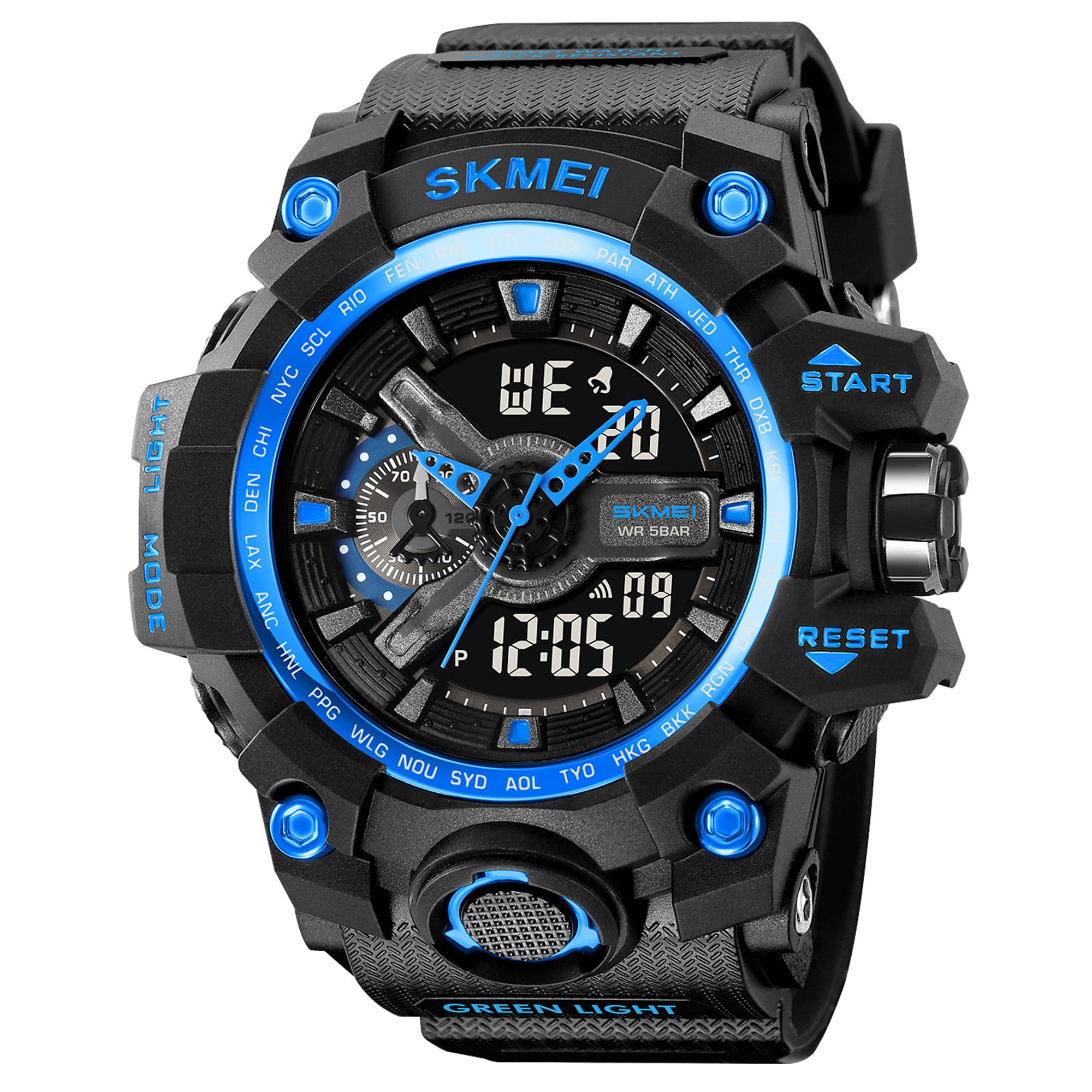
Image: Front view of the SKMEI Digital Watch Model 2396, showcasing its robust design and blue accents.
Key Features
The SKMEI 2396 watch is equipped with several features to enhance your timekeeping experience:
- Display: Analog-Digital combination for versatile time reading.
- Functions: Dual time zones, chronograph stopwatch, alarm, date, week display, and 12/24-hour format.
- Backlight: LED backlight for visibility in low-light conditions.
- Water Resistance: 50 meters (5ATM), suitable for swimming and handwashing.
- Durability: Shock-resistant ABS+TPU case and scratch-resistant resin crystal.
- Strap Material: Comfortable and durable Thermoplastic Polyurethane (TPU) strap.

Image: A banner illustrating the watch's function overview, including 2 Time, Stopwatch, Week, Alarm, Date, LED Light, WR 50M, and 12/24 Hour display.
Setup
Initial Activation
Upon receiving your watch, ensure any protective films are removed from the watch face and back. The watch may already be running. If not, it might require a battery check or activation.

Image: Illustration showing the removal of the protective film from the watch face and the location of the Light, Start/Stop, Mode, and Reset buttons.
Button Functions Overview
- Light Button: Activates the LED backlight.
- Start/Stop Button: Used for starting and stopping the chronograph, and for adjusting settings.
- Mode Button: Cycles through different watch modes (Time, Alarm, Chronograph, Dual Time).
- Reset Button: Resets the chronograph, and used for confirming settings.
Operating Instructions
Setting Time and Date
- From the normal time display, press the Mode Button repeatedly until the time setting mode is reached (usually indicated by flashing digits).
- Use the Start/Stop Button to adjust the flashing digit (hours, minutes, seconds).
- Press the Reset Button to move to the next setting item (e.g., from hours to minutes, then to date, month, year).
- Once all settings are correct, press the Mode Button to exit the setting mode and return to normal time display.
- To switch between 12-hour and 24-hour format, while in time setting mode, adjust the hour until the desired format appears.
Using the Alarm Function
- Press the Mode Button to cycle to the Alarm mode.
- Press and hold the Reset Button until the alarm time digits begin to flash.
- Use the Start/Stop Button to adjust the hours.
- Press the Reset Button to move to the minutes setting, then use the Start/Stop Button to adjust.
- Press the Mode Button to confirm and exit the alarm setting.
- To turn the alarm ON/OFF, in Alarm mode, press the Start/Stop Button. An alarm icon will appear/disappear.
Using the Chronograph (Stopwatch)
- Press the Mode Button to cycle to the Chronograph mode (usually indicated by "ST" or "STOPW").
- Press the Start/Stop Button to start the stopwatch.
- Press the Start/Stop Button again to pause the stopwatch.
- To resume, press the Start/Stop Button.
- To reset the stopwatch to zero, ensure it is paused, then press the Reset Button.
Activating the LED Backlight
Press the Light Button (top left) to illuminate the digital display for a few seconds.
Setting Dual Time Zone
The watch supports a dual time zone feature.
- Press the Mode Button to cycle to the Dual Time mode (often labeled "T2" or similar).
- Press and hold the Reset Button until the digits begin to flash.
- Use the Start/Stop Button to adjust the hours.
- Press the Reset Button to move to the minutes setting, then use the Start/Stop Button to adjust.
- Press the Mode Button to confirm and exit the dual time setting.
Maintenance
Water Resistance (50M / 5ATM)
Your SKMEI 2396 watch is water-resistant up to 50 meters (5 ATM). This means it is suitable for daily use, handwashing, rain, and short periods of swimming.
- Do NOT press any buttons while the watch is submerged in water.
- Do NOT use the watch in hot water, saunas, or steam rooms, as this can compromise the seals.
- Avoid prolonged exposure to water pressure or high-velocity water streams.

Image: The SKMEI 2396 watch shown with water splashes, indicating its water resistance for activities like rain, sweat, or splashes.
Cleaning Your Watch
To clean your watch, wipe it gently with a soft, damp cloth. Avoid using harsh chemicals or abrasive materials, which can damage the case or strap.
Battery Information
The watch uses a CR2025/SR626SW battery. When the display dims or functions become erratic, it may be time to replace the battery. Battery replacement should ideally be performed by a qualified watch technician to ensure water resistance is maintained.

Image: Close-up of the watch's stainless steel back, displaying the model number "2396" and recommended battery codes "CR2025/SR626SW".
Troubleshooting
| Problem | Possible Cause | Solution |
|---|---|---|
| Display is dim or blank. | Low battery. | Replace the battery. |
| Buttons are unresponsive. | Watch may be in a locked mode or internal issue. | Try a soft reset (if applicable, consult a technician) or replace battery. |
| Water inside the watch. | Seals compromised, buttons pressed underwater, or exposure to hot water. | Immediately take to a qualified watch technician for repair to prevent further damage. |
| Time is inaccurate. | Incorrect setting or low battery. | Re-set the time. If problem persists, replace battery. |
Specifications
| Feature | Detail |
|---|---|
| Model Number | 2396 |
| Display Type | Analog-Digital |
| Case Material | ABS+TPU |
| Strap Material | Thermoplastic Polyurethane (TPU) |
| Water Resistance | 50M (5ATM) |
| Case Diameter | 56 Millimetres |
| Case Thickness | 20 Millimetres |
| Strap/Lug Width | 27.2 Millimetres |
| Item Weight | 73.3 Grams |
| Battery Type | CR2025/SR626SW (included) |
| Movement Type | Quartz |

Image: Diagram illustrating the watch dimensions, including case height (60mm), strap/lug width (27.2mm), case width (56mm), and case thickness (20mm).
Warranty and Support
Your SKMEI Digital Watch Model 2396 comes with a 9-month manufacturer's warranty. This warranty covers manufacturing defects from the date of purchase. It does not cover damage caused by misuse, accidents, unauthorized repairs, or normal wear and tear.
For warranty claims or technical support, please contact your retailer or the official SKMEI customer service. Keep your purchase receipt as proof of purchase.
Manufacturer: SKMEI


